
ClawTick
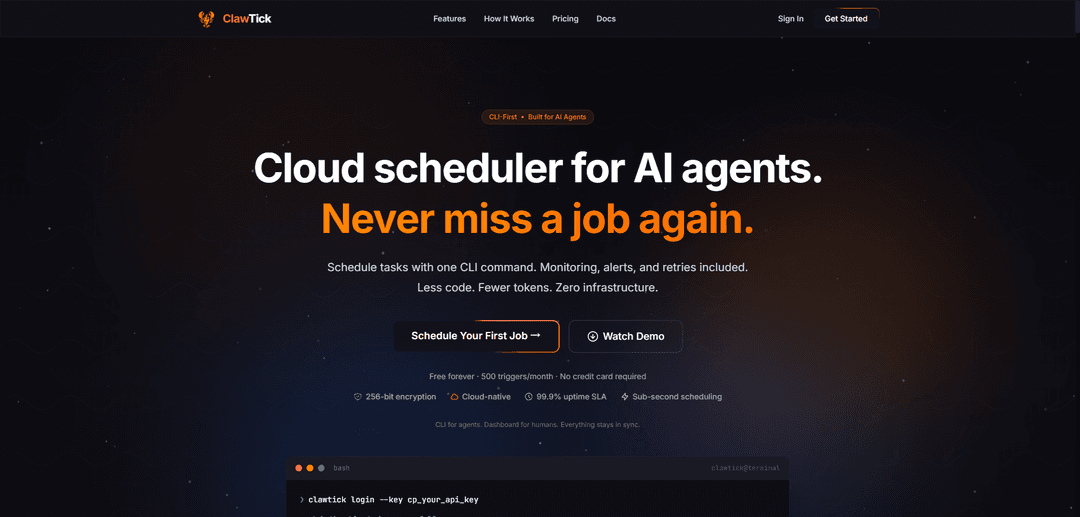
ClawTick is a CLI-first cloud scheduler for AI agents that runs jobs via webhooks/APIs with built-in monitoring, retries, alerts, and execution logs—no server or cron infrastructure required.
https://clawtick.com/?ref=producthunt
Product Information
Updated:May 18, 2026
What is ClawTick
ClawTick is an AI agent automation platform designed to reliably schedule and run recurring agent tasks in the cloud. Instead of managing cron on your own servers, you create schedules programmatically (via CLI or REST API) for LangChain, CrewAI, custom agents, or any webhook endpoint. It pairs “CLI for agents, dashboard for humans” so jobs can be created and managed with minimal friction while still providing a visual place to monitor runs, view history, and troubleshoot failures.
Key Features of ClawTick
ClawTick is a CLI-first, cloud-hosted scheduling and automation platform built for AI agents. It lets you schedule LangChain, CrewAI, OpenClaw, and custom webhook tasks with a single command or REST API call, while providing production-grade reliability (AWS EventBridge-backed), automatic retries, execution history with logs, and real-time failure alerts. It’s designed to minimize “human UI friction” and token usage for agents, offering a dashboard for monitoring and management and optional multi-channel delivery to messaging platforms.
CLI-first scheduling for agents: Create, update, trigger, enable/disable, and manage jobs via simple CLI commands optimized for minimal tokens and fast automation flows.
REST API for everything: All features are exposed via REST endpoints so agents and developers can programmatically create jobs, check status, and read logs without a UI.
Reliable cloud cron (AWS-backed): Cloud-native scheduling designed to avoid missed triggers and common cron pitfalls, leveraging AWS infrastructure for dependable execution.
Monitoring, alerts, and execution history: Built-in logs and searchable execution history (plan-dependent retention) plus real-time failure alerts so issues don’t fail silently.
Automatic retries with backoff: Failed executions can be retried automatically with exponential backoff to handle transient errors and improve job robustness.
Multi-framework + webhook support: Works with LangChain, CrewAI, OpenClaw, and any custom service via HTTP webhooks; supports multi-channel delivery like WhatsApp, Telegram, and Slack in supported workflows.
Use Cases of ClawTick
Daily AI briefings for individuals or teams: Schedule a morning briefing agent (calendar + inbox summary, daily priorities) and deliver it to WhatsApp/Slack/Telegram on a fixed cadence.
Ops and reliability status checks: Run recurring health checks or system status agents hourly/every few minutes, keep logs for audits, and get alerted immediately on failures.
Automated weekly reporting for businesses: Generate weekly activity, sales, or KPI reports every Monday and deliver them to a team channel with execution history for traceability.
ETL/data sync workflows: Trigger scheduled data pulls, enrichment agents, or sync jobs (e.g., CRM to warehouse) with retries to handle rate limits and transient API errors.
Customer support and community automation: Schedule recurring triage/summarization agents (ticket queues, community posts) and push summaries to internal chat channels for faster response.
Pros
CLI + API-first design makes it easy to automate scheduling from agents and scripts with minimal friction.
Built-in monitoring, alerts, logs, and retries reduce the operational burden compared to traditional cron.
Cloud-hosted reliability (AWS-backed) helps avoid missed triggers and silent failures common in self-managed cron.
Cons
Usage limits and log retention depend on plan (e.g., free tier has fewer jobs/triggers and shorter history).
Primarily oriented around scheduled/webhook-style jobs; complex workflow orchestration (e.g., DAGs/branching) is not the core focus.
How to Use ClawTick
1) Create a ClawTick account and get an API key: Sign up on the ClawTick website and copy your API key (e.g., cp_...). You’ll use it to authenticate the CLI and/or REST API.
2) Install the ClawTick CLI: Install globally with npm: `npm install -g clawtick`.
3) Log in from the CLI: Authenticate the CLI with your API key: `clawtick login --key cp_your_api_key`. This stores config locally (commonly under `~/.clawtick/config.json`).
4) Decide how your job will run (Webhook vs Agent + Channel delivery): Choose one of two common patterns: (A) Webhook integration: ClawTick calls your HTTP endpoint on schedule. (B) Agent messaging: ClawTick connects to your gateway via WebSocket, authenticates, sends a message to a specified agent, and can optionally deliver the response to a channel like WhatsApp/Telegram/Slack.
5) Create a scheduled job (Webhook example): Create a cron-based job that calls your endpoint: `clawtick job create --integration webhook --cron "0 9 * * *" --message "Your task description" --webhook-url "https://your-agent.com/trigger" --webhook-method POST --webhook-headers '{"Authorization":"Bearer your-key"}' --name "my-scheduled-job"`.
6) Use a valid cron expression: ClawTick uses standard 5-field cron format: `minute hour day month weekday` (e.g., daily at midnight is `0 0 * * *`). Use a helper like crontab.guru to build expressions.
7) (Optional) Create a job that delivers results to a chat channel: Example: daily WhatsApp briefing: `clawtick job create --cron "0 9 * * *" --message "Summarize my calendar and top emails" --name "morning-briefing" --agent main --channel whatsapp --deliver`. For Telegram/Slack/Discord you may need `--reply-to` (e.g., Telegram chat ID) depending on the channel.
8) List jobs to confirm creation: Run `clawtick job list` to see all jobs. Jobs are shared across CLI and dashboard—creating/updating in one stays in sync with the other.
9) Trigger a job immediately (test run): Run the job on-demand: `clawtick job trigger <id>` to validate your webhook/agent setup before relying on the schedule.
10) Update or remove jobs as needed: Update: `clawtick job update <id> [options]`. Delete: `clawtick job remove <id>`.
11) Pause and resume schedules: Pause: `clawtick job disable <id>`. Resume: `clawtick job enable <id>`.
12) Monitor runs and troubleshoot failures: Use the dashboard to view execution history and logs. If ClawTick can’t connect (e.g., gateway/WebSocket or webhook issues), the run is recorded as failed with the connection error; you can retry manually with the dashboard’s “Run Now” button.
13) Understand idempotency and retries: Each trigger uses a unique idempotency key (no reused key per trigger). Still, design your job handler to be idempotent (safe if invoked more than once) to handle network retries or scheduler edge cases.
14) Secure your integration: Keep secrets in environment variables (don’t commit keys). Protect webhook endpoints with auth headers and consider webhook signatures. Validate inputs, add logging, and rate-limit production endpoints.
15) Use the dashboard and REST API when CLI isn’t ideal: ClawTick supports three synced interfaces: CLI (agent-friendly), dashboard (human-friendly monitoring), and REST API (programmatic control). You can create/manage the same jobs from any of them.
ClawTick FAQs
ClawTick is a CLI-first cloud scheduler/automation platform built for AI agents. It lets you schedule agent tasks (e.g., LangChain, CrewAI, custom workflows) with built-in monitoring, alerts, retries, and logs—without managing servers or cron infrastructure.
Popular Articles

Atoms: A Multi-Agent AI Platform That Transforms Ideas into Launch-Ready Products
May 22, 2026

Nano Banana SBTI: What It Is, How It Works, and How to Use It in 2026
Apr 15, 2026

Atoms Review — The AI Product Builder Redefining Digital Creation in 2026
Apr 10, 2026

Kilo Claw: How to Deploy and Use a True "Do‑It‑For‑You" AI Agent(2026 Update)
Apr 3, 2026
Latest AI Tools Similar to ClawTick

Hapticlabs
Hapticlabs is a no-code toolkit that enables designers, developers and researchers to easily design, prototype and deploy immersive haptic interactions across devices without coding.

Deployo.ai
Deployo.ai is a comprehensive AI deployment platform that enables seamless model deployment, monitoring, and scaling with built-in ethical AI frameworks and cross-cloud compatibility.

CloudSoul
CloudSoul is an AI-powered SaaS platform that enables users to instantly deploy and manage cloud infrastructure through natural language conversations, making AWS resource management more accessible and efficient.

Devozy.ai
Devozy.ai is an AI-powered developer self-service platform that combines Agile project management, DevSecOps, multi-cloud infrastructure management, and IT service management into a unified solution for accelerating software delivery.
Popular AI Tools Like ClawTick

A2A Protocol
A2A (Agent2Agent) Protocol is an open interoperability protocol developed by Google that enables seamless communication and collaboration between AI agents across different frameworks and vendors, regardless of their underlying architecture.

VoltOps
VoltOps is a framework-agnostic LLM observability platform that provides real-time visual monitoring, debugging, and optimization tools for AI agents across any technology stack.

Chaterm
Chaterm is an open-source AI-native terminal and SRE copilot that enables engineers to manage complex infrastructure through natural language, automating deployment, troubleshooting, and operations without memorizing commands.

Open Browser Use
Open Browser Use is an open-source, agent-runtime-neutral browser automation layer that pairs a Chrome extension with a CLI/SDK/MCP to enable DOM-aware, CDP-powered tab control, navigation, and actions across different AI agent tools.