X-Pilot
X-Pilot is an AI-powered knowledge visualization engine that transforms documents, PDFs, and presentations into accurate, professional course videos with zero hallucination and 100% content fidelity.
https://www.x-pilot.ai/?ref=producthunt
Product Information
Updated:May 8, 2026
What is X-Pilot
X-Pilot is an accuracy-first AI video platform founded by ex-Baidu Apollo Tech Lead Heshan Bian and backed by MiraclePlus. Launched in 2024, it serves over 15,000 creators and organizations across 40+ countries, including major enterprises like Bosch, BYD, and Google Cloud partners. Unlike generic AI video tools that focus on avatars or stock footage, X-Pilot is built specifically for educational and training content, featuring a proprietary Knowledge Visualization Engine with 10,000+ motion graphics templates. The platform uses code-based rendering (SVG, Canvas, WebGL) instead of generative AI diffusion models, ensuring that every equation, code block, diagram, and data point is rendered exactly from source materials without AI hallucination. Designed for subject-matter experts rather than video editors, X-Pilot enables course creators, corporate L&D teams, university faculty, and knowledge entrepreneurs to produce professional video courses in minutes instead of weeks.
Key Features of X-Pilot
X-Pilot is an AI-powered knowledge visualization platform that transforms documents (PDFs, PowerPoints, Word docs, Markdown) into professional course videos with zero hallucinations and 100% content accuracy. Founded by ex-Baidu Apollo Tech Lead Heshan Bian and backed by MiraclePlus, it uses code-based rendering (SVG, Canvas, WebGL) instead of generative AI to ensure every formula, diagram, and data point remains accurate. The platform features 10,000+ motion graphics templates structured with Bloom's Taxonomy, natural language editing (36x faster than traditional editing), AI voiceovers in 50+ languages with voice cloning, and supports export in multiple formats including MP4, 4K, and SCORM for LMS integration.
Zero-Hallucination Knowledge Visualization: Uses code-based rendering (SVG, Canvas, WebGL) instead of generative AI to ensure 100% accuracy of formulas, diagrams, and data points from source materials. Every visual is generated directly from your content, not imagined by AI models.
Natural Language Video Editor: Edit videos by typing simple commands like 'shorten the intro' or 'swap the chart in scene 3' without using timelines or complex editing tools. X-Pilot applies changes instantly, making editing 36x faster than traditional video editing software.
Visual Motion Boxes with 10,000+ Templates: Automatically matches content with 150+ specialized knowledge visualization templates including animated infographics, flowcharts, diagrams, and code walkthroughs. Structured with Bloom's Taxonomy learning principles for 40% higher retention vs. static slides.
AI Voiceover with Voice Cloning: Access 200+ AI voices across 50+ languages with adjustable pronunciation and pacing. Voice cloning feature allows you to create custom voice clones so every lesson sounds like you, maintaining personal branding throughout courses.
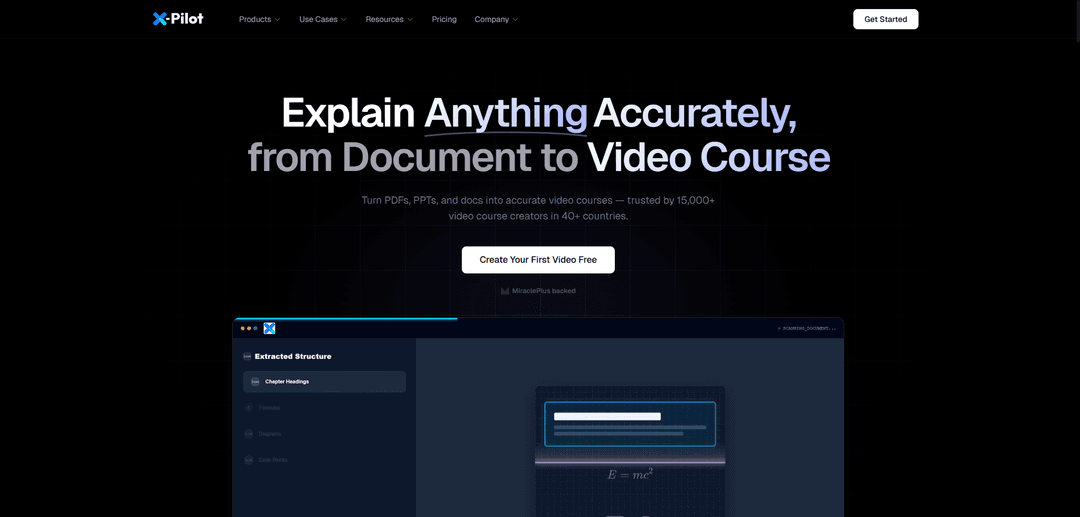
Document-to-Video Conversion: Upload PDFs, PowerPoints, DOCX, or Markdown files and X-Pilot automatically analyzes structure, extracts key concepts, generates scripts, and creates complete video courses with narration and animations in minutes.
All-in-One Platform with Multi-Format Export: Create, preview, edit, export, and publish in one place. Export videos in 1080p/4K HD, MP4, WebM, or SCORM format for LMS platforms. Translate to 160+ languages while preserving visualization and voiceover sync.
Use Cases of X-Pilot
Online Course Creation for Udemy & Teachable: Course creators transform written content into professional video courses without camera or editing skills. Export directly to platforms like Udemy, Teachable, Coursera, or Thinkific with full commercial rights to sell courses.
Corporate Training & L&D: Companies like Bosch and BYD use X-Pilot to convert SOPs, handbooks, and compliance documents into standardized training videos. One user cut training video production cost by 80% and reduced turnaround from 3 weeks to 2 days.
Higher Education & University Lectures: University professors and educators transform lesson plans, lecture notes, and academic materials into engaging classroom videos. Includes pause points, embedded quizzes, and scaffolded complexity for K-12 and higher education.
Medical & Healthcare Training: Healthcare professionals create clinically accurate training videos preserving complex medical concepts and terminology. Dr. Emily Rodriguez from Johns Hopkins noted it's 'the first AI tool I trust for medical education' due to its attention to clinical accuracy.
Financial Services Compliance Training: Financial institutions create compliance training videos on regulations with exact rule citations. X-Pilot's Citation Tracking feature preserves legal language precision and mandatory disclaimers like SEC rule references.
Technical Documentation & Software Training: Tech companies and developers convert technical documentation, API guides, and code tutorials into visual explainer videos with accurate code rendering and step-by-step walkthroughs for onboarding and customer education.
Pros
100% content accuracy with zero AI hallucinations through code-based rendering instead of generative AI
36x faster editing with natural language commands, no timeline or complex tools required
Strong free tier (3 minutes/month) with no credit card required, allowing full workflow testing
All-in-one platform eliminating context-switching with export to multiple formats (MP4, 4K, SCORM) and 160+ language translation
Cons
Niche focus optimized for educational/explanatory content, not suitable for creative storytelling, music videos, or cinematic productions
Template reliance may result in less unique visual flair compared to custom-designed videos by human editors
Free tier limited to 3 minutes per month, most users need to upgrade to paid plans ($9-$99/month) for practical use
Visual style constrained by existing motion graphics templates, potentially limiting creative customization options
How to Use X-Pilot
1. Sign up for a free account: Visit www.x-pilot.ai and create a free account. No credit card is required to start. The free Creator plan includes 3 minutes of AI video generation per month.
2. Upload your content: Upload your source material - PDFs, PPTs, Word documents, Markdown files, or plain text scripts. X-Pilot's AI will analyze the document structure and extract key concepts automatically.
3. Review the AI-generated storyboard in real-time: Watch as X-Pilot processes your content and generates a video outline with Visual Motion Boxes. The system uses WebSocket streaming to display content (scripts, scenes) as they are generated. Review the AI-generated chapter structure, animations, and voiceover before finalizing.
4. Configure settings (optional): Select your target language, voice profile, grade level (for K-12 content), and other preferences via the Settings panel. You can choose from natural-sounding AI voices in multiple languages or use voice cloning.
5. Generate your video: Click 'Generate' and the AI will render animations, sync voiceovers, and apply transitions. Most videos are completed in under 5 minutes. A typical 5-minute training video from a 20-page PDF takes 8-12 minutes total (analysis + generation + rendering).
6. Edit using natural language commands: Refine your video by typing plain-English commands like 'Slow down the formula animation in scene 3,' 'Make the definition box larger,' 'Add a 3-second pause after the chart,' or 'Change diagram colors to blue/orange.' X-Pilot's AI understands pedagogical intent and makes changes instantly - 36x faster than traditional video editing.
7. Make iterative refinements: Use the conversational agent to refine specific sections. You can swap Motion Boxes, adjust timing, refine scripts, or make other modifications. Most users make 2-3 storyboard iterations before final rendering.
8. Add custom voiceover (optional): Upload custom voiceover files (.mp3, .wav) for any scene if desired. X-Pilot will auto-sync visuals to your audio timing. You can use AI narration for drafts and then record custom voiceover for the final version.
9. Export your video: Export your finished video in 1080p or 4K with no watermark. Choose from multiple formats: MP4 for direct upload, SCORM for LMS deployment, or translate to 160+ languages while preserving knowledge visualization and voiceover sync.
10. Publish and distribute: Share directly to platforms like Udemy, Coursera, YouTube, Google Classroom, Canvas, or any SCORM-compatible LMS. Download for offline distribution, embed on your website, or use for internal training. You own 100% commercial rights to every video you create.
X-Pilot FAQs
X-Pilot is a cloud-based AI platform that converts documents (PDFs, PPTs, Markdown files) into professional video courses with knowledge visualization. It uses Visual Motion Boxes—animated infographics, flowcharts, and diagrams—to transform your content into structured, narrated course videos in minutes, without requiring video editing skills.
X-Pilot Video
Popular Articles

Vosko AI: Localize and Dub Videos for Global Audiences
Oct 15, 2026

Atoms: A Multi-Agent AI Platform That Transforms Ideas into Launch-Ready Products
Oct 13, 2026

Nano Banana SBTI: What It Is, How It Works, and How to Use It in 2026
Apr 15, 2026

Atoms Review — The AI Product Builder Redefining Digital Creation in 2026
Apr 10, 2026
Latest AI Tools Similar to X-Pilot

EzVideos
EzVideos is an all-in-one video creation tool that helps users generate viral videos for social media platforms like Instagram, TikTok, and YouTube with automated editing features and built-in resources.

Blanc AI
Blanc AI is a revolutionary AI solution that enables video content translation and dubbing into 47+ languages while preserving the original voice, emotions, and lip synchronization.

Wink Mody
Wink Mody is a modified version of the Wink video editing app that offers premium features like AI-powered retouching, 4K exports, and watermark-free editing completely free of charge.

Shortmake AI
ShortMake is an AI-powered video creation platform that transforms ideas into viral-ready videos by automatically generating scripts, voiceovers, visuals, and subtitles specifically optimized for platforms like TikTok and YouTube Shorts.
Popular AI Tools Like X-Pilot

AI Clips - New Gen
AI Clips - New Gen is an AI-powered video clipping tool that automatically generates engaging short-form content from long videos for multiple social media platforms like YouTube Shorts, TikTok, Instagram Reels and more.

Edit Mind
Edit Mind is an open-source, AI-powered video indexing and semantic search platform that enables users to analyze and search through video content using natural language queries, with features including transcription, frame analysis, face recognition, and object detection.

Dinamo Notebook
FreeAI Video Editing
Dinamo Notebook is a free, MIT-licensed, local-first browser extension for football video analysis that lets you draw tactical annotations on YouTube/Dailymotion/Twitch footage and optionally use AI (with your own OpenAI API key) for tactical insights.

MediaSeg
MediaSeg is a stable, local-first macOS utility that splits large MP4/WEBM media files into upload-ready chunks under a configurable size limit while preserving quality using ffmpeg/ffprobe and an AI-assisted, target-based sizing strategy.