
WUPHF by Nex.ai
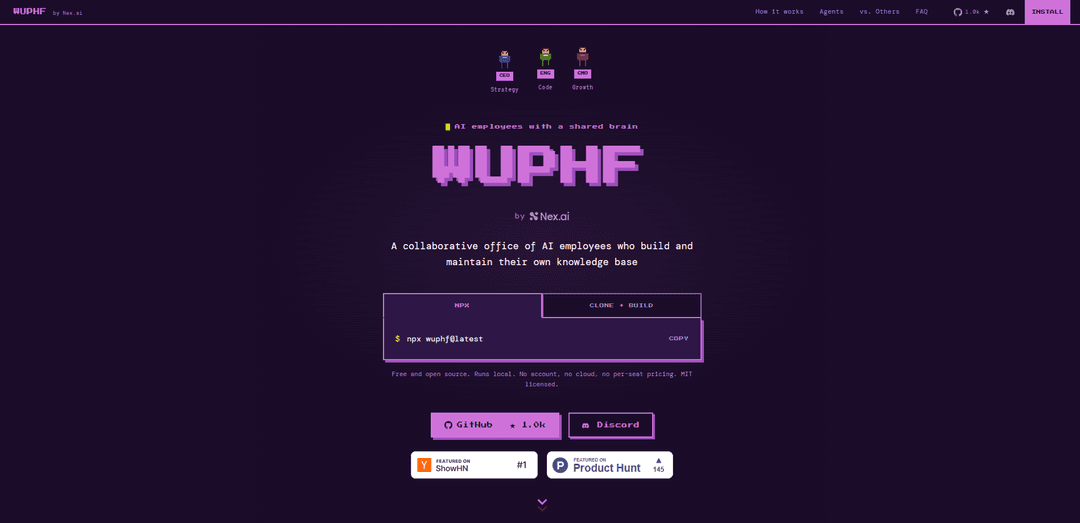
WUPHF by Nex.ai is a free, MIT-licensed local “AI office” that orchestrates role-based agents (e.g., CEO/ENG/CMO) to collaborate autonomously, keep persistent context via per-agent notebooks and a shared git-backed wiki, and ship work without you acting as the routing layer.
https://wuphf.team/?ref=producthunt
Product Information
Updated:May 19, 2026
What is WUPHF by Nex.ai
WUPHF by Nex.ai is an open-source multi-agent orchestration platform that runs on your machine and feels like Slack for AI employees with a shared brain. Instead of managing a single chatbot session, you drop a goal into a channel and a team of specialized agents decomposes the task, delegates work, and continues executing even after you close the UI. It supports multiple agent runtimes (including Claude Code, Codex, OpenClaw, and local LLMs via OpenCode), and it stores context locally—channel history in local state plus durable knowledge in per-agent notebooks and a shared team wiki you can read as files and version with git.
Key Features of WUPHF by Nex.ai
WUPHF by Nex.ai is an open-source, local-first multi-agent “AI office” that lets you drop a goal into a chat channel and have role-based AI agents (e.g., CEO/ENG/CMO/PM/Design) decompose, coordinate, and execute work autonomously. It maintains durable context through per-agent notebooks plus a shared, git-backed markdown wiki that agents can read/write and promote validated conclusions into, so knowledge compounds across sessions without repeatedly re-pasting context. It supports multiple runtimes (Claude Code, Codex, OpenClaw, and local LLMs via OpenCode), runs without accounts or per-seat pricing, and provides transparent traces (“receipts”) of tool usage and actions.
Multi-agent office with real roles: Agents are configured as editable JSON (system prompt + tool list) and collaborate in shared channels using role responsibilities (CEO routes, ENG builds/opens PRs, CMO writes copy, PM writes specs, etc.), emphasizing coordination over single-prompt chains.
Persistent memory: notebooks + shared wiki: Each agent keeps a private notebook for raw observations, while the team shares a markdown wiki stored locally (git clone-able) where durable conclusions can be promoted for long-term reuse and cross-agent context.
Local-first, self-hosted runtime: Runs on your machine with local state (e.g., channel history in local storage) and no required cloud account; network calls are primarily to your chosen LLM provider unless you point it at a local model.
Mix-and-match LLM runtimes: Different agents can run on different backends (Claude Code, Codex, OpenClaw, or local models via OpenCode) while still collaborating in the same workspace with consistent @mention and channel semantics.
Tooling and integrations with auditability: Supports real actions (e.g., GitHub operations via CLI) and optional bridges (e.g., Telegram, external action providers), with a receipts/tool-call trace so you can verify what agents actually did.
Autonomous execution with guardrails: Agents continue working after you close the UI, but runs are bounded by timeouts and step budgets; when stuck, agents escalate back to you with context and traces.
Use Cases of WUPHF by Nex.ai
Software delivery & PR automation: Engineering teams can drop goals like “ship onboarding by Friday,” letting agents break down tasks, surface blockers, modify code, run tests, and open PRs while documenting decisions in the shared wiki.
Product management & requirements synthesis: PM workflows can convert scattered feedback into specs, acceptance criteria, and post-mortems, then promote stable learnings into the wiki so future projects start with institutional knowledge.
Marketing and launch execution: Teams can generate and iterate on READMEs, announcements, launch checklists, and positioning, coordinating between “CMO” and “PM” style agents and retaining messaging decisions in the wiki.
Design-to-dev handoff coordination: Design and engineering agents can coordinate asset exports, design token updates, and implementation details (e.g., SVG/PNG fallbacks), reducing human routing overhead and preserving handoff conventions.
Internal operations playbooks: Ops or RevOps teams can build repeatable procedures (incident checklists, onboarding steps, customer-specific runbooks) in a git-backed wiki that agents continuously refine and reuse.
Research and knowledge management: Individuals or teams can accumulate research notes in agent notebooks, then promote validated summaries into a shared, searchable wiki that remains readable as plain markdown and versioned in git.
Pros
Local-first and open source (MIT): no required account, no per-seat pricing, and data stays on your machine except for chosen inference calls.
Durable, compounding context via notebooks + git-backed markdown wiki that is portable, readable, and version-controlled.
Multi-agent coordination reduces human “routing” work and supports heterogeneous LLM backends in one workspace.
Auditability through receipts/tool traces and bounded runs (timeouts/step budgets) improves debuggability and safety.
Cons
Quality and reliability depend on agent prompts/configuration and chosen model backends; agents can still get stuck or loop and require escalation.
Some integrations may be optional, incomplete, or require user wiring (e.g., third-party tools may be placeholders until connected).
Local operation implies you manage environment setup, permissions, and compute; heavier workloads may require stronger local hardware or careful model selection.
Autonomous actions (e.g., GitHub via CLI) can be powerful but may require careful access control and review practices.
How to Use WUPHF by Nex.ai
1) Install WUPHF: In a terminal, run: `npx wuphf@latest` (this launches WUPHF and opens the web UI at `http://localhost:7891`).
2) (Optional) Build from source instead of npx: Run: `git clone https://github.com/nex-crm/wuphf.git && cd wuphf` then `go build -o wuphf ./cmd/wuphf`.
3) Start an office and pick a team pack: If you built from source, start it with a pack, e.g. `./wuphf --pack founding-team` (the browser opens at `localhost:7891`).
4) Drop a goal into a channel: In the web UI, go to `#general` and type one sentence describing the outcome you want (example from the docs: “Ship the onboarding flow by Friday.”).
5) Let the agents decompose and delegate: The CEO agent routes work to other role agents (e.g., ENG, DSG, CMO, PM). They coordinate in threads, surface blockers, and assign dependencies without you manually handing off context.
6) Close the tab (optional) and come back later: WUPHF is designed so you can walk away; the agents keep working. When you return, you should see progress like resolved blockers, updated assets, and shipped work.
7) Understand where context is stored (persistence): Channel history persists locally in `~/.wuphf/state` (per-project). The shared wiki lives locally in `~/.wuphf/wiki/` and is readable as files and git-cloneable.
8) Use the memory model: notebooks + shared wiki: Each agent has its own notebook (private working memory) and the team shares a wiki. When conclusions hold up, they can be promoted from notebooks into the shared wiki so future work compounds.
9) Customize your team by editing agent configs: Agents are JSON configs (system prompt + tool list). Fork a pack (e.g., the founding-team pack), edit prompts/tools, and swap in your own agents to match your workflow.
10) Verify what happened via receipts/tool traces: Use the UI’s Receipts panel (or `wuphf log`) to inspect which tools were called and what actions were taken, so you can confirm what was real execution vs. text-only references.
11) (Optional) Connect integrations: WUPHF supports optional bridges/integrations (e.g., Nex, Telegram via `/connect`, OpenClaw via `/connect openclaw`, and external actions via an action provider). These are load-time optional; core WUPHF runs locally without them.
12) (Optional) Choose/understand what leaves your machine: Runtime and context are local; the main network calls are to the LLM provider you configure for inference. If you use a local model, nothing needs to leave your machine for inference.
WUPHF by Nex.ai FAQs
WUPHF is a local, open-source “AI office” where multiple role-based agents (e.g., CEO, ENG, CMO, PM, DSG) collaborate in shared channels, maintain a shared knowledge base, and keep context across days so you don’t have to manually route tasks between separate agents.
WUPHF by Nex.ai Video
Popular Articles

Atoms: A Multi-Agent AI Platform That Transforms Ideas into Launch-Ready Products
May 22, 2026

Nano Banana SBTI: What It Is, How It Works, and How to Use It in 2026
Apr 15, 2026

Atoms Review — The AI Product Builder Redefining Digital Creation in 2026
Apr 10, 2026

Kilo Claw: How to Deploy and Use a True "Do‑It‑For‑You" AI Agent(2026 Update)
Apr 3, 2026
Latest AI Tools Similar to WUPHF by Nex.ai

Hapticlabs
Hapticlabs is a no-code toolkit that enables designers, developers and researchers to easily design, prototype and deploy immersive haptic interactions across devices without coding.

Deployo.ai
Deployo.ai is a comprehensive AI deployment platform that enables seamless model deployment, monitoring, and scaling with built-in ethical AI frameworks and cross-cloud compatibility.

CloudSoul
CloudSoul is an AI-powered SaaS platform that enables users to instantly deploy and manage cloud infrastructure through natural language conversations, making AWS resource management more accessible and efficient.

Devozy.ai
Devozy.ai is an AI-powered developer self-service platform that combines Agile project management, DevSecOps, multi-cloud infrastructure management, and IT service management into a unified solution for accelerating software delivery.
Popular AI Tools Like WUPHF by Nex.ai

A2A Protocol
A2A (Agent2Agent) Protocol is an open interoperability protocol developed by Google that enables seamless communication and collaboration between AI agents across different frameworks and vendors, regardless of their underlying architecture.

VoltOps
VoltOps is a framework-agnostic LLM observability platform that provides real-time visual monitoring, debugging, and optimization tools for AI agents across any technology stack.

Chaterm
Chaterm is an open-source AI-native terminal and SRE copilot that enables engineers to manage complex infrastructure through natural language, automating deployment, troubleshooting, and operations without memorizing commands.

Open Browser Use
Open Browser Use is an open-source, agent-runtime-neutral browser automation layer that pairs a Chrome extension with a CLI/SDK/MCP to enable DOM-aware, CDP-powered tab control, navigation, and actions across different AI agent tools.