
TransMov
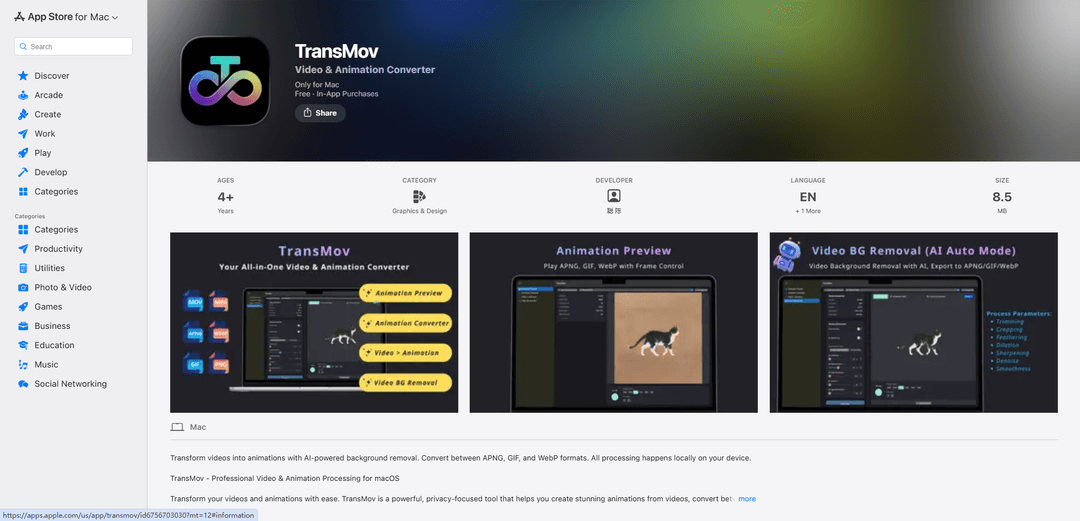
TransMov is a powerful, privacy-focused macOS app that helps users create stunning animations from videos, remove backgrounds using AI, and convert between popular animation formats like APNG, GIF, and WebP - all processed locally on your device.
https://apps.apple.com/us/app/transmov/id6756703030?mt=12&ref=producthunt
Product Information
Updated:Jan 15, 2026
What is TransMov
TransMov is a professional video and animation processing tool designed specifically for macOS users. It serves as an all-in-one solution for converting videos into animations, removing backgrounds, and handling different animation file formats. The app is built with privacy in mind, ensuring all processing happens locally on the user's device without uploading any data to external servers. It caters to UI/UX designers, content creators, developers, and anyone needing efficient video and animation conversion capabilities.
Key Features of TransMov
TransMov is a macOS application that specializes in video and animation processing, offering powerful features for converting videos into various animation formats (APNG, GIF, and WebP). It includes AI-powered background removal capabilities, frame-by-frame navigation, and comprehensive animation editing tools. The app prioritizes privacy by processing all files locally on the user's device and provides both free and premium features through a subscription model.
AI-Powered Background Removal: Remove backgrounds from videos using advanced AI segmentation or chroma key technology, with customizable edge processing parameters
Multi-Format Conversion: Convert between APNG, GIF, and WebP formats with quality control options and customizable export parameters
Frame-by-Frame Control: Navigate, edit, and manage animation frames through a grid layout browser with precise playback controls
Local Processing: All processing occurs locally on the device using Apple's Vision framework, ensuring complete privacy and security
Use Cases of TransMov
UI/UX Design: Designers can create and optimize animations for app interfaces and interactive elements
Social Media Content Creation: Content creators can convert videos into optimized animations for social media platforms
Web Development: Developers can prepare and optimize animated assets for websites and web applications
Digital Marketing: Marketers can create engaging animated content with transparent backgrounds for promotional materials
Pros
Complete privacy with local processing
Professional-grade editing tools
Support for multiple animation formats
Cons
Requires macOS 14.0 or later
Advanced features require paid subscription
Limited to Mac platform only
How to Use TransMov
Download and Install: Download TransMov from the Mac App Store and install it on your macOS device (requires macOS 14.0 or later)
Import Media: Open TransMov and import your video file (MP4/MOV) or animation file (APNG/GIF/WebP) that you want to process
Preview Animation: Use the animation preview feature to play and review your imported animation files with playback controls, navigate frame by frame, and adjust playback speed
Remove Video Background: For videos, use either AI-powered segmentation or chroma key technology to remove the background. Adjust edge processing parameters for professional results
Convert Format: Choose your desired output format (APNG/GIF/WebP) and use the interactive cropping tool to adjust the frame size
Customize Settings: Adjust advanced parameters like size, quality, and other export settings to optimize your animation
Process Frames: Use the frame browser with grid layout to review individual frames, delete unwanted frames, or replace specific frames as needed
Export: Export your processed animation in your chosen format. All processing happens locally on your device for privacy
TransMov FAQs
TransMov is a macOS app that helps users create animations from videos, convert between different animation formats (APNG, GIF, and WebP), and process media files with features like background removal. All processing happens locally on your device.
Popular Articles

Atoms: A Multi-Agent AI Platform That Transforms Ideas into Launch-Ready Products
May 22, 2026

Nano Banana SBTI: What It Is, How It Works, and How to Use It in 2026
Apr 15, 2026

Atoms Review — The AI Product Builder Redefining Digital Creation in 2026
Apr 10, 2026

Kilo Claw: How to Deploy and Use a True "Do‑It‑For‑You" AI Agent(2026 Update)
Apr 3, 2026
Latest AI Tools Similar to TransMov

EzVideos
EzVideos is an all-in-one video creation tool that helps users generate viral videos for social media platforms like Instagram, TikTok, and YouTube with automated editing features and built-in resources.

Blanc AI
Blanc AI is a revolutionary AI solution that enables video content translation and dubbing into 47+ languages while preserving the original voice, emotions, and lip synchronization.

Wink Mody
Wink Mody is a modified version of the Wink video editing app that offers premium features like AI-powered retouching, 4K exports, and watermark-free editing completely free of charge.

Shortmake AI
ShortMake is an AI-powered video creation platform that transforms ideas into viral-ready videos by automatically generating scripts, voiceovers, visuals, and subtitles specifically optimized for platforms like TikTok and YouTube Shorts.
Popular AI Tools Like TransMov

AI Clips - New Gen
AI Clips - New Gen is an AI-powered video clipping tool that automatically generates engaging short-form content from long videos for multiple social media platforms like YouTube Shorts, TikTok, Instagram Reels and more.

Edit Mind
Edit Mind is an open-source, AI-powered video indexing and semantic search platform that enables users to analyze and search through video content using natural language queries, with features including transcription, frame analysis, face recognition, and object detection.

Dinamo Notebook
FreeAI Video Editing
Dinamo Notebook is a free, MIT-licensed, local-first browser extension for football video analysis that lets you draw tactical annotations on YouTube/Dailymotion/Twitch footage and optionally use AI (with your own OpenAI API key) for tactical insights.

MediaSeg
MediaSeg is a stable, local-first macOS utility that splits large MP4/WEBM media files into upload-ready chunks under a configurable size limit while preserving quality using ffmpeg/ffprobe and an AI-assisted, target-based sizing strategy.