
Tencent EdgeOne
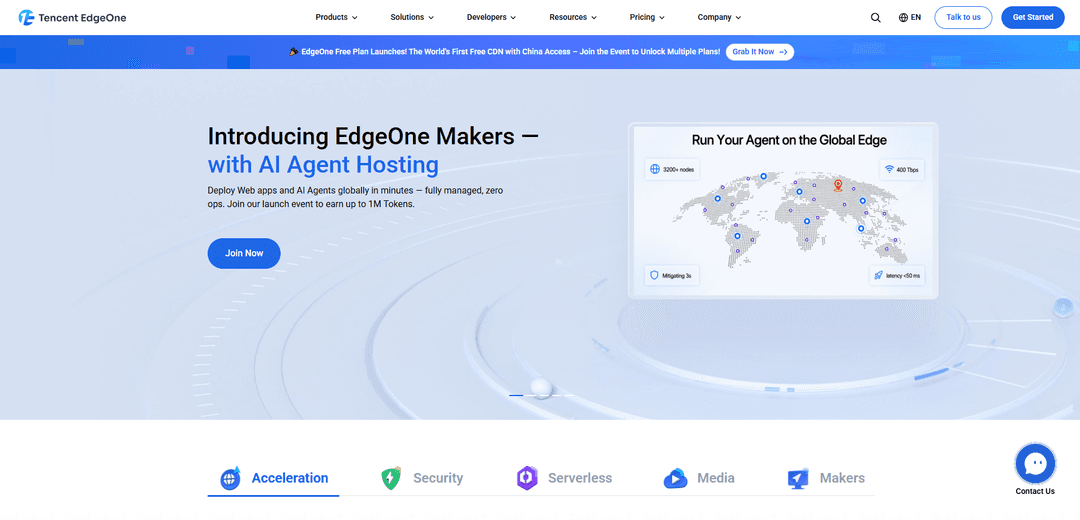
Tencent EdgeOne is an integrated CDN and edge computing platform that combines Asia-optimized global acceleration with built-in DDoS/WAF/bot security and developer-friendly serverless hosting for web apps, APIs, and media.
https://edgeone.ai/?ref=producthunt
Product Information
Updated:Jul 8, 2026
What is Tencent EdgeOne
Tencent EdgeOne is Tencent Cloud’s next-generation edge services platform that unifies site/app acceleration and security on top of Tencent’s globally distributed edge network. Positioned as a leading CDN in Asia, it provides capabilities across edge acceleration (CDN, smart acceleration, and L4 TCP/UDP proxy), edge security (DDoS protection, web protection/WAF, bot management, CAPTCHA, and CC protection), and an edge developer platform for building and deploying applications. It also includes media-oriented offerings such as VOD on EdgeOne, which focuses on reliable uploads and AI-powered transcoding and delivery optimization.
Key Features of Tencent EdgeOne
Tencent EdgeOne is an integrated edge platform combining global acceleration (CDN, smart L7 routing, and L4 TCP/UDP proxy), built-in security (DDoS, WAF/web protection, bot management, CAPTCHA, rate limiting/CC protection), and a developer platform for deploying modern full-stack web apps and serverless code at the edge. It emphasizes strong Asia performance and China access, offers one-click free SSL with auto-renewal, supports edge programmability (rules/rewrites/headers), and includes media capabilities such as VOD with AI-powered transcoding and high upload success rates.
Global CDN + intelligent acceleration: Accelerates both static and dynamic content via a large edge network with intelligent caching and routing to improve latency and stability, especially optimized for Asia.
Integrated security stack (DDoS/WAF/CC/Bot/CAPTCHA): Provides layered L3/4/7 protection including real-time DDoS mitigation, web protection/WAF rules, rate limiting and CC protection, bot management with client reputation, and one-click CAPTCHA challenges.
L4 proxy for TCP/UDP workloads: Supports transport-layer acceleration for applications that rely on TCP/UDP (e.g., game protocols), improving connectivity while maintaining protection at the edge.
Edge developer platform (Makers + Functions): Enables one-click deployment of full-stack apps and serverless APIs from edge functions to cloud functions with minimal ops, scaling automatically; includes framework-friendly workflows (e.g., Next.js support), Git-based deployment, and CLI tooling.
Edge programmability and traffic control: Allows customizable edge rules such as authentication, anti-hotlinking, URL rewrites/redirects, and HTTP header rewriting to shape traffic behavior without changing origin code.
Media delivery and AI-powered VOD: Provides VOD capabilities with industry-focused AI transcoding templates to reduce bitrate and support fast, smooth playback; highlights high upload success rates and just-in-time transcoding with edge caching.
Use Cases of Tencent EdgeOne
Gaming: protect and accelerate game services: Use L4 proxy acceleration and DDoS/CC protection to keep latency low and availability high for TCP/UDP-based game traffic, while efficiently distributing patches and updates to global players.
E-commerce: handle traffic spikes and protect key APIs: Accelerate storefronts and dynamic checkout flows while applying bot management, rate limiting, and WAF rules to defend shopping cart/checkout APIs from scraping, click-farming, and abusive automation during promotions.
Financial services: low-latency, high-availability web protection: Improve performance for transaction-heavy applications with smart acceleration, while using integrated security controls (DDoS/WAF/rate limiting) to reduce downtime risk and protect sensitive endpoints.
SaaS: multi-domain acceleration with simplified SSL ops: Accelerate globally distributed SaaS apps and manage many customer domains more easily with one-click SSL issuance and auto-renewal, plus unified security and performance controls.
Modern web apps: deploy full-stack sites at the edge: Host and ship web apps with edge functions and built-in acceleration, leveraging framework integration (e.g., Next.js), Git/CLI workflows, and global edge distribution for fast first-load and iterative releases.
Media & entertainment: optimize video delivery cost and QoE: Use VOD and AI transcoding templates to reduce bitrate and improve playback smoothness, with edge caching and fast processing to support large-scale video distribution.
Pros
All-in-one edge suite combining acceleration, security, serverless development, and media delivery on a single platform.
Strong Asia-focused performance and broad node coverage, with positioning around China access and global acceleration.
Rich built-in security capabilities (DDoS, WAF, bot management, CAPTCHA, rate limiting) tightly integrated with delivery.
Developer-friendly deployment workflow (templates, Git/CLI, functions) and out-of-the-box support for popular frameworks like Next.js.
Cons
China/Asia-optimized strengths may be less compelling for teams whose users are primarily outside those regions.
The breadth of features (CDN, L4/L7, WAF/bots, functions, VOD) can increase configuration complexity for small teams.
Some performance and cost claims (e.g., bitrate reduction, mitigation times) are marketing-stated and may vary by workload and setup.
How to Use Tencent EdgeOne
1) Create an EdgeOne account and open the console: Go to https://edgeone.ai/ and click “Get Started” (register) or “Console” (login). After first login, you’ll enter the scenario selection area if you have no existing EdgeOne resources.
2) Choose a plan (start with Free Plan if you’re evaluating): Open “Plans & Pricing” and select a plan (Free/Personal/Basic). The Free Plan is promoted as a permanently free option with unmetered CDN traffic and unlimited DDoS protection for developers. Agree to the EdgeOne Service Level Agreement and activate the plan.
3) Decide how you will connect your domain: NS access or CNAME access: EdgeOne supports both NS access and CNAME access. Choose NS if you want EdgeOne to manage DNS for the domain; choose CNAME if you prefer to keep DNS elsewhere and only point specific hostnames to EdgeOne.
4) Add your site/domain to EdgeOne: In the EdgeOne console, add your domain. EdgeOne will perform a domain credibility check when adding a domain name. Provide your origin information (where your website/app is hosted) so EdgeOne can accelerate and protect it.
5) Update DNS to route traffic through EdgeOne: If using NS access, replace your registrar’s nameservers with the EdgeOne-provided NS records. If using CNAME access, create the required CNAME record(s) to point your hostname(s) to the EdgeOne acceleration address. Wait for DNS propagation.
6) Enable HTTPS with EdgeOne’s free SSL certificate: Use EdgeOne’s one-click free SSL certificate issuance and enable HTTPS. EdgeOne supports automatic renewal upon expiration, so you don’t need to maintain certificates manually.
7) Turn on acceleration features (CDN + Smart Acceleration as needed): Enable CDN for static delivery and use Smart Acceleration for dynamic content via intelligent routing. EdgeOne supports L4/L7 intelligent acceleration, including L4 proxy for TCP/UDP acceleration when your application needs it.
8) Configure core security protections (DDoS, WAF/Web Protection, Bot, CAPTCHA, CC/rate limits): Enable the integrated security layer: DDoS Protection (real-time mitigation), Web Protection (WAF-style protection against common web attacks), Bot Management (intelligent bot mitigation), and CAPTCHA. Add rate limiting/CC protection policies to reduce abusive traffic reaching your origin.
9) Validate performance and security using EdgeOne tools: Use built-in tools like Website Speed Test, Ping Test, and SSL Certificate Checker (available under Tools on edgeone.ai) to confirm faster delivery, correct TLS configuration, and stable connectivity from different regions.
10) (Optional) Deploy on the Edge Developer Platform: Makers (Pages) for web apps and AI agents: If you want a managed deployment workflow, use EdgeOne Makers (Pages) to deploy web apps and AI agents globally in minutes. It supports Git-based deployment, CLI tools, local debugging, serverless APIs, and mainstream full-stack frameworks (e.g., Next.js). Start from https://pages.edgeone.ai/ or the Makers entry in the EdgeOne site.
11) (Optional) Add Edge Functions for serverless logic at the edge: Use Edge Functions to run JavaScript serverless code at edge nodes close to users. Typical use cases include authentication, URL rewriting/redirects, header rewriting, anti-hotlinking, and other programmable edge rules.
12) (Optional) Use Media/VOD capabilities for video delivery optimization: If you deliver video, explore EdgeOne VOD features such as AI-powered transcoding templates and just-in-time transcoding (generate on demand and cache on CDN). The site highlights high upload success rate and significant bitrate reduction for certain scenarios.
13) Monitor analytics and security events; set alerts/log delivery if needed: Use EdgeOne’s security analysis and event/alert options to review attack interception and traffic quality. The platform mentions minute-level granularity for security analysis and log push, helping you investigate incidents and tune policies.
14) Automate operations via API or Terraform when scaling: EdgeOne supports Tencent Cloud API and Terraform API. Use Infrastructure as Code to manage domains, acceleration rules, and security policies consistently across environments.
15) Manage quotas and out-of-plan usage: If your plan quota is exceeded, usage may be billed on an hourly cycle (pay-as-you-go). Upgrading a plan keeps the same effective/expiration time while upgrading remaining validity together, per the pricing/fee guidance.
16) Get help and stay updated: Use official Documentation, Tutorials, Learning Center, and community channels (GitHub/Discord/Telegram/WhatsApp) linked on https://edgeone.ai/ for troubleshooting, examples, and product updates.
Tencent EdgeOne FAQs
Tencent EdgeOne is an edge platform that provides acceleration and security services (including CDN and L4/L7 acceleration plus integrated security protections) based on Tencent’s global edge nodes.
Tencent EdgeOne Video
Popular Articles

Vosko AI: Localize and Dub Videos for Global Audiences
Oct 15, 2026

Atoms: A Multi-Agent AI Platform That Transforms Ideas into Launch-Ready Products
Oct 13, 2026

Nano Banana SBTI: What It Is, How It Works, and How to Use It in 2026
Apr 15, 2026

Atoms Review — The AI Product Builder Redefining Digital Creation in 2026
Apr 10, 2026
Latest AI Tools Similar to Tencent EdgeOne

EzVideos
EzVideos is an all-in-one video creation tool that helps users generate viral videos for social media platforms like Instagram, TikTok, and YouTube with automated editing features and built-in resources.

Blanc AI
Blanc AI is a revolutionary AI solution that enables video content translation and dubbing into 47+ languages while preserving the original voice, emotions, and lip synchronization.

Wink Mody
Wink Mody is a modified version of the Wink video editing app that offers premium features like AI-powered retouching, 4K exports, and watermark-free editing completely free of charge.

Shortmake AI
ShortMake is an AI-powered video creation platform that transforms ideas into viral-ready videos by automatically generating scripts, voiceovers, visuals, and subtitles specifically optimized for platforms like TikTok and YouTube Shorts.
Popular AI Tools Like Tencent EdgeOne

AI Clips - New Gen
AI Clips - New Gen is an AI-powered video clipping tool that automatically generates engaging short-form content from long videos for multiple social media platforms like YouTube Shorts, TikTok, Instagram Reels and more.

Edit Mind
Edit Mind is an open-source, AI-powered video indexing and semantic search platform that enables users to analyze and search through video content using natural language queries, with features including transcription, frame analysis, face recognition, and object detection.

Dinamo Notebook
FreeAI Video Editing
Dinamo Notebook is a free, MIT-licensed, local-first browser extension for football video analysis that lets you draw tactical annotations on YouTube/Dailymotion/Twitch footage and optionally use AI (with your own OpenAI API key) for tactical insights.

MediaSeg
MediaSeg is a stable, local-first macOS utility that splits large MP4/WEBM media files into upload-ready chunks under a configurable size limit while preserving quality using ffmpeg/ffprobe and an AI-assisted, target-based sizing strategy.