
Suprbox
WebsiteFreemium
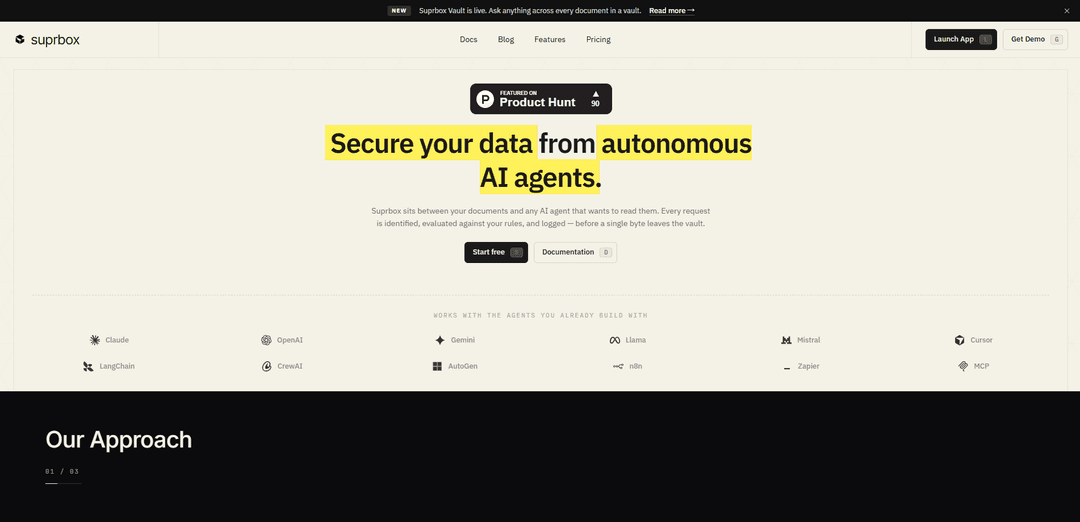
Suprbox ist ein sicherer, richtliniengesteuerter Dokumententresor für autonome KI-Agenten, der jede Anfrage authentifiziert, Regeln durchsetzt und den Zugriff protokolliert, bevor Daten geliefert werden.
https://www.suprbox.com/?ref=producthunt&utm_source=aipure
Produktinformationen
Aktualisiert:May 18, 2026
Was ist Suprbox
Suprbox ist eine Sicherheitsebene, die zwischen den Dokumenten Ihrer Organisation und den KI-Agenten liegt, die diese lesen müssen. Entwickelt für Teams, die „echte Agenten mit echten Daten“ betreiben, bietet es einen kontrollierten Tresor, in dem Dokumente aufgenommen und verschlüsselt und den Agenten nur über einen geregelten Zugriff zugänglich gemacht werden. Suprbox unterstützt gängige Agenten-Ökosysteme (z. B. OpenAI, Claude, Gemini, LangChain, CrewAI, AutoGen, MCP) und legt Wert auf Auditierbarkeit und Compliance mit Funktionen wie manipulationssicherer Protokollierung und Optionen wie Region-Pinning und SOC 2 Typ II-Haltung.
Hauptfunktionen von Suprbox
Suprbox ist ein sicherer, richtliniengesteuerter Dokumententresor, der zwischen den Dokumenten Ihrer Organisation und autonomen KI-Agenten angesiedelt ist. Er nimmt Dokumente auf und verschlüsselt sie, authentifiziert jede Agentenanfrage, bewertet sie anhand konfigurierbarer Regeln (z. B. Sensibilitätsklassifizierung, PII-/Geheimnis-Erkennung, Zeitfenster, Ratenbegrenzungen und Bereichskontrollen) und signiert, liefert und protokolliert dann das Ergebnis. Die Plattform legt Wert auf Auditierbarkeit und Compliance mit manipulationssicheren Protokollen, verschlüsselten Schlüsseln pro Tresor, optionaler Regionsbindung und Integrationen mit gängigen Agenten-Ökosystemen (z. B. OpenAI, Claude, Gemini, LangChain, AutoGen, CrewAI, Zapier, n8n, MCP).
Richtliniengesteuerter Zugriff für jede Anfrage: Alle Agenten-Lesezugriffe fließen durch ein einziges Gate mit drei Prüfpunkten – Authentifizierung, Richtlinienbewertung und signierte Lieferung – sodass Zugriffsentscheidungen konsistent durchgesetzt werden, bevor Daten den Tresor verlassen.
Verschlüsselung pro Tresor und sichere Aufnahme: Dokumente werden mit AES-256 im Ruhezustand unter Verwendung von Schlüsseln pro Tresor (bei Bedarf rotierbar) aufgenommen und verschlüsselt, was eine Zero-Knowledge-ähnliche Haltung unterstützt, bei der selbst Mitarbeiter keine gespeicherten Inhalte lesen können.
Regelwerk mit Sicherheitsprimitiven: Konfigurieren Sie Schutzmaßnahmen mithilfe von Regeltypen wie Klassifizierungsstufen, Datendetektoren (PII/Geheimnisse), Schlüsselwort-Triggern, Zeitfenstern, Ratenbegrenzungen, Sitzungs-TTL/Leases und Lesebereichsbeschränkungen (Metadaten vs. Auszüge vs. vollständiger Inhalt).
Genehmigungen durch Menschen und Schreibkontrollen: Erzwingen Sie Lese-/Schreib-/Bearbeitungs-/Lösch-/Exportberechtigungen und fordern Sie Genehmigungen für sensible Vorgänge an, um kontrollierte Workflows für regulierte oder risikoreiche Dokumente zu ermöglichen.
Manipulationssichere Prüfung und Überwachung: Jedes Zulassungs-/Verweigerungs-/Drosselungsereignis wird signiert und verkettet, exportierbar an Ziele wie S3/SIEM, mit konfigurierbarer Aufbewahrung (bis zu 7 Jahre bei Enterprise-Plänen).
Kompatibilität mit Agenten-Ökosystemen und API-Schlüssel-Bereichsdefinition: Funktioniert mit gängigen Agenten-Stacks über SDK/REST und bereichsbezogene API-Schlüssel, wodurch Berechtigungsmatrizen pro Agent und kontrollierter Zugriff über mehrere Teams und Tresore hinweg ermöglicht werden.
Anwendungsfälle von Suprbox
Vertriebsrecherche-Agenten mit strengen Datengrenzen: Einem Vertriebs-Bot den Zugriff auf Pipeline- und Umsatzdokumente ermöglichen, während die Offenlegung von nicht verwandten sensiblen Finanzdateien (z. B. Gehaltsdaten) blockiert wird, mit vollständiger Überprüfung jedes Lesevorgangs.
Rechtliche Vertragsprüfung mit Compliance-Kontrollen: KI-Vertragsprüfern ermöglichen, Vereinbarungen zu lesen, während Änderungen/Exporte verhindert werden, Genehmigung für als "Eingeschränkt" gekennzeichnete Dokumente erforderlich ist und die Nachweiskette der Dokumente erhalten bleibt.
Engineering-Organisationen, die Flotten von Agenten betreiben: Verwaltung vieler Agenten über mehrere Tresore hinweg mit bereichsbezogenen API-Schlüsseln, Ratenbegrenzungen zur Verhinderung von Endlosschleifen und zentralisierten Audit-Protokollen, um zu beweisen, wer wann auf was zugegriffen hat.
HR-Automatisierung mit PII-Schutzmaßnahmen: Unterstützung von Onboarding- oder Richtlinienassistenten, während die Offenlegung von PII erkannt und kontrolliert wird, der Zugriff auf Geschäftszeiten beschränkt wird und kurze Sitzungsmieten erzwungen werden, um das Risiko zu reduzieren.
Regulierter Datenzugriff mit Regionsbindung: Tresordaten in einer ausgewählten Region (USA/EU/APAC) aufbewahren, um Compliance-Anforderungen (z. B. DSGVO-Überlegungen) zu unterstützen, während eine konsistente Richtliniendurchsetzung und lange Aufbewahrungsprotokolle beibehalten werden.
Vorteile
Starke Sicherheitslage: AES-256 im Ruhezustand, Schlüssel pro Tresor, Richtlinienkontrolle vor dem Datenabfluss und signierte/manipulationssichere Prüfung.
Granulare Governance: Mehrere Regelprimitiven (PII-Erkennung, Zeit-/Ratenbegrenzungen, Bereichskontrollen, Genehmigungen) ermöglichen präzise Schutzmaßnahmen pro Tresor/Agent.
Entwickelt für reale Agenten-Workflows: Bereichsbezogene API-Schlüssel, Sitzungsmieten und Kompatibilität mit gängigen Agenten-Frameworks und Automatisierungstools.
Nachteile
Erweiterte Funktionen sind stufenabhängig: Team-/Enterprise-Funktionen (z. B. längere Aufbewahrung, SSO/SCIM, Regionsbindung) sind im kostenlosen Tarif nicht vollständig verfügbar und einige Tarife sind als "bald verfügbar" aufgeführt.
Fügt eine zusätzliche Kontrollebene hinzu: Das Weiterleiten von Agentenanfragen durch ein Gate kann im Vergleich zum direkten Dateizugriff zu operativem Mehraufwand führen (Richtlinienentwurf, Genehmigungsworkflows).
Wie verwendet man Suprbox
1) Konto erstellen und anmelden: Gehen Sie zu https://www.suprbox.com/register, um ein Konto zu erstellen, und melden Sie sich dann an, um auf das Suprbox-Dashboard zuzugreifen.
2) Erstellen Sie Ihren ersten Tresor: Erstellen Sie im Dashboard einen Tresor (einen sicheren Container für Dokumente). Tresore sind die Einheit, in der Verschlüsselung, Regeln, Berechtigungen und Audit-Aufbewahrung angewendet werden.
3) Wählen Sie, wo Ihr Tresor gespeichert werden soll (falls in Ihrem Plan verfügbar): Wenn Ihr Tarif dies unterstützt (z. B. Enterprise), wählen Sie Region-Pinning (US/EU/APAC), damit die Daten in der von Ihnen gewählten Region bleiben.
4) Dokumente in den Tresor aufnehmen: Fügen Sie Dokumente zum Tresor hinzu, indem Sie Quellen wie Streaming von einem S3-Pfad (z. B. s3://...) verbinden oder Dateien in die Warteschlange stellen (E-Mails mit Anhängen, PDFs, DOCX, JSON usw.). Suprbox nimmt Daten im Ruhezustand (AES-256) mit Tresor-spezifischen Schlüsseln auf und verschlüsselt sie.
5) Dokumente klassifizieren und kennzeichnen (damit Richtlinien sie ansprechen können): Wenden Sie Sensibilitätsstufen/-tags an (z. B. Öffentlich, Intern, Vertraulich, Reguliert/DSGVO), damit die Regel-Engine den Zugriff basierend auf der Klassifizierung zulassen/verweigern kann.
6) API-Schlüssel für jeden Agenten erstellen: Generieren Sie einen API-Schlüssel pro Agent (Berechtigungen mit Geltungsbereich). So identifiziert Suprbox, wer Daten anfordert und was er tun darf.
7) Bereiche und Berechtigungen an den Tresor binden: Weisen Sie jedem API-Schlüssel den entsprechenden Tresorzugriff und die entsprechenden Bereiche zu (z. B. schreibgeschützt vs. umfassendere Funktionen). Halten Sie die Schlüssel pro Agent getrennt, um übermäßige Zugriffe zu vermeiden.
8) Globale Regeln konfigurieren (Leitplanken, die umfassend gelten): Legen Sie Basisrichtlinien fest, die in Ihrer Umgebung gelten sollen (z. B. Standardverweigerung für unbekannte Agenten, Standarddrosselungen oder Standarderwartungen für die Redaktion).
9) Pro-Tresor-Regeln konfigurieren (fein abgestimmte Richtlinie): Fügen Sie Regeln hinzu, die spezifisch für die Daten und den Anwendungsfall des Tresors sind. Suprbox bewertet jede Anfrage anhand dieser Regeln, bevor Bytes den Tresor verlassen.
10) Eine Klassifizierungsregel hinzufügen: Beschränken Sie den Zugriff nach Sensibilitätsstufe (z. B. einem Agenten erlauben, interne Dokumente zu lesen, aber regulierte/PHI zu verweigern). Dies erzwingt einen Zugriffsstil nach Freigabe.
11) Eine Datendetektorregel hinzufügen: Aktivieren Sie die Erkennung für PII, Geheimnisse, API-Schlüssel und regulierte Daten. Konfigurieren Sie die Aktion zum Maskieren/Redigieren/Blockieren, damit sensible Zeichenfolgen das Modell nicht erreichen.
12) Eine Inhalts-Schlüsselwortregel hinzufügen: Definieren Sie Schlüsselwörter/Phrasen (z. B. „Akquisition“, „Entlassung“, „Fusionsgespräche“) und legen Sie Aktionen fest (mit Genehmigung zulassen, drosseln oder verweigern), wenn eine Übereinstimmung gefunden wird.
13) Bearbeitungs- und Löschkontrollen hinzufügen: Kontrollieren Sie Schreib-/Bearbeitungs-/Lösch-/Exportvorgänge. Für schreibgeschützte Agenten (z. B. Vertragsprüfer) erzwingen Sie schreibgeschützten Zugriff und erfordern eine Genehmigung für jeden Änderungs-/Exportversuch.
14) Ratenbegrenzungsregeln hinzufügen: Begrenzen Sie die Lesevorgänge pro Stunde pro Tresor (z. B. 60/Stunde), um außer Kontrolle geratene Schleifen zu verhindern und Kosten und Exposition zu reduzieren.
15) Zeitfensterregeln hinzufügen: Beschränken Sie den Zugriff auf genehmigte Stunden (z. B. Mo–Fr 08:00–19:00 Uhr). Anfragen außerhalb des Zeitfensters werden verweigert, es sei denn, Sie erlauben ausdrücklich Ausnahmen.
16) Lesebereichsregeln hinzufügen: Begrenzen Sie, was der Agent erhält: nur Metadaten, Auszüge bis zu N Zeichen/Seiten oder vollständigen Inhalt. Dies passt die Nutzlast an die Aufgabe an.
17) Kopier- und Downloadkontrollen hinzufügen: Blockieren Sie Rohdownloads, versehen Sie Antworten mit Wasserzeichen oder entfernen Sie Anhänge, um das Leckagerisiko zu reduzieren, bevor Daten den Tresor verlassen.
18) Session-TTL-Regeln hinzufügen: Legen Sie eine Leasingdauer fest (z. B. 15 Minuten). Nach Ablauf der TTL geben Anfragen lease_expired zurück, bis eine neue Sitzung geöffnet wird.
19) Genehmigungen (Human-in-the-Loop) bei Bedarf aktivieren: Für sensible Aktionen oder eingeschränkte Tags ist eine menschliche Genehmigung erforderlich. Verwenden Sie ein Umgehungsfenster nur, wenn es ausdrücklich erforderlich ist, und lassen Sie es auditieren.
20) Integrieren Sie Ihren Agenten über die Suprbox API/SDK: Aktualisieren Sie Ihren Agenten, um Dokumente über Suprbox (über SDK oder REST) anzufordern. Fügen Sie den API-Schlüssel des Agenten und den Operations-Header (z. B. X-Suprbox-Op) hinzu, damit Suprbox die Anfrage authentifizieren und bewerten kann.
21) Führen Sie eine Testanfrage aus und überprüfen Sie die Richtlinienergebnisse: Lassen Sie einen bekannten Agenten ein bekanntes Dokument anfordern und bestätigen Sie das erwartete Ergebnis (Zulassen/Drosseln/Genehmigung erforderlich/Verweigern). Testen Sie auch einen „unbekannten Agenten“, um zu bestätigen, dass er verweigert wird.
22) Überprüfen Sie das Audit-Log für jede Anfrage: Überprüfen Sie protokollierte Ereignisse (Lesevorgänge, Verweigerungen, Drosselungen, Genehmigungen). Suprbox bietet manipulationssichere, signierte/verkettete Audit-Ereignisse für die Nachweiskette.
23) Audit-Ereignisse in Ihre Tools exportieren (optional): Exportieren Sie bei Bedarf Audit-Logs nach S3/SIEM oder an Ihr Ziel der Wahl und legen Sie die Aufbewahrungsfrist fest (z. B. 30 Tage bei Starter, länger bei höheren Stufen).
24) Tresor-spezifische Verschlüsselungsschlüssel bei Bedarf rotieren: Verwenden Sie die Tresor-spezifische Schlüsselrotation bei Bedarf, um den Explosionsradius zu reduzieren und die Sicherheitshygiene aufrechtzuerhalten.
25) Skalieren Sie auf mehrere Agenten und Tresore: Erstellen Sie zusätzliche Tresore für Abteilungen (Vertrieb, Recht, Personal, Technik), geben Sie separate API-Schlüssel pro Agent aus und wenden Sie Tresor-spezifische Regeln an, damit jeder Agent nur das sieht, was er benötigt.
Suprbox FAQs
Suprbox ist eine sichere Speicherschicht für autonome KI-Agenten. Es sitzt zwischen Ihren Dokumenten und jedem KI-Agenten, der sie lesen möchte, identifiziert jede Anfrage, bewertet sie anhand Ihrer Regeln und protokolliert sie, bevor Daten den Tresor verlassen.
Beliebte Artikel

Atoms: Eine Multi-Agenten-KI-Plattform, die Ideen in startbereite Produkte verwandelt
May 22, 2026

Nano Banana SBTI: Was es ist, wie es funktioniert und wie man es im Jahr 2026 einsetzt
Apr 15, 2026

Atoms Review – Der KI-Produkt-Builder, der die digitale Erstellung im Jahr 2026 neu definiert
Apr 10, 2026

Kilo Claw: Wie man einen echten "Do-It-For-You" KI-Agenten bereitstellt und verwendet (2026 Update)
Apr 3, 2026