theORQL
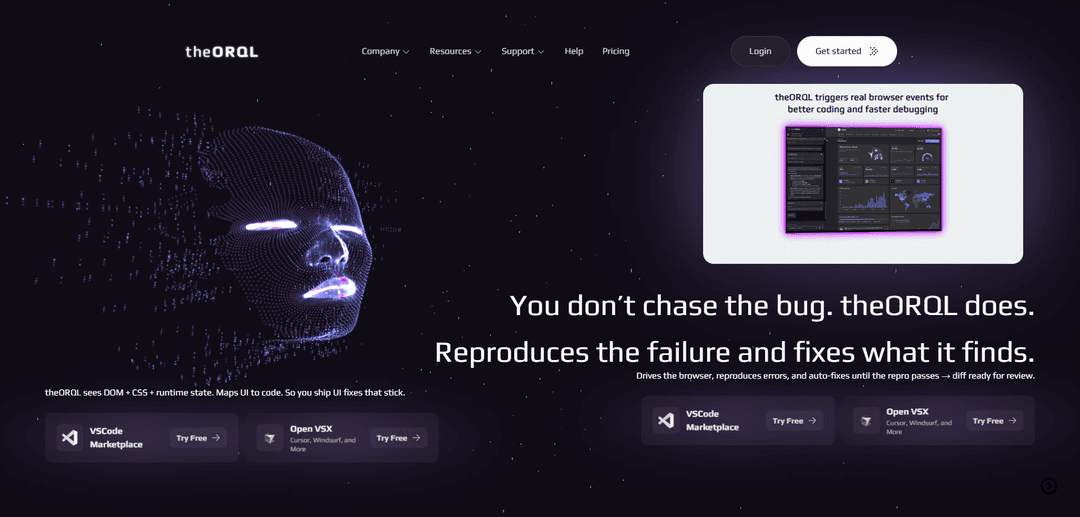
theORQL is a next-generation runtime debugging tool that captures and analyzes runtime errors in Chrome, explains their causes, and generates verified fixes directly in VS Code, enabling developers to fix bugs in minutes without context switching.
https://theorql.com/?ref=producthunt
Product Information
Updated:Mar 8, 2026
What is theORQL
theORQL is a groundbreaking debugging tool designed to streamline the debugging process for modern JavaScript/TypeScript frontend applications. It bridges the gap between Chrome DevTools and VS Code by deeply parsing the runtime environment in real-time, capturing every console log, network request, and stack trace the instant an error occurs. Unlike traditional debugging methods or generic AI coding tools, theORQL provides a comprehensive view of the application's state, including DOM structure, network activity, variable values, and execution order.
Key Features of theORQL
theORQL is a runtime debugging tool that streamlines the debugging process by capturing runtime errors (network, console, stack traces) and deployment failures in Chrome, explaining their root causes, and generating verified fixes directly in VS Code. It features real-time synchronization between Chrome DevTools and VS Code, eliminates the need for manual console logging and DevTools switching, and uses AI-powered analysis to provide instant fixes while maintaining full context of the runtime environment.
Runtime Vision & Auto-Reproduction: Captures and analyzes DOM structure, computed styles, and runtime state, then automatically reproduces errors and validates fixes in the browser environment
Chrome-VSCode Synchronization: Provides seamless integration between Chrome DevTools and VS Code, eliminating the need for context switching and manual copy-pasting
AI-Powered Fix Generation: Uses advanced AI models with reasoning and image understanding to analyze issues and generate verified fixes with full runtime context
Visual Verification System: Utilizes screenshots and runtime evidence to verify that UI changes match what actually renders, not just what compiles
Use Cases of theORQL
Frontend Development Debugging: Helps developers quickly identify and fix UI state bugs, async promise failures, and integration problems in modern JavaScript/TypeScript frontends
Educational Support: Assists coding tutors and students in understanding why code breaks by making the debugging process visible and educational
Enterprise Development Teams: Streamlines debugging workflows for large teams working on complex applications, reducing time spent on error tracking and fixing
Freelance Development: Enables freelance developers to quickly diagnose and fix client issues, reducing debugging time from hours to minutes
Pros
Significantly reduces debugging time and effort
Eliminates context switching between tools
Provides verified fixes with runtime validation
Seamless integration with existing development workflow
Cons
Limited to Chromium-based browsers
Primarily focused on frontend JavaScript/TypeScript applications
Not designed for full production monitoring
How to Use theORQL
Install theORQL Extension: Search for 'theORQL' in VSCode marketplace or OpenVSX (for Cursor, Windsurf) and click Install. The theORQL icon will appear in your activity bar.
Sign In: Click the theORQL icon in the activity bar and sign in to your account to activate the tool.
Launch Your App: Start your local development server and provide theORQL with your localhost URL (e.g., http://localhost:3000).
Debug in Chrome: Use your application normally in Chrome. When an error occurs, theORQL will automatically capture runtime evidence including console logs, network requests, DOM state, and stack traces.
Review Error Analysis: theORQL will analyze the captured data and provide an explanation of what went wrong, along with the exact code path that caused the issue.
Apply Fixes: Review the AI-generated fix suggestions right in VS Code. theORQL will verify the fixes by automatically reproducing the error scenario and testing if the fix resolves the issue.
Verify Changes: theORQL will run its Auto Repro → Fix loop to ensure the changes actually work in the runtime environment, not just in the code.
Review and Commit: Once verified, review the final diff of the changes and commit them to your codebase, all without leaving VS Code.
theORQL FAQs
theORQL is a debugging tool that captures runtime errors (network, console, stack traces) and deployment failures in web applications. It integrates with Chrome DevTools and VS Code to provide automated bug fixing and UI debugging without constant context switching.
Popular Articles

Atoms: A Multi-Agent AI Platform That Transforms Ideas into Launch-Ready Products
May 22, 2026

Nano Banana SBTI: What It Is, How It Works, and How to Use It in 2026
Apr 15, 2026

Atoms Review — The AI Product Builder Redefining Digital Creation in 2026
Apr 10, 2026

Kilo Claw: How to Deploy and Use a True "Do‑It‑For‑You" AI Agent(2026 Update)
Apr 3, 2026
Latest AI Tools Similar to theORQL

Gait
Gait is a collaboration tool that integrates AI-assisted code generation with version control, enabling teams to track, understand, and share AI-generated code context efficiently.

invoices.dev
invoices.dev is an automated invoicing platform that generates invoices directly from developers' Git commits, with integration capabilities for GitHub, Slack, Linear, and Google services.

EasyRFP
EasyRFP is an AI-powered edge computing toolkit that streamlines RFP (Request for Proposal) responses and enables real-time field phenotyping through deep learning technology.

Cart.ai
Cart.ai is an AI-powered service platform that provides comprehensive business automation solutions including coding, customer relations management, video editing, e-commerce setup, and custom AI development with 24/7 support.
Popular AI Tools Like theORQL

GitHub Copilot Chat
GitHub Copilot Chat is an AI-powered coding assistant that provides natural language interactions, real-time code suggestions, and contextual support directly within supported IDEs and GitHub.com.

CopilotForXcode
CopilotForXcode is an Xcode Source Editor Extension that integrates GitHub Copilot, Codeium, and ChatGPT to provide AI-powered code suggestions, chat assistance, and prompt-to-code functionality within Xcode.

BrowserAI
BrowserAI is an open-source library that enables running local Large Language Models (LLMs) directly in web browsers with WebGPU acceleration, offering privacy-focused AI capabilities without requiring server infrastructure.

OpenAI Codex CLI
OpenAI Codex CLI is a lightweight, open-source coding agent that runs in your terminal, enabling developers to translate natural language into code execution while providing ChatGPT-level reasoning with the ability to run code, manipulate files, and iterate under version control.