scritty
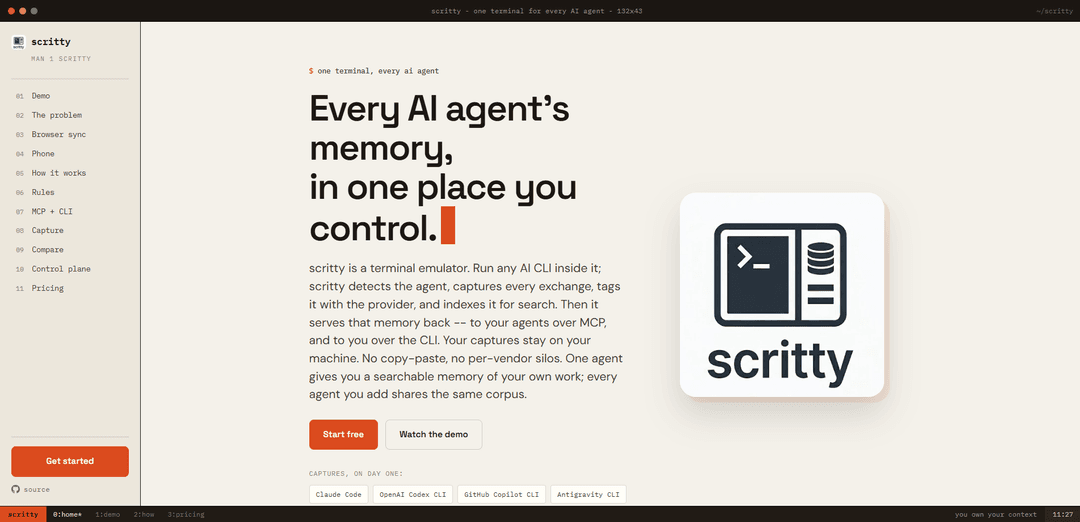
scritty is a local-first terminal emulator that captures and tags every AI CLI conversation, indexes it into one searchable cross-agent memory, and serves it back via an in-terminal panel, a browser/phone live view, and an MCP/CLI interface.
https://scritty.dev/?ref=producthunt
Product Information
Updated:Jul 8, 2026
What is scritty
scritty is a terminal emulator designed to unify the “memory” of AI coding agents you run from the command line—such as Claude Code, OpenAI Codex CLI, GitHub Copilot CLI, Antigravity, Aider, and Ollama—into a single corpus you control. Instead of leaving your work scattered across vendor-specific histories and formats, scritty automatically captures each exchange as you work, labels it by provider, and makes it searchable across sessions and tools. Its core promise is local-first ownership: captures stay on your machine by default, while still being accessible to you (and optionally your agents) through built-in search, scripting, and integrations.
Key Features of scritty
scritty is a local-first terminal emulator that automatically captures and tags conversations from any AI CLI you run (e.g., Claude Code, OpenAI Codex CLI, GitHub Copilot CLI, Antigravity, Aider, Ollama), indexes them into a single searchable corpus you control, and makes that memory available to you via an inline terminal search panel and CLI, and to agents via an MCP server. It supports hybrid keyword+vector search with offline embeddings, cross-device continuation by mirroring the same live PTY session in a browser or phone (token-gated, TLS), and can standardize outbound prompts by assembling your standing instructions and enforcement rules before messages are sent—so multiple agents can share consistent context and constraints across sessions and tools.
Agent-agnostic capture at the terminal boundary: Run any AI CLI inside scritty and it captures every exchange without vendor plugins or wrappers, because the terminal is the shared OS boundary all CLI agents must cross.
Provider-aware tagging via process-level detection: Detects which agent/provider is running by reading the process (not prompt text heuristics), and automatically tags each captured exchange with its source (Claude, Codex, Copilot, Ollama, etc.).
Unified memory corpus with hybrid search: Indexes all captured conversations into one store and provides fused keyword + semantic (vector) search (with Reciprocal Rank Fusion) using offline ONNX embeddings tuned for code and prose.
Memory access via inline UI, CLI, and MCP: Search and read sessions from an in-terminal panel (Ctrl+Shift+M), script access via CLI commands, and expose the same corpus to agents through an MCP server (stdio or Streamable HTTP) with bearer-token auth.
Cross-device live session mirroring (desktop ↔ browser ↔ phone): Embeds a token-secured web server so the exact same PTY session and memory panel can be driven from a browser or paired phone in real time; supports PWA install and auto-reconnect with TLS and allowlisting.
Outbound prompt assembly and rule enforcement: Before sending messages to any agent, scritty can fold in your standing instructions (prompt.toml), enforcement constraints, goal state, and vendor-native rule files (e.g., .claude/CLAUDE.md, AGENTS.md) to keep behavior consistent across tools.
Use Cases of scritty
Software engineering teams using multiple AI CLIs: Capture architecture decisions from Claude, tests from Codex, boilerplate from Copilot, and research from Antigravity into one searchable memory so developers can quickly answer “what did we decide?” across weeks and tools.
Security/incident response and auditability: Maintain a local, searchable record of AI-assisted terminal work (commands, outputs, agent reasoning) to support post-incident reviews, reproducibility, and controlled sharing—without sending captures to a third-party cloud by default.
Regulated or air-gapped environments: Use local capture and offline models (e.g., Ollama) to keep sensitive context on controlled hardware, while still enabling semantic search and standardized prompt rules across agents.
DevOps and long-running automation monitoring: Start an agent-driven task on a workstation and continue or monitor the same live terminal session from a browser or phone on the network—useful for deployments, migrations, and CI/CD troubleshooting.
Knowledge management for power users and consultants: Build a personal corpus of prior prompts, outputs, and decisions across clients/projects, then retrieve relevant context instantly via hybrid search instead of re-explaining requirements to each agent or redoing prior work.
Org-wide cross-team search with governance (Team/Enterprise): Federate multiple developers’ captures into a central control plane with per-tenant isolation and admin/audit controls, enabling shared institutional memory while keeping private sessions private.
Pros
Local-first architecture: captures live on your machine by design, reducing vendor lock-in and data leakage risk.
Works across many AI CLIs: agent-agnostic capture and provider tagging unify otherwise siloed histories.
Multiple access paths (inline panel, CLI, MCP): the same memory can be used by humans, scripts, and agents.
Cross-device continuity: drive the same PTY session from desktop, browser, or phone with token-gated TLS.
Cons
Terminal-centric scope: benefits are strongest for CLI-based agents/workflows; it’s not primarily an IDE conversation indexer.
Operational overhead for teams: central federation, networking, certificates, and governance may require setup and ongoing admin.
Metering by exchange volume: heavy users/teams may need to manage capture volume to control costs on paid tiers.
How to Use scritty
1) Install and launch scritty: Install scritty on your machine and start the desktop terminal app. scritty runs as a local-first terminal emulator that captures and indexes AI CLI conversations on your own hardware.
2) Run an AI CLI inside scritty (capture starts automatically): From within the scritty terminal, launch any supported AI CLI (e.g., Claude Code, OpenAI Codex CLI, GitHub Copilot CLI, Antigravity, Aider, Ollama). scritty detects the running process (provider detection), captures every prompt+reply exchange, tags it by provider, and stores it into one unified local corpus.
3) Use inline search to query your captured memory: Press Ctrl+Shift+M to open scritty’s inline memory search panel. Search across all captured sessions and providers using hybrid ranking (keyword + vector embeddings) to find prior decisions, commands, and agent outputs.
4) Keep consistent instructions across agents (optional but recommended): Create and maintain your standing instructions in prompt.toml so scritty can fold them into outgoing messages before they reach the agent. scritty can also read vendor-native rule files (e.g., .claude/CLAUDE.md, AGENTS.md, copilot-instructions.md, GEMINI.md) so the same rules apply across different CLIs.
5) Toggle message assembly sections from the terminal (optional): Use scritty’s hotkeys to manage what gets injected before sending: Ctrl+Shift+R (User rules), Ctrl+Shift+E (Enforcement constraints), Ctrl+Shift+G (Goal state), Ctrl+Shift+K (Control context). Toggle sections on/off per message as needed.
6) Open the exact same live session in a browser: Use scritty’s embedded token-secured web server to open the session URL in any browser on the same machine or another device on your network. The browser view is byte-for-byte the same PTY and memory panel: typing on desktop updates the browser, and typing in the browser updates the desktop.
7) Install the browser view as a PWA (optional): In Chrome/Edge, choose “Install app” to run the browser view as a standalone PWA window (no browser chrome). This gives you an app-like experience while still driving the same underlying scritty session.
8) Pair your phone to the running session: Run `scritty pair` to display a QR code and pairing URL. Scan it from your phone to open the same live terminal session (scrollback + memory panel). The mobile UI is touch-friendly and auto-reconnects if the connection drops.
9) Use MCP so agents can query the memory substrate: Start the MCP server with `scritty serve` for local stdio MCP, or `scritty serve --http --bind 127.0.0.1 --port 8081` for Streamable HTTP MCP at `/mcp`. Configure your MCP client to connect so agents can search/read the same captured corpus via tools and memory:// resources.
10) Query memory from scripts or the command line: Use the scritty CLI to list/read/search sessions from any shell. Example: `scritty memory cross-session-search --query "auth refactor" --limit 10` to find matches across providers, and `scritty memory read-session --session-id <id>` to retrieve a full captured conversation as text.
11) Close and reopen scritty with tab restore: Quit scritty with multiple tabs/projects open. On relaunch, scritty restores your tabs like a browser, returning each shell to the working directory you left it in.
12) (Teams) Roll out scritty with a central control plane (optional): For teams, deploy scritty so members’ captures federate into an org control plane with tenant-scoped isolation and compliance-gated admin search. Team usage is metered by captured exchange-pairs (prompt+reply), not per-seat.
scritty FAQs
scritty is a terminal emulator that captures and indexes exchanges from AI command-line agents you run inside it, tagging them by provider and making them searchable in one local corpus you control.
Popular Articles

Atoms: A Multi-Agent AI Platform That Transforms Ideas into Launch-Ready Products
May 22, 2026

Nano Banana SBTI: What It Is, How It Works, and How to Use It in 2026
Apr 15, 2026

Atoms Review — The AI Product Builder Redefining Digital Creation in 2026
Apr 10, 2026

Kilo Claw: How to Deploy and Use a True "Do‑It‑For‑You" AI Agent(2026 Update)
Apr 3, 2026
Latest AI Tools Similar to scritty

Gait
Gait is a collaboration tool that integrates AI-assisted code generation with version control, enabling teams to track, understand, and share AI-generated code context efficiently.

invoices.dev
invoices.dev is an automated invoicing platform that generates invoices directly from developers' Git commits, with integration capabilities for GitHub, Slack, Linear, and Google services.

EasyRFP
EasyRFP is an AI-powered edge computing toolkit that streamlines RFP (Request for Proposal) responses and enables real-time field phenotyping through deep learning technology.

Cart.ai
Cart.ai is an AI-powered service platform that provides comprehensive business automation solutions including coding, customer relations management, video editing, e-commerce setup, and custom AI development with 24/7 support.
Popular AI Tools Like scritty

GitHub Copilot Chat
GitHub Copilot Chat is an AI-powered coding assistant that provides natural language interactions, real-time code suggestions, and contextual support directly within supported IDEs and GitHub.com.

CopilotForXcode
CopilotForXcode is an Xcode Source Editor Extension that integrates GitHub Copilot, Codeium, and ChatGPT to provide AI-powered code suggestions, chat assistance, and prompt-to-code functionality within Xcode.

BrowserAI
BrowserAI is an open-source library that enables running local Large Language Models (LLMs) directly in web browsers with WebGPU acceleration, offering privacy-focused AI capabilities without requiring server infrastructure.

OpenAI Codex CLI
OpenAI Codex CLI is a lightweight, open-source coding agent that runs in your terminal, enabling developers to translate natural language into code execution while providing ChatGPT-level reasoning with the ability to run code, manipulate files, and iterate under version control.