
Retrace
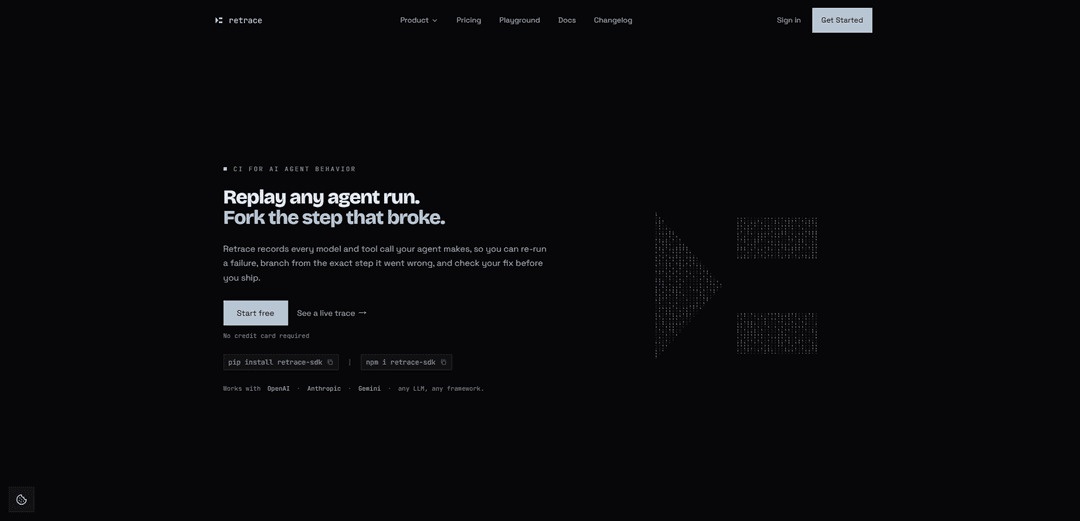
Retrace is an execution replay engine for AI agents that records every LLM/tool call, lets you replay and fork failures from the exact broken step, and verifies fixes with eval gates, guardrails, and quality detection.
https://retraceai.tech/?ref=producthunt
Product Information
Updated:Jul 8, 2026
What is Retrace
Retrace is a reliability and debugging platform for AI agents, positioned as “CI for AI agent behavior.” It captures complete end-to-end agent executions—LLM calls, tool invocations, errors, latency, and cost—so teams can inspect what happened in production and turn failures into repeatable regression tests. Designed to be framework-agnostic, Retrace works with common agent stacks (e.g., LangChain, CrewAI, LlamaIndex) and supports Python and TypeScript, with auto-instrumentation for major model providers (OpenAI, Anthropic, and Google Gemini).
Key Features of Retrace
Retrace is an execution replay engine and reliability platform for AI agents that records every LLM call, tool invocation, cost, latency, and error so teams can replay exact runs, fork from the step where a failure originated, and verify fixes before shipping. Beyond observability, it adds a closed-loop workflow—record → replay/fork → fix → prove—plus automated failure detection (e.g., groundedness gaps, drift, clustering), runtime enforcement (budgets, loop/step limits, approval gates), and CI eval gates that turn real production failures into regression tests. It works across common LLM providers and agent frameworks via lightweight instrumentation in Python or TypeScript.
Record full agent executions: A lightweight decorator/SDK captures every model call, tool call, error, timing, and cost, turning each run into a trace you can inspect and reuse as a regression artifact.
Replay & fork from any failed step: Re-run an exact recorded execution or fork from the span where things went wrong, edit the prompt/tool input/model, and cascade-replay forward to see how the trajectory changes.
Prove-the-fix verification: After making a change, Retrace can re-run against the original failed trace and return a verdict (e.g., fixed/improved/regressed/unchanged) to validate the correction before release.
Automated failure detection & analysis: Flags common agent failure patterns such as groundedness/faithfulness gaps, statistical drift, failure clusters, and multi-agent failure types to explain why a run failed—not just that it failed.
Runtime guardrails and enforcement: Policies like cost budgets, loop detection, step limits, latency caps, and pre-call gateways (hold-for-approval) can halt or block risky actions to prevent runaway behavior and unexpected spend.
CI eval gates for agent behavior: Runs evaluations in CI/CD and fails builds when behavior regresses vs. a baseline, enabling “behavioral regression tests” for prompts, tools, and model upgrades.
Use Cases of Retrace
Debugging production agent incidents: When an agent fails in production, engineers can replay the exact run, fork at the true root-cause step (not the final symptom), and validate a fix with prove-the-fix before redeploying.
Shipping safer tool-using agents (DevOps/SRE): For agents that query logs/metrics or trigger operational actions, guardrails (budgets, loop limits, approval gates) reduce the risk of cascading failures or costly runaway executions.
Regression testing for prompt/tool/model changes: Teams iterating on prompts, swapping tools, or upgrading models can use recorded failures and eval gates to ensure multi-step behavior doesn’t silently degrade across releases.
Multi-agent workflow reliability (research → write pipelines): In systems with planner/researcher/writer agents, Retrace helps visualize agent topology, identify cross-agent handoff failures, and replay/fork to test improved coordination.
Quality and compliance monitoring for enterprise assistants: Groundedness detection and traceability support auditing and quality control for assistants in regulated or high-stakes contexts (e.g., finance, healthcare, legal), where hallucinations and unsafe actions must be caught early.
Pros
Closed-loop debugging: replay, fork, and verify fixes instead of only inspecting logs/metrics.
Framework- and provider-agnostic approach with lightweight instrumentation (Python/TypeScript) and support for common LLM providers.
Runtime guardrails can prevent costly or unsafe agent behavior (budgets, loop detection, approval gating).
CI eval gates convert real failures into behavioral regression tests, helping teams ship with more confidence.
Cons
Some capabilities depend on provider/key support (e.g., certain replay/eval flows may be more mature for specific providers).
Meaningful eval gates require thoughtful evaluation design and thresholds; setup can be non-trivial for complex agents.
Recording detailed traces may raise privacy/compliance considerations, requiring careful redaction and data governance in sensitive environments.
How to Use Retrace
1) Create an account: Go to https://retraceai.tech/ and sign up (GitHub sign-in is supported). No credit card is required to start.
2) Install the Retrace SDK: Add the Retrace SDK to your agent project (Python or TypeScript). Retrace is framework-agnostic and works with LangChain, CrewAI, LlamaIndex, Vercel AI SDK, AutoGen, etc.
3) Configure your API key: In your code, configure Retrace with your workspace API key (example shown on the site uses `retrace.configure(api_key="rt_...")`). This connects your app to Retrace so traces can stream to the dashboard.
4) Add the recording decorator to your agent entrypoint: Wrap your main agent function with the decorator shown in the docs: `@retrace.record(name="my-agent")`. This single decorator captures every LLM call, tool invocation, cost, timing, and error.
5) Run your agent normally: Execute your agent as you usually do. Retrace auto-captures calls to OpenAI, Anthropic, and Gemini, and records tool calls and failures as spans in a trace timeline.
6) Watch traces stream live (optional CLI tail): Use the CLI to tail live traces (example from the site: `retrace traces tail`). You’ll see steps like intent classification, context fetch, and response generation with timings and costs.
7) Inspect the trace in the dashboard: Open the Retrace UI to scrub the timeline, open any span, and see the full sequence of model/tool calls. This helps you find where the run actually went wrong (often earlier than the final error).
8) Replay a failed run: Re-run any recorded trace to reproduce the exact behavior. Retrace is designed so a production failure becomes a permanent regression test you can re-run.
9) Fork from the exact failing span: Select the span where the run diverged or failed, then create a fork to branch from that point (example commands shown: `retrace forks create --trace <id> --span <id> --input "..."`).
10) Edit the broken step (prompt/tool input/model) and cascade-replay: In the fork, change what caused the failure (e.g., adjust a prompt, fix a tool input, or swap the model), then replay the fork (example: `retrace forks replay <id> --wait`). Retrace cascade-replays from the fork point forward so downstream steps use the updated context.
11) Prove the fix with a verdict: Run the built-in verification to compare the fixed fork against the original failed run and get a verdict (example: `retrace traces verify-fix <id>`), reported as improved/regressed/unchanged (and shown as “fix verified” in the site example).
12) Add runtime guardrails (recommended): Configure guardrails/circuit breakers to halt runs that exceed budgets, loop too long, overflow context, or exceed latency caps. Retrace can issue a HALT to stop runaway behavior before it racks up cost or triggers bad actions.
13) Enable detection signals (recommended): Use Retrace’s detection features to automatically flag groundedness gaps, drift, failure clusters, and MAST failure types so you learn why a run failed (not just that it failed).
14) (Optional) Add your model provider key for server-side replays and eval gates: In the Retrace dashboard Settings, add your provider key (the site highlights Google/Gemini for eval gates + replays). Retrace validates the key on save, encrypts it at rest, shows only the last 4 characters, and uses it so replay/eval tokens are billed to your provider account.
15) Create an evaluation and dataset for regression testing: Set up evaluations (and optionally datasets and auto eval-rules) so you can score agent behavior over recorded runs and compare against a baseline (“golden”) behavior.
16) Gate PRs with an Eval Gate in CI: Add a CI step that runs Retrace’s eval gate so builds fail when behavior regresses. Example GitHub Actions step from the site: `retrace eval gate --evaluation $EVAL_ID --trace $TRACE_ID --threshold 0.8` with `RETRACE_API_KEY` in secrets; the command exits with code 1 on failure.
17) Iterate using the closed-loop workflow: Repeat the reliability loop: Record a real failure → Replay it → Fork from the failing step → Fix → Prove-the-fix → Add it to eval gates so the same regression is harder to ship again.
Retrace FAQs
Retrace is an execution replay engine for AI agents that records every LLM call, tool invocation, and error, so you can replay runs, fork from a failing step, and verify fixes before shipping.
Popular Articles

Atoms: A Multi-Agent AI Platform That Transforms Ideas into Launch-Ready Products
May 22, 2026

Nano Banana SBTI: What It Is, How It Works, and How to Use It in 2026
Apr 15, 2026

Atoms Review — The AI Product Builder Redefining Digital Creation in 2026
Apr 10, 2026

Kilo Claw: How to Deploy and Use a True "Do‑It‑For‑You" AI Agent(2026 Update)
Apr 3, 2026
Latest AI Tools Similar to Retrace

Hapticlabs
Hapticlabs is a no-code toolkit that enables designers, developers and researchers to easily design, prototype and deploy immersive haptic interactions across devices without coding.

Deployo.ai
Deployo.ai is a comprehensive AI deployment platform that enables seamless model deployment, monitoring, and scaling with built-in ethical AI frameworks and cross-cloud compatibility.

CloudSoul
CloudSoul is an AI-powered SaaS platform that enables users to instantly deploy and manage cloud infrastructure through natural language conversations, making AWS resource management more accessible and efficient.

Devozy.ai
Devozy.ai is an AI-powered developer self-service platform that combines Agile project management, DevSecOps, multi-cloud infrastructure management, and IT service management into a unified solution for accelerating software delivery.
Popular AI Tools Like Retrace

A2A Protocol
A2A (Agent2Agent) Protocol is an open interoperability protocol developed by Google that enables seamless communication and collaboration between AI agents across different frameworks and vendors, regardless of their underlying architecture.

VoltOps
VoltOps is a framework-agnostic LLM observability platform that provides real-time visual monitoring, debugging, and optimization tools for AI agents across any technology stack.

Chaterm
Chaterm is an open-source AI-native terminal and SRE copilot that enables engineers to manage complex infrastructure through natural language, automating deployment, troubleshooting, and operations without memorizing commands.

Open Browser Use
Open Browser Use is an open-source, agent-runtime-neutral browser automation layer that pairs a Chrome extension with a CLI/SDK/MCP to enable DOM-aware, CDP-powered tab control, navigation, and actions across different AI agent tools.