
Pulldog
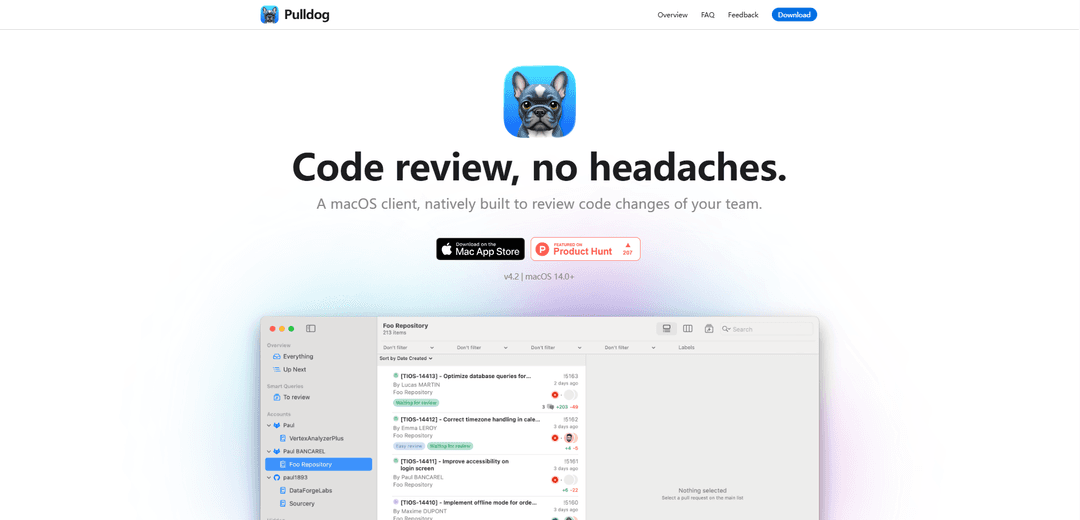
Pulldog is a native macOS client designed specifically for code review, offering seamless integration with GitHub and GitLab while leveraging Apple's ecosystem features to streamline the review process.
https://www.natic.app/pulldog?ref=producthunt
Product Information
Updated:Mar 9, 2026
What is Pulldog
Pulldog is a powerful code review application built natively for macOS using Swift. It serves as a dedicated platform for developers to review code changes within their team, while not attempting to replace GitHub or GitLab but rather complement them by providing better integration with the Apple ecosystem. The app supports both GitHub and GitLab platforms (with Azure support in development) and is compatible with macOS 14.0 and above.
Key Features of Pulldog
Pulldog is a native macOS application designed for code review, supporting both GitHub and GitLab platforms. It offers a comprehensive suite of features including smart queries, multiple account management, customizable interface with 185 language supports and 90 themes, auto-commit filtering, widgets integration, and AI-powered review capabilities using Apple's on-device intelligence. The app focuses on improving the code review experience by integrating seamlessly with the Apple ecosystem through Spotlight, widgets, Siri & shortcuts.
Smart Queries System: Allows users to create customized filters for PRs based on various criteria like approval status, creation date, team members, and PR size
Multiple Account Integration: Supports managing multiple GitHub and GitLab accounts in one place, similar to email client functionality
Native macOS Integration: Built entirely in Swift with deep integration into macOS features including Spotlight search, widgets, and Siri shortcuts
AI-Powered Review Assistant: Utilizes Apple's on-device AI model with 3 billion parameters for local code review analysis and PR evaluation
Use Cases of Pulldog
Team Lead Code Review Management: Helps tech leads track and manage multiple PRs across different teams using smart queries and timeline visualization
Cross-Platform Development Teams: Enables developers working across multiple repositories and platforms to manage all their code reviews in one unified interface
Enterprise Security Compliance: Provides secure code review capabilities with local AI processing, suitable for companies with strict security requirements
Pros
Deep integration with macOS ecosystem
Local AI processing for enhanced privacy
Highly customizable interface and filtering options
Cons
Limited to macOS platform only
Currently only supports GitHub and GitLab (Azure in development)
Requires macOS 14.0+ for full feature set
How to Use Pulldog
Download and Install: Download Pulldog from the Mac App Store and install it on your macOS device (requires macOS 14.0 or later)
Add Accounts: Add your GitHub and/or GitLab accounts to Pulldog to monitor code reviews across multiple repositories
Set Up Smart Queries: Create custom smart queries to filter and organize pull requests based on criteria like approvals, age, size, author, etc.
Configure Preferences: Customize the app appearance by selecting from 90 available themes and 185 language syntax highlighting options
Add Widgets: Add Pulldog widgets to your Desktop or Notification Center to monitor team activity at a glance
Review Code Changes: Use the code review interface to examine changes, with options to filter files, search across changes, and use auto-commit filtering to see what changed since last review
Use AI Review (macOS 26.0+): Leverage Apple's on-device AI model to get automated code reviews and PR summaries
Use Spotlight Actions (macOS 26.0+): Access quick actions like rebasing PRs, merging approved PRs, and re-running failed pipelines directly from Spotlight search
Pulldog FAQs
Pulldog is a native macOS client built for reviewing code changes of your team. It's designed to integrate with the Apple ecosystem while working with GitHub and GitLab repositories.
Pulldog Video
Popular Articles

Vosko AI: Localize and Dub Videos for Global Audiences
Oct 15, 2026

Atoms: A Multi-Agent AI Platform That Transforms Ideas into Launch-Ready Products
Oct 13, 2026

Nano Banana SBTI: What It Is, How It Works, and How to Use It in 2026
Apr 15, 2026

Atoms Review — The AI Product Builder Redefining Digital Creation in 2026
Apr 10, 2026
Latest AI Tools Similar to Pulldog

Gait
Gait is a collaboration tool that integrates AI-assisted code generation with version control, enabling teams to track, understand, and share AI-generated code context efficiently.

invoices.dev
invoices.dev is an automated invoicing platform that generates invoices directly from developers' Git commits, with integration capabilities for GitHub, Slack, Linear, and Google services.

EasyRFP
EasyRFP is an AI-powered edge computing toolkit that streamlines RFP (Request for Proposal) responses and enables real-time field phenotyping through deep learning technology.

Cart.ai
Cart.ai is an AI-powered service platform that provides comprehensive business automation solutions including coding, customer relations management, video editing, e-commerce setup, and custom AI development with 24/7 support.
Popular AI Tools Like Pulldog

GitHub Copilot Chat
GitHub Copilot Chat is an AI-powered coding assistant that provides natural language interactions, real-time code suggestions, and contextual support directly within supported IDEs and GitHub.com.

CopilotForXcode
CopilotForXcode is an Xcode Source Editor Extension that integrates GitHub Copilot, Codeium, and ChatGPT to provide AI-powered code suggestions, chat assistance, and prompt-to-code functionality within Xcode.

BrowserAI
BrowserAI is an open-source library that enables running local Large Language Models (LLMs) directly in web browsers with WebGPU acceleration, offering privacy-focused AI capabilities without requiring server infrastructure.

OpenAI Codex CLI
OpenAI Codex CLI is a lightweight, open-source coding agent that runs in your terminal, enabling developers to translate natural language into code execution while providing ChatGPT-level reasoning with the ability to run code, manipulate files, and iterate under version control.