MashuPack
MashuPack is a browser-based tool that lets you select exact files or subsystems from a local repository and export them as one clean, structured text file for AI workflows—no backend, no account, and no repo upload.
https://mashupack.com/?ref=producthunt
Product Information
Updated:Jun 8, 2026
What is MashuPack
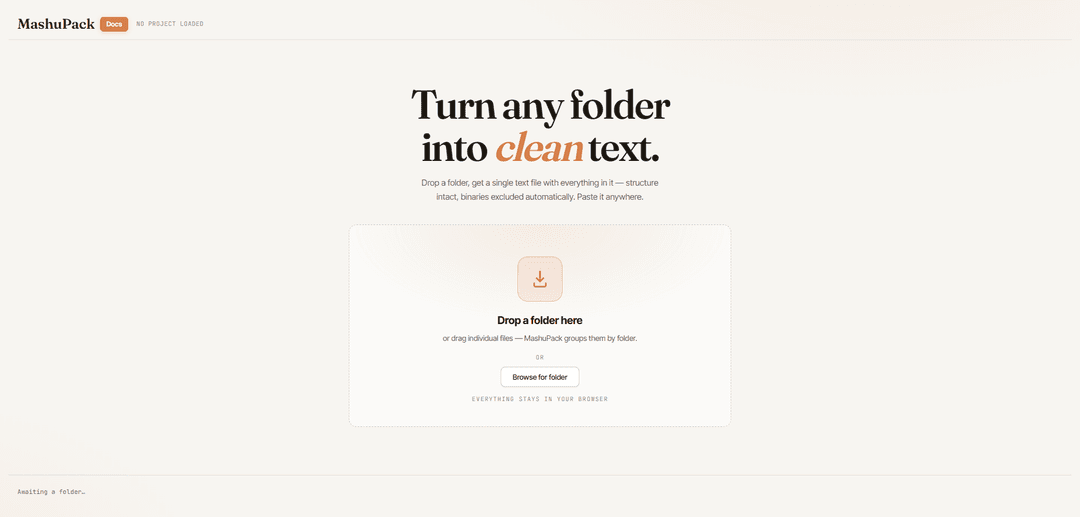
MashuPack turns a local folder or codebase into a single, AI-friendly text export while preserving project structure. After you drag-and-drop a folder (or browse to select one), it scans your repository, displays a navigable file tree, and lets you preview files and curate exactly what should be included. Everything runs locally in your browser using the File System Access API, with binaries excluded automatically, so your code doesn’t get uploaded anywhere by MashuPack.
Key Features of MashuPack
MashuPack is a browser-based tool that turns a local folder or code repository into a single, structured plain-text export that AI tools (like ChatGPT or Claude) can navigate reliably. It scans your project locally (no upload), shows a file tree with search and selection controls, provides stats including an estimated token count, previews files with syntax highlighting, and exports a combined text file with directory structure plus clear per-file START/END path markers so models can find and reference specific files without treating the repo as an undifferentiated paste.
Single structured text export: Exports one combined .txt that includes a directory tree header and explicit START/END markers with full file paths, making it easier for AI tools to locate and reason about specific files.
Local-first privacy (no server): Runs entirely in the browser using the File System Access API; files are not uploaded anywhere, and contents are read only when previewing or exporting.
Scoped selection by folder, file, or type: Lets you tick exact files/folders to include, select/deselect by extension, and quickly narrow exports to just the subsystem you want to discuss.
Repo stats + token estimation: Shows counts and size breakdowns by file type and lets you toggle size into estimated tokens (~4 chars/token) to gauge whether an export fits a model context window.
Fast UX for large repositories: Designed to stay responsive on big codebases via virtualized tree rendering and Rust/WASM indexing running in a Web Worker.
Built-in file viewer with syntax highlighting: Previews files in-app (CodeMirror highlighting) without automatically including them in the export, keeping selection control explicit.
Use Cases of MashuPack
AI-assisted code review and debugging: Export a whole project (or a targeted module) so an AI can trace imports, identify bugs, and suggest fixes with correct file-path references.
Onboarding and architecture walkthroughs: Generate a structured snapshot of a repo for new team members or consultants to quickly understand layout, key modules, and dependencies.
Preparing minimal context for LLM chats: Select only the relevant subsystem (e.g., auth, payments, UI) to avoid overwhelming the model and reduce leakage of unrelated code.
Documentation and refactor planning: Provide an AI with a navigable project export to propose refactor steps, identify duplication, or draft documentation aligned to actual file structure.
Security and compliance triage: Scope exports to sensitive areas (config, auth flows, dependencies) so an AI can help spot risky patterns while keeping the rest of the repo out of scope.
Pros
Privacy-friendly: runs fully client-side with no upload to a MashuPack server.
AI-readable structure: path headers and START/END markers make navigation and referencing more reliable than raw copy-paste.
Flexible scoping: selection by file/folder/type plus token estimation helps fit model limits and focus analysis.
Handles large repos well: Web Worker + Rust/WASM indexing and virtualized tree keep performance responsive.
Cons
Requires a desktop browser and File System Access support; mobile use is not the target.
Very large repos still incur an unavoidable initial filesystem scan delay (e.g., 10–20 seconds).
If you upload the export to an AI provider, privacy then depends on that provider’s policies (MashuPack’s protection ends at export).
How to Use MashuPack
1) Open MashuPack in a desktop browser: Go to https://mashupack.com/ (desktop/laptop recommended). MashuPack runs entirely in your browser (no backend, no account, no repo upload).
2) Load a project folder: Load code either by dragging and dropping a folder onto the page, or by clicking “Browse for folder” and selecting the repository directory. MashuPack will scan the folder and build a file tree.
3) (Optional) Clear and reload a different project: Use “Clear project” in the top bar to reset, then load a new folder.
4) Browse the repository tree: Use the left-side tree to expand/collapse folders and explore structure. You can use the search bar to filter by name (press “/” to focus it). Use “Expand all / Collapse all” to open/close everything; Shift+click or Alt+click a folder to expand/collapse its entire subtree.
5) Preview files in the File viewer: Click a file name to open it in the File viewer (syntax highlighted). Previewing does not automatically include the file in exports—exports are controlled by checkboxes.
6) Select exactly what you want to export: Tick checkboxes next to files or folders to include them. Selecting a folder includes everything inside it. Use “Select all / Deselect all” to quickly change scope. You can also toggle by extension using the file-type pills or by clicking rows in the File types table.
7) Confirm you’re in selection mode (if applicable): When you have an active selection, a “SELECTION” indicator appears in the stats header and exports operate only on the selected subset. Deselect all to return to full-project mode.
8) Check project stats and estimated token size: Review the right-side stats (files, folders, size, etc.). Click the Size stat to toggle between bytes and estimated tokens (~4 chars/token) to gauge whether the export will fit in your AI tool’s context window.
9) Export a single combined text file (main workflow): Click “Export combined text” to download one structured .txt containing: (a) a directory tree header, and (b) each included file wrapped with explicit START/END markers and full paths (e.g., “// ===== START OF FILE: path ===== //”).
10) Alternatively copy/save the text report from the report panel: In the Text report panel, use “Copy to clipboard” to paste directly into an AI chat, or “Save as .txt” to save the same combined report to disk.
11) (Optional) Download the full project as a ZIP: Click “Download .zip” to download the full project as a ZIP archive (this is separate from the combined-text export).
12) Use the export with ChatGPT/Claude: Upload or paste the combined text into your AI tool. The directory tree plus START/END file markers help the model navigate the project like a virtual repo (find files by path, trace imports, and focus on relevant sections).
MashuPack FAQs
MashuPack is a browser-based tool that turns a local folder/repository into a single structured plain-text export suitable for AI tools like ChatGPT and Claude, preserving folder structure and adding clear file boundaries.
MashuPack Video
Popular Articles

Proferex: A Cloud-Based Ad Tracking and Campaign Optimization Platform
Nov 4, 2026

How to Create Viral Talking Baby Podcast Videos with AI: Step-by-Step Guide
Nov 2, 2026

Vosko AI: Localize and Dub Videos for Global Audiences
Oct 15, 2026

Atoms: A Multi-Agent AI Platform That Transforms Ideas into Launch-Ready Products
Oct 13, 2026
Latest AI Tools Similar to MashuPack

Gait
Gait is a collaboration tool that integrates AI-assisted code generation with version control, enabling teams to track, understand, and share AI-generated code context efficiently.

invoices.dev
invoices.dev is an automated invoicing platform that generates invoices directly from developers' Git commits, with integration capabilities for GitHub, Slack, Linear, and Google services.

EasyRFP
EasyRFP is an AI-powered edge computing toolkit that streamlines RFP (Request for Proposal) responses and enables real-time field phenotyping through deep learning technology.

Cart.ai
Cart.ai is an AI-powered service platform that provides comprehensive business automation solutions including coding, customer relations management, video editing, e-commerce setup, and custom AI development with 24/7 support.
Popular AI Tools Like MashuPack

GitHub Copilot Chat
GitHub Copilot Chat is an AI-powered coding assistant that provides natural language interactions, real-time code suggestions, and contextual support directly within supported IDEs and GitHub.com.

CopilotForXcode
CopilotForXcode is an Xcode Source Editor Extension that integrates GitHub Copilot, Codeium, and ChatGPT to provide AI-powered code suggestions, chat assistance, and prompt-to-code functionality within Xcode.

BrowserAI
BrowserAI is an open-source library that enables running local Large Language Models (LLMs) directly in web browsers with WebGPU acceleration, offering privacy-focused AI capabilities without requiring server infrastructure.

OpenAI Codex CLI
OpenAI Codex CLI is a lightweight, open-source coding agent that runs in your terminal, enabling developers to translate natural language into code execution while providing ChatGPT-level reasoning with the ability to run code, manipulate files, and iterate under version control.