ProdShort
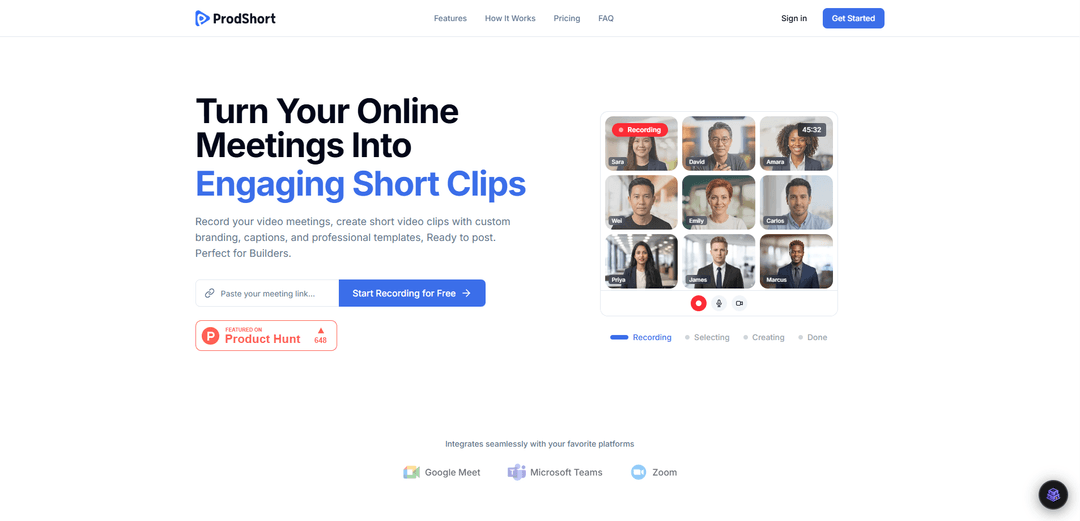
ProdShort is an automated video editing tool that records online meetings and transforms them into engaging, branded short-form video clips with AI-powered captions and professional templates, ready for social media posting.
https://prodshort.com/?ref=producthunt
Product Information
Updated:Apr 15, 2026
What is ProdShort
ProdShort is a comprehensive video content creation platform designed specifically for content creators, marketers, and builders who want to repurpose their online meetings into shareable social media content. The platform seamlessly integrates with popular video conferencing tools including Google Meet, Zoom, and Microsoft Teams to automatically record meetings and convert them into polished, professional short-form videos. With its intuitive interface and powerful editing features, ProdShort eliminates the time-consuming process of manual video editing, allowing users to create viral-ready content directly from their recorded meetings. The platform offers both free and premium plans, making it accessible for individuals and businesses of all sizes who want to maximize their content output without investing hours in post-production work.
Key Features of ProdShort
ProdShort is an automated video recording and editing tool designed to transform online meetings into engaging, ready-to-post short video clips. It seamlessly integrates with popular video conferencing platforms like Google Meet, Zoom, and Microsoft Teams to automatically record meetings. The platform offers smart clip creation capabilities, AI-powered animated captions with word-level highlighting, customizable templates with multiple speaker views, and brand customization options including logo placement. Users can quickly export high-quality video clips optimized for social media platforms, making it ideal for content creators, marketers, and builders who want to repurpose meeting content into shareable video content.
Automatic Meeting Recording: Schedule meetings and ProdShort automatically joins and records them across Google Meet, Zoom, and Microsoft Teams without manual intervention.
Smart Clip Creation: Select any segment from recorded meetings and transform them into polished short clips that are ready for social media posting.
AI-Powered Animated Captions: Automatically generate TikTok-style animated captions with word-level highlighting to boost engagement and accessibility.
Custom Branding Templates: Customize videos with multiple speaker views, custom fonts, colors, positioning, and logo placement to maintain brand consistency.
Quick High-Quality Exports: Export edited clips instantly in high quality, optimized and ready for posting on any social media platform.
Use Cases of ProdShort
Content Marketing: Marketers can repurpose webinars, product demos, and client meetings into bite-sized social media content to increase brand visibility and engagement across platforms.
Product Launches: Builders and product creators can record launch meetings, demos, and feature walkthroughs, then create shareable clips to promote their products on social media.
Educational Content Creation: Educators and trainers can transform online teaching sessions and workshops into digestible short clips for student review or promotional content.
Thought Leadership: Business leaders and consultants can convert expert panel discussions, interviews, and strategy sessions into professional clips to establish authority in their field.
Customer Testimonials: Sales and marketing teams can extract positive customer feedback and testimonials from client meetings to create authentic social proof content.
Team Highlights: Companies can capture and share key moments from team meetings, announcements, and celebrations to build company culture and employer branding.
Pros
Seamless integration with major video conferencing platforms (Google Meet, Zoom, Microsoft Teams)
Automated recording and AI-powered caption generation saves significant time and effort
Flexible pricing with a free tier offering 10 exports per month for users to test the platform
Custom branding options allow for professional, on-brand video content creation
Cons
Limited monthly exports even on paid plans (30 exports for $99/month may not be sufficient for heavy users)
Free plan includes ProdShort logo watermark that cannot be edited or removed
No mention of advanced editing features beyond basic clip selection and template customization
Relatively high cost per export on the Creator Plan compared to some competing solutions
How to Use ProdShort
1: Create a ProdShort account by visiting prodshort.com and clicking 'Get Started Free' or 'Create Account'
2: Schedule your online meeting on Google Meet, Zoom, or Microsoft Teams as you normally would
3: Set up automatic recording by scheduling the meeting in ProdShort - the platform will automatically join and record your meeting
4: After your meeting ends, access the full recording in your ProdShort dashboard
5: Select the specific segment or moment from your recording that you want to turn into a short clip
6: Customize your clip using the available templates - choose speaker views, fonts, colors, and positioning to match your brand
7: Add AI-powered captions with TikTok-style animated word-level highlighting for better engagement
8: Upload and position your custom logo on the video (available on Creator Plan) or keep the ProdShort logo (on Freemium plan)
9: Preview your edited short clip to ensure it looks exactly how you want
10: Export your clip in high quality and download it instantly, ready to post on social media platforms
ProdShort FAQs
ProdShort is a tool that automatically records online meetings and creates short video clips with custom branding, captions, and professional templates. It transforms your video meetings into engaging, ready-to-post short clips perfect for social media.
ProdShort Video
Popular Articles

Atoms: A Multi-Agent AI Platform That Transforms Ideas into Launch-Ready Products
May 22, 2026

Nano Banana SBTI: What It Is, How It Works, and How to Use It in 2026
Apr 15, 2026

Atoms Review — The AI Product Builder Redefining Digital Creation in 2026
Apr 10, 2026

Kilo Claw: How to Deploy and Use a True "Do‑It‑For‑You" AI Agent(2026 Update)
Apr 3, 2026
Latest AI Tools Similar to ProdShort

EzVideos
EzVideos is an all-in-one video creation tool that helps users generate viral videos for social media platforms like Instagram, TikTok, and YouTube with automated editing features and built-in resources.

Blanc AI
Blanc AI is a revolutionary AI solution that enables video content translation and dubbing into 47+ languages while preserving the original voice, emotions, and lip synchronization.

Wink Mody
Wink Mody is a modified version of the Wink video editing app that offers premium features like AI-powered retouching, 4K exports, and watermark-free editing completely free of charge.

Shortmake AI
ShortMake is an AI-powered video creation platform that transforms ideas into viral-ready videos by automatically generating scripts, voiceovers, visuals, and subtitles specifically optimized for platforms like TikTok and YouTube Shorts.
Popular AI Tools Like ProdShort

AI Clips - New Gen
AI Clips - New Gen is an AI-powered video clipping tool that automatically generates engaging short-form content from long videos for multiple social media platforms like YouTube Shorts, TikTok, Instagram Reels and more.

Edit Mind
Edit Mind is an open-source, AI-powered video indexing and semantic search platform that enables users to analyze and search through video content using natural language queries, with features including transcription, frame analysis, face recognition, and object detection.

Dinamo Notebook
FreeAI Video Editing
Dinamo Notebook is a free, MIT-licensed, local-first browser extension for football video analysis that lets you draw tactical annotations on YouTube/Dailymotion/Twitch footage and optionally use AI (with your own OpenAI API key) for tactical insights.

MediaSeg
MediaSeg is a stable, local-first macOS utility that splits large MP4/WEBM media files into upload-ready chunks under a configurable size limit while preserving quality using ffmpeg/ffprobe and an AI-assisted, target-based sizing strategy.