Outpaint
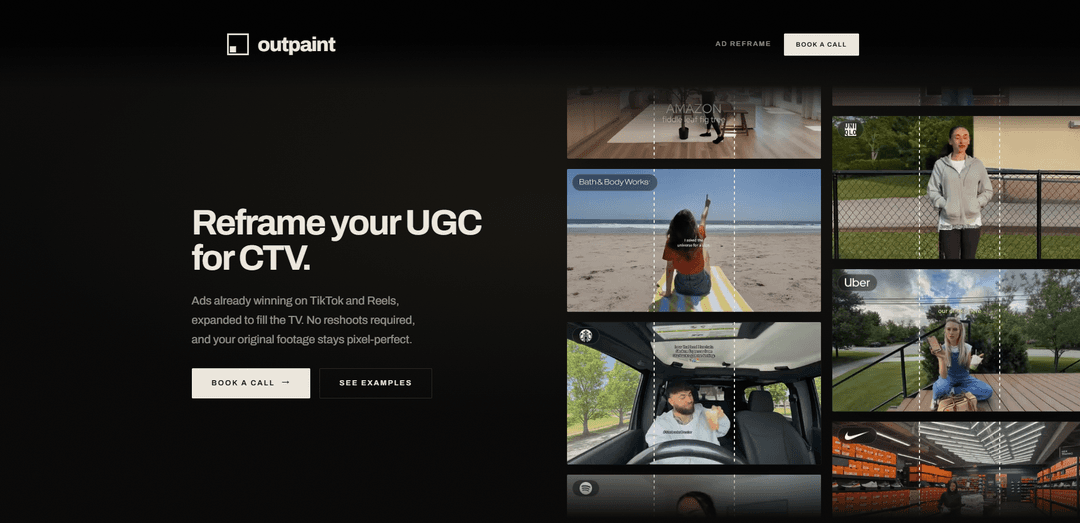
Outpaint reframes vertical UGC ads into full-frame, pixel-perfect CTV-ready 16:9 commercials by generating only outside the original footage—no reshoots, fast turnaround, and better on-screen performance than blur or pillarbox.
https://outpaint.com/ugc-to-ctv?ref=producthunt
Product Information
Updated:Jul 8, 2026
What is Outpaint
Outpaint is a creative reframing service/product that helps brands take the vertical ads already winning on TikTok, Reels, and other social platforms and expand them to look native on connected TV (CTV) and other widescreen placements. Instead of letterboxing (black bars) or blurring the sides, Outpaint uses video outpainting to extend the scene beyond the original frame so the ad fills a 16:9 screen while keeping the original creative intact. It’s designed for marketers who want to test and scale CTV without the time and expense of new shoots or agency production cycles, delivering CTV-ready outputs in days.
Key Features of Outpaint
Outpaint (Ad Reframe) takes vertical UGC ads that are already performing on TikTok/Reels and expands them to fit widescreen formats like 16:9 for connected TV without reshoots. The original footage remains pixel-perfect and untouched, while AI-generated content fills the extra canvas outside the frame to avoid pillarboxing or blurred sidebars. The service is positioned for fast turnaround (delivered in days) and repeatable scaling of existing creator assets into CTV-ready commercials and other aspect ratios.
UGC-to-CTV reframing: Expands vertical social ads to full-frame 16:9 outputs designed to look native on TV screens rather than letterboxed or blurred.
Pixel-perfect source preservation: Keeps every original pixel exactly where it was; only generates new imagery outside the original frame to fill the new aspect ratio.
Multiple aspect-ratio delivery: Supports 16:9 and 1:1 (and also vertical, square, ultrawide, and more) so the same source creative can be delivered across screens and placements.
No reshoot required: Repurposes finished social ads or even raw clips, avoiding crews, production cycles, and agency timelines typically associated with CTV creative.
Fast turnaround in days: Workflow is built for speed—send a clip and required format, receive an expanded cut back within a couple of days.
Performance-oriented full-frame approach: Positioned as a better alternative to pillarboxing/blur fills; cited survey results indicate outpainted versions won on attention-holding, purchase intent, and brand perception versus common formatting options.
Use Cases of Outpaint
DTC ecommerce CTV expansion: Turn top-performing TikTok/IG UGC product ads into CTV-ready 16:9 commercials to test and scale on streaming TV without new production spend.
Cross-platform creative adaptation: Produce a consistent library of versions (CTV, YouTube/OLV, paid social, programmatic) from one source clip so campaigns can run everywhere without black bars.
OTT/FAST and linear-ready deliverables: Generate widescreen outputs suitable for connected TV, OTT, FAST channels, and linear placements where full-frame presentation is expected.
Rapid creative testing on new channels: Quickly convert existing social winners into TV formats to launch experiments faster than traditional CTV production timelines.
Scale creator partnerships into TV inventory: Operationalize a repeatable pipeline: feed in batches of creator assets and receive reframed TV-ready cuts to increase creative volume for CTV buys.
Pros
Preserves original footage pixel-perfect while expanding the canvas, reducing risk of degrading core creative.
Avoids reshoots and traditional CTV production costs, enabling cheaper and faster iteration.
Designed to look native on 16:9 screens compared with pillarboxing or blurred side fills.
Supports multiple aspect ratios, making it easier to distribute one concept across many placements.
Cons
Generated areas outside the frame may not always perfectly match real-world scene details, depending on the source content.
Best results likely depend on source video quality and composition; low-quality or chaotic footage may be harder to expand convincingly.
Primarily focused on reframing/format expansion rather than full end-to-end TV ad production (e.g., scripting, new shoots).
How to Use Outpaint
1) Pick the vertical ad you want to reframe: Choose a finished social ad (e.g., TikTok/Reels) or a raw vertical clip that’s already performing well. Outpaint is designed to expand vertical footage to fill wider screens (commonly 16:9 for CTV) without reshooting.
2) Decide the target format(s) you need: Specify the aspect ratio(s) you want delivered—typically 16:9 for connected TV, but Outpaint can also deliver 1:1, vertical, ultrawide, and other ratios depending on where you plan to run the video.
3) Send the clip and your delivery requirements to Outpaint: Provide the video asset and tell Outpaint the target format(s). If you’re unsure whether to send a finished ad or raw footage, you can send what you have—Outpaint indicates they can handle either.
4) Outpaint expands beyond the original frame (no changes to original pixels): Outpaint generates new visual content only outside your existing frame to fill the new aspect ratio. The original footage stays pixel-perfect and remains exactly where it was; only the surrounding area is generated to remove black bars/blurred sides.
5) Review the reframed output for a ‘native-to-TV’ look: Compare the outpainted version against common alternatives like pillarboxing (black bars) or blurred sides. Outpaint’s goal is a full-frame 16:9 result that looks made for TV rather than padded or blurred.
6) Receive the final cut(s) and prepare for distribution: Outpaint returns the expanded cut(s) in the requested format(s), typically in days. Use the 16:9 version for CTV/OTT/FAST/linear placements, and optionally request additional aspect ratios for YouTube, OLV, programmatic, or paid social.
7) Scale by repeating the process with more winning vertical ads: Once you validate performance, reuse the same workflow: feed in additional high-performing vertical creatives and request the formats you need to expand into new screens/channels without new production.
Outpaint FAQs
Outpaint reframes vertical UGC/social ads (e.g., TikTok/Reels creatives) into full-frame formats for connected TV (CTV), expanding the video to fill a 16:9 screen without requiring a reshoot.
Outpaint Video
Popular Articles

Atoms: A Multi-Agent AI Platform That Transforms Ideas into Launch-Ready Products
May 22, 2026

Nano Banana SBTI: What It Is, How It Works, and How to Use It in 2026
Apr 15, 2026

Atoms Review — The AI Product Builder Redefining Digital Creation in 2026
Apr 10, 2026

Kilo Claw: How to Deploy and Use a True "Do‑It‑For‑You" AI Agent(2026 Update)
Apr 3, 2026
Latest AI Tools Similar to Outpaint

EzVideos
EzVideos is an all-in-one video creation tool that helps users generate viral videos for social media platforms like Instagram, TikTok, and YouTube with automated editing features and built-in resources.

Blanc AI
Blanc AI is a revolutionary AI solution that enables video content translation and dubbing into 47+ languages while preserving the original voice, emotions, and lip synchronization.

Wink Mody
Wink Mody is a modified version of the Wink video editing app that offers premium features like AI-powered retouching, 4K exports, and watermark-free editing completely free of charge.

Shortmake AI
ShortMake is an AI-powered video creation platform that transforms ideas into viral-ready videos by automatically generating scripts, voiceovers, visuals, and subtitles specifically optimized for platforms like TikTok and YouTube Shorts.
Popular AI Tools Like Outpaint

AI Clips - New Gen
AI Clips - New Gen is an AI-powered video clipping tool that automatically generates engaging short-form content from long videos for multiple social media platforms like YouTube Shorts, TikTok, Instagram Reels and more.

Edit Mind
Edit Mind is an open-source, AI-powered video indexing and semantic search platform that enables users to analyze and search through video content using natural language queries, with features including transcription, frame analysis, face recognition, and object detection.

Dinamo Notebook
FreeAI Video Editing
Dinamo Notebook is a free, MIT-licensed, local-first browser extension for football video analysis that lets you draw tactical annotations on YouTube/Dailymotion/Twitch footage and optionally use AI (with your own OpenAI API key) for tactical insights.

MediaSeg
MediaSeg is a stable, local-first macOS utility that splits large MP4/WEBM media files into upload-ready chunks under a configurable size limit while preserving quality using ffmpeg/ffprobe and an AI-assisted, target-based sizing strategy.