
OpenBot
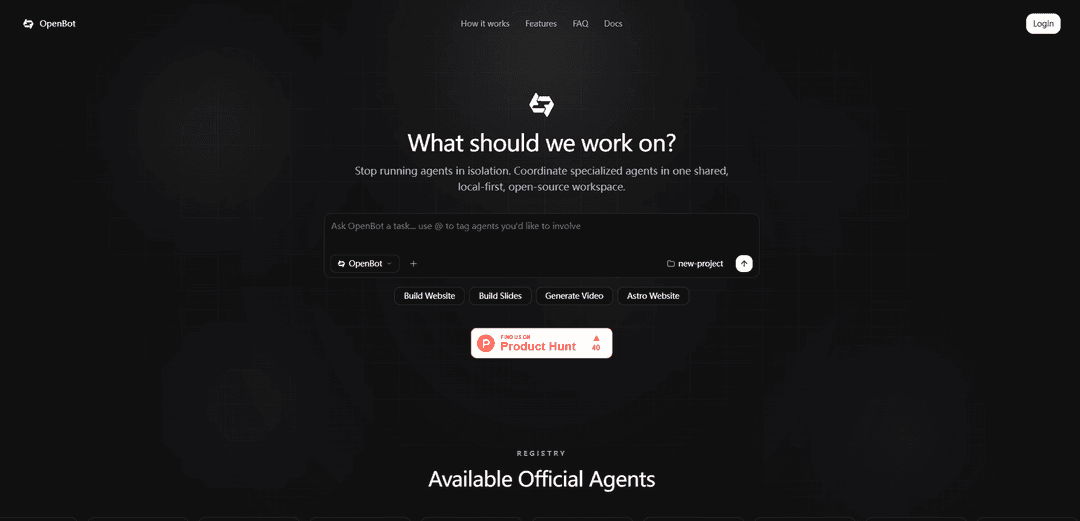
OpenBot is a local-first, open-source multi-agent coordination platform that lets you orchestrate specialized AI agents in a shared workspace using your own API keys, with persistent memory and real-time state tracking.
https://getopenbot.com/?ref=producthunt
Product Information
Updated:Jul 8, 2026
What is OpenBot
OpenBot is a multi-agent coordination platform designed to help you stop running AI agents in isolation and instead manage them together in one integrated, local-first workspace. It provides a central place to compose tasks in natural language, coordinate multiple specialized agents (including community and official agents from a registry), and track progress across complex workflows. OpenBot is open-source and extensible, supports “bring your own keys” (BYOK) for major model providers, and emphasizes privacy by keeping keys, configurations, and task data stored locally on your machine.
Key Features of OpenBot
OpenBot is a local-first, open-source multi-agent coordination platform that lets you orchestrate specialized AI agents inside a shared workspace (terminal + browser). It uses a central orchestrator to break down tasks, delegate work to the right agents, maintain persistent memory/state across sessions, and provide real-time progress/state tracking. OpenBot supports a registry of official and community agents, is extensible via an SDK for building custom agents, and follows a BYOK (bring your own keys) model so you can connect providers like OpenAI, Anthropic, and Google Gemini without sending your data or keys to OpenBot servers.
Local-first workspace: Runs locally so your API keys, agent configurations, and task data stay on your machine for privacy and speed.
Multi-agent orchestration: A central controller analyzes intent, decomposes requests into sub-tasks, and coordinates specialized agents to complete complex workflows.
Agent registry + @-tag collaboration: Browse official/community agents and involve them in a task by tagging them (e.g., research, code, design, automation agents).
Bring Your Own Keys (BYOK): Connect your own provider keys (OpenAI, Anthropic, Google Gemini, etc.) with no middleman markups and flexible model/provider choice.
Persistent memory & state management: Keeps long-running project context across sessions (via memory/state tracking) to support deeper research and ongoing work.
Extensible agent SDK: Build and publish custom agents to the registry or run them privately to tailor workflows to your tools and domain.
Use Cases of OpenBot
Content & media production pipelines: Coordinate research, scripting, asset gathering, and video generation by chaining agents (e.g., web crawling + video rendering) in one workspace.
Software delivery automation: Orchestrate coding, code review, issue triage, and repository operations by combining coding agents with GitHub/tooling agents.
Sales/ops back-office workflows: Automate multi-step tasks like lead enrichment, document generation, and follow-ups by coordinating agents connected to email/CRM and document tools.
E-commerce operations: Create and update product listings, sync inventory/fulfillment steps, and generate marketing assets by orchestrating agents tied to commerce and payment tools.
Team knowledge work & research: Run deep research tasks with persistent context, track progress transparently, and reuse memory across sessions for ongoing projects.
Pros
Local-first design improves privacy and keeps sensitive project data and keys on your machine.
Strong orchestration model for complex, multi-step workflows using specialized agents rather than a single chatbot.
Open-source and extensible via an SDK, enabling custom agents and private deployments.
BYOK model provides flexibility across AI providers and avoids platform markups.
Cons
Requires users to supply and manage their own API keys and provider billing.
Multi-agent setup and orchestration can add complexity compared to single-agent chat tools.
Quality and reliability may vary across community agents and integrations.
Some advanced team features (e.g., SSO/audit logs) appear to be gated behind an enterprise plan.
How to Use OpenBot
1) Understand what OpenBot is: OpenBot is a local-first, open-source multi-agent coordination workspace. You describe a task in natural language, OpenBot orchestrates specialized agents to complete it, and delivers results back to your environment. It supports persistent memory, real-time state tracking, and a registry of agents.
2) Access OpenBot: Open the OpenBot website and launch the app via the “Launch App” flow (login → connect runtime → BYOK → done). You can also use the browser-based Playground if available in your setup.
3) Log in: Follow the in-app login step (as shown in the “Get Started in Minutes” sequence). This sets up your workspace access.
4) Connect a runtime (local-first): Connect the local runtime so OpenBot runs on your machine. This is what enables the local-first privacy model where your data, agent configs, and task context stay local.
5) Bring Your Own Keys (BYOK): Add your own provider API keys (e.g., OpenAI, Anthropic, Google Gemini, and other supported providers). OpenBot is BYOK, meaning it uses your keys directly rather than proxying through OpenBot servers.
6) Explore the agent registry: Open the Registry and browse available agents. The official registry includes integrations/agents such as Claude Code, Codex, Cursor, Firecrawl, GitHub, Figma, Notion, Vercel, Remotion, Gamma Slides, Stripe, Shopify, and more.
7) Create or open a project workspace: Start a new project in the OpenBot workspace. Projects are where you coordinate agents, manage state, and track progress across multi-step workflows.
8) Compose a task in natural language: In the main prompt area (“Ask OpenBot a task…”), describe what you want done. OpenBot follows a “Compose → Orchestrate → Deliver” workflow: you describe the goal, OpenBot breaks it into subtasks, then returns outputs.
9) Tag agents with @ to delegate work: Use @ mentions to explicitly involve specific agents (e.g., “@Firecrawl research competitors and summarize”, “@Remotion generate a promo video draft”). This is the recommended way to coordinate specialized agents instead of running them in isolation.
10) Let OpenBot orchestrate the workflow: After you submit the task, OpenBot’s central controller decomposes the request into sub-tasks and assigns them to the most capable agents in your workspace (multi-agent orchestration).
11) Monitor real-time state tracking: Use the workspace UI to monitor progress as agents work. OpenBot emphasizes transparency with real-time state tracking so you can see what’s happening as tasks run.
12) Use persistent memory for long-running work: Enable or rely on persistent memory so agents can remember context across sessions. This is useful for ongoing projects, repeated workflows, and deep research tasks.
13) Retrieve delivered outputs: When the workflow completes, OpenBot delivers results directly to your environment/workspace (e.g., generated files, summaries, code changes, or other artifacts produced by the agents you invoked).
14) Iterate: refine prompts and re-run subtasks: If results aren’t correct, adjust your task description, tag different agents, or break the request into smaller steps. OpenBot is designed for iterative multi-step workflows.
15) Build your own custom agents (optional): If you need capabilities not in the registry, build your own agent using the OpenBot SDK and documentation. You can publish custom agents to the registry or run them privately.
16) Join the community for help and sharing (optional): Join the OpenBot Discord and/or use GitHub Issues to get help, share agents, and learn best practices from the community.
17) Enterprise features (optional): If you need team features like SSO, audit logs, and dedicated support, use the Enterprise plan (per the FAQ) and contact OpenBot for details.
OpenBot FAQs
OpenBot is a multi-agent coordination platform that lets you coordinate specialized AI agents in a shared, local-first, open-source workspace to automate complex workflows.
OpenBot Video
Popular Articles

Atoms: A Multi-Agent AI Platform That Transforms Ideas into Launch-Ready Products
May 22, 2026

Nano Banana SBTI: What It Is, How It Works, and How to Use It in 2026
Apr 15, 2026

Atoms Review — The AI Product Builder Redefining Digital Creation in 2026
Apr 10, 2026

Kilo Claw: How to Deploy and Use a True "Do‑It‑For‑You" AI Agent(2026 Update)
Apr 3, 2026
Latest AI Tools Similar to OpenBot

Hapticlabs
Hapticlabs is a no-code toolkit that enables designers, developers and researchers to easily design, prototype and deploy immersive haptic interactions across devices without coding.

Deployo.ai
Deployo.ai is a comprehensive AI deployment platform that enables seamless model deployment, monitoring, and scaling with built-in ethical AI frameworks and cross-cloud compatibility.

CloudSoul
CloudSoul is an AI-powered SaaS platform that enables users to instantly deploy and manage cloud infrastructure through natural language conversations, making AWS resource management more accessible and efficient.

Devozy.ai
Devozy.ai is an AI-powered developer self-service platform that combines Agile project management, DevSecOps, multi-cloud infrastructure management, and IT service management into a unified solution for accelerating software delivery.
Popular AI Tools Like OpenBot

A2A Protocol
A2A (Agent2Agent) Protocol is an open interoperability protocol developed by Google that enables seamless communication and collaboration between AI agents across different frameworks and vendors, regardless of their underlying architecture.

VoltOps
VoltOps is a framework-agnostic LLM observability platform that provides real-time visual monitoring, debugging, and optimization tools for AI agents across any technology stack.

Chaterm
Chaterm is an open-source AI-native terminal and SRE copilot that enables engineers to manage complex infrastructure through natural language, automating deployment, troubleshooting, and operations without memorizing commands.

Open Browser Use
Open Browser Use is an open-source, agent-runtime-neutral browser automation layer that pairs a Chrome extension with a CLI/SDK/MCP to enable DOM-aware, CDP-powered tab control, navigation, and actions across different AI agent tools.