
NoMac.app
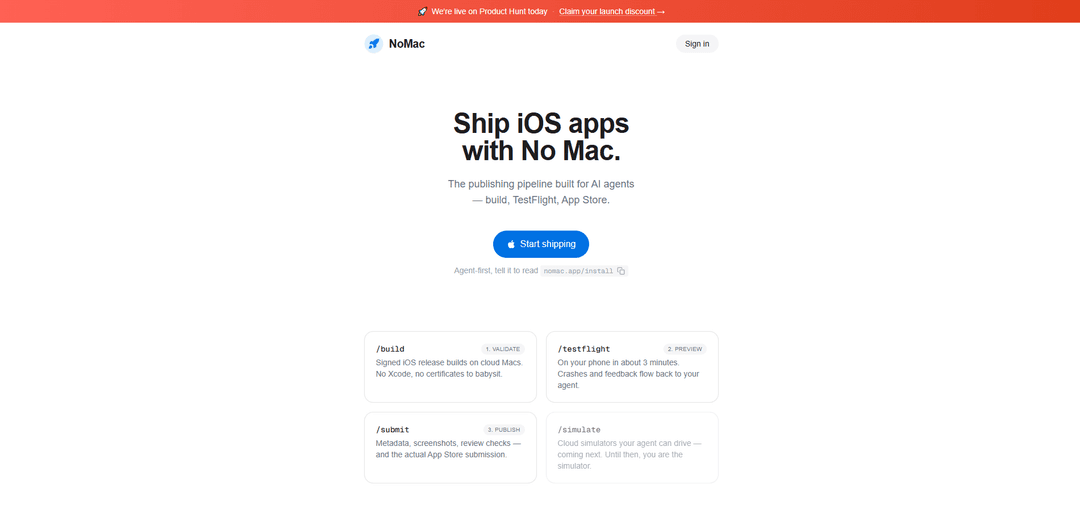
NoMac.app is a cloud-based iOS publishing pipeline for AI agents that builds signed releases on cloud Macs, pushes to TestFlight, and submits to the App Store—without needing a Mac or Xcode.
https://nomac.app/?ref=producthunt
Product Information
Updated:Jul 15, 2026
What is NoMac.app
NoMac.app is an agent-first iOS release and publishing platform designed to let developers (and AI coding agents) ship iOS apps end-to-end from the cloud. Instead of managing Xcode, certificates, and local build machines, NoMac provides a guided setup and an automated pipeline that handles signed iOS builds, TestFlight distribution, and App Store submission. It’s built to be driven via CLI, API, or MCP, so tools like Claude Code, Codex, Cursor, and other agents can run the release process as part of an automated workflow.
Key Features of NoMac.app
NoMac.app is a cloud-based iOS publishing pipeline designed for AI agents and CLI-driven workflows, enabling teams to build signed iOS release builds on cloud Macs, distribute builds via TestFlight, and submit apps to the App Store without owning or using a Mac or Xcode. After a one-time Apple-gated setup (Apple Developer account, App Store Connect API key, privacy questions, and TestFlight install), NoMac automates certificates/provisioning, signing, builds, uploads, metadata/screenshot handling, review checks, and the final App Store submission—integrating with agents via CLI, API, or MCP.
Cloud Mac signed release builds: Generates signed iOS release builds on cloud Macs, removing the need to run Xcode locally or maintain a Mac build machine.
Automated code signing & provisioning: Handles certificates, provisioning profiles, and signing automatically, reducing the operational burden of iOS release management.
TestFlight distribution to real devices: Uploads builds to TestFlight and distributes invites so you can test on an iPhone quickly, with feedback flowing back to the workflow.
App Store submission pipeline: Supports end-to-end submission including metadata, screenshots, review-readiness checks, and the actual App Store submission step.
Agent-first integrations (CLI/API/MCP): Works with any AI agent that can run a CLI or speak MCP (e.g., Claude Code, Codex, Cursor), letting an agent drive builds and releases.
Guided one-time setup wizard: Walks through Apple-required setup steps and verifies them live, using Sign in with Apple and not requiring your Apple ID password.
Use Cases of NoMac.app
AI-assisted indie app shipping: Solo developers can have an AI agent run builds, push to TestFlight, and submit to the App Store without investing in Mac hardware.
Cross-platform teams without Macs: Windows/Linux-based engineering teams can maintain an iOS release pipeline without procuring and maintaining Mac build infrastructure.
CI-style release automation for startups: Early-stage companies can standardize repeatable iOS releases (build → TestFlight → App Store) with minimal manual steps after initial setup.
Rapid QA and stakeholder previews: Product teams can distribute frequent TestFlight builds for quick on-device validation and feedback loops, driven by an agent or CLI.
Agency or multi-app publishing operations: Agencies managing multiple client apps can centralize signing/build/submission tasks in a cloud pipeline, scaling across apps (plan-dependent).
Pros
No Mac or Xcode required: builds and signing run on cloud Macs, enabling iOS shipping from any development environment.
Automates the hardest operational parts of iOS releases: certificates, provisioning, TestFlight uploads, and App Store submission steps.
Agent/CLI-friendly: designed to be driven by AI agents via CLI/API/MCP for repeatable, hands-off publishing.
Cons
Still requires Apple prerequisites and human-gated steps: Apple Developer account, App Store Connect API key, and privacy questions must be completed.
Testing is primarily via TestFlight on real devices; cloud simulators are listed as “coming next,” so simulator automation may be limited today.
Ongoing subscription cost (in addition to Apple’s $99/year developer fee).
How to Use NoMac.app
1) Create prerequisites (one-time): Make sure you have an Apple Developer account (Apple charges $99/yr). You’ll also need to create an App Store Connect API key (created once) and be ready to answer the App Privacy questions before your first release. Install TestFlight on your iPhone (for testing builds).
2) Sign in to NoMac and choose a plan: Go to https://nomac.app/ and click “Start shipping” / sign in with Apple. Pick a plan (Starter or Pro).
3) Follow the setup wizard to connect Apple services: In NoMac’s setup flow, paste in your App Store Connect API key when prompted and complete the required Apple-gated steps (including App Privacy questions). The wizard verifies setup live; NoMac does not ask for your Apple ID password.
4) Install/connect the NoMac CLI in your app folder: In your iOS app’s project directory, run: npx @nomac/cli login. (Alternatively, have your agent read the install page at nomac.app/install and follow it.)
5) Trigger a cloud build (signed release build): Use NoMac via its CLI/API/MCP (from your agent or directly) to run the build step. NoMac builds on cloud Macs, handles certificates/provisioning/signing automatically, and produces a signed iOS release build.
6) Send the build to TestFlight and install on your iPhone: Run the TestFlight step to upload and distribute the build. Accept the TestFlight invite/install on your iPhone and test the app there (NoMac notes builds can land on your phone in ~3 minutes).
7) Review crashes and tester feedback: As you test via TestFlight, collect crash reports and feedback that flow back to your agent/NoMac workflow. Iterate by repeating build → TestFlight as needed.
8) Prepare App Store submission materials: Use NoMac’s submission pipeline for metadata, screenshots, and review-readiness checks. Complete any remaining required fields for your first release.
9) Submit to the App Store: Run the submit step to send the app for App Store review. NoMac automates the submission process after the one-time Apple-gated setup is complete.
10) Repeat for future releases (hands-off pipeline): For subsequent versions, use the same CLI/API/MCP flow to build, upload to TestFlight, and submit updates. NoMac continues to manage signing, cloud builds, distribution, and submission steps.
NoMac.app FAQs
NoMac is an iOS publishing pipeline that runs entirely in the cloud: it builds and signs iOS releases on cloud Macs, uploads to TestFlight, and submits apps to the App Store. You (or your AI agent) can drive it via a CLI, API, or MCP.
Popular Articles

Vosko AI: Localize and Dub Videos for Global Audiences
Oct 15, 2026

Atoms: A Multi-Agent AI Platform That Transforms Ideas into Launch-Ready Products
Oct 13, 2026

Nano Banana SBTI: What It Is, How It Works, and How to Use It in 2026
Apr 15, 2026

Atoms Review — The AI Product Builder Redefining Digital Creation in 2026
Apr 10, 2026
Latest AI Tools Similar to NoMac.app

Gait
Gait is a collaboration tool that integrates AI-assisted code generation with version control, enabling teams to track, understand, and share AI-generated code context efficiently.

invoices.dev
invoices.dev is an automated invoicing platform that generates invoices directly from developers' Git commits, with integration capabilities for GitHub, Slack, Linear, and Google services.

EasyRFP
EasyRFP is an AI-powered edge computing toolkit that streamlines RFP (Request for Proposal) responses and enables real-time field phenotyping through deep learning technology.

Cart.ai
Cart.ai is an AI-powered service platform that provides comprehensive business automation solutions including coding, customer relations management, video editing, e-commerce setup, and custom AI development with 24/7 support.
Popular AI Tools Like NoMac.app

GitHub Copilot Chat
GitHub Copilot Chat is an AI-powered coding assistant that provides natural language interactions, real-time code suggestions, and contextual support directly within supported IDEs and GitHub.com.

CopilotForXcode
CopilotForXcode is an Xcode Source Editor Extension that integrates GitHub Copilot, Codeium, and ChatGPT to provide AI-powered code suggestions, chat assistance, and prompt-to-code functionality within Xcode.

BrowserAI
BrowserAI is an open-source library that enables running local Large Language Models (LLMs) directly in web browsers with WebGPU acceleration, offering privacy-focused AI capabilities without requiring server infrastructure.

OpenAI Codex CLI
OpenAI Codex CLI is a lightweight, open-source coding agent that runs in your terminal, enabling developers to translate natural language into code execution while providing ChatGPT-level reasoning with the ability to run code, manipulate files, and iterate under version control.