noirdoc
WebsiteFree
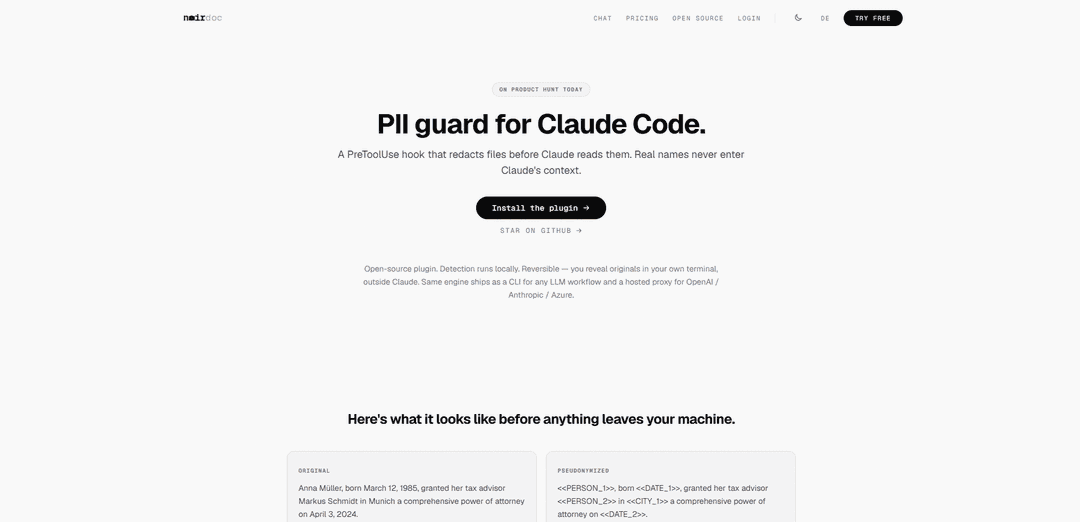
noirdoc is an open-source, locally running PII-guard that automatically pseudonymizes sensitive data before it reaches an LLM (e.g., via a Claude Code plugin), keeps reversible mappings on your machine, and restores model outputs back to the original values.
https://www.noirdoc.de/en/launch?ref=producthunt
Product Information
Updated:May 18, 2026
What is noirdoc
noirdoc is a privacy tool designed to prevent personally identifiable information (PII) from ever entering an LLM’s context. It provides a Claude Code PreToolUse hook/plugin that redacts files locally before Claude reads them, ensuring real names and identifiers do not appear in the transcript. The same redaction engine is also available as a CLI for broader LLM workflows and as a hosted proxy option for teams using providers like OpenAI, Anthropic, or Azure. It is open-source and MIT-licensed, with detection and mapping handled locally.
Key Features of noirdoc
Noirdoc is an open-source PII-guard that locally pseudonymizes sensitive content (e.g., names, dates, cities, IDs, IBANs) before it reaches an LLM, keeping real values out of the model’s context. It provides a Claude Code plugin that automatically redacts protected files on read and restores responses afterward, plus the same redaction engine as a CLI for broader LLM workflows and a hosted proxy option for OpenAI/Anthropic/Azure API traffic. Mappings remain on the user’s machine, and originals can be revealed only in the user’s terminal, keeping transcripts and shared logs clean.
Local, reversible pseudonymization: Detects and replaces PII with placeholders on-device and keeps a reversible mapping locally so you can restore originals without exposing them to the LLM.
Claude Code plugin with automatic restore: Acts as a PreToolUse hook that redacts protected files before Claude reads them and automatically restores the model’s responses afterward.
Hands-free auto-redaction on file access: As soon as a protected file is opened/read in Claude Code, noirdoc replaces sensitive values locally before anything leaves your machine.
Path-based protection rules (glob patterns): Lets you define which files/folders are protected using glob rules (e.g., ./incoming/**, *.contract.*), leaving other content untouched.
Local cache and mapping storage: Stores pseudonymized copies in a local .noirdoc/cache/ directory and keeps the mapping on your machine; no API call is required for detection.
Multiple entry points: plugin, CLI, hosted proxy: Use the Claude Code plugin for IDE workflows, the CLI for local documents and pipelines, or a hosted proxy to protect team-wide LLM API calls (OpenAI/Anthropic/Azure).
Use Cases of noirdoc
Legal and contract review: Pseudonymize client names, addresses, and contract identifiers before using LLMs to summarize agreements, draft clauses, or extract obligations—without leaking PII into chat logs.
Healthcare documentation workflows: Redact patient identifiers and dates while generating visit summaries, coding suggestions, or internal notes, keeping sensitive data out of model context and transcripts.
Finance and accounting assistance: Protect IBANs, customer names, and transaction references while using LLMs for reconciliations, reporting drafts, or support responses.
Customer support and CRM ticket handling: Automatically redact personal details in inbound tickets or attachments (e.g., IDs, names) before asking an LLM to draft replies or categorize issues.
Engineering teams with real user data: Prevent accidental exposure of production data (user names, identifiers) when developers use Claude Code to inspect logs, debug reports, or user-submitted files.
Enterprise LLM governance via proxy: Route organization-wide LLM API calls through a hosted proxy to consistently pseudonymize sensitive fields across tools and teams using OpenAI/Anthropic/Azure.
Pros
Keeps real PII out of the LLM context by redacting locally before any data is sent.
Reversible workflow: originals can be revealed in your own terminal while transcripts remain clean.
Flexible adoption via Claude Code plugin, CLI, or hosted proxy depending on workflow needs.
Open-source (MIT-licensed) components and local-only mapping storage improve transparency and control.
Cons
Effectiveness depends on detection coverage; uncommon formats or edge-case identifiers may require tuning or could be missed.
Reversible mappings stored locally can become a security responsibility (access control, backups, device compromise).
Path/glob-based protection requires correct configuration; misconfigured rules could leave sensitive files unredacted.
How to Use noirdoc
1) Install noirdoc (CLI engine): Install noirdoc via pip on your machine (as described on the official site). After installation, you can run it either from Python or directly from the shell.
2) (Optional) Install the Claude Code plugin: From the noirdoc launch page, use the “Install the plugin” link to install the open-source Claude Code plugin (MIT-licensed). This enables automatic local pseudonymization before Claude reads protected files.
3) Choose which files should be protected (path rules): Configure glob-based path rules to decide what gets pseudonymized automatically (examples given: "./incoming/**" or "*.contract.*"). Files matching these rules are redacted locally before any content reaches Claude.
4) Use Claude Code normally; noirdoc auto-redacts protected files: When you open or read a protected file in Claude Code, the plugin replaces sensitive data (e.g., names, IBANs, IDs) with placeholders locally—before Claude sees it. Example placeholders include tokens like "<<PERSON_1>>", "<<DATE_1>>", "<<CITY_1>>".
5) Understand where data is stored locally: Pseudonymized copies are stored in ".noirdoc/cache/" and the reversible mapping stays on your machine. Detection runs locally and no API call is sent out (including to the noirdoc team).
6) Reveal originals only in your own terminal (never in Claude transcript): When you need to see real values, run "noirdoc reveal" in your shell. This reveals originals outside Claude, keeping the Claude conversation free of real personal data.
7) Use noirdoc outside Claude Code (CLI workflow): Use the noirdoc CLI to pseudonymize local documents for any LLM workflow (not just Claude Code). The same local detection and reversible mapping approach applies.
8) (Team option) Use the hosted proxy for API calls: If your team wants to protect every API call (OpenAI / Anthropic / Azure), use the hosted proxy offering mentioned on the site, or contact the vendor for proxy/self-hosted options.
noirdoc FAQs
Noirdoc is a PII-guard tool that pseudonymizes/redacts sensitive data (e.g., real names, IBANs, IDs) before an LLM can read it, so real values don’t enter the model’s context.
Popular Articles

Atoms: A Multi-Agent AI Platform That Transforms Ideas into Launch-Ready Products
May 22, 2026

Nano Banana SBTI: What It Is, How It Works, and How to Use It in 2026
Apr 15, 2026

Atoms Review — The AI Product Builder Redefining Digital Creation in 2026
Apr 10, 2026

Kilo Claw: How to Deploy and Use a True "Do‑It‑For‑You" AI Agent(2026 Update)
Apr 3, 2026