
Nod
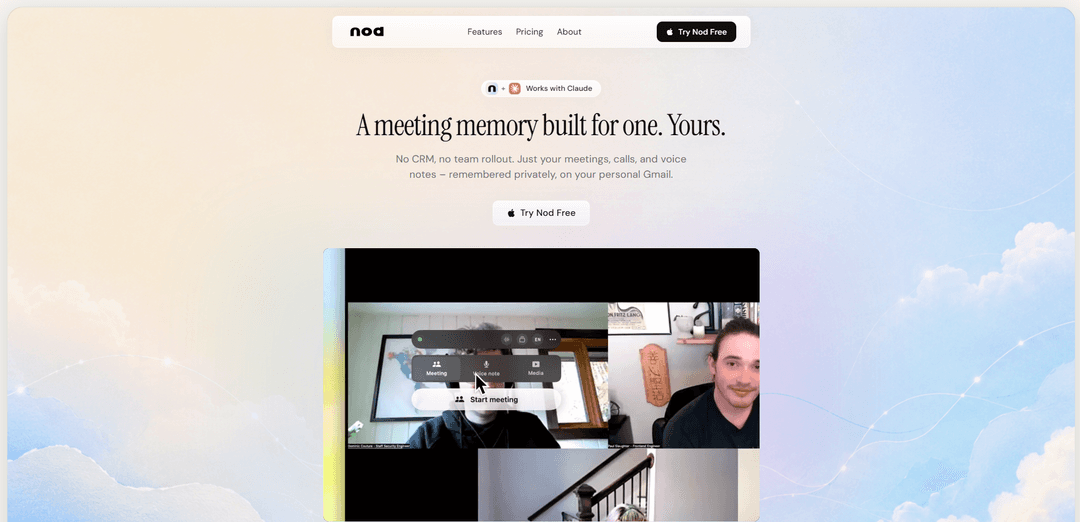
Nod is a Mac-based AI notepad that captures conversations from any call app without a meeting bot, transcribes and summarizes them in seconds, and lets you query everything later—while never storing audio recordings.
https://hellonod.app/?ref=producthunt
Product Information
Updated:Jul 8, 2026
What is Nod
Nod is an “AI meeting memory” designed for individuals—not teams or enterprises—that helps you remember what was said across meetings, calls, and voice notes. Instead of joining meetings as a visible participant, Nod runs locally on your Mac and works regardless of which communication tool you use (e.g., Zoom, Google Meet, Microsoft Teams, Slack huddles, Discord, and more). It’s built for people who manage their own tool stack (freelancers, founders, and heavy meeting-goers) and can be used with a personal Gmail account—no corporate Workspace or IT setup required. After capturing conversations, Nod saves transcripts and AI summaries so you can quickly recall decisions, commitments, and follow-ups.
Key Features of Nod
Nod is a Mac app that captures conversations from calls, meetings, and voice notes and turns them into searchable transcripts and clean AI notes you can query later. It works without joining meetings as a bot by listening to your Mac’s audio across any app, keeping a single “memory” of what was said and what follow-ups you owe. Audio is not stored (it’s chunked briefly, transcribed, then discarded), while transcripts and summaries are saved privately by default with EU-based storage and no model training on your data; it’s designed for individuals using personal tools like Gmail rather than requiring a corporate Workspace setup.
Bot-free meeting capture: Listens through your Mac’s system audio instead of joining as a meeting participant—no “assistant joined” moment, no host setup, no meeting link sharing.
Works across many apps: Captures conversations regardless of where they happen (e.g., Zoom, Google Meet, Microsoft Teams, Slack huddles, Discord, FaceTime, even speakerphone), since it’s audio-based rather than app-integrated.
Search + ask across every conversation: Creates a unified, queryable memory of meetings and notes so you can ask questions like what was decided, what was promised, or what tasks are owed.
No stored audio by design: Audio is held only briefly in memory to chunk (~5 seconds) and transcribe, then discarded immediately after transcription returns; only transcript and AI summary are retained.
Privacy and EU data handling: Transcription/summarization runs in the cloud with zero data retention routing; data is stored in EU infrastructure (Supabase Postgres on AWS eu-west-1) with encryption at rest and per-user row-level security.
Personal-stack friendly + multilingual: Built for individuals (no corporate rollout required) with sign-in via personal Gmail and support for 14 languages, returning notes in the meeting’s language.
Use Cases of Nod
Freelancers/contractors managing client calls: Keep reliable records of requirements, decisions, and next steps across client meetings without needing client IT approval or adding a visible bot to calls.
Product/engineering teams tracking decisions: Capture standups, 1:1s, sprint planning, and design reviews across tools, then quickly retrieve commitments, blockers, and rationale behind decisions.
Sales and founders preserving follow-ups: Remember promises, objections, and renewal requirements from customer/investor calls and ask Nod for outstanding follow-ups (e.g., “What did I promise to send?”).
Recruiting and interview debriefs: Turn hiring panels and debrief discussions into structured notes for later comparison, reducing reliance on memory and scattered documents.
Cross-functional operations and leadership meetings: Maintain continuity across recurring meetings (all-hands, roadmap reviews, skip-levels) by making past discussions searchable and easy to summarize.
Pros
No meeting bot or calendar integration required; works immediately across many calling apps by listening to Mac audio.
Audio is not stored, reducing risk compared with tools that keep recordings; transcripts/summaries remain searchable.
Designed for individuals using personal accounts (e.g., personal Gmail), not dependent on corporate Workspace/IT rollout.
Strong privacy posture described: EU storage, encryption at rest, per-user access controls, and no model training on user data.
Cons
Audio still leaves the device for cloud transcription/summarization (not fully on-device), which may be unacceptable for highly sensitive conversations.
Because Nod can’t post an in-meeting notice, participant consent/notification is on the user and may add compliance burden depending on local laws.
Primarily Mac-based capture (listens through your Mac), which may limit use for non-Mac workflows.
How to Use Nod
1) Download and install Nod on your Mac: Go to https://hellonod.app/ and click “Try Nod Free” to download the .dmg, then install Nod like a normal Mac app.
2) Sign in with your personal Gmail: Open Nod and sign in using your personal Gmail account (no corporate Workspace required). This sets up your private meeting memory tied to your own account.
3) Review the one-time consent disclaimer: Before your first recording, Nod shows a one-time reminder to get consent from everyone on the call. Recording laws vary by location, and in some places all-party consent is required.
4) Start a call (or any conversation) in your usual app: Join or start a conversation in Zoom, Google Meet, Microsoft Teams, Slack huddles, Discord, FaceTime, or any other app—Nod works across apps because it listens through your Mac’s audio.
5) Let Nod capture the conversation locally (no meeting bot): Nod does not join as a participant and does not post anything in the meeting chat. It runs locally on your Mac, so there’s no “Nod has joined” moment and no link to share with the host.
6) Understand what happens to audio while you talk: Audio is held in memory only long enough to chunk it (~5 seconds) and transcribe it. After the transcript returns, the audio bytes are released—no saved audio file, no waveform export, and no cloud-stored audio. Only the transcript and the AI summary are saved.
7) Use Nod in your preferred language (if supported): Nod supports 14 languages (including English, Mandarin, Hindi, Spanish, French, Arabic, Bengali, Portuguese, Russian, Urdu, German, Italian, Ukrainian, and Serbian). Your notes come back in the language spoken in the meeting.
8) Ask questions across all your captured conversations: Open Nod and use its “Ask” workflow to query across meetings/calls/voice notes (e.g., ask what you promised to follow up on, what decisions were made, or what action items you own).
9) Keep the thread across many apps and meeting types: Continue using Nod for recurring meetings, 1:1s, customer calls, and voice notes. Nod’s value compounds as it keeps everything in one place you can search and ask about later.
10) Manually notify other participants when needed: Because Nod doesn’t integrate with meeting platforms or post notices automatically, it’s your responsibility to inform other participants that you’re using it and obtain any required consent.
Nod FAQs
No. Nod listens through your Mac’s audio, so it doesn’t appear as a bot in the participant list and doesn’t post anything in the meeting.
Popular Articles

Atoms: A Multi-Agent AI Platform That Transforms Ideas into Launch-Ready Products
May 22, 2026

Nano Banana SBTI: What It Is, How It Works, and How to Use It in 2026
Apr 15, 2026

Atoms Review — The AI Product Builder Redefining Digital Creation in 2026
Apr 10, 2026

Kilo Claw: How to Deploy and Use a True "Do‑It‑For‑You" AI Agent(2026 Update)
Apr 3, 2026
Latest AI Tools Similar to Nod

Ticknotes
Ticknotes is an AI-powered meeting assistant that automatically records, transcribes, and generates personalized meeting summaries, action items, and key insights from audio, video, and text content.

Feta
Feta is an AI-powered meeting tool that helps product and engineering teams run efficient meetings by capturing discussions, automating tasks, and providing actionable insights through smart summaries and integrations.

Aimeet
Aimeet is a comprehensive AI-powered communication platform that combines real-time translation, transcription, screen sharing, and unlimited meeting capabilities for effective virtual collaboration.

MinutesLink
MinutesLink is an advanced AI-powered note-taking assistant that automatically records, transcribes, summarizes and organizes virtual meetings while building personalized digital avatars from meeting data.
Popular AI Tools Like Nod

Second Brain for AI
Second Brain for AI is a self-hosted, MCP-compatible persistent memory layer on Cloudflare that lets Claude, ChatGPT, Cursor, and other AI clients store and semantically recall shared context across sessions.

Slack
Slack is an AI-powered work platform that brings team communication, channels, files, automation, and app integrations into one conversational workspace.

24me Smart Personal Assistant
24me is an award-winning smart personal assistant app that combines calendar, to-do lists, notes, and personal accounts in one unified platform to help boost productivity and time management.

Granola for iOS
Granola for iOS is an AI-powered notepad app that helps users effortlessly capture, transcribe and summarize meeting conversations through intelligent note-taking and one-tap recording capabilities.