Moxie Docs

Moxie Docs

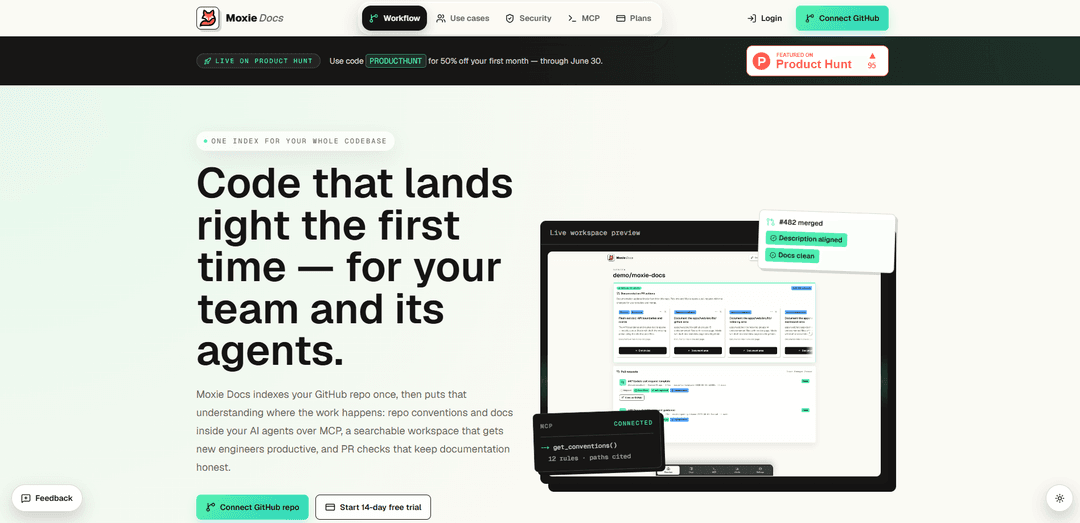
Moxie Docs indexes your GitHub repo into a living, source-cited documentation hub and read-only MCP context for AI agents, with PR doc-impact checks, description alignment, and weekly “Friday Cleanup” docs PRs.
https://moxiedocs.com/?ref=producthunt
Moxie Docs

Product Information

Updated:Jun 5, 2026

What is Moxie Docs

Moxie Docs is an AI documentation product that creates “one index for your whole codebase” by reading your repository’s source code, tests, docs, and history and turning that understanding into searchable, source-cited documentation. It’s designed to help teams and AI coding agents work from the same up-to-date facts: engineers get a readable workspace for architecture and conventions, while tools like Cursor, Claude Code, Codex, and Copilot can pull scoped context over MCP. Moxie is read-only by default, scoped per repository, and emphasizes citations back to the exact files and paths it learned from.

Key Features of Moxie Docs

Moxie Docs is an AI documentation product that indexes a GitHub repository (source, tests, docs, and history) to produce a living, source-cited documentation workspace for humans and a scoped, read-only MCP context for AI agents. It keeps the index current on every merge, helps engineers find architecture and conventions quickly, and adds PR automation that aligns PR descriptions to templates/conventions and flags documentation impact before merging. It also provides weekly “Friday Recap/Cleanup” workflows that summarize changes and open reviewable docs-only PRs to prevent documentation from rotting, plus changelog generation for internal and external audiences.
Living, repo-wide index: Indexes your GitHub repo once (code, tests, docs, history) and re-indexes on every merge so documentation and derived insights stay current.
Source-cited generated documentation: Produces readable architecture/conventions/walkthrough pages with citations back to the exact source locations they came from, alongside your existing Markdown.
Searchable documentation workspace: Provides a single place to search across generated docs and existing repo docs, with highlights/bookmarks/notes to preserve team knowledge.
MCP context for AI agents (read-only, scoped): Exposes conventions, doc gaps, documentation patterns, and search over MCP so tools like Cursor/Claude Code/Codex/Copilot can pull targeted repo context without dumping the repo into chat.
PR checks: description alignment + doc-impact scanning: On each pull request, rewrites the PR description to match your template/conventions (not your code) and flags missing/stale docs related to the diff before it merges.
Friday Recap & Cleanup PRs + changelog export: Summarizes merged PRs into shareable changelogs (internal/external views) and, on a weekly cadence, proposes small docs-only PRs to close documentation gaps—never auto-merging.

Use Cases of Moxie Docs

Faster onboarding for engineering teams: New hires can search one workspace for architecture and conventions (with source citations) instead of piecing together tribal knowledge from scattered docs and Slack.
AI-assisted development with fewer wrong-first-tries: Teams using agentic coding tools can feed agents verified, scoped repo conventions over MCP, reducing rework and token spend from repeated codebase re-discovery.
Documentation governance for multi-service organizations: Engineering orgs with many repos can use continuous indexing, doc-impact PR checks, and weekly cleanup PRs to keep docs accurate as systems evolve.
Release notes and stakeholder updates: Product/engineering teams can turn merged PRs into internal and external changelog views, then export as Markdown/Slack/plain text for announcements.
Compliance-minded teams needing traceability: Source-cited docs and reviewable docs-only PRs provide an auditable trail from documentation claims back to code, helping teams justify behaviors and conventions.

Pros

Source-cited docs improve trust and reduce hallucinated documentation.
MCP delivery keeps agent context token-light, scoped, and read-only by default.
PR automation (description alignment + doc-impact checks) helps prevent doc drift before merge.
Reviewable docs-only cleanup PRs avoid risky auto-changes while still keeping docs current.

Cons

Requires GitHub App installation and ongoing indexing, which may not fit non-GitHub or air-gapped workflows.
Plan limits (e.g., indexed files per repo and monthly cleanup PR counts) may constrain very large repositories or heavy documentation needs.
Doc updates are not automatic merges—teams must still review and approve cleanup PRs to realize the benefit.

How to Use Moxie Docs

1) Connect your GitHub repo: Go to https://moxiedocs.com/ and click “Connect GitHub repo”. Install the Moxie GitHub App and select the repositories you want Moxie to access (read-only by default and scoped per repo).
2) Start the 14-day trial: From the onboarding flow, start the trial (the site notes: “No charge today. Cancel anytime.”).
3) Generate the first index: Let Moxie index the repository. It reads your source code, tests, docs, and history to build a “living index” that becomes searchable documentation and structured context for agents.
4) Use the searchable docs workspace: Open the workspace to search across generated docs and your existing Markdown in one place. Use search to find topics (e.g., “webhook”) and open results that are cited back to the source files they came from.
5) Review generated architecture/conventions pages: Browse the generated pages that summarize how the repo is put together (architecture, conventions, walkthroughs). Use the source citations to jump back to the exact files/lines behind each statement.
6) Identify documentation gaps: Check Moxie’s “doc gaps” output to see missing or stale documentation areas. Use the ranked gaps (with cited paths) to decide what to document next.
7) Connect an AI agent via MCP (read-only context): Use Moxie’s MCP context so tools like Cursor, Claude Code, Codex, and Copilot can pull repo conventions/docs/gaps without pasting the repo into chat. Example MCP calls shown by Moxie include: get_conventions(), get_doc_gaps(), search_docs("webhook"), and get_documentation_patterns().
8) Let PR checks run on every pull request: After indexing, Moxie automatically runs on new PRs: it aligns PR descriptions to your template/conventions and performs a doc-impact scan to flag what documentation should be updated before merge.
9) Use Friday Recaps and approve Cleanup PRs (if enabled): On Fridays, Moxie summarizes what changed and, when docs have fallen behind, opens a small docs-only PR with source-cited updates for you to review and merge (nothing auto-merges).
10) Generate and export changelogs from merged PRs: Use the changelog view to turn merged PRs into clear entries grouped by day/week/month. Choose internal vs external wording, edit summaries inline, and export/copy in Markdown, Slack, or plain text.

Moxie Docs FAQs

Moxie Docs is a tool that indexes a GitHub repository and produces a living, searchable documentation workspace for engineers plus scoped, read-only MCP context that AI agents (e.g., Cursor, Claude Code, Codex, Copilot) can use to follow repo conventions and docs.

Latest AI Tools Similar to Moxie Docs

Gait
Gait
Gait is a collaboration tool that integrates AI-assisted code generation with version control, enabling teams to track, understand, and share AI-generated code context efficiently.
invoices.dev
invoices.dev
invoices.dev is an automated invoicing platform that generates invoices directly from developers' Git commits, with integration capabilities for GitHub, Slack, Linear, and Google services.
EasyRFP
EasyRFP
EasyRFP is an AI-powered edge computing toolkit that streamlines RFP (Request for Proposal) responses and enables real-time field phenotyping through deep learning technology.
Cart.ai
Cart.ai
Cart.ai is an AI-powered service platform that provides comprehensive business automation solutions including coding, customer relations management, video editing, e-commerce setup, and custom AI development with 24/7 support.