
Motion Software
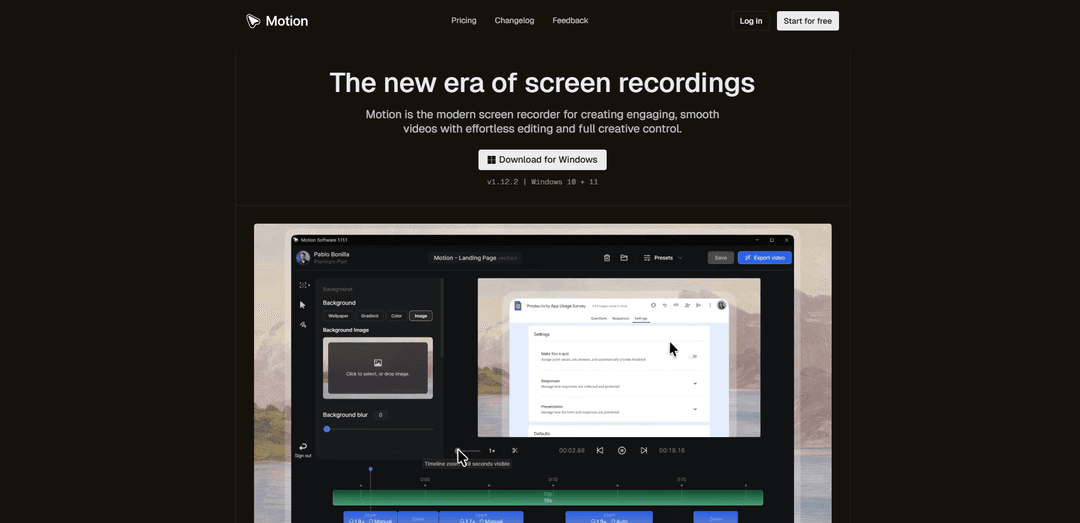
Motion Software is a modern screen recording and video editing application for Windows that enables users to create professional, smooth videos with automated animations, effortless editing capabilities, and comprehensive creative control.
https://www.motion.software/?ref=producthunt
Product Information
Updated:Mar 16, 2026
What is Motion Software
Motion Software is a professional-grade screen recording and video editing tool designed specifically for Windows 10 and 11 users. It combines advanced recording capabilities with an intuitive editing interface, allowing users to capture screen content, webcam footage, microphone audio, and system sound. The software stands out for its ability to automatically process recordings with smooth animations and transitions, making it ideal for creating tutorials, product demos, educational content, and professional presentations. As a cloud-integrated solution, it offers both free and premium plans, with the premium version providing additional features and watermark-free exports.
Key Features of Motion Software
Motion Software is a modern screen recording and video editing application for Windows that enables users to create professional-quality videos with automated animations and smooth editing capabilities. It offers features like cursor movement tracking, smart zooms, background customization, cloud storage integration, and shareable links. The software combines screen capture, webcam recording, microphone input, and system audio recording with an intuitive editing interface designed for speed and precision.
Advanced Screen Recording: Fully integrated desktop menu to capture screen content, webcam, microphone, and system audio with professional quality
Smart Animation Engine: Spring-based animations that automatically smoothen cursor movements and zoom transitions for more polished final videos
Powerful Editor: Custom-built editor with timeline control, background settings, cursor customization, and precise trimming capabilities
Cloud Integration: Built-in cloud storage for video syncing, preset sharing, and quick link generation for easy sharing
Use Cases of Motion Software
Software Tutorials: Create professional software walkthroughs and product demonstrations with smooth cursor movements and zooms
Educational Content: Produce online course materials and educational videos with clear screen captures and professional editing
Professional Communications: Develop internal training materials, client presentations, and project updates with polished screen recordings
Content Creation: Generate high-quality content for social media, YouTube, and marketing materials with professional editing capabilities
Pros
Intuitive and user-friendly interface
High-quality automated animations
Comprehensive cloud integration and sharing features
Cons
Windows-only availability
Free version includes watermarks
Some features limited to Premium subscription
How to Use Motion Software
Download and Install: Download Motion Software for Windows 10/11 from the official website (motion.software) and run the installer
Launch and Setup: Open Motion and connect your email provider to create/login to your account for cloud syncing features
Configure Recording Settings: Use the desktop menu to select your recording preferences - screen area, webcam, microphone, and system audio options
Start Recording: Click the record button to start capturing your screen. Use hotkeys or the menu to pause/stop recording when finished
Edit in Timeline: Use the timeline editor to trim clips, adjust playback speed, and fine-tune your recording
Enhance with Effects: Add cursor effects, smart zooms, background settings, and spring-based animations to make your video more engaging
Preview and Adjust: Use the preview engine to review your edits and make any necessary adjustments before finalizing
Export Video: Choose your export settings (format, quality, resolution) and use the export engine to render your final video
Share Content: Generate a shareable link to distribute your video online or save it locally to your computer
Save Presets: Save your favorite settings and effects as templates for future recordings to maintain consistency
Motion Software FAQs
Motion is a modern screen recorder and video editor for Windows that creates beautiful, smooth videos with effortless editing and full creative control. It processes your recordings and handles all the animations automatically.
Popular Articles

Vosko AI: Localize and Dub Videos for Global Audiences
Oct 15, 2026

Atoms: A Multi-Agent AI Platform That Transforms Ideas into Launch-Ready Products
Oct 13, 2026

Nano Banana SBTI: What It Is, How It Works, and How to Use It in 2026
Apr 15, 2026

Atoms Review — The AI Product Builder Redefining Digital Creation in 2026
Apr 10, 2026
Latest AI Tools Similar to Motion Software

EzVideos
EzVideos is an all-in-one video creation tool that helps users generate viral videos for social media platforms like Instagram, TikTok, and YouTube with automated editing features and built-in resources.

Blanc AI
Blanc AI is a revolutionary AI solution that enables video content translation and dubbing into 47+ languages while preserving the original voice, emotions, and lip synchronization.

Wink Mody
Wink Mody is a modified version of the Wink video editing app that offers premium features like AI-powered retouching, 4K exports, and watermark-free editing completely free of charge.

Shortmake AI
ShortMake is an AI-powered video creation platform that transforms ideas into viral-ready videos by automatically generating scripts, voiceovers, visuals, and subtitles specifically optimized for platforms like TikTok and YouTube Shorts.
Popular AI Tools Like Motion Software

AI Clips - New Gen
AI Clips - New Gen is an AI-powered video clipping tool that automatically generates engaging short-form content from long videos for multiple social media platforms like YouTube Shorts, TikTok, Instagram Reels and more.

Edit Mind
Edit Mind is an open-source, AI-powered video indexing and semantic search platform that enables users to analyze and search through video content using natural language queries, with features including transcription, frame analysis, face recognition, and object detection.

Dinamo Notebook
FreeAI Video Editing
Dinamo Notebook is a free, MIT-licensed, local-first browser extension for football video analysis that lets you draw tactical annotations on YouTube/Dailymotion/Twitch footage and optionally use AI (with your own OpenAI API key) for tactical insights.

MediaSeg
MediaSeg is a stable, local-first macOS utility that splits large MP4/WEBM media files into upload-ready chunks under a configurable size limit while preserving quality using ffmpeg/ffprobe and an AI-assisted, target-based sizing strategy.