
LogStitch
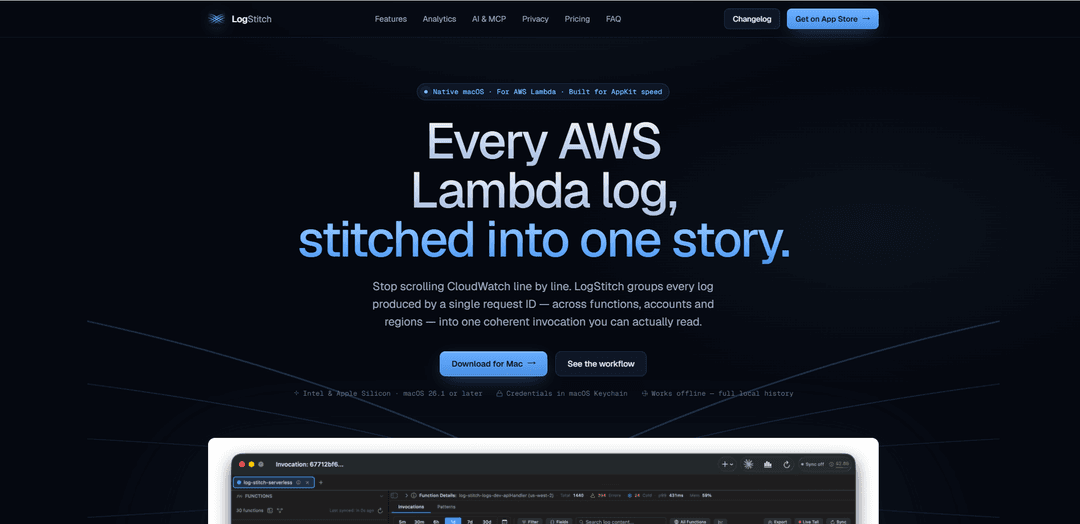
LogStitch is a native, local-first macOS app for AWS Lambda that stitches CloudWatch log lines into readable per-request invocations, correlates requests across functions/accounts/regions, and adds built-in analytics, anomaly detection, and a local MCP server for AI-assisted log querying.
https://www.logstitch.app/?ref=producthunt
Product Information
Updated:Jul 8, 2026
What is LogStitch
LogStitch is a native macOS log viewer purpose-built for AWS Lambda and CloudWatch Logs. Instead of forcing you to read interleaved, timestamp-sorted log streams, it reconstructs each Lambda execution into a single coherent “invocation story” by grouping log lines by request ID. The app is designed for speed (AppKit-native), supports both Intel and Apple Silicon, and stores everything locally in a SQLite database so you can browse history offline. It’s sold as a one-time purchase with a free 14-day trial, and it emphasizes privacy by keeping logs on your machine and using macOS Keychain for credentials.
Key Features of LogStitch
LogStitch is a native, local-first macOS app for viewing and analyzing AWS Lambda logs by automatically grouping CloudWatch log lines into readable per-invocation “stories” using request IDs. It supports cross-function/account/region correlation, real-time live tailing that preserves structure, built-in performance and cost analytics (p99 trends, cold starts, memory right-sizing, projections), and automated detection of recurring error patterns and statistical anomalies. Logs are fetched directly from AWS using credentials stored in macOS Keychain and cached into a local SQLite database for fast search and offline use, and it also ships a localhost-only MCP server so tools like Claude can query your logs without exposing AWS credentials.
Invocation stitching by request ID: Reassembles interleaved CloudWatch streams into coherent, per-request invocation views, surfacing platform events, parsed JSON, and cold-start indicators so executions are readable end-to-end.
Cross-account / cross-region correlation: Tracks a single request across multiple Lambdas, accounts, and regions with a swim-lane timeline, highlighting propagation latency, origin of error, and downstream blast radius.
Structured live tail with persistence: Streams logs in real time and finalizes them into the same stitched invocation cards; completed invocations are automatically saved to local history for later investigation.
Local analytics for performance and cost: Computes p50/p95/p99 duration trends, cold-start distributions, memory utilization and right-sizing suggestions, plus monthly cost projections—directly from the locally cached data.
Pattern detection and anomaly surfacing: Auto-clusters recurring errors into patterns with lifecycle/impact indicators and flags statistical anomalies (e.g., error spikes, duration regressions, cost trajectory changes).
Local-first storage, search, and MCP server: Caches logs in a local SQLite database with full-text search and retention controls; includes a localhost-only MCP server so AI tools can query logs and analyses without sharing AWS credentials.
Use Cases of LogStitch
Serverless incident response (SaaS / web backends): During outages, quickly pinpoint the failing Lambda invocation, see the full request path across services, and identify the originating error pattern without manually untangling CloudWatch interleaving.
Performance tuning and cost optimization (FinOps): Use p99/cold-start trends and memory right-sizing guidance to reduce latency and spend; validate improvements over time with built-in projections and historical comparisons.
Multi-account enterprise troubleshooting (platform teams): Correlate requests across multiple AWS accounts/regions (common in large orgs) to diagnose propagation delays, missing hops, and cross-service failures in distributed serverless architectures.
Developer debugging loops (local-first workflow): Keep a fast, offline-accessible local history of invocations for repeatable debugging, sharing exports (CSV/JSON/text) when needed, and avoiding constant console context switching.
AI-assisted log investigation (security/ops/dev): Let MCP-enabled assistants query stitched invocations, search patterns, and run analyses against the local database—useful for rapid triage while keeping credentials and logs on-device.
Pros
Local-first privacy model: logs stay on your Mac; credentials stored in macOS Keychain; direct-to-AWS fetching with no LogStitch backend.
Improves readability dramatically by stitching interleaved CloudWatch lines into per-invocation narratives and correlating across services.
Built-in analytics and detection (p99, cold starts, cost, error patterns, anomalies) reduce reliance on separate dashboards.
One-time purchase with a free trial (no subscription).
Cons
macOS-only and requires macOS 26.1 or later, limiting teams on Windows/Linux or older macOS versions.
Focused specifically on AWS Lambda/CloudWatch workflows, so it may not cover non-Lambda logging stacks without additional tools.
Local caching/retention implies disk usage and requires managing retention windows/backups for large log volumes.
How to Use LogStitch
1) Install LogStitch and launch it: Download LogStitch from the Mac App Store (or start the free 14-day trial), install it, and open the app on your Mac (requires macOS 26.1 or later).
2) Add/select an AWS profile: In LogStitch, open the AWS profile picker and import your existing AWS profiles from ~/.aws/config and credentials. LogStitch supports static keys, SSO (OIDC device flow), and Assume Role chains. Credentials are stored in macOS Keychain.
3) Validate credentials and connect to AWS: Save the profile after LogStitch validates it via STS. Once validated, LogStitch will call CloudWatch APIs directly from your machine (no LogStitch backend).
4) Browse your Lambda functions in the Navigator: Use the function list (Navigator) to find the Lambda you want. Filter by runtime/region/health, pin important functions, and optionally alias long ARNs for readability.
5) Sync function logs into the local database: Let LogStitch background-sync CloudWatch logs for the selected function. It fetches only new data since the last cursor, applies throttling backoff, and stores everything locally in a SQLite database for fast browsing and offline access.
6) Read a single invocation as a stitched story: Open an invocation to view all log lines grouped by the AWS Lambda request ID (instead of CloudWatch’s interleaved, timestamp-sorted stream). LogStitch surfaces platform events, parses JSON, and flags cold starts at a glance.
7) Use Live Tail for real-time debugging: Open a 15-minute live-tail window for a function. Use Stream mode to watch raw lines as they arrive, or Invocations mode to have completed executions finalized into stitched invocation cards. Completed invocations are saved automatically.
8) Correlate a request across multiple Lambdas/accounts/regions: Use Correlation to search by request ID or correlation header and view the end-to-end request as a swim-lane timeline across functions (including propagation latency and the origin of errors). If correlation IDs are missing, LogStitch can use temporal-proximity correlation and will flag sparse/missing hops.
9) Search logs with filters and full-text search: Use Log Search to run full-text queries over cached logs (SQLite FTS5). Apply field-aware filters with auto-complete on discovered keys, run cross-function searches grouped by invocation, and pin JSON fields as columns for faster triage.
10) Analyze performance and cost from the same data: Open Analytics for a function to review duration trends (p50/p95/p99), cold-start distributions, memory right-sizing recommendations, and a monthly cost projection—computed from the logs already stored on your disk.
11) Detect recurring error patterns and anomalies: Go to Detection to see clustered error patterns (same message template collapsed into one pattern with lifecycle and impact) and statistical anomalies (z-score) across duration, error rate, cold starts, and cost. Track whether issues are worsening, improving, or steady.
12) Link findings to Jira or GitHub (optional): Connect Jira Cloud (OAuth 2.0) and/or GitHub (OAuth/App) and create or link issues directly from an invocation or pattern. Use templates to include invocation context, and monitor issue status from within LogStitch.
13) Export logs or invocation data (optional): Export to JSON, CSV, or plain text. Choose which fields to include and whether to include raw log lines. LogStitch provides size-limit warnings and progress for large exports.
14) Use the local MCP server with Claude/AI tools (optional): Enable/use LogStitch’s local Model Context Protocol (MCP) server (bound to 127.0.0.1 only). Point an MCP-aware tool (e.g., Claude Code) at the local port so it can query your locally cached logs (e.g., list_functions, search_logs, get_correlated_invocations, get_cost_projection) without exposing AWS credentials.
15) Manage retention and work offline: Configure retention windows and let LogStitch auto-clean old data. Because logs are stored locally in SQLite, you can browse/search/analyze previously synced history even when offline; you can also back up, encrypt, or delete the SQLite file as needed.
LogStitch FAQs
LogStitch is a native macOS app for viewing AWS Lambda logs. It reads the request ID stamped on CloudWatch log lines and stitches the lines back into the single invocation they belong to, so each Lambda execution is readable as one coherent story.
LogStitch Video
Popular Articles

Vosko AI: Localize and Dub Videos for Global Audiences
Oct 15, 2026

Atoms: A Multi-Agent AI Platform That Transforms Ideas into Launch-Ready Products
Oct 13, 2026

Nano Banana SBTI: What It Is, How It Works, and How to Use It in 2026
Apr 15, 2026

Atoms Review — The AI Product Builder Redefining Digital Creation in 2026
Apr 10, 2026
Latest AI Tools Similar to LogStitch

invoices.dev
invoices.dev is an automated invoicing platform that generates invoices directly from developers' Git commits, with integration capabilities for GitHub, Slack, Linear, and Google services.

Monyble
Monyble is a no-code AI platform that enables users to launch AI tools and projects within 60 seconds without requiring technical expertise.

Devozy.ai
Devozy.ai is an AI-powered developer self-service platform that combines Agile project management, DevSecOps, multi-cloud infrastructure management, and IT service management into a unified solution for accelerating software delivery.
Mediatr
MediatR is a popular open-source .NET library that implements the Mediator pattern to provide simple and flexible request/response handling, command processing, and event notifications while promoting loose coupling between application components.
Popular AI Tools Like LogStitch

Launch
Launch is an AI-powered platform that enables users to build full-stack applications instantly while providing comprehensive tools for product launches, entrepreneurship programs, and customer acquisition.

GitHub Copilot Chat
GitHub Copilot Chat is an AI-powered coding assistant that provides natural language interactions, real-time code suggestions, and contextual support directly within supported IDEs and GitHub.com.

Rememberall
Rememberall is a secure, open-source long-term memory solution that enables AI applications and GPT models to maintain persistent memory across conversations through semantic search and vector storage capabilities.

Upsonic
Upsonic is a reliability-focused AI agent framework with dockerized server-client architecture that enables trusted agent workflows through advanced features like verification layers, triangular architecture, and Model Context Protocol (MCP) integration.