LLM-Citeops
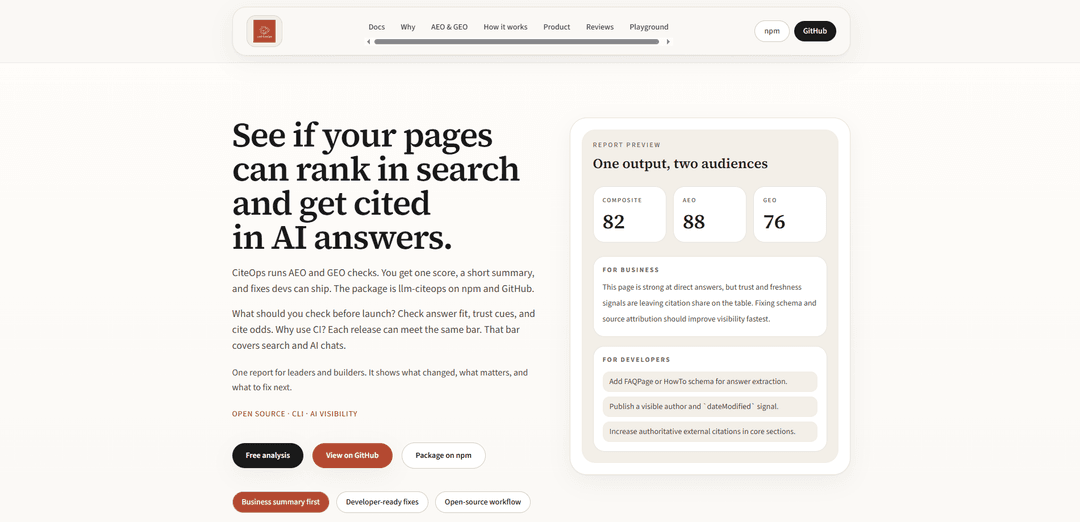
LLM-CiteOps is an open-source CLI tool that audits web pages for AEO (Answer Engine Optimization) and GEO (Generative Engine Optimization), providing actionable scores and developer-ready fixes to improve visibility in both traditional search and AI-generated answers.
https://llm-citeops.vercel.app/?ref=producthunt
Product Information
Updated:Apr 15, 2026
What is LLM-Citeops
LLM-CiteOps is a developer-focused auditing tool designed for the answer-engine era, where visibility extends beyond traditional search rankings to include citations in AI-generated responses. Built as an npm package (llm-citeops), it functions like Lighthouse but specifically for AI-ready pages, evaluating whether content can rank in search engines and get cited by AI systems like ChatGPT, Perplexity, and other generative tools. The tool provides a composite score alongside separate AEO and GEO metrics, delivering both business-level summaries for stakeholders and technical implementation details for developers. It's built to integrate seamlessly into modern development workflows, supporting CI/CD pipelines, GitHub Actions, and platforms like Vercel.
Key Features of LLM-Citeops
LLM-Citeops is an open-source CLI tool that audits web pages for AI visibility by measuring Answer Engine Optimization (AEO) and Generative Engine Optimization (GEO). It provides a single composite score along with actionable fixes that help pages rank in traditional search while also being cited by AI chatbots and answer engines. The tool generates business-friendly summaries for stakeholders and technical implementation details for developers, supporting multiple output formats (HTML, JSON, CSV) and CI/CD integration for automated quality gates before release.
Dual AEO & GEO Scoring: Provides separate scores for Answer Engine Optimization (for direct answers and snippets) and Generative Engine Optimization (for AI citation trust), plus a composite score that reflects overall AI visibility potential.
Two-Audience Reporting: Generates reports with executive summaries for business leaders explaining visibility impact and competitive positioning, alongside technical evidence and specific markup fixes for developers to implement.
CI/CD Integration: Supports automated workflows with exit codes, score thresholds, and configurable gates that can block releases when AI visibility scores drop below agreed standards, similar to Lighthouse for performance.
Multiple Input & Output Formats: Accepts URLs, local files, folders, or sitemaps as input and exports results in HTML (for human review), JSON (for automation), or CSV (for batch analysis), fitting various team workflows.
Actionable Fix Recommendations: Provides concrete, prioritized improvements including schema markup additions, trust signal enhancements, citation quality upgrades, and content structure changes mapped to specific visibility gaps.
Batch Audit Capability: Processes entire directories of content or expands sitemaps to audit multiple pages at scale, enabling comprehensive site-wide AI readiness assessments with CSV output for analysis.
Use Cases of LLM-Citeops
Pre-Release Quality Gates: Development teams integrate llm-citeops into GitHub Actions or CI pipelines to automatically audit staging URLs and block deployments when pages fail to meet minimum AEO/GEO thresholds, ensuring consistent AI visibility standards.
Content Migration Validation: Content operations teams audit documentation sites, knowledge bases, or help centers during CMS migrations to verify that restructured pages maintain or improve their ability to be cited by AI assistants and answer engines.
Competitive AI Visibility Analysis: SEO and marketing teams compare their pages against competitor URLs to identify citation gaps, trust signal weaknesses, and structural differences that explain why rivals appear more frequently in AI-generated answers.
B2B Documentation Optimization: SaaS companies audit technical documentation and product guides to ensure they appear in AI-assisted developer searches and chatbot responses, improving discoverability when buyers research solutions through conversational interfaces.
Editorial Workflow Enhancement: Content teams run audits on draft articles before publication to identify missing FAQ schema, weak authorship signals, or insufficient external citations that would reduce the likelihood of AI systems quoting the content.
Site-Wide AI Readiness Assessment: Digital experience teams process entire sitemaps through batch audits to generate CSV reports showing which page categories, content types, or site sections are under-optimized for AI visibility, informing strategic improvement roadmaps.
Pros
Open-source and CLI-based, allowing teams full control over data and integration into existing developer workflows without vendor lock-in
Bridges business and technical audiences with dual-layer reporting that explains both commercial impact and implementation details in one output
Provides repeatable, objective scoring that eliminates the subjectivity and inconsistency of manual reviews across releases
Supports modern CI/CD practices with configurable thresholds, exit codes, and multiple output formats for automation
Cons
Requires Node.js 18+ environment and CLI familiarity, which may present adoption friction for non-technical content teams
As an emerging tool for a new optimization category (AEO/GEO), scoring methodology may evolve as AI search behaviors change
Limited to read-only auditing and recommendations—does not automatically implement fixes or integrate with CMS platforms
Effectiveness depends on the maturity of AI citation patterns, which vary across different AI models and answer engines
How to Use LLM-Citeops
1. Install llm-citeops: Run 'npm install -g llm-citeops' in your terminal to install the CLI tool globally on your system. Requires Node.js 18+ and npm/npx.
2. Choose your input source: Decide what you want to audit: a URL (HTTPS page), a local Markdown or HTML file, a folder of files, or a sitemap. The tool honors rate limits and robots.txt unless you override for your own site.
3. Run the audit command: Execute 'npx llm-citeops audit --url "https://example.com/docs/article"' for a URL, or use appropriate flags for files/folders. The audit will check your content for AEO (Answer Engine Optimization) and GEO (Generative Engine Optimization) readiness.
4. Specify output format and path: Add '--output html --output-path ./report.html' to generate an HTML report, or use 'json' or 'csv' formats depending on your needs. HTML is for human review, JSON for automation, and CSV for batch analysis.
5. Review the composite score: Check the combined score (0-100) along with separate AEO and GEO scores. The report shows whether your page is likely to earn trust and citations in AI-generated answers.
6. Read the business summary: Review the executive summary that explains answer readiness, trust signals, and competitive position in plain language for stakeholders.
7. Examine developer fixes: Look at the technical section with specific failed checks, missing signals, and concrete improvements like schema markup, metadata, citations, and content structure changes.
8. (Optional) Create project configuration: Add a '.citeops.json' file to your repo or home directory to set project defaults and avoid repeating flags on every run.
9. Integrate with CI/CD: Use '--ci' and '--threshold' flags to fail builds when scores drop below your agreed bar. Add llm-citeops to GitHub Actions, GitLab CI, or other pipelines to gate releases.
10. Run batch audits for scale: Audit multiple pages by pointing to a folder of files or expanding sitemaps. Export to CSV format to benchmark many URLs from staging or production sites.
11. Use the overview command: Run 'llm-citeops overview' to see capabilities, outputs, and quick-start hints directly in your terminal.
12. Implement recommended fixes: Work through the top 3 highest-value actions: improve authorship and freshness metadata, add authoritative external citations, and structure content with FAQ or HowTo schema for better answer extraction.
LLM-Citeops FAQs
llm-citeops is an open-source CLI tool that audits web pages for AI visibility by running AEO (Answer Engine Optimization) and GEO (Generative Engine Optimization) checks. It provides a composite score, business summary, and developer-ready fixes to help pages rank in search and get cited in AI answers.
Popular Articles

Vosko AI: Localize and Dub Videos for Global Audiences
Oct 15, 2026

Atoms: A Multi-Agent AI Platform That Transforms Ideas into Launch-Ready Products
Oct 13, 2026

Nano Banana SBTI: What It Is, How It Works, and How to Use It in 2026
Apr 15, 2026

Atoms Review — The AI Product Builder Redefining Digital Creation in 2026
Apr 10, 2026
Latest AI Tools Similar to LLM-Citeops

Gait
Gait is a collaboration tool that integrates AI-assisted code generation with version control, enabling teams to track, understand, and share AI-generated code context efficiently.

invoices.dev
invoices.dev is an automated invoicing platform that generates invoices directly from developers' Git commits, with integration capabilities for GitHub, Slack, Linear, and Google services.

EasyRFP
EasyRFP is an AI-powered edge computing toolkit that streamlines RFP (Request for Proposal) responses and enables real-time field phenotyping through deep learning technology.

Cart.ai
Cart.ai is an AI-powered service platform that provides comprehensive business automation solutions including coding, customer relations management, video editing, e-commerce setup, and custom AI development with 24/7 support.
Popular AI Tools Like LLM-Citeops

GitHub Copilot Chat
GitHub Copilot Chat is an AI-powered coding assistant that provides natural language interactions, real-time code suggestions, and contextual support directly within supported IDEs and GitHub.com.

CopilotForXcode
CopilotForXcode is an Xcode Source Editor Extension that integrates GitHub Copilot, Codeium, and ChatGPT to provide AI-powered code suggestions, chat assistance, and prompt-to-code functionality within Xcode.

BrowserAI
BrowserAI is an open-source library that enables running local Large Language Models (LLMs) directly in web browsers with WebGPU acceleration, offering privacy-focused AI capabilities without requiring server infrastructure.

OpenAI Codex CLI
OpenAI Codex CLI is a lightweight, open-source coding agent that runs in your terminal, enabling developers to translate natural language into code execution while providing ChatGPT-level reasoning with the ability to run code, manipulate files, and iterate under version control.