
JoyFun AI: Image to Image, Video
JoyFun AI ist eine umfassende generative KI-Plattform für visuelles Storytelling. Seine Vorzeige-Engine für Bild-zu-Video animiert statische Fotos sofort in filmische Clips. Es bietet außerdem leistungsstarke Text-zu-Video- und fortschrittliche Bild-zu-Bild-Tools zum Umgestalten von Bildern und bietet eine Komplettlösung für Kreative.
https://joyfun.ai/?utm_source=aipure
Produktinformationen
Aktualisiert:Feb 2, 2026
Was ist JoyFun AI: Image to Image, Video
JoyFun AI ist eine umfassende kreative Plattform, die die professionelle Videoerstellung demokratisiert, indem sie sie für jeden zugänglich macht. Sie kombiniert mehrere KI-Generatoren an einem Ort und ist auf die Umwandlung statischer Bilder in animierte Videos, die Durchführung realistischer Gesichtstausche und die Generierung von Videoinhalten aus Textbeschreibungen spezialisiert. Die Plattform arbeitet völlig kostenlos ohne Registrierungsanforderungen, sodass Benutzer sofort über ihren Browser auf die gesamte Suite von Videogenerierungs- und -bearbeitungstools zugreifen können.
Hauptfunktionen von JoyFun AI: Image to Image, Video
JoyFun AI ist eine umfassende KI-gestützte Videogenerierungsplattform, die es Benutzern ermöglicht, statische Bilder und Texte in dynamische Videos mit verschiedenen Effekten umzuwandeln. Sie bietet Funktionen wie Gesichtstausch, Bild-zu-Video-Animation, Text-zu-Video-Generierung und spezielle Videoeffekte, die alle ohne Registrierungsanforderungen verfügbar sind und eine Ausgabe mit bis zu 1080p HD-Auflösung und 10 Sekunden Videolänge unterstützen. Die Plattform integriert mehrere KI-Modelle und bietet eine weitgehend unzensierte kreative Umgebung für den persönlichen und kommerziellen Gebrauch.
Image to Video Animation: Verwandeln Sie statische Bilder in dynamische Videos mit anpassbaren Bewegungseffekten, die eine hochwertige 1080p-Ausgabe und Videos mit einer Länge von bis zu 10 Sekunden unterstützen
Face Swap Technology: Tauschen Sie Gesichter in Fotos und Videos nahtlos aus, während Sie realistische Gesichtszüge, Ausdrücke und Beleuchtung beibehalten
Text-to-Video Generation: Erstellen Sie komplette Videoclips aus detaillierten Textbeschreibungen, sodass Benutzer Szenen durch Prompt-Engineering steuern können
Specialized Video Effects: Greifen Sie auf eine Reihe von KI-Videoeffekten mit einem Klick zu, darunter Tanzanimationen, Kleidungswechsel und künstlerische Transformationen
Anwendungsfälle von JoyFun AI: Image to Image, Video
Content Creation: Social-Media-Ersteller können schnell ansprechende Videoinhalte aus statischen Bildern oder Textvorlagen für Plattformen wie YouTube und Instagram generieren
Digital Art Portfolio: Künstler können ihre statischen Kunstwerke und Charakterdesigns animieren, um dynamische Portfoliostücke mit subtilen Bewegungen und Ausdrücken zu erstellen
Marketing and Advertising: Unternehmen können Produktfotos in animierte Werbeinhalte umwandeln oder dynamische Videoanzeigen aus Konzeptbeschreibungen erstellen
Storyboard Visualization: Filmemacher und Animatoren können Szenen und Konzepte schnell visualisieren, indem sie Videovorschauen aus Textbeschreibungen oder Konzeptzeichnungen generieren
Vorteile
Keine Anmeldung für sofortigen Zugriff erforderlich
Völlig kostenlos mit unbegrenzten Generationen
Hochwertige Ausgabe mit bis zu 1080p Auflösung
Integration mit mehreren fortschrittlichen KI-Modellen
Nachteile
Maximale Videolänge auf 10 Sekunden begrenzt
Einige Funktionen erfordern möglicherweise hohe Rechenressourcen
Potenzieller Missbrauch von unzensierten Inhaltsgenerierungsfunktionen
Wie verwendet man JoyFun AI: Image to Image, Video
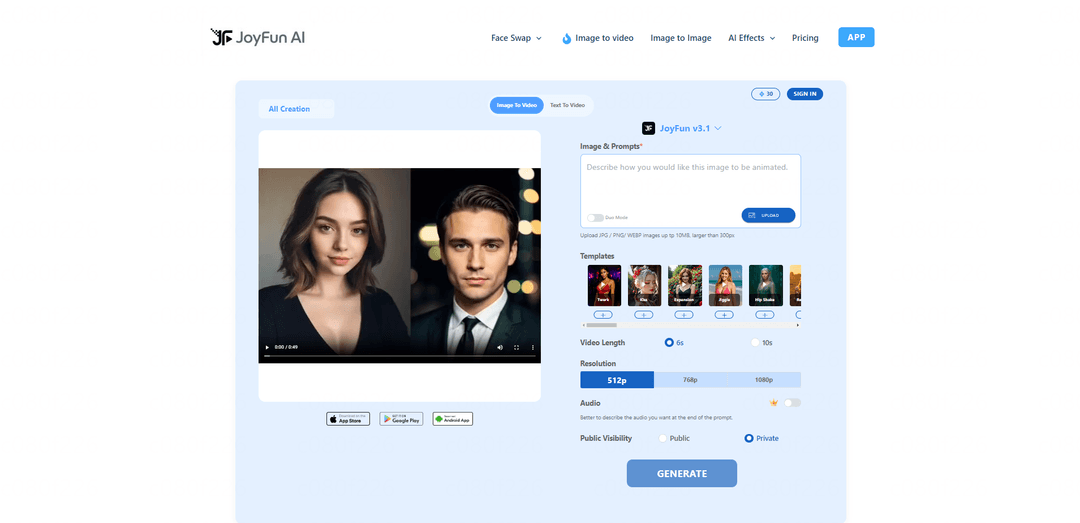
Zugriff auf die Website: Besuchen Sie joyfun.ai in Ihrem Webbrowser. Für die Nutzung der Tools ist keine Registrierung oder Anmeldung erforderlich.
Wählen Sie Ihr Tool aus: Wählen Sie das Tool aus, das Sie verwenden möchten, aus dem Hauptmenü: Bild zu Video, Gesichtstausch, Text zu Video oder andere KI-Effektoptionen.
Medien hochladen: Laden Sie Ihre Quelldatei(en) hoch, indem Sie auf die Upload-Schaltfläche klicken. Unterstützte Formate sind JPG/PNG/WEBP bis zu 10 MB, Mindestgröße 300 Pixel.
KI-Modell auswählen: Wählen Sie aus verfügbaren KI-Modellen wie JoyFun v3.1, Seedance 1.5 Pro, Wan 2.6 usw. basierend auf Ihren Anforderungen. Jedes Modell verfügt über unterschiedliche Fähigkeiten und Verarbeitungszeiten.
Einstellungen konfigurieren: Legen Sie Ihre gewünschte Videolänge (6 oder 10 Sekunden), Auflösung (512p, 768p oder 1080p) fest und aktivieren Sie optional Audio, falls für Ihr ausgewähltes Modell verfügbar.
Text-Prompts hinzufügen: Geben Sie beschreibende Text-Prompts ein, um die KI anzuleiten, wie die Ausgabe aussehen soll. Seien Sie spezifisch in Bezug auf Bewegung, Stil und gewünschte Effekte.
Sichtbarkeit festlegen: Wählen Sie aus, ob Ihre Kreation öffentlich oder privat sein soll.
Generieren: Klicken Sie auf die Schaltfläche \'Generieren\' und warten Sie, während die KI Ihre Anfrage verarbeitet. Die Verarbeitungszeit variiert je nach Modell.
Vorschau & Herunterladen: Sobald die Generierung abgeschlossen ist, sehen Sie sich eine Vorschau Ihres Videos an und laden Sie es, falls Sie zufrieden sind, in der von Ihnen gewählten Auflösung herunter. Keine Wasserzeichen bei kostenlosen Downloads.
JoyFun AI: Image to Image, Video FAQs
Ja, Joyfun AI ist zu 100 % kostenlos nutzbar, ohne versteckte Kosten, erforderliche Abonnements oder Kreditsysteme. Die Plattform bietet unbegrenzte Generierungen ohne Registrierung.
Beliebte Artikel

Vosko AI: Videos für ein globales Publikum lokalisieren und synchronisieren
Oct 15, 2026

Atoms: Eine Multi-Agenten-KI-Plattform, die Ideen in startbereite Produkte verwandelt
May 22, 2026

Nano Banana SBTI: Was es ist, wie es funktioniert und wie man es im Jahr 2026 einsetzt
Apr 15, 2026

Atoms Review – Der KI-Produkt-Builder, der die digitale Erstellung im Jahr 2026 neu definiert
Apr 10, 2026
Neueste KI-Tools ähnlich wie JoyFun AI: Image to Image, Video

EzVideos
EzVideos ist ein All-in-One-Tool zur Videoerstellung, das Nutzern hilft, virale Videos für soziale Medien wie Instagram, TikTok und YouTube mit automatisierten Bearbeitungsfunktionen und integrierten Ressourcen zu generieren.

Blanc AI
Blanc AI ist eine revolutionäre KI-Lösung, die die Übersetzung und Synchronisation von Videoinhalten in über 47 Sprachen ermöglicht und dabei die ursprüngliche Stimme, Emotionen und Lippen-Synchronisation bewahrt.

Wink Mody
Wink Mody ist eine modifizierte Version der Wink-Videobearbeitungs-App, die Premium-Funktionen wie KI-gestützte Retusche, 4K-Exporte und bearbeitungsfreie Videos völlig kostenlos anbietet.

Shortmake AI
ShortMake ist eine KI-gestützte Videoerstellungsplattform, die Ideen in viralbereite Videos verwandelt, indem sie automatisch Skripte, Sprachaufnahmen, visuelle Elemente und Untertitel generiert, die speziell für Plattformen wie TikTok und YouTube Shorts optimiert sind.
Beliebte KI-Tools wie JoyFun AI: Image to Image, Video

AI Clips - New Gen
AI Clips - New Gen ist ein KI-gestütztes Video-Clipping-Tool, das automatisch ansprechende Kurzform-Inhalte aus langen Videos für mehrere soziale Medienplattformen wie YouTube Shorts, TikTok, Instagram Reels und mehr generiert.

Edit Mind
Edit Mind ist eine Open-Source-, KI-gestützte Videoindizierungs- und semantische Suchplattform, die es Benutzern ermöglicht, Videoinhalte mithilfe von natürlichen Sprachabfragen zu analysieren und zu durchsuchen, mit Funktionen wie Transkription, Frame-Analyse, Gesichtserkennung und Objekterkennung.

Dinamo Notebook
FreeAI Video Editing
Dinamo Notebook ist eine kostenlose, MIT-lizenzierte, lokale Browser-Erweiterung für die Fußballvideoanalyse, mit der Sie taktische Anmerkungen auf YouTube-/Dailymotion-/Twitch-Material zeichnen und optional KI (mit Ihrem eigenen OpenAI API-Schlüssel) für taktische Einblicke nutzen können.

MediaSeg
MediaSeg ist ein stabiles, "local-first" macOS-Dienstprogramm, das große MP4/WEBM-Mediendateien in upload-bereite "Chunks" unter einer konfigurierbaren Größenbeschränkung aufteilt, während die Qualität mithilfe von ffmpeg/ffprobe und einer KI-gestützten, zielbasierten Größenstrategie erhalten bleibt.