iPromise
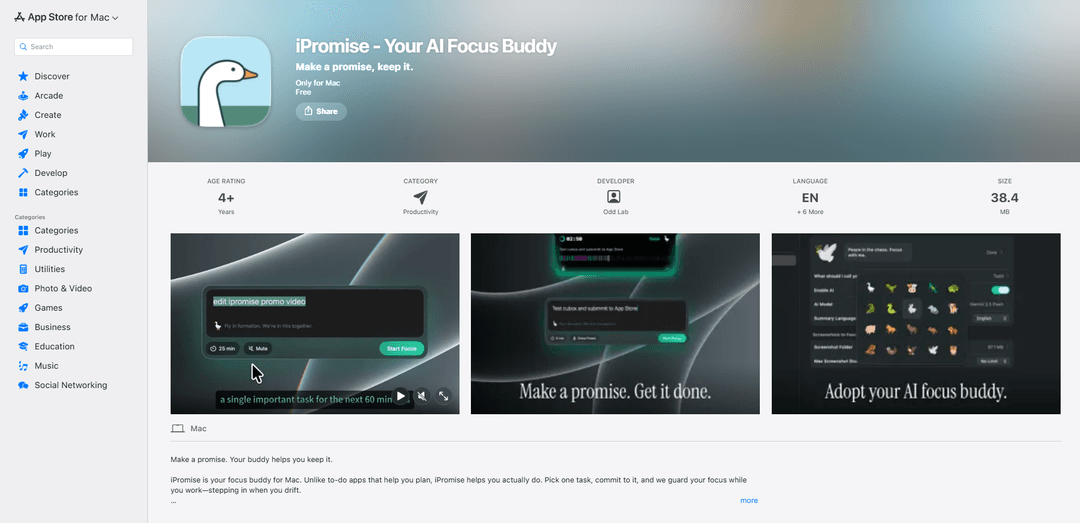
iPromise is a Mac-only AI focus buddy that turns one chosen task into a timed commitment, monitors on-screen context to detect distraction, and delivers session insights, streaks, and iCloud-synced history—using your own AI provider and API key.
https://apps.apple.com/app/id6756086425?ref=producthunt

Product Information
Updated:May 25, 2026
What is iPromise
iPromise is a productivity app for macOS designed to help you actually do the work, not just plan it. Instead of managing long to-do lists, it asks you to make a single “promise” (one task) and commit to a focused session with a timer, supported by a small animated AI buddy you can choose (e.g., goose, turtle, rabbit, comet). Built for Mac (macOS 14+), iPromise includes focus sessions with optional ambient sounds, a heads-up display (HUD) for accountability, post-session AI summaries, a session inspector, and progress tracking like streaks and focus-time distribution. It also supports iCloud sync for your focus history across Macs, while emphasizing privacy controls for screen context analysis.
Key Features of iPromise
iPromise is a Mac-only productivity app designed to help you actually complete one chosen task at a time through timed focus sessions, an on-screen HUD that tracks focus vs. distraction, and an AI “Focus Buddy” character that intervenes when you drift. It analyzes on-screen context during sessions (via screen recording/snapshots) to classify focus, then produces AI-generated post-session summaries and segment insights so you can improve over time. It also includes ambient sounds, session review tools (timeline and focus bar), streaks and distribution stats, and iCloud sync for your focus history—while keeping screenshots under your control and not stored by iPromise.
One-task focus sessions: Commit to a single task, set a duration, and start quickly (including a global shortcut like ⌘⇧Space) to reduce multitasking and procrastination.
AI Focus Buddy with selectable characters: Choose a companion (e.g., goose, turtle, rabbit, comet, tree) that provides accountability and can step in when your focus breaks.
On-screen focus HUD (dockable): A heads-up display shows your current focus state and accountability signals; it can float on screen or dock to the MacBook notch area.
Screen-context focus detection (privacy-forward): Uses screen recording to understand what’s on screen during focus sessions; screenshots are processed locally and sent only to your chosen AI provider, and iPromise does not store them.
Session Inspector + AI summaries: Review each session with a 60-segment focus bar, timeline/segment summaries, overall evaluation, and shareable outputs to learn what caused distractions.
Insights, streaks, and iCloud sync: Track today’s sessions and total focus time, current/longest streaks, total sessions, and focus-time distribution; sync history and insights across Macs via iCloud (no screenshots uploaded).
Use Cases of iPromise
Deep work for knowledge workers: Writers, engineers, analysts, and designers can run timed sessions on a single deliverable and use post-session summaries to identify recurring distraction patterns.
Remote work accountability: Distributed teams or individuals working from home can use the HUD and focus detection to stay honest about context switching and build consistent streaks.
Study and exam preparation: Students can structure study blocks with ambient sounds, then review session timelines to see when they drifted to non-study content and adjust habits.
Creative practice routines: Artists and creators can set “promise” sessions for practice (music, illustration, video editing) and use streaks plus session insights to maintain momentum.
Personal habit building and self-coaching: Individuals aiming to reduce doomscrolling or improve consistency can use the buddy + streak tracking as lightweight behavioral reinforcement.
Pros
Designed for execution (single-task promises + accountability) rather than just planning.
Detailed session review (segments, summaries, evaluations) helps diagnose distractions and improve focus over time.
Privacy positioning: screenshots remain under user control; iPromise states it doesn’t store them and lets you bring your own AI provider/API key.
Cons
Mac-only and requires macOS 14.0 or later, limiting accessibility for non-Mac users.
Focus detection relies on screen recording/screenshot analysis, which may be sensitive for some users or restricted in certain workplaces.
Requires configuring and paying for your own AI provider/API usage for AI features (depending on provider).
How to Use iPromise
1. Install iPromise on your Mac: Download and install “iPromise - Your AI Focus Buddy” from the Mac App Store (requires macOS 14.0 or later).
2. Launch iPromise and choose your buddy: Open iPromise and pick an AI Focus Buddy character (e.g., goose, turtle, rabbit, comet, tree) to accompany your focus sessions.
3. (Optional) Set up your AI provider and API key: In iPromise settings, configure your chosen AI provider and enter your own API key so the app can generate session summaries and segment insights.
4. Grant required macOS permissions for focus detection: Allow screen recording permission when prompted so iPromise can understand on-screen context during focus sessions (used for focus/distraction detection).
5. Create a promise (pick one task): Choose a single task to commit to for the session. You can type it in, or copy/drag it from your to-do app into iPromise.
6. Set your session duration: Choose how long you want to focus for, then prepare to start the session.
7. Start a focus session: Start the session with one tap, or use the keyboard shortcut ⌘⇧Space.
8. (Optional) Turn on ambient sound: Select an ambient sound preset (e.g., rain, cafe, forest, white noise) to play during your session.
9. Use the HUD to stay accountable: Keep the on-screen HUD visible to monitor your focus state. Dock it to the MacBook notch area (if applicable) or float it anywhere on screen.
10. Respond when your buddy steps in: If iPromise detects you drifting, your AI Focus Buddy can intervene to help you return to the promised task.
11. End the session and review the AI summary: When the timer ends, read the AI-generated session summary and focus/distraction evaluation to understand how the session went.
12. Inspect session details in Session Inspector: Open the Session Inspector to review the 60-segment focus bar, the timeline with segment summaries, and the overall evaluation; optionally share the session view.
13. Track progress with Overview and streaks: Check your daily sessions and focus time, current streak, longest streak, total sessions, and focus-time distribution to monitor consistency.
14. Use iCloud sync across Macs: Sign into iCloud on your Macs to sync focus history, summaries, and insights across devices (screenshots are not uploaded).
15. Manage screenshot/privacy controls: Know that screenshots are processed locally and sent only to your chosen AI provider; you can delete them anytime, and iPromise does not see or store them.
iPromise FAQs
iPromise is an AI “focus buddy” app for Mac that helps you actually do a single task you commit to, by monitoring your focus during a timed session and stepping in when you drift.
iPromise Video
Popular Articles

Atoms: A Multi-Agent AI Platform That Transforms Ideas into Launch-Ready Products
May 22, 2026

Nano Banana SBTI: What It Is, How It Works, and How to Use It in 2026
Apr 15, 2026

Atoms Review — The AI Product Builder Redefining Digital Creation in 2026
Apr 10, 2026

Kilo Claw: How to Deploy and Use a True "Do‑It‑For‑You" AI Agent(2026 Update)
Apr 3, 2026