
Heron
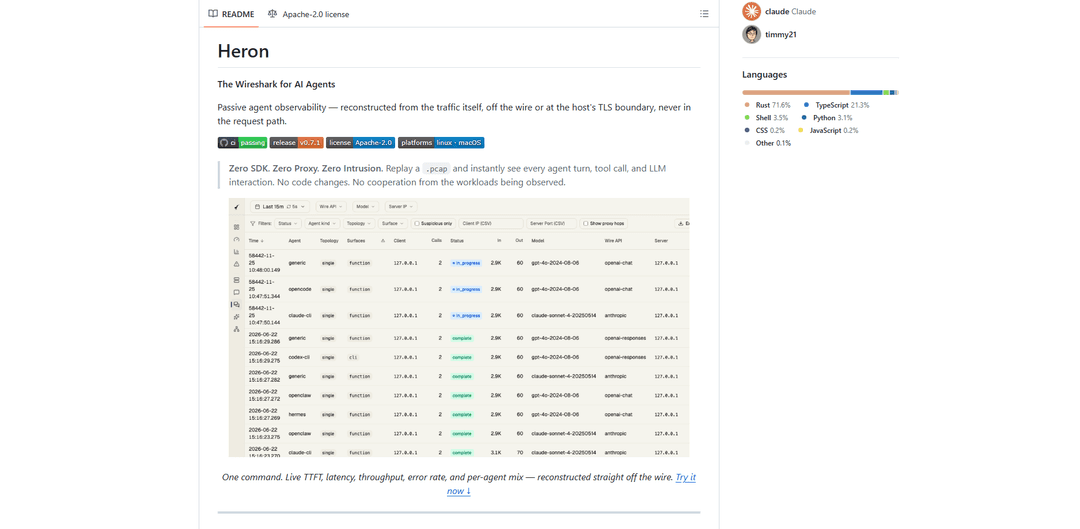
Heron is a passive, zero-intrusion observability tool for AI agents that reconstructs agent turns and LLM/tool interactions from network traffic (pcap/live/eBPF) with a built-in dashboard, metrics, and SFT data export—no SDK, no proxy, no code changes.
https://github.com/Netis/heron?ref=producthunt
Product Information
Updated:Jul 8, 2026
What is Heron
Heron (Netis/heron) positions itself as “the Wireshark for AI Agents”: an observability product that lets you see what AI agents are doing by reconstructing their behavior directly from captured traffic rather than instrumenting code or routing requests through a proxy. It focuses on agent workflows (planner → tool calls → results → next step) and LLM interactions, providing a local web console (http://localhost:3000) to explore timelines, per-call details, errors, and performance/usage metrics. It supports replaying captured .pcap files without privileges, live capture via libpcap (with appropriate capabilities), optional ZMQ ingestion from a remote probe, and an experimental Linux eBPF mode to observe TLS traffic at the SSL boundary on-host.
Key Features of Heron
Heron (Netis/heron) is a passive observability tool for AI agents—positioned as “the Wireshark for AI Agents”—that reconstructs agent turns, tool calls, and LLM interactions directly from network traffic (pcap/live capture) or host-level TLS boundaries, without requiring any SDK, proxy, or code changes and without sitting in the request path. It parses plaintext HTTP/SSE (or captures decrypted content via optional Linux eBPF SSL uprobes), identifies common LLM wire APIs (OpenAI/Anthropic/Gemini and OpenAI-compatible servers), builds timelines and service-topology graphs, computes latency/token metrics, and stores results (DuckDB by default, ClickHouse optional) behind a local web console and REST API, with the ability to export real traffic into SFT-ready datasets.
Zero-intrusion passive capture: Observes LLM/agent traffic off the wire (pcap replay or live interface) or at the host’s TLS boundary, requiring no SDK instrumentation, no proxying, and no client code changes—while staying out of the request path.
Agent turn reconstruction: Stitches multi-call agent workflows (planner → tool → result → next step) into single, addressable “turns,” with named profiles for tools like Claude Code and Codex CLI plus a generic mode.
Wire-API detection & semantic decoding: Automatically detects and decodes popular LLM APIs (OpenAI Chat Completions/Responses, Anthropic Messages, Gemini) and supports OpenAI-compatible backends (vLLM, SGLang, Ollama, llama.cpp, LM Studio, LiteLLM) by inspecting bytes on the wire.
Live console with deep drill-down: Embedded web UI (localhost:3000) for timelines, per-call request/response inspection, agent sessions/turns, raw HTTP, pipeline health, and dashboards for performance, usage, and errors.
Ops-grade metrics & topology views: Computes TTFT/E2E latency/TPOT, token throughput, error rates, call volume, latency percentiles, and visualizes service-to-service paths (clients → proxies → inference backends) as a directed graph.
SFT trajectory export from real traffic: Exports reconstructed turns/sessions into OpenAI-style messages JSONL (including tool calls/results and structured arguments) to turn captured agent runs into fine-tuning data.
Use Cases of Heron
Agent debugging & QA: Developers can diagnose stalled tool calls, plan loops, malformed prompts, and unexpected outputs by inspecting reconstructed turns and full request/response bodies—without modifying the agent.
Inference platform observability: AI platform teams can map real service topology (client → LiteLLM → vLLM/SGLang, etc.), measure each hop’s latency, and detect silent model/endpoint substitutions based on observed traffic.
FinOps / cost attribution: Engineering managers and FinOps can attribute usage and performance by agent kind, model, endpoint, and session using evidence from actual traffic rather than periodic SDK exports.
Compliance, audit, and incident response: Security/compliance teams can maintain a capture-once evidence chain of what agents sent/received (where traffic is decrypted), supporting audits and investigations without impacting production paths.
Dataset generation for model training: ML teams can convert real agent interactions into SFT datasets by exporting turns/sessions as structured JSONL, preserving tool call structure and provider wire formats.
Pros
No SDK/proxy required and not in the request path, reducing deployment friction and avoiding observer-induced outages.
High-fidelity visibility: captures full request/response bodies (when plaintext is available) and reconstructs higher-level agent turns, not just per-call logs.
Broad compatibility with multiple LLM providers and OpenAI-compatible inference servers via wire-level detection.
Portable distribution: single binary with embedded console; supports pcap replay for offline/CI analysis.
Cons
Requires plaintext HTTP visibility; encrypted traffic needs placement behind TLS termination or use of experimental Linux eBPF SSL-urobe capture with extra capabilities.
Passive capture may limit end-to-end correlation across distributed client clusters compared to explicit tracing/SDK tagging.
Some formats are only partially supported; unsupported wire formats are skipped/reported rather than decoded.
Live interface capture can require elevated privileges/capabilities (e.g., CAP_NET_RAW/CAP_NET_ADMIN on Linux).
How to Use Heron
1) Install Heron (Linux/macOS, user-local, no sudo): Run the one-line installer to place the `heron` binary under a user-local directory.
Command:
curl -fsSL https://raw.githubusercontent.com/Netis/heron/main/install.sh | INSTALL_DIR="$HOME/.local" sh
2) Verify the installation: Confirm the binary runs and is on your PATH.
Commands:
heron --version
heron --help
3) Run a no-privileges smoke test using a .pcap replay: Replay an existing packet capture containing LLM traffic. This requires no live capture and no special privileges.
Command:
heron --pcap-file capture.pcap --no-retention
Tip: If you don’t have a pcap, use the repo fixtures in `testdata/pcaps/` and replay any of them.
4) Open the web console: After starting Heron, open the embedded console in your browser to inspect agent turns, timelines, and metrics.
URL:
http://localhost:3000
Note: After a pcap finishes replaying, Heron keeps the API/console available so you can browse. Press Ctrl+C to exit, or pass `--exit-after-drain` to exit automatically once the pipeline drains.
5) Check health and confirm traces were reconstructed (API verification): Use the REST API to confirm the service is healthy and that reconstructed traces are available.
Commands:
curl -s http://localhost:3000/api/health
curl -s 'http://localhost:3000/api/traces?limit=5'
6) (Optional) Run live capture from a network interface (Linux/macOS): If you have a live interface and want real-time capture, run Heron against an interface.
Command:
heron -i eth0
Linux note: live capture needs `CAP_NET_RAW` (and related capabilities). The install docs recommend granting capabilities once so you don’t need sudo at runtime:
sudo setcap cap_net_raw,cap_net_admin=eip ~/.local/bin/heron
7) Understand the TLS requirement (where to deploy Heron): Heron reconstructs LLM calls from plaintext HTTP. Install it where traffic is already decrypted: on the inference host, behind a TLS terminator, or feed it from a trusted packet source. Packet capture alone cannot see encrypted bodies.
8) (Optional, Linux experimental) Capture TLS traffic as plaintext via eBPF SSL uprobes: On Linux, Heron has an opt-in experimental eBPF source that hooks `SSL_read`/`SSL_write` to read TLS-encrypted LLM calls as plaintext on-host and attribute calls to processes (pid/command/executable). This is built behind the `ebpf` cargo feature and requires `CAP_BPF` and kernel BTF. Follow the repo’s eBPF capture documentation for setup.
9) Use the console to analyze agent behavior and service topology: In the console (`http://localhost:3000`), use pages like Overview/Performance/Usage/Errors and the Services views to see directed graphs of clients → proxies → backends. Heron detects endpoints (e.g., vLLM, SGLang, Ollama, llama.cpp, LiteLLM) from bytes on the wire.
10) Inspect reconstructed Agent Turns (multi-call narratives): Navigate to Agent Turns to see multi-call interactions stitched into single turns (planner → tool → result → next tool). This provides a narrative view rather than raw per-request logs.
11) Export SFT trajectories from real traffic (fine-tuning data): From a turn’s detail view (or batch-export from the Agent Turns list with filters), export OpenAI-style `messages` JSONL. Heron preserves tool calls/results and rehydrates arguments to objects. Supported today: Anthropic and OpenAI-chat wire formats; unsupported formats are reported and skipped.
12) Configure storage and retention (DuckDB default; ClickHouse optional): By default Heron stores data in DuckDB (embedded single-file) with per-table retention controls. For higher-volume analytics, configure ClickHouse by setting `storage.backend = "clickhouse"` (per the Configure docs).
13) (Optional) Build from source correctly (console embedded): If developing/building from source, use the project’s `just` commands so the web console is embedded. The repo warns that a plain `cargo build --release` can yield a working API but a blank console.
Recommended:
just build all
just quality all
just test all
If invoking cargo directly, build the console first (`bun run build` in `console/`) and compile with `--features console`.
Heron FAQs
Heron (Netis/heron) is a passive observability tool for AI agents—described as “The Wireshark for AI Agents.” It reconstructs agent turns, tool calls, and LLM interactions from network traffic (off the wire or at the host’s TLS boundary) without being in the request path.
Heron Video
Popular Articles

Atoms: A Multi-Agent AI Platform That Transforms Ideas into Launch-Ready Products
May 22, 2026

Nano Banana SBTI: What It Is, How It Works, and How to Use It in 2026
Apr 15, 2026

Atoms Review — The AI Product Builder Redefining Digital Creation in 2026
Apr 10, 2026

Kilo Claw: How to Deploy and Use a True "Do‑It‑For‑You" AI Agent(2026 Update)
Apr 3, 2026
Latest AI Tools Similar to Heron

Hapticlabs
Hapticlabs is a no-code toolkit that enables designers, developers and researchers to easily design, prototype and deploy immersive haptic interactions across devices without coding.

Deployo.ai
Deployo.ai is a comprehensive AI deployment platform that enables seamless model deployment, monitoring, and scaling with built-in ethical AI frameworks and cross-cloud compatibility.

CloudSoul
CloudSoul is an AI-powered SaaS platform that enables users to instantly deploy and manage cloud infrastructure through natural language conversations, making AWS resource management more accessible and efficient.

Devozy.ai
Devozy.ai is an AI-powered developer self-service platform that combines Agile project management, DevSecOps, multi-cloud infrastructure management, and IT service management into a unified solution for accelerating software delivery.
Popular AI Tools Like Heron

A2A Protocol
A2A (Agent2Agent) Protocol is an open interoperability protocol developed by Google that enables seamless communication and collaboration between AI agents across different frameworks and vendors, regardless of their underlying architecture.

VoltOps
VoltOps is a framework-agnostic LLM observability platform that provides real-time visual monitoring, debugging, and optimization tools for AI agents across any technology stack.

Chaterm
Chaterm is an open-source AI-native terminal and SRE copilot that enables engineers to manage complex infrastructure through natural language, automating deployment, troubleshooting, and operations without memorizing commands.

Open Browser Use
Open Browser Use is an open-source, agent-runtime-neutral browser automation layer that pairs a Chrome extension with a CLI/SDK/MCP to enable DOM-aware, CDP-powered tab control, navigation, and actions across different AI agent tools.