
Funy AI
Funy AI is a comprehensive creative suite specializing in high-fidelity Image-to-Video animation, transforming static photos into dynamic cinematic clips. It also features powerful Text-to-Video capabilities, along with professional Text-to-Image and Image-to-Image generation tools for seamless digital content production.
https://funy.ai/?utm_source=aipure
Product Information
Updated:Dec 23, 2025
What is Funy AI
Funy AI is a versatile and user-friendly AI platform designed to transform creativity and content creation effortlessly. It provides a comprehensive suite of AI tools including image-to-video conversion, text-to-video generation, face swapping for photos and videos, AI art generation across multiple styles, AI background removal, photo enhancement, and AI aging filters. The platform emphasizes accessibility by offering its basic features completely free without requiring users to sign up, making high-quality AI content creation available to everyone from casual users to professionals.
Key Features of Funy AI
Funy AI is an all-in-one AI-powered creative platform that offers a comprehensive suite of tools for content creation, including image-to-video conversion, text-to-video generation, face swapping, AI art generation, and image enhancement features. The platform provides free access to basic features without requiring sign-up, supports multiple devices, and offers both web-based and mobile app versions. It specializes in creating various types of AI-generated videos, from animated portraits to creative effects, while also providing tools for image editing like background removal and photo enhancement.
AI Video Generation: Transform static images or text into dynamic videos with multiple AI models, including features like kiss videos, dance animations, and outfit changes with customizable duration and resolution
Image Enhancement Suite: Comprehensive tools for image editing including background removal, unblurring, watermark removal, and AI-powered photo enhancement for improving quality and details
Face Swap & Effects: Advanced face swapping technology for photos and videos with multi-face support, plus special effects like aging filters and hairstyle changes
Cross-Platform Accessibility: Available on multiple platforms (Windows, Mac, iOS, Android) with seamless synchronization and no registration required for basic features
Use Cases of Funy AI
Social Media Content Creation: Creators can quickly generate engaging video content, animated portraits, and enhanced images for social media platforms without complex editing skills
E-commerce Product Photography: Online sellers can enhance product photos, remove backgrounds, and create dynamic product presentations using the image enhancement and video generation tools
Personal Entertainment: Users can create fun face swaps, try virtual hairstyles, and generate entertaining video effects for personal amusement and sharing
Digital Marketing: Marketers can create promotional videos, enhance brand visuals, and generate creative content for advertising campaigns using various AI tools
Pros
Free access to basic features with no registration required
Wide range of AI-powered tools in one platform
User-friendly interface suitable for beginners
Cross-platform support with mobile apps available
Cons
Advanced features require credits or paid upgrades
Quality and consistency may vary depending on the tool and input
Some features may have usage limitations in free version
How to Use Funy AI
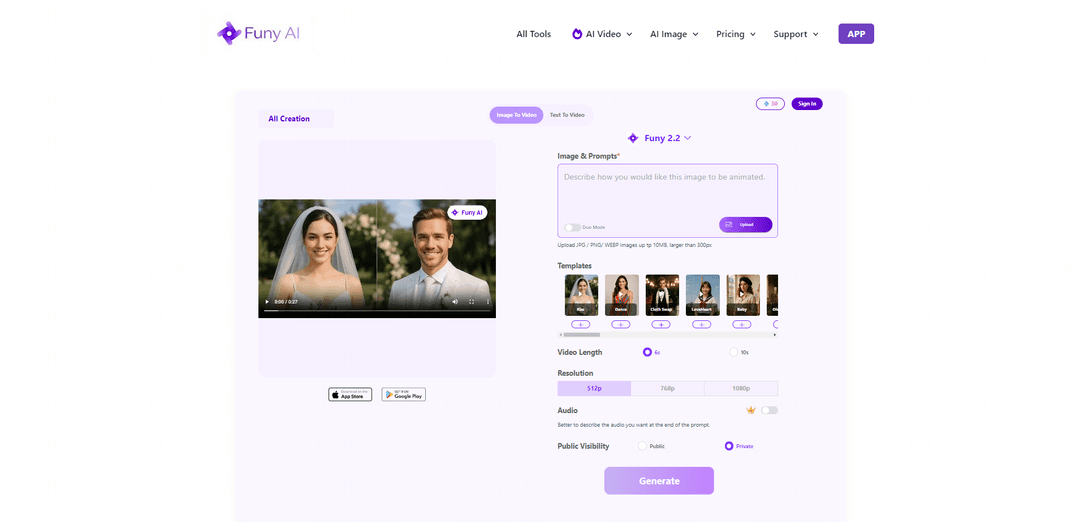
Access Funy AI: Visit funy.ai website or download the mobile app (available for iOS and Android). No sign-up or account creation required.
Choose AI Tool: Select from available tools like Image to Video, Text to Video, AI Art Generator, Face Swap, Background Removal, etc. from the main menu.
Upload Content: For image-based tools, upload your image (supports JPG/PNG/WEBP up to 10MB, larger than 300px). For text-based tools, enter your text prompt.
Select Model/Template: Choose from various AI models (like Funy 2.2, Wan 2.5, etc.) or pre-made templates depending on your chosen tool.
Adjust Settings: Configure options like video length (6s/10s), resolution (512p/768p/1080p), and other tool-specific settings.
Add Audio (Optional): For video generation, you can optionally include audio by describing the desired sound in your prompt.
Set Visibility: Choose whether to make your creation public or private.
Generate Content: Click the 'Generate' button and wait for the AI to process your request.
Preview & Download: Review the generated content and download if satisfied. Free credits are available for creating and exporting content without watermarks.
Optional Upgrade: For additional features, you can upgrade to VIP with a one-time payment (no monthly subscriptions required).
Funy AI FAQs
Yes! Funy AI offers free credits to create and export content without watermarks. Users get 30+ free credits to start with. Upgrade to VIP for more features with a one-time payment—no monthly subscriptions needed.
Popular Articles

Vosko AI: Localize and Dub Videos for Global Audiences
Oct 15, 2026

Atoms: A Multi-Agent AI Platform That Transforms Ideas into Launch-Ready Products
Oct 13, 2026

Nano Banana SBTI: What It Is, How It Works, and How to Use It in 2026
Apr 15, 2026

Atoms Review — The AI Product Builder Redefining Digital Creation in 2026
Apr 10, 2026
Latest AI Tools Similar to Funy AI

EzVideos
EzVideos is an all-in-one video creation tool that helps users generate viral videos for social media platforms like Instagram, TikTok, and YouTube with automated editing features and built-in resources.

Blanc AI
Blanc AI is a revolutionary AI solution that enables video content translation and dubbing into 47+ languages while preserving the original voice, emotions, and lip synchronization.

Wink Mody
Wink Mody is a modified version of the Wink video editing app that offers premium features like AI-powered retouching, 4K exports, and watermark-free editing completely free of charge.

Shortmake AI
ShortMake is an AI-powered video creation platform that transforms ideas into viral-ready videos by automatically generating scripts, voiceovers, visuals, and subtitles specifically optimized for platforms like TikTok and YouTube Shorts.
Popular AI Tools Like Funy AI

AI Clips - New Gen
AI Clips - New Gen is an AI-powered video clipping tool that automatically generates engaging short-form content from long videos for multiple social media platforms like YouTube Shorts, TikTok, Instagram Reels and more.

Edit Mind
Edit Mind is an open-source, AI-powered video indexing and semantic search platform that enables users to analyze and search through video content using natural language queries, with features including transcription, frame analysis, face recognition, and object detection.

Dinamo Notebook
FreeAI Video Editing
Dinamo Notebook is a free, MIT-licensed, local-first browser extension for football video analysis that lets you draw tactical annotations on YouTube/Dailymotion/Twitch footage and optionally use AI (with your own OpenAI API key) for tactical insights.

MediaSeg
MediaSeg is a stable, local-first macOS utility that splits large MP4/WEBM media files into upload-ready chunks under a configurable size limit while preserving quality using ffmpeg/ffprobe and an AI-assisted, target-based sizing strategy.