
Franz Messenger
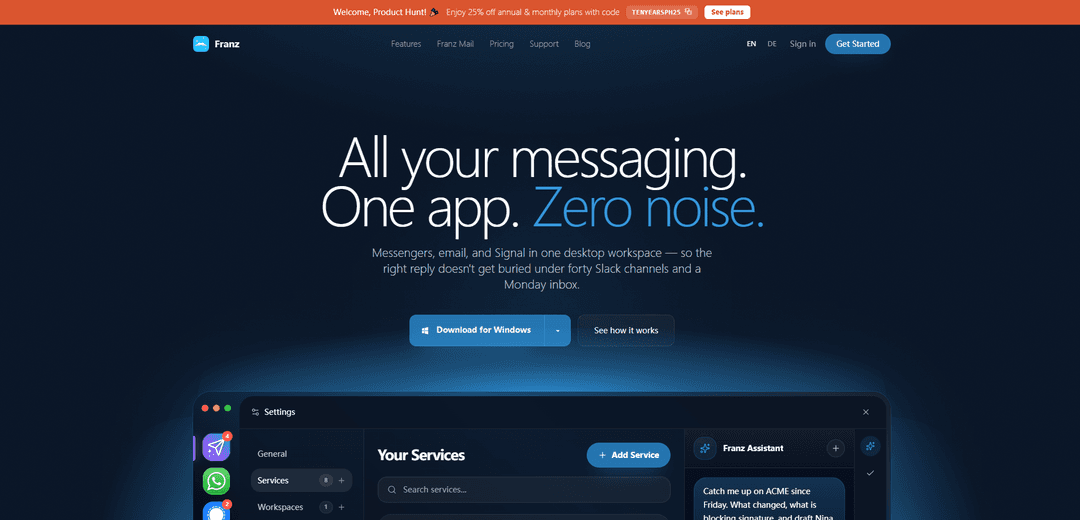
Franz Messenger is an all-in-one desktop workspace that brings 75+ messaging and email services (including WhatsApp, Slack, Gmail, Telegram, Discord, and native Signal) into isolated containers with unified notifications, workspaces, and optional AI summaries designed with privacy-conscious controls.
http://meetfranz.com/?ref=producthunt
Product Information
Updated:Jun 8, 2026
What is Franz Messenger
Franz Messenger is a cross-platform desktop application for macOS, Windows, and Linux that consolidates your everyday communication tools into a single, organized workspace. Instead of juggling multiple browser tabs and standalone apps, Franz lets you add popular chat services and email accounts side by side, switch between them quickly, and keep unread counts and notifications centralized. It’s built for people who move between client chats, team channels, inbox follow-ups, and secure conversations throughout the day, and it can also add custom websites as services for broader workflow coverage.
Key Features of Franz Messenger
Franz Messenger is an all-in-one desktop workspace (Windows/macOS/Linux) that brings 75+ messaging and email services—like WhatsApp, Slack, Gmail/Outlook, Telegram, Discord, and native Signal—into a single app with unified unread badges/notifications, isolated service containers, workspaces, and optional AI features for catch-up summaries and drafting. It emphasizes privacy-conscious behavior (e.g., tracker blocking, email pixel neutralization, encrypted secrets in the OS keychain) and flexible AI options (local on-device, bring-your-own provider key, or EU-hosted zero-retention cloud), helping professionals keep client chats, team channels, and inbox follow-through in one focused view.
Multi-service inbox (75+ services + custom websites): Connect WhatsApp, Slack, email, Telegram, Discord, Signal, and more in one desktop app, and add any website as a custom service to reduce tab/app sprawl.
Isolated containers per service: Each service runs in its own isolated container, supporting multiple accounts side-by-side (e.g., multiple Slack workspaces or personal vs. client WhatsApp) without constant logins.
Unified notifications and unread badges: Centralizes unread indicators and desktop notifications across all connected services so important replies don’t get buried across channels.
Workspaces and split views: Group services by mode/team/priority using Workspaces, and optionally keep two services visible side-by-side to compare context and reply faster.
Cross-channel AI catch-up and drafting (optional): Ask for catch-up summaries across email, Slack, WhatsApp, and Signal, and draft replies with context—using local AI, your own API key, or Franz’s EU cloud option depending on plan.
Privacy and security controls: Includes privacy-focused features such as tracker/fingerprinting blocking, email pixel neutralization, encrypted credentials stored in the OS keychain, and optional app lock (plan-dependent).
Use Cases of Franz Messenger
Recruiting and staffing coordination: Manage candidate outreach (email/LinkedIn-style web tools), client updates (WhatsApp), and internal coordination (Slack) in one place, with fast catch-up after time away.
Consulting and agency client delivery: Keep multiple client channels and handoffs together—client chat, team chat, and formal email approvals—so follow-ups and next actions are visible and timely.
Founder/operations “command center”: Run customer support chats, partner conversations, and the company inbox in a single desktop workspace, using workspaces to switch between “Sales,” “Support,” and “Internal.”
Sales and account management: Handle prospect messaging, customer threads, and escalations across chat and email, using split view to reference context while replying and unified badges to avoid missed pings.
Privacy-sensitive teams using Signal alongside work tools: Use native Signal in the same workflow as email and Slack, keeping sensitive conversations accessible without juggling separate apps, with optional transcription/summaries depending on setup.
Pros
Reduces context switching by consolidating many chat/email services into one desktop workspace.
Supports multiple accounts and keeps services isolated, which helps separate client/team/personal contexts.
Strong privacy posture (tracker blocking, email pixel neutralization, encrypted secrets) with flexible AI options (local/BYOK/EU cloud).
Workspaces, split view, and unified notifications help keep communication triage organized.
Cons
Free tier is limited (e.g., a small number of services/workspaces), pushing heavier users to paid plans.
Many services are web-based wrappers, so some features may differ from full native apps depending on the service.
Advanced privacy/security features (e.g., Privacy Shield, app lock) and broader capabilities vary by plan.
How to Use Franz Messenger
1. Download and install Franz: Go to https://meetfranz.com/ and download the Franz desktop app for Windows, macOS, or Linux, then run the installer (or install the Linux package) and complete the setup wizard.
2. (Optional) Create or sign in to a Franz account: Register/sign in via the website or inside the app. This is optional, but useful if you want to sync/import your configured services and settings across devices.
3. Create your first workspace: Set up a workspace to group services by mode, team, client, or priority. (The free Starter plan includes 1 workspace; paid plans unlock unlimited workspaces.)
4. Add a messaging or email service: In Franz, add a service from the supported catalog (75+ services like WhatsApp, Slack, Gmail, Signal, Discord, Telegram) or add a website as a custom service.
5. Sign in to each service inside Franz: When the service opens in its tab/container, log in with that service’s normal credentials. Each service runs in its own isolated container.
6. Add multiple accounts for the same service (if needed): Add the same service again to run multiple accounts side-by-side (e.g., separate client/work/personal accounts) without constantly signing in and out.
7. Use unread badges and unified notifications: Watch unread badges across your services and rely on unified notifications so you can see what needs attention without switching browser tabs.
8. Organize services with workspaces: Move services into different workspaces (or share a service across workspaces) to keep your setup aligned with how you work.
9. Use split view (two services, one view) when comparing threads: Open two services side-by-side in one tab/view to compare context and reply across tools more efficiently.
10. Refresh a service if it looks stale: If a service UI looks outdated after an update, use reload and cache clearing for that service so the embedded web app refreshes without reinstalling Franz.
11. (Optional) Enable privacy protections: If your plan includes it, turn on Privacy Shield to block trackers and fingerprinting across services. Franz also keeps passwords/tokens encrypted in your OS keychain.
12. (Optional) Set up AI the way you want: Choose an AI mode based on your plan: run AI locally, bring your own OpenAI/Anthropic key (BYOK), connect local/self-hosted models (e.g., Ollama), or use Franz Cloud (France-hosted, zero retention) if available on your plan.
13. (Optional) Use Franz AI to catch up and draft replies: Ask Franz to summarize/catch you up across channels (e.g., email, WhatsApp, Slack, Signal) and draft the next reply with relevant context.
14. (Optional) Use Franz Mail features (if available): Use email sender intelligence, priority inbox, and local search features (plan-dependent) to triage and follow up on formal email handoffs.
15. (Optional) Lock the app (if available): Enable app lock (plan-dependent) to protect your workspace on shared machines or when stepping away.
16. Debug or develop custom integrations (advanced): For recipe/integration development, open Franz developer tools with Cmd/Ctrl+Alt+Shift+I. A Franz recipe is a Node module; the webview.js runs inside the service webview for deeper integration.
17. Manage your subscription and billing (if applicable): Use your Franz profile billing page to update payment details, change plans, cancel renewal, or review billing status. If a paid plan isn’t recognized after upgrading versions, try reload/cache clearing; the plan should be honored.
18. Export or delete your account data (privacy controls): Use Franz privacy settings to request an account export or delete your account (deletion confirmation may require your password). Note that your messages remain with the underlying services (e.g., Slack/WhatsApp/email providers).
Franz Messenger FAQs
Franz is an all-in-one desktop workspace that brings multiple messaging services and email into one app, with unified notifications and unread badges across services. It supports 75+ services (including WhatsApp, Slack, Gmail, Signal, Discord, and Telegram) and also lets you add any website as a custom service.
Popular Articles

Vosko AI: Localize and Dub Videos for Global Audiences
Oct 15, 2026

Atoms: A Multi-Agent AI Platform That Transforms Ideas into Launch-Ready Products
Oct 13, 2026

Nano Banana SBTI: What It Is, How It Works, and How to Use It in 2026
Apr 15, 2026

Atoms Review — The AI Product Builder Redefining Digital Creation in 2026
Apr 10, 2026
Latest AI Tools Similar to Franz Messenger

Ticknotes
Ticknotes is an AI-powered meeting assistant that automatically records, transcribes, and generates personalized meeting summaries, action items, and key insights from audio, video, and text content.

Feta
Feta is an AI-powered meeting tool that helps product and engineering teams run efficient meetings by capturing discussions, automating tasks, and providing actionable insights through smart summaries and integrations.

Aimeet
Aimeet is a comprehensive AI-powered communication platform that combines real-time translation, transcription, screen sharing, and unlimited meeting capabilities for effective virtual collaboration.

MinutesLink
MinutesLink is an advanced AI-powered note-taking assistant that automatically records, transcribes, summarizes and organizes virtual meetings while building personalized digital avatars from meeting data.
Popular AI Tools Like Franz Messenger

Second Brain for AI
Second Brain for AI is a self-hosted, MCP-compatible persistent memory layer on Cloudflare that lets Claude, ChatGPT, Cursor, and other AI clients store and semantically recall shared context across sessions.

Slack
Slack is an AI-powered work platform that brings team communication, channels, files, automation, and app integrations into one conversational workspace.

24me Smart Personal Assistant
24me is an award-winning smart personal assistant app that combines calendar, to-do lists, notes, and personal accounts in one unified platform to help boost productivity and time management.

Granola for iOS
Granola for iOS is an AI-powered notepad app that helps users effortlessly capture, transcribe and summarize meeting conversations through intelligent note-taking and one-tap recording capabilities.