
Flixier
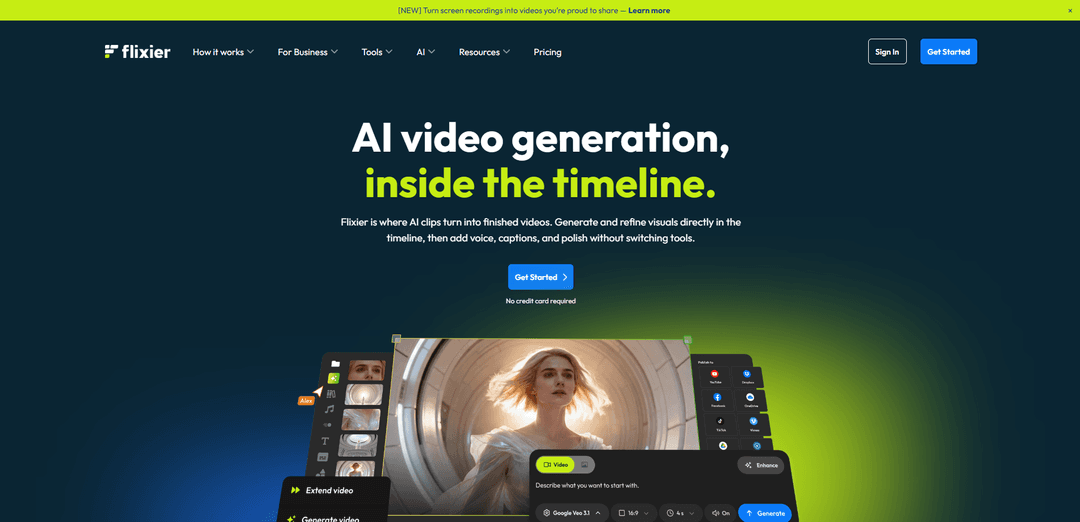
Flixier é um editor de vídeo baseado em navegador e com tecnologia de IA que permite aos usuários gerar, editar e colaborar em vídeos diretamente na linha do tempo, sem downloads ou requisitos de hardware poderosos.
https://flixier.com/?ref=producthunt&utm_source=aipure
Informações do Produto
Atualizado:Mar 8, 2026
O que é Flixier
Flixier é uma plataforma de edição de vídeo baseada em nuvem que combina recursos de IA com ferramentas de edição de vídeo tradicionais em uma interface baseada em navegador. Ao contrário dos geradores de vídeo de IA típicos, o Flixier oferece um ambiente completo de criação de vídeo onde os usuários podem não apenas gerar conteúdo de vídeo de IA, mas também editar, refinar e finalizar vídeos profissionais, tudo em um só lugar. A plataforma foi projetada para criadores de conteúdo, profissionais de marketing, educadores e empresas que precisam criar vídeos de alta qualidade de forma eficiente, sem hardware especializado ou instalações de software.
Principais Recursos do Flixier
Flixier é um editor de vídeo baseado em navegador e com tecnologia de IA que combina recursos de geração e edição de vídeo em uma única plataforma. Ele oferece processamento baseado em nuvem, colaboração em tempo real e recursos de IA, como geração de vídeo, criação de narração, geração de legendas e tradução. Os usuários podem editar vídeos diretamente em seus navegadores, sem downloads, acessar seus projetos de qualquer dispositivo e utilizar recursos avançados, como tela verde, gravação de tela e geração automática de legendas em vários idiomas.
Geração de Vídeo com Tecnologia de IA: Gere conteúdo de vídeo diretamente na linha do tempo a partir de prompts de texto ou imagens, com vários modelos de IA disponíveis para diferentes estilos visuais
Processamento Baseado em Nuvem: Edite e renderize vídeos inteiramente no navegador com processamento em nuvem, permitindo exportações rápidas, independentemente dos recursos de hardware local
Colaboração em Tempo Real: Vários membros da equipe podem trabalhar no mesmo projeto simultaneamente, deixar comentários e compartilhar projetos por meio de links, sem transferências de arquivos
Suporte a Vários Idiomas: Gere e traduza automaticamente legendas em mais de 130 idiomas, com recursos de texto para fala de IA em 30 idiomas
Casos de Uso do Flixier
Criação de Conteúdo para Mídias Sociais: Crie e edite vídeos para plataformas como TikTok, Instagram Reels e YouTube Shorts com proporções e formatação adequadas
Treinamento Corporativo: Desenvolva vídeos de integração de funcionários, treinamento de conformidade e demonstração de produtos com ferramentas de edição profissional e recursos de colaboração
Conteúdo Educacional: Crie materiais de cursos online, vídeos tutoriais e conteúdo educacional com gravação de tela e geração automática de legendas
Vantagens
Nenhuma instalação de software necessária - funciona inteiramente no navegador
Renderização rápida por meio de processamento em nuvem
Extensos recursos de IA para geração e edição de vídeo
Recursos colaborativos para projetos de equipe
Desvantagens
Requer conexão de internet estável
Recursos limitados no plano gratuito
O processo de upload pode ser demorado
Preços mais altos em comparação com alguns concorrentes
Como Usar o Flixier
Inscrever-se/Login: Acesse o site do Flixier e crie uma conta ou faça login usando sua conta do Google. Nenhuma instalação de software é necessária, pois ele é executado no navegador.
Criar Novo Projeto: Clique em 'Novo Projeto' ou 'Começar' para iniciar. Selecione o formato de vídeo desejado (widescreen, social, quadrado ou retrato).
Importar Mídia: Importe seus arquivos de mídia através do painel da biblioteca à esquerda. Você pode fazer upload do seu dispositivo, armazenamento em nuvem (Google Drive, Dropbox) ou importar diretamente do YouTube, Twitch, SoundCloud usando links.
Adicionar Conteúdo à Linha do Tempo: Arraste e solte sua mídia (videoclipes, imagens, áudio) da biblioteca para a linha do tempo na parte inferior da tela. Você pode mover e organizar clipes livremente na linha do tempo.
Edição Básica: Use a linha do tempo para cortar, dividir ou reorganizar segmentos de vídeo. Você também pode ajustar a velocidade do vídeo, adicionar transições entre clipes e modificar as propriedades de clipes individuais.
Adicionar Elementos: Use a barra lateral esquerda para adicionar texto, legendas, transições, filtros, sobreposições, mídia de estoque e outros elementos para aprimorar seu vídeo. Arraste os elementos desejados para a linha do tempo.
Usar Ferramentas de IA (Opcional): Acesse recursos de IA como legendas automáticas, aprimoramento de áudio, geração de voz, tradução de vídeo através da seção de ferramentas de IA para aprimorar seu conteúdo.
Visualizar e Ajustar: Use a janela de visualização para revisar suas edições em tempo real. Faça os ajustes necessários no tempo, efeitos ou elementos.
Exportar Vídeo: Clique no botão de exportação quando terminar. Escolha suas configurações de exportação desejadas (resolução, formato) e destino (download, plataformas de mídia social ou armazenamento em nuvem).
Perguntas Frequentes do Flixier
Flixier é um editor de vídeo com tecnologia de IA que funciona inteiramente no seu navegador, sem necessidade de downloads ou instalações. Ele usa tecnologia baseada na nuvem para lidar com o processamento, permitindo que os usuários criem vídeos profissionais, mesmo em dispositivos de baixa especificação.
Vídeo do Flixier
Artigos Populares

Atoms: Uma Plataforma de IA Multiagente Que Transforma Ideias em Produtos Prontos para Lançamento
May 22, 2026

Nano Banana SBTI: O Que É, Como Funciona e Como Usá-lo em 2026
Apr 15, 2026

Análise do Atoms — O Construtor de Produtos de IA Redefinindo a Criação Digital em 2026
Apr 10, 2026

Kilo Claw: Como Implementar e Usar um Verdadeiro Agente de IA "Faça Você Mesmo" (Atualização de 2026)
Apr 3, 2026
Ferramentas de IA Mais Recentes Semelhantes a Flixier

EzVideos
EzVideos é uma ferramenta de criação de vídeos tudo-em-um que ajuda os usuários a gerar vídeos virais para plataformas de mídia social como Instagram, TikTok e YouTube com recursos de edição automatizados e recursos integrados.

Blanc AI
Blanc AI é uma solução de IA revolucionária que permite a tradução e dublagem de conteúdo em vídeo em mais de 47 idiomas, preservando a voz original, emoções e sincronização labial.

Wink Mody
Wink Mody é uma versão modificada do aplicativo de edição de vídeo Wink que oferece recursos premium como retoque impulsionado por IA, exportações em 4K e edição sem marcas d'água completamente grátis.

Shortmake AI
ShortMake é uma plataforma de criação de vídeos impulsionada por IA que transforma ideias em vídeos prontos para viralização, gerando automaticamente roteiros, narrações, visuais e legendas especificamente otimizados para plataformas como TikTok e YouTube Shorts.
Ferramentas de IA Populares Como Flixier

AI Clips - New Gen
AI Clips - New Gen é uma ferramenta de clipping de vídeo impulsionada por IA que gera automaticamente conteúdo curto envolvente a partir de vídeos longos para várias plataformas de mídia social como YouTube Shorts, TikTok, Instagram Reels e mais.

Edit Mind
Edit Mind é uma plataforma de indexação de vídeo e pesquisa semântica de código aberto, alimentada por IA, que permite aos usuários analisar e pesquisar conteúdo de vídeo usando consultas em linguagem natural, com recursos incluindo transcrição, análise de quadros, reconhecimento facial e detecção de objetos.

Dinamo Notebook
FreeAI Video Editing
O Dinamo Notebook é uma extensão de navegador gratuita, com licença MIT e local-first para análise de vídeo de futebol que permite desenhar anotações táticas em filmagens do YouTube/Dailymotion/Twitch e, opcionalmente, usar IA (com a sua própria chave de API OpenAI) para obter informações táticas.

MediaSeg
MediaSeg é um utilitário macOS estável e local que divide grandes arquivos de mídia MP4/WEBM em blocos prontos para upload sob um limite de tamanho configurável, preservando a qualidade usando ffmpeg/ffprobe e uma estratégia de dimensionamento baseada em destino assistida por IA.