
Fathom
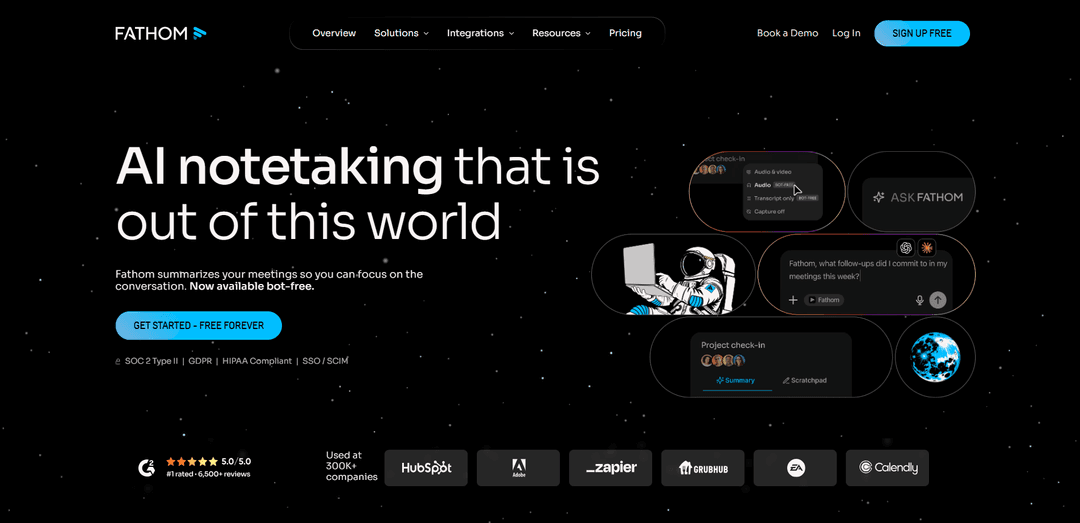
Fathom is an AI-powered meeting notetaker that automatically records, transcribes, summarizes, and extracts action items from virtual meetings across Zoom, Google Meet, and Microsoft Teams.
https://www.fathom.ai/?utm_campaign=directories&utm_source=aipure&utm_medium=referral&utm_content=mainlisting&ref=producthunt
Product Information
Updated:Apr 16, 2026
What is Fathom
Fathom is a comprehensive AI meeting assistant designed to eliminate the administrative burden of note-taking and meeting documentation. Available as both a desktop application and bot-free option, Fathom integrates seamlessly with popular video conferencing platforms including Zoom, Google Meet, and Microsoft Teams. The platform serves individuals, teams, and enterprises by automatically capturing meeting conversations, generating accurate transcripts, creating instant AI summaries, and identifying action items. Used by over 300,000 companies, Fathom offers a generous free plan with unlimited recordings and transcripts, while premium plans starting at $20/month unlock advanced features like the 'Ask Fathom' conversational assistant and deeper CRM integrations with tools like Salesforce, HubSpot, Slack, Notion, and Asana.
Key Features of Fathom
Fathom is an AI-powered meeting assistant that automatically records, transcribes, and summarizes video calls across Zoom, Google Meet, and Microsoft Teams. It offers unlimited free recording and transcription with AI-generated summaries, action items, and highlights delivered instantly after calls. Key capabilities include 'Ask Fathom' for searching across all meetings, customizable summary templates for different meeting types, automatic CRM integration with Salesforce and HubSpot, AI Scorecards for coaching and performance tracking, and bot-free meeting capture options. The platform serves as a shared source of truth for teams, enabling searchable conversation archives, clip sharing, and workflow automation through integrations with tools like Slack, Asana, and Notion.
AI-Powered Transcription & Summaries: Delivers 85-90% transcription accuracy with support for multiple speakers, accents, and overlapping dialogue. Generates instant AI summaries with action items and key points delivered to your inbox the moment calls end.
Ask Fathom - Conversational AI Search: ChatGPT-like interface that allows users to search and query across all recorded meetings, instantly retrieving answers, insights, direct quotes, and specific moments without manually reviewing transcripts or recordings.
Customizable Summary Templates: Offers 14-17 templates designed for different meeting types including sales calls, customer success check-ins, stand-ups, and strategy sessions, structuring AI summaries to fit specific workflow needs and priorities.
AI Scorecards & Coaching: Automatically grades calls against configurable scorecards, generating time-stamped coaching notes that help managers identify coachable moments and track team performance with consistent feedback loops.
Automatic CRM & Tool Integration: Seamlessly syncs meeting notes, summaries, and action items with Salesforce, HubSpot, Slack, Asana, Notion, and other tools through native integrations and public API, eliminating manual data entry.
Clips & Playlists: Enables users to create, organize, and share AI-generated meeting clips and highlights across team recordings, making it easy to surface key moments and distribute important conversations to stakeholders.
Use Cases of Fathom
Sales & Customer Success Teams: Captures customer conversations, automatically updates CRM records, tracks engagement metrics, and uses AI Scorecards to coach sales reps on performance, helping teams close deals faster while reducing post-call admin work.
Product & Engineering Teams: Tracks and synthesizes feature requests from user interviews, monitors customer satisfaction patterns, and builds searchable repositories of user feedback to inform product roadmaps and prioritize features that matter most.
HR & Talent Acquisition: Streamlines interview processes by recording and evaluating candidates consistently, identifies patterns that predict success, and creates highlight playlists for onboarding new employees with key information and context.
Marketing Teams: Captures insights from customer interviews and brainstorming sessions, spots trending feedback and sentiment changes, and harvests valuable content ideas from conversations for campaigns and content strategy.
Operations & Project Management: Tracks decisions and commitments across internal syncs and strategy calls, generates clear action items from every conversation, and maintains visibility of project status to ensure consistent follow-through.
Consulting & Client Services: Enables consultants to stay fully present in client meetings while capturing every detail, pulls direct quotes for proposals and follow-up documents, and maintains accurate records of client requirements and commitments.
Pros
Completely free plan with unlimited recordings, transcriptions, and basic AI summaries - among the most generous free tiers in the market
High transcription accuracy (85-90%) with strong performance on non-native accents and multiple speakers
Saves significant time with users reporting 6+ hours saved per week and 38 minutes saved per meeting on average
Strong security and compliance with SOC2 Type II, GDPR, and HIPAA certifications making it suitable for sensitive business conversations
Cons
AI summaries don't always know what to emphasize, requiring more manual editing in roles where subtlety and nuance matter
Limited data export diversity compared to competitors like Fireflies.ai which offers more format options (CSV, JSON, MD)
Some advanced features like AI Scorecards and coaching tools are playing catch-up to competitors like tl;dv rather than breaking new ground
Transcription accuracy, while solid, is not as high as some competitors like Fellow or MeetGeek in certain testing conditions
How to Use Fathom
1. Create Your Account: Go to fathom.ai to sign up. Fathom uses single sign-on (SSO), so you can log in with your Google email address or Microsoft account. Note that Fathom requires company email addresses for new users who don't meet certain activity thresholds. The signup process only takes a minute.
2. Connect Your Calendar: After signing up, connect your Google or Microsoft calendar to Fathom. This allows Fathom to automatically detect your scheduled meetings and join them. Fathom looks for meetings with Zoom, Google Meet, or Microsoft Teams links in the location field.
3. Download the Desktop App: Download the Fathom Desktop App from https://fathom.video/download. The Desktop App unlocks the full power of Fathom, especially when you're not the meeting host. It's available for both Windows and Mac. Even if you plan to use the Zoom app or Chrome extension, the Desktop App is recommended.
4. Optimize Your Settings: Go to the settings menu and configure your preferences. You can decide if you want Fathom to auto-join and record all your internal or external meetings. You can also edit the name of your bot that appears in meetings.
5. Install Platform-Specific Extensions (Optional): For Google Meet, install the Fathom Chrome extension to get recording controls embedded directly in Google Meet. For Zoom, you can install the Fathom Zoom app to record directly within Zoom. Note: Starting March 2, 2026, all Fathom users must connect their Zoom account for Fathom to join Zoom calls.
6. Join Your Meeting: When your meeting starts, Fathom will automatically join (if auto-join is enabled) or you can manually start it from the Desktop App. The Fathom AI notetaker begins recording and taking notes in real-time. You can stay focused on the conversation without worrying about taking notes.
7. Highlight Key Moments During the Call: During the meeting, click the 'Highlight' button to mark important points such as big decisions, action items, or key tasks. This helps the AI understand what matters most for your follow-up and ensures these moments are easily accessible later.
8. Access Your Auto-Generated Summaries: After the call ends, Fathom instantly generates call summaries, transcripts, and action items. These are delivered straight to your inbox. Go to your dashboard and click on the video recording you want to review. You can quickly jump between different calls from various platforms.
9. Use 'Ask Fathom' to Search and Query: Use the 'Ask Fathom' feature to search across all your meetings or ask specific questions about past conversations. The AI will scan the text and provide answers right away, helping you find information without manually reviewing entire transcripts.
10. Share and Integrate with Your Tools: Copy your summaries and notes into Google Docs, Notion, or Word with a single click. Sync meeting notes directly to your CRM (Salesforce, HubSpot), project management tools (Asana), or communication platforms (Slack). You can also share specific highlights or recordings with team members or clients for follow-up.
11. Organize with Playlists and Clips: Create playlists to collect, organize, and share AI-generated meeting clips and key moments across your team's recordings. This is useful for training, onboarding, or sharing customer feedback patterns.
12. Upgrade for Advanced Features (Optional): The free plan offers unlimited recordings and transcripts with instant AI summaries. To access advanced features like customizable summary templates, AI-generated action items, AI Scorecards for coaching, and CRM field sync, consider upgrading to Premium ($20/month), Team ($18/user/month), or Business ($25/user/month) plans.
Fathom FAQs
Fathom is an AI notetaker that records, transcribes, and summarizes your meetings across Zoom, Google Meet, and Microsoft Teams. It captures every detail so you can stay fully present in conversations without worrying about taking notes.
Fathom Video
Popular Articles

Vosko AI: Localize and Dub Videos for Global Audiences
Oct 14, 2026

Atoms: A Multi-Agent AI Platform That Transforms Ideas into Launch-Ready Products
Oct 13, 2026

Nano Banana SBTI: What It Is, How It Works, and How to Use It in 2026
Apr 15, 2026

Atoms Review — The AI Product Builder Redefining Digital Creation in 2026
Apr 10, 2026
Latest AI Tools Similar to Fathom

Ticknotes
Ticknotes is an AI-powered meeting assistant that automatically records, transcribes, and generates personalized meeting summaries, action items, and key insights from audio, video, and text content.

Feta
Feta is an AI-powered meeting tool that helps product and engineering teams run efficient meetings by capturing discussions, automating tasks, and providing actionable insights through smart summaries and integrations.

Aimeet
Aimeet is a comprehensive AI-powered communication platform that combines real-time translation, transcription, screen sharing, and unlimited meeting capabilities for effective virtual collaboration.

MinutesLink
MinutesLink is an advanced AI-powered note-taking assistant that automatically records, transcribes, summarizes and organizes virtual meetings while building personalized digital avatars from meeting data.
Popular AI Tools Like Fathom

Second Brain for AI
Second Brain for AI is a self-hosted, MCP-compatible persistent memory layer on Cloudflare that lets Claude, ChatGPT, Cursor, and other AI clients store and semantically recall shared context across sessions.

Slack
Slack is an AI-powered work platform that brings team communication, channels, files, automation, and app integrations into one conversational workspace.

24me Smart Personal Assistant
24me is an award-winning smart personal assistant app that combines calendar, to-do lists, notes, and personal accounts in one unified platform to help boost productivity and time management.

Granola for iOS
Granola for iOS is an AI-powered notepad app that helps users effortlessly capture, transcribe and summarize meeting conversations through intelligent note-taking and one-tap recording capabilities.