
Elvin
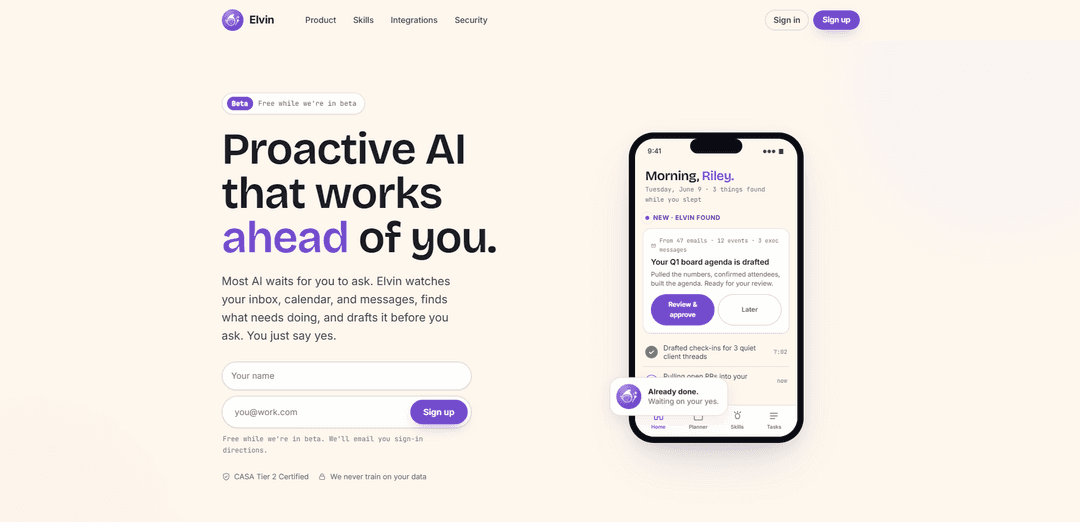
Elvin is a proactive AI for professionals that monitors your inbox, calendar, and messages to draft and deliver finished work products (docs, decks, spreadsheets) before you ask, with approval-based actions and strong security commitments.
https://www.tryelvin.com/?ref=producthunt
Product Information
Updated:Jul 8, 2026
What is Elvin
Elvin is a proprietary “proactive AI” product built for professionals who are overwhelmed by coordination work across email, chat, and meetings. Instead of waiting for prompts, it looks for open loops—like upcoming meetings, overdue follow-ups, quiet client threads, or slipping projects—and prepares the work in advance so you can review and approve. Elvin is currently in private beta (free during beta) and is designed to reduce cognitive load by keeping your to-do list, inbox, and calendar moving forward with less manual effort.
Key Features of Elvin
Elvin is a proactive AI assistant for professionals that connects to your inbox, calendar, and work tools to detect upcoming obligations and “open loops,” then drafts the work before you ask—emails, agendas, status updates, briefs, and even finished files like docs, decks, and spreadsheets. It runs in a cloud sandbox, asks for approval before taking sensitive actions, learns your preferences over time, and offers a library of role-based “Skills” that can be turned on and customized to automate recurring coordination work with minimal setup.
Proactive work detection: Monitors connected sources (email, calendar, messages) to spot follow-ups, meeting prep, overdue items, and slipping projects—then prepares drafts and plans ahead of time.
Finished-file output via cloud computer use: Produces ready-to-use artifacts (formatted documents, decks, spreadsheets with formulas, charts) rather than just instructions or raw text.
One-click Skills library (role-based workflows): Includes pre-built workflows for common roles (e.g., product managers, consultants, founders, engineering managers, investors) like Meeting Prep, Stakeholder Updates, Inbox Zero, and Due Diligence, with the ability to save and reuse custom Skills.
Approval-first automation: Drafts and prepares actions, then waits for your “yes” before sending messages or taking sensitive steps—reducing risk while still saving time.
Low-friction setup and personalization: Works soon after connecting accounts (minimal configuration) and adapts to your style preferences (e.g., concise replies, no sign-off) over time.
Multi-surface access (where you work): Available across web and mobile, and usable through Telegram and SMS for quick task capture, briefings, and approvals on the go.
Use Cases of Elvin
Executive/leadership meeting prep: Detects upcoming board or leadership meetings, pulls context from emails and calendar activity, drafts agendas/briefs, confirms attendees, and prepares materials for review and sending.
Product management stakeholder updates: Identifies scope changes and recent decisions from tools and messages, then drafts concise sprint or stakeholder updates in the user’s voice before standups or weekly syncs.
Consulting client follow-ups: Surfaces quiet client threads and drafts check-ins to keep engagements moving, helping consultants maintain responsiveness across many parallel conversations.
Fundraising and investor relations: Aggregates active investor threads, drafts replies and updates, and helps keep the “raise” warm by ensuring timely follow-through on requests and inbound interest.
Engineering management project health: Reviews project signals (e.g., open PRs, stalled work) to flag blockers and at-risk items, enabling earlier intervention before issues become incidents.
Venture investing deal processing: For inbound pitches, researches companies and founders and produces deal briefs; supports due diligence by compiling financials, competitive landscape, and key risks into a reviewable summary.
Pros
Proactive approach reduces cognitive load by finding and drafting work before you remember to ask
Delivers tangible outputs (docs/decks/sheets) instead of only chat responses, speeding real workflows
Minimal setup with reusable Skills tailored to common professional roles
Emphasizes safety with sandboxed operation, permissioning, and approval before sensitive actions (plus stated “never train on your data”)
Cons
Requires broad access to inbox/calendar/tools to be most effective, which may be a barrier for some users or organizations
Some value depends on integration coverage and quality across a user’s existing toolchain
Currently in private beta, which may limit availability and maturity of features/support
How to Use Elvin
1. Sign up for Elvin (beta): Go to https://www.tryelvin.com/ and create an account. Elvin is free while in beta.
2. Connect your work accounts: Link the accounts Elvin uses to work ahead of you (e.g., Gmail/Google Calendar or Outlook/Teams, plus tools like Google Drive/Docs/Sheets/Slides, Notion, Linear, Slack, and optionally CRMs like HubSpot/Salesforce). Setup is designed to take about a minute and requires no custom agent-building.
3. Let Elvin scan for “what needs doing”: Once connected, Elvin reviews your inbox, calendar, and messages to surface open loops (follow-ups, meeting prep, overdue invoices, quiet threads) and drafts the work before you ask.
4. Open your Home/Planner view to review what Elvin prepared: Check Elvin’s surfaced items and drafts (e.g., a drafted board agenda, drafted client check-ins, a project health check, or a daily plan) that are waiting for your review.
5. Review, edit, and approve drafts: Elvin produces ready-to-use outputs (emails, briefs, agendas, status updates). You can edit them, then approve when they match your intent.
6. Send or execute—Elvin acts after your yes: After approval, Elvin can send messages or complete the next step. Elvin is designed to avoid taking sensitive actions without explicit approval.
7. Use “computer use” to get finished files (not just text): Ask Elvin to produce deliverables like formatted documents, decks, spreadsheets with formulas, or charts—so you receive a finished artifact you can paste into tools like Notion.
8. Turn on prebuilt Skills for your role: Enable Skills from Elvin’s library (examples shown: Meeting Prep, Stakeholder Update, Inbox Zero, Follow-Up, Weekly Deal Flow, Due Diligence). Skills run at the right moment and bring results back for approval.
9. Customize how Elvin writes and works (teach it once): Tell Elvin your preferences (e.g., keep follow-ups under three sentences, skip sign-offs). Over time, Elvin adapts so future drafts match your style without repeated prompting.
10. Create your own Skill from a workflow you like: Describe what you want Elvin to do; it builds a plan. If you like the result, save it as a named Skill and set how often it should run.
11. Accept proactive automation suggestions: When Elvin notices repeated routines (e.g., writing a Monday status update from meeting notes), it may offer to take over. Approve once to let it handle that workflow going forward.
12. Get a Daily Briefing: Use Elvin’s daily plan/briefing to start your day: it reads your calendar, inbox, and priorities and prepares a plan you can read (or listen to) before you begin work.
13. Use Elvin wherever you are (web, mobile, SMS/Telegram): Interact with Elvin via web, iPhone/Android apps, and directly through Telegram or text messages. You can message it like a coworker to kick off tasks and receive drafts in the same thread.
14. Use voice-to-text to delegate on the go: Example shown: “Hey Siri, text Elvin, put together a competitive intelligence deck.” Elvin starts the work and returns a draft by the time you’re back at your desk.
15. Keep trust & safety in mind while using it: Elvin positions itself as sandboxed and permissioned, asks before acting on sensitive steps, and states it does not train on your data (with CASA Tier 2 certification and SOC 2 in progress per the site).
Elvin FAQs
Elvin is a proactive AI assistant that works ahead of you by monitoring connected inbox, calendar, and messages to find what needs doing and draft the work before you ask—then you review and approve.
Popular Articles

Vosko AI: Localize and Dub Videos for Global Audiences
Oct 15, 2026

Atoms: A Multi-Agent AI Platform That Transforms Ideas into Launch-Ready Products
Oct 13, 2026

Nano Banana SBTI: What It Is, How It Works, and How to Use It in 2026
Apr 15, 2026

Atoms Review — The AI Product Builder Redefining Digital Creation in 2026
Apr 10, 2026
Latest AI Tools Similar to Elvin

Ticknotes
Ticknotes is an AI-powered meeting assistant that automatically records, transcribes, and generates personalized meeting summaries, action items, and key insights from audio, video, and text content.

Feta
Feta is an AI-powered meeting tool that helps product and engineering teams run efficient meetings by capturing discussions, automating tasks, and providing actionable insights through smart summaries and integrations.

Aimeet
Aimeet is a comprehensive AI-powered communication platform that combines real-time translation, transcription, screen sharing, and unlimited meeting capabilities for effective virtual collaboration.

MinutesLink
MinutesLink is an advanced AI-powered note-taking assistant that automatically records, transcribes, summarizes and organizes virtual meetings while building personalized digital avatars from meeting data.
Popular AI Tools Like Elvin

Second Brain for AI
Second Brain for AI is a self-hosted, MCP-compatible persistent memory layer on Cloudflare that lets Claude, ChatGPT, Cursor, and other AI clients store and semantically recall shared context across sessions.

Slack
Slack is an AI-powered work platform that brings team communication, channels, files, automation, and app integrations into one conversational workspace.

24me Smart Personal Assistant
24me is an award-winning smart personal assistant app that combines calendar, to-do lists, notes, and personal accounts in one unified platform to help boost productivity and time management.

Granola for iOS
Granola for iOS is an AI-powered notepad app that helps users effortlessly capture, transcribe and summarize meeting conversations through intelligent note-taking and one-tap recording capabilities.