
CodeGuide
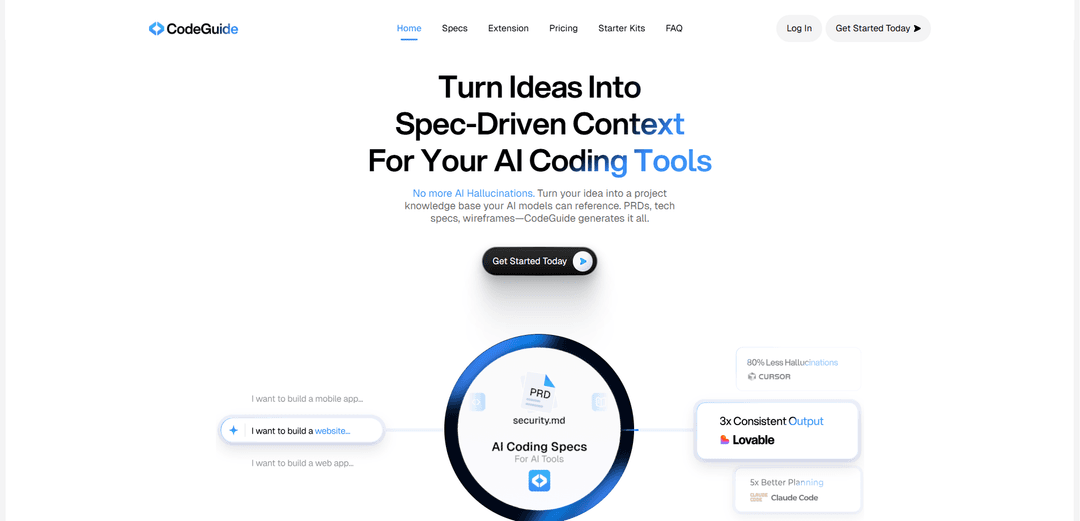
CodeGuide is an AI-powered documentation tool that streamlines software development by generating comprehensive project specifications and providing context for AI coding tools to reduce hallucinations and improve code quality.
https://www.codeguide.dev/?ref=producthunt
Product Information
Updated:Mar 15, 2026
What is CodeGuide
CodeGuide is a specialized platform designed to bridge the gap between human ideas and AI coding tools. It serves as a project knowledge base generator that transforms plain English descriptions into detailed technical documentation, including Product Requirements Documents (PRDs), tech stacks, architecture plans, and wireframes. The platform is built specifically for developers, founders, agencies and teams who want to leverage AI coding tools more effectively by providing them with proper context and specifications upfront. CodeGuide integrates with major AI coding tools like Cursor, Claude Code, GitHub Copilot, Bolt, Lovable, and others to ensure consistent and accurate code generation.
Key Features of CodeGuide
CodeGuide is an AI-powered documentation and specification generation tool that helps developers create comprehensive project documentation for AI coding projects. It automates the creation of Product Requirements Documents (PRDs), workflows, and prompts, while providing integration with various AI coding tools like Cursor, Claude Code, and GitHub Copilot. The platform aims to reduce AI hallucinations and improve code quality by providing clear context and specifications upfront.
AI Documentation Generation: Automatically generates complete documentation including PRDs, tech stacks, wireframes and architecture specs from plain English project descriptions
Multi-Tool Integration: Seamlessly integrates with major AI coding tools like Cursor, Claude Code, GitHub Copilot and others through Chrome extension and direct connections
Existing Codebase Analysis: Can analyze existing GitHub repositories to generate documentation and provide context for AI tools working with legacy code
Starter Kit Templates: Provides pre-configured boilerplate templates optimized for AI coding with authentication, database and other common features built-in
Use Cases of CodeGuide
Startup MVP Development: Helps founders quickly turn ideas into MVPs by generating comprehensive specs that AI tools can use to build working products faster
Enterprise Legacy Code Management: Assists large organizations in documenting and maintaining existing codebases by generating clear specifications for AI tools
Agency Client Projects: Enables agencies to maintain consistent documentation across different client projects while accelerating development with AI tools
Team Collaboration: Provides teams with a shared knowledge base and specifications to ensure everyone works from the same blueprint
Pros
Significantly reduces development time by providing clear context to AI tools
Minimizes AI hallucinations and coding errors through comprehensive specifications
Integrates with multiple popular AI coding tools through various methods
Cons
Requires monthly subscription for full features
Some features may be oriented specifically towards AI coding projects, limiting general use
Learning curve for optimal usage of all features and integrations
How to Use CodeGuide
Sign Up: Go to app.codeguide.dev and sign up with your Google account for instant access to the CodeGuide dashboard
Create New Project: Click 'Create a new project' and describe your project idea and core functionality in plain English
Select AI Tool: Choose which AI coding tool you plan to use (Cursor, Claude Code, GitHub Copilot etc.) as CodeGuide supports all major AI coding tools
Answer Questions: Answer a few clarifying questions about your project requirements and specifications to help CodeGuide generate comprehensive documentation
Review Generated Documentation: Review the automatically generated documentation package which includes PRDs, tech stack recommendations, wireframes, architecture plans and task lists
Connect Documentation to AI Tool: Use one command or the Chrome extension to attach your generated specs directly to your chosen AI coding tool as a knowledge base
Optional: Import Existing Project: For existing projects, you can import your GitHub repository to generate documentation and make it AI-native for future development
Start Development: Begin coding with your AI tool which now has full context of your project through the CodeGuide documentation
Iterate and Refine: Use CodeGuide to generate additional documentation as needed when adding new features or making changes to your project
CodeGuide FAQs
CodeGuide is a tool that translates your project ideas into comprehensive documentation and specifications for AI coding tools. It creates a complete project blueprint including features, tech stack, architecture, database, screens, and task lists that can be directly used with AI coding tools like Cursor, Claude Code, and Lovable.
Popular Articles

Atoms: A Multi-Agent AI Platform That Transforms Ideas into Launch-Ready Products
May 22, 2026

Nano Banana SBTI: What It Is, How It Works, and How to Use It in 2026
Apr 15, 2026

Atoms Review — The AI Product Builder Redefining Digital Creation in 2026
Apr 10, 2026

Kilo Claw: How to Deploy and Use a True "Do‑It‑For‑You" AI Agent(2026 Update)
Apr 3, 2026
Latest AI Tools Similar to CodeGuide

Gait
Gait is a collaboration tool that integrates AI-assisted code generation with version control, enabling teams to track, understand, and share AI-generated code context efficiently.

invoices.dev
invoices.dev is an automated invoicing platform that generates invoices directly from developers' Git commits, with integration capabilities for GitHub, Slack, Linear, and Google services.

EasyRFP
EasyRFP is an AI-powered edge computing toolkit that streamlines RFP (Request for Proposal) responses and enables real-time field phenotyping through deep learning technology.

Cart.ai
Cart.ai is an AI-powered service platform that provides comprehensive business automation solutions including coding, customer relations management, video editing, e-commerce setup, and custom AI development with 24/7 support.
Popular AI Tools Like CodeGuide

GitHub Copilot Chat
GitHub Copilot Chat is an AI-powered coding assistant that provides natural language interactions, real-time code suggestions, and contextual support directly within supported IDEs and GitHub.com.

CopilotForXcode
CopilotForXcode is an Xcode Source Editor Extension that integrates GitHub Copilot, Codeium, and ChatGPT to provide AI-powered code suggestions, chat assistance, and prompt-to-code functionality within Xcode.

BrowserAI
BrowserAI is an open-source library that enables running local Large Language Models (LLMs) directly in web browsers with WebGPU acceleration, offering privacy-focused AI capabilities without requiring server infrastructure.

OpenAI Codex CLI
OpenAI Codex CLI is a lightweight, open-source coding agent that runs in your terminal, enabling developers to translate natural language into code execution while providing ChatGPT-level reasoning with the ability to run code, manipulate files, and iterate under version control.