
box
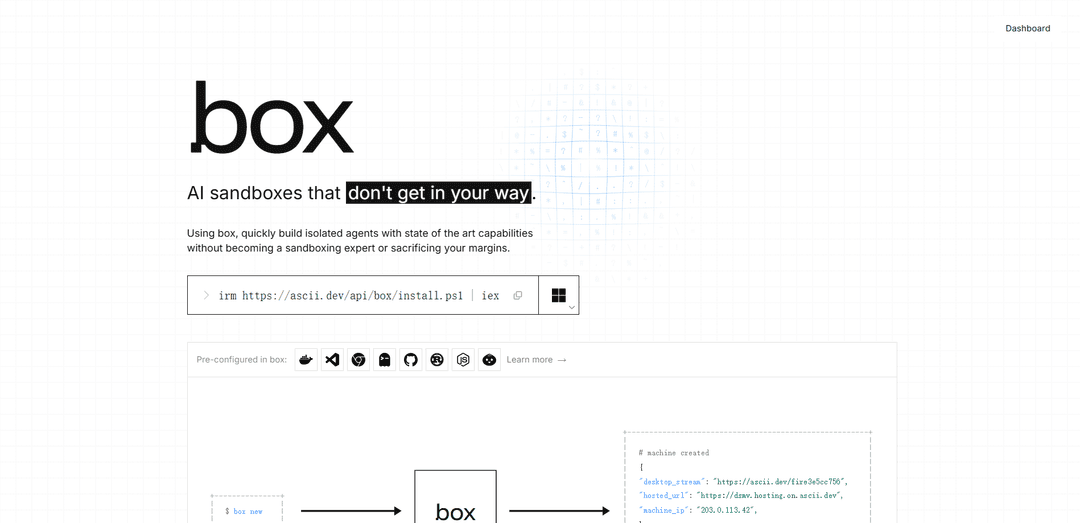
ASCII'den box, SSH/SCP, VM içinde Docker, özel IPv4, anlık görüntü/çatallama iş akışları, 60fps masaüstü ve saniye başına faturalandırma (aylık 20$ minimum ile) ile AI aracıları için oluşturulmuş kalıcı Ubuntu VM'ler sağlar.
https://box.ascii.dev/?ref=producthunt&utm_source=aipure
Ürün Bilgisi
Güncellendi:Aug 8, 2026
box Nedir
box (box.ascii.dev), kısıtlı geçici sanal alanlar yerine tam Linux makinelerinde uzun süreli, durum bilgisi olan aracı iş yüklerini çalıştırmak için tasarlanmış ASCII'den bir bulut sanal alan ürünüdür. Her "kutu", SSH ve SCP aracılığıyla erişebileceğiniz, içinde Docker çalıştırabileceğiniz ve hatta yüksek kare hızlı bir sanal masaüstü aracılığıyla kullanabileceğiniz kalıcı bir Ubuntu sanal makinesidir. Kutular, yaygın geliştirici araçlarıyla (örn. Docker, VS Code, Chrome, GitHub CLI, Rust, Node.js, Bun) önceden yapılandırılmış olarak gelir, böylece tercih ettiğiniz aracı araçlarını (Claude Code, Codex veya OpenCode gibi) getirebilir ve kendi sanal alan yığınınızı oluşturmadan hızlı bir şekilde başlayabilirsiniz.
box Temel Özellikleri
box (ASCII tarafından), yapay zeka ajanları ve otomasyon için sanal alanlar olarak tasarlanmış kalıcı Ubuntu sanal makineleri sağlar. Her kutu SSH/SCP erişimi, VM içinde Docker, özel bir IPv4 adresi, hızlı disk düzeyinde çatallanma ile anlık görüntü alma ve isteğe bağlı 60 fps sanal masaüstü desteği sunar. Yaygın geliştirici araçları ve dilleri (örn. Docker, VS Code, Chrome, GitHub CLI, Rust, Node.js, Bun) önceden yüklenmiş olarak gelir ve kutular bir CLI (betik oluşturma için JSON çıktısı ile) veya bir HTTP API ve SDK'lar aracılığıyla oluşturulabilir ve yönetilebilir. Fiyatlandırma, çalışırken saniye başına olup, faturalandırmayı duraklatmak için durdurma/devam ettirme anlık görüntüleme özelliği bulunur ve birçok kutuda kullanılabilen bir VM-saniye havuzuna dönüşen basit bir aylık 20 dolarlık minimum ücret uygulanır.
Ajanlar için Kalıcı Ubuntu VM'ler: Her kutu, durdurma/devam ettirme arasında dosya sistemi durumunu koruyan tam bir Linux makinesidir (Ubuntu), ortamları yeniden oluşturmadan uzun süreli veya durum bilgisi olan ajan iş akışlarını mümkün kılar.
SSH/SCP + VM içinde Docker: Standart SSH/SCP ile bağlanın ve VM içinde Docker çalıştırın, böylece tipik devops iş akışları, kapsayıcılı araç zincirleri ve mevcut otomasyon betikleriyle uyumlu hale gelir.
Anlık Görüntüler ve Hızlı Çatallanma: Bir kutuyu anlık görüntülemek için durdurun (faturalandırmayı duraklatır), ardından hızlıca devam ettirin; paralel görevler veya tekrarlanabilir çalıştırmalar için ortamları verimli bir şekilde klonlamak için anlık görüntülerden çatallayın.
Makine Başına Özel IPv4: Her kutu kendi IPv4 adresini içerir, hizmetler, geri aramalar/webhook'lar ve kararlı adresleme gerektiren entegrasyon testleri için ağ iletişimini basitleştirir.
Önceden Yüklenmiş Geliştirici Araçları ve Diller: Docker, VS Code, Chrome, Ghostty, GitHub CLI, Rust, Node.js ve Bun gibi araçlarla hazır gelir, ajan veya geliştirici ortamları için kurulum süresini azaltır.
CLI, API ve SDK Otomasyonu: Betik oluşturma için `--json` ile `box new`, `box ssh`, `box fork`, `box stop` vb. komutları kullanın veya ürün düzeyinde orkestrasyon için HTTP API ve Python/TypeScript SDK'ları aracılığıyla doğrudan entegre edin.
box Kullanım Alanları
Ajan fabrikaları ve uzun süreli asistanlar: Devam eden görevler için proje dosyalarını ve yüklü bağımlılıkları koruyarak, anlık görüntülerle durdurulup/devam ettirilebilen dayanıklı, durum bilgisi olan ajan çalışanları çalıştırın.
Mühendislik ekipleri için CI/otomasyon çalışanları: İş veya dal başına izole VM'ler oluşturun, Docker tabanlı derlemeler/testler çalıştırın, ardından işlem hatlarını hızlandırmak için altın ortamları anlık görüntüleyin veya çatallayın.
Müşteri iş yükleri için SaaS ürün sanal alanı: Son kullanıcılar için (isteğe bağlı olarak sırlarınızı devralmadan) kutular sağlayın, böylece müşteri özel kodunu, entegrasyonları veya veri işlemeyi güvenli bir şekilde izole bir ortamda çalıştırabilirler.
Tarayıcı tabanlı QA ve web otomasyonu: Gerçek bir tarayıcı ortamına ihtiyaç duyan UI testleri, kazıma veya RPA tarzı iş akışlarını çalıştırmak için dahil edilen Chrome'u ve isteğe bağlı sanal masaüstünü kullanın.
Tekrarlanabilir araştırma ve veri deneyleri: Yapılandırılmış ortamların anlık görüntülerini yakalayın ve paralel deneyler için çatallayın, tutarlı bağımlılıklar sağlayın ve ortam kaymasını azaltın.
Artıları
Birçok kutuda birleştirilmiş VM süresine dönüşen basit bir aylık 20 dolarlık minimum ücretle uygun maliyetli saniye başına faturalandırma
Kalıcı duruma sahip tam VM yetenekleri (Ubuntu + Docker + SSH), gerçek dünya geliştirme/ajan iş yükleri için esneklik sağlar
Hızlı anlık görüntü/durdurma/devam ettirme ve çatallanma, tekrarlanabilir ortamlar ve kolay paralelleştirme sağlar
CLI (`--json`), HTTP API ve Python/TypeScript SDK'ları aracılığıyla otomasyon dostu
Eksileri
Bölge kullanılabilirliği şu anda AB odaklıdır (örn. Almanya, Finlandiya, Fransa), bu da başka yerlerdeki veri yerleşimi veya gecikme ihtiyaçlarına uymayabilir
Varsayılan kutu TTL'si 1 saattir (geçersiz kılınabilir olsa da), gerçekten uzun ömürlü gözetimsiz iş yükleri için dikkat gerektirir
Durdurma/devam ettirme sırasında, elle çalıştırılan işlemler kalıcı olmaz ve yeniden başlatılmalıdır (yalnızca dosyalar/paketler/systemd hizmetleri hayatta kalır)
box Nasıl Kullanılır
1) Box CLI'yi yükleyin: macOS/Linux: `curl -fsSL https://ascii.dev/api/box/install | sh` komutunu çalıştırın. Windows (PowerShell): `irm https://ascii.dev/api/box/install.ps1 | iex` komutunu çalıştırın.
2) Katılımı tamamlayın / kimlik doğrulaması yapın: Kurulumdan sonra, CLI'nin hesabınızda kutular oluşturabilmesi ve yönetebilmesi için istendiğinde CLI'nin katılım/kimlik doğrulama akışını tamamlayın.
3) İlk kutunuzu oluşturun (kalıcı bir Ubuntu VM): Yeni bir kalıcı Ubuntu VM ("kutu") oluşturmak için `box new` komutunu çalıştırın.
4) Kutuları listeleyin ve kullanmak istediğinizi bulun: Hesabınızdaki tüm kutuları görmek ve yeni kutunuzun çalıştığını doğrulamak için `box list` komutunu çalıştırın.
5) SSH üzerinden bağlanın (interaktif terminal): Terminalinizden kutuya bir SSH oturumu açmak için `box ssh` komutunu çalıştırın.
6) SCP ile dosyaları içeri/dışarı kopyalayın: Makineniz ile kutu arasında SCP kullanarak dosya aktarmak için `box scp` komutunu çalıştırın.
7) Bir GUI'ye ihtiyacınız olduğunda yerleşik masaüstünü kullanın: GUI iş akışları için kutunun 60fps sanal masaüstünü açmak için `box desktop` komutunu çalıştırın.
8) Kutunun içinde bir aracı çalıştırın (Claude/Codex): Kutunun içinde Claude veya Codex çalıştırmak için `box prompt` komutunu çalıştırın (gerçek bir VM ortamına ihtiyaç duyan aracı iş akışları için kullanışlıdır).
9) Şimdilik işiniz bittiğinde anlık görüntü alın + faturalandırmayı duraklatın: Kutunun anlık görüntüsünü almak ve faturalandırmayı duraklatmak için `box stop` komutunu çalıştırın; dosyalarınız, yüklü paketleriniz ve etkin systemd hizmetleriniz durdurma/devam ettirme arasında kalıcı olur.
10) Çalışmayı dallandırmak için bir anlık görüntüden bir kutuyu çatallayın: Bilinen bir durumdan paralel ortamlar oluşturabilmek için bir anlık görüntüden bir kutuyu klonlamak için `box fork` komutunu çalıştırın (hızlı disk düzeyinde çatallama).
11) Kararlı JSON çıktısı ile CLI kullanımını otomatikleştirin (isteğe bağlı): Betikleme/otomasyon için kararlı JSONL çıktısı almak üzere herhangi bir CLI komutuna `--json` ekleyin.
12) Ürün/CI entegrasyonları için HTTP API/SDK'ları tercih edin (isteğe bağlı): Box'ı bir ürüne, CI sistemine, barındırılan bir çalışana veya aracı platformuna entegre ediyorsanız, CLI'ye shell komutları göndermek yerine HTTP API ve SDK'ları kullanın: API belgeleri `https://docs.ascii.dev/box/api/v1` adresinde, SDK genel bakışı `https://docs.ascii.dev/box/sdks/overview` adresinde.
box SSS
box, ASCII'nin bir ürünüdür. Bir box, SSH/SCP erişimi, VM içinde Docker desteği, makine başına özel bir IPv4, 60 fps sanal masaüstü ve anlık görüntüden hızlı disk düzeyinde çatallanma ile aracılar için tasarlanmış kalıcı bir Ubuntu (Linux) sanal makinesidir.
box Videosu
Popüler Makaleler

Vosko AI: Küresel Kitleler İçin Videoları Yerelleştirin ve Dublaj Yapın
Oct 15, 2026

Atoms: Fikirleri Lansmana Hazır Ürünlere Dönüştüren Çoklu Ajan Yapay Zeka Platformu
May 22, 2026

Nano Banana SBTI: Nedir, Nasıl Çalışır ve 2026'da Nasıl Kullanılır
Apr 15, 2026

Atoms İncelemesi — 2026'da Dijital Oluşumu Yeniden Tanımlayan Yapay Zeka Ürün Geliştiricisi
Apr 10, 2026
box Benzer En Yeni Yapay Zeka Araçları

Gait
Gait, AI destekli kod üretimini sürüm kontrolü ile entegre eden bir işbirliği aracıdır, ekiplerin AI tarafından üretilen kod bağlamını verimli bir şekilde takip etmelerini, anlamalarını ve paylaşmalarını sağlar.

invoices.dev
invoices.dev, geliştiricilerin Git commit'lerinden doğrudan fatura oluşturan otomatik bir faturalama platformudur; GitHub, Slack, Linear ve Google hizmetleri için entegrasyon yetenekleri vardır.

EasyRFP
EasyRFP, RFP (Teklif Talebi) yanıtlarını kolaylaştıran ve derin öğrenme teknolojisi ile gerçek zamanlı alan fenotipleme sağlayan AI destekli bir kenar bilişim araç takımıdır.

Cart.ai
Cart.ai, kodlama, müşteri ilişkileri yönetimi, video düzenleme, e-ticaret kurulumu ve 24/7 destek ile özel AI geliştirme dahil kapsamlı iş otomasyon çözümleri sunan AI destekli bir hizmet platformudur.
box Gibi Popüler Yapay Zeka Araçları

GitHub Copilot Chat
GitHub Copilot Chat, desteklenen IDE'ler ve GitHub.com içinde doğal dil etkileşimleri, gerçek zamanlı kod önerileri ve bağlamsal destek sağlayan AI destekli bir kodlama asistanıdır.

CopilotForXcode
CopilotForXcode, Xcode içinde AI destekli kod önerileri, sohbet yardımı ve prompt-to-code işlevselliği sağlamak için GitHub Copilot, Codeium ve ChatGPT'yi entegre eden bir Xcode Kaynak Editörü Uzantısıdır.

BrowserAI
BrowserAI, sunucu altyapısı gerektirmeden gizlilik odaklı yapay zeka yetenekleri sunarak, WebGPU hızlandırmasıyla doğrudan web tarayıcılarında yerel Büyük Dil Modellerini (LLM'ler) çalıştırmayı sağlayan açık kaynaklı bir kitaplıktır.

OpenAI Codex CLI
OpenAI Codex CLI, terminalinizde çalışan, geliştiricilerin doğal dili kod yürütmeye çevirmesini sağlayan, kod çalıştırma, dosyaları manipüle etme ve sürüm kontrolü altında yineleme yeteneği ile ChatGPT düzeyinde akıl yürütme sağlayan hafif, açık kaynaklı bir kodlama aracıdır.