
Bob's CLI
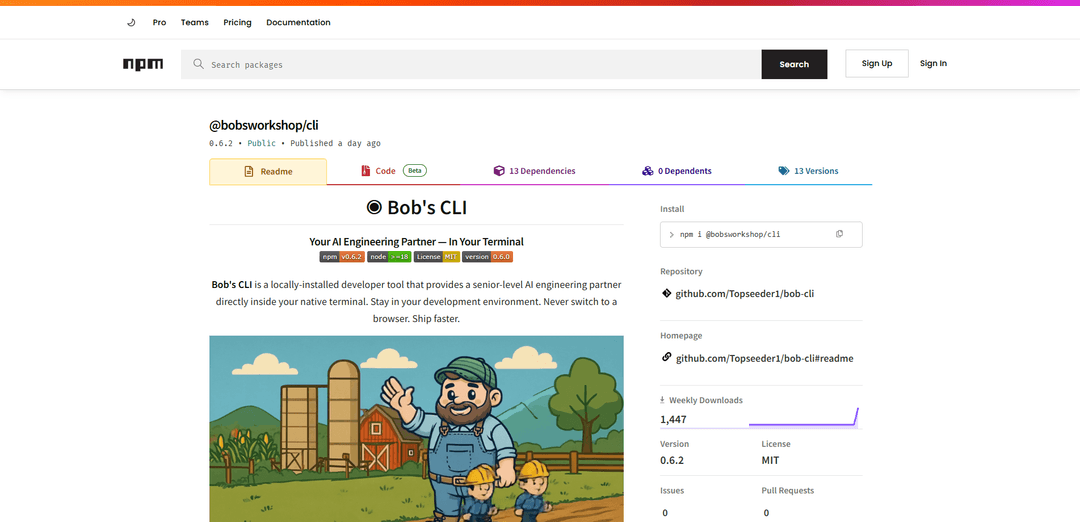
Bob's CLI is a locally installed AI engineering partner that runs in your terminal with local file awareness, optional zero-cost on-device models via Ollama, and advanced workflows like code indexing, QA analysis with auto-fix, autonomy, and cloud sync when you choose.
https://www.npmjs.com/package/@bobsworkshop/cli?ref=producthunt
Product Information
Updated:Jun 16, 2026
What is Bob's CLI
Bob's CLI (published as @bobsworkshop/cli) is a developer tool that brings an AI coding assistant directly into your native terminal so you can stay in your normal workflow while it understands your project structure and works with your local files. It supports a “local-first” setup (Node.js 18+ and, for local AI, Ollama with a downloaded model) so you can chat and get help without internet, API keys, or usage costs, while keeping code on-device. If you opt in, you can also log in to access platform features such as cross-surface sync (CLI ↔ web), additional model access (e.g., Claude/Gemini via the platform), and deeper workflow tools like deep dives, forks, and personalization.
Key Features of Bob's CLI
Bob's CLI is a locally-installed AI engineering partner that runs inside your terminal, with on-device file awareness and optional cloud features. It can chat about your code, index and understand a repository, run production-style QA reviews, and even attempt automated fixes or broader autonomous repairs—while keeping source code on your machine by default (especially when using a local model via Ollama). It also supports workflow features like conversation persistence, deep dives/forks for exploring alternatives, optional personalization via behavioral profiling, and convenience commands for remote execution and Git operations.
Terminal-native AI pair programmer: Runs directly in your native terminal (no browser context switching) and can answer questions, refactor services, and assist with implementation using project context.
Local-first privacy with Ollama support: Auto-detects Ollama for zero-cost local inference; designed so your code stays on-device unless you opt into platform syncing/features.
Project indexing & file-aware assistance: Indexes the codebase and uses local file awareness to provide architecture-aware guidance and more relevant code suggestions.
QA review + guided or automatic fixes: Provides codebase-wide analysis (bugs, improvements, upgrades) with actionable steps, plus optional auto-fix modes with safety constraints.
Autonomous repair workflows: Supports an autonomy mode intended to tackle broader repair tasks across the codebase beyond single-file edits.
Workflow tooling: persistence, deep dives, forks, remote exec, Git push: Keeps conversations over time, lets you branch explorations (fork/deep dive), supports remote execution (SovereignLink), and includes a streamlined Git stage/commit/push command.
Use Cases of Bob's CLI
Software teams accelerating feature delivery: Engineers use terminal chat plus repository indexing to quickly understand modules, generate changes with approval, and reduce context switching during development.
Automated code review for CI-like quality checks: Run analyse to surface bugs, refactors, and upgrade opportunities across a codebase, then optionally apply bounded auto-fixes before merging.
Maintaining large legacy codebases: Use autonomy and analysis to identify risky areas, propose incremental repairs, and modernize patterns while staying grounded in existing architecture.
Privacy-sensitive development environments: Organizations or individuals working on proprietary code can rely on local models (Ollama) so source code doesn’t need to leave the machine.
Developer enablement and onboarding: New team members can query the codebase, get architecture explanations, and explore alternatives via deep dives/forks to ramp up faster.
Remote troubleshooting and support workflows: Use SovereignLink/remote commands to execute or assist from another device when diagnosing issues, while keeping the developer workflow centered in the CLI.
Pros
Local-first approach with Ollama enables low-cost usage and strong privacy by keeping code on-device.
Broad capability set (chat, index, QA analysis, auto-fix, autonomy) covers much of the day-to-day engineering loop.
Terminal-native UX reduces context switching and fits existing developer workflows.
Optional platform features (sync, BYOK, personalization, deep dives/forks, remote exec) allow scaling up without changing tools.
Cons
Local AI requires installing and running Ollama plus downloading models, which can be resource-intensive on some machines.
Advanced features (cloud sync, Claude/Gemini access, profiling) may require an account/subscription and introduce reliance on external services if enabled.
Autonomous/auto-fix modes can still require careful review to avoid unintended changes, especially on complex codebases.
How to Use Bob's CLI
1) Install Bob's CLI: Install globally with pnpm or npm:
- pnpm: `pnpm add -g @bobsworkshop/cli`
- npm: `npm install -g @bobsworkshop/cli`
2) Confirm requirements: Ensure you have:
- Node.js 18+
- A terminal (VS Code terminal, Windows Terminal, iTerm, PowerShell, etc.)
- For local AI: Ollama installed with at least one downloaded model
- For platform features: a Bob's Workshop account
3) Verify the installation: Run: `bob whoami` to confirm the CLI is installed and see your current status.
4) Use Bob locally (no internet / no API keys) with Chat: Start a local chat (Bob auto-detects Ollama): `bob chat "hello, what can you help me with?"`
5) Get coding help in your repo (file-aware assistance): From your project directory, ask for help (Bob can discover and reason about local files): `bob chat "help me refactor this service"`
6) Use Consult for strategy-only answers: When you want advice without code output, run: `bob consult "question"`
7) Index your codebase for better understanding: Generate an AI-powered understanding of the project: `bob index`
8) Run a full code review (Analyse): Run QA review across the codebase: `bob analyse`
9) View analysis results: Open the results/dashboard view: `bob analyse --results`
10) Auto-fix issues (with safety constraints): Let Bob apply fixes automatically: `bob analyse --auto`
11) Run autonomous repair across the codebase: Trigger broader autonomous repair: `bob autonomy`
12) Create a developer profile (local or cloud): Generate/view your behavioral profile:
- Cloud profile: `bob profile --cloud`
- View profile/dashboard: `bob profile`
13) Use Personalized Mode (after profiling): Ask for guidance tailored to your working style: `bob chat --personalized "what should I focus on?"`
14) Branch work with Forks: Split a conversation into a sub-thread/sub-project: `bob fork "topic"`
15) Explore safely with Deep Dives: Run a sandboxed exploration on a message/problem: `bob deepdive`
16) Enable platform features by logging in (optional): Authenticate to sync to web and access Claude/Gemini and other platform features: `bob login`
17) Add your own API keys (BYOK) (optional): Configure bring-your-own-keys for providers, e.g. Google: `bob byok set google <key>`
18) Start SovereignLink for remote execution (optional): Start the remote execution service: `bob serve`
19) Run commands remotely (optional): Send a remote chat message/command: `bob remote chat "msg"`
20) Stage + commit + push with one command: Use the built-in Git helper: `bob push "message"`
21) Learn more commands and options: Use CLI help output and the command reference in the docs. Common commands include:
`bob chat`, `bob consult`, `bob index`, `bob analyse`, `bob autonomy`, `bob profile`, `bob deepdive`, `bob fork`, `bob serve`, `bob remote chat`, `bob push`, `bob login`, `bob whoami`.
Bob's CLI FAQs
Bob's CLI is a locally-installed developer tool that provides an AI engineering partner directly in your terminal. It can chat, consult, index a codebase, run QA-style analysis, and assist with repairs while staying in your development environment.
Popular Articles

Proferex: A Cloud-Based Ad Tracking and Campaign Optimization Platform
Nov 4, 2026

How to Create Viral Talking Baby Podcast Videos with AI: Step-by-Step Guide
Nov 2, 2026

Vosko AI: Localize and Dub Videos for Global Audiences
Oct 15, 2026

Atoms: A Multi-Agent AI Platform That Transforms Ideas into Launch-Ready Products
Oct 13, 2026
Latest AI Tools Similar to Bob's CLI

Gait
Gait is a collaboration tool that integrates AI-assisted code generation with version control, enabling teams to track, understand, and share AI-generated code context efficiently.

invoices.dev
invoices.dev is an automated invoicing platform that generates invoices directly from developers' Git commits, with integration capabilities for GitHub, Slack, Linear, and Google services.

EasyRFP
EasyRFP is an AI-powered edge computing toolkit that streamlines RFP (Request for Proposal) responses and enables real-time field phenotyping through deep learning technology.

Cart.ai
Cart.ai is an AI-powered service platform that provides comprehensive business automation solutions including coding, customer relations management, video editing, e-commerce setup, and custom AI development with 24/7 support.
Popular AI Tools Like Bob's CLI

GitHub Copilot Chat
GitHub Copilot Chat is an AI-powered coding assistant that provides natural language interactions, real-time code suggestions, and contextual support directly within supported IDEs and GitHub.com.

CopilotForXcode
CopilotForXcode is an Xcode Source Editor Extension that integrates GitHub Copilot, Codeium, and ChatGPT to provide AI-powered code suggestions, chat assistance, and prompt-to-code functionality within Xcode.

BrowserAI
BrowserAI is an open-source library that enables running local Large Language Models (LLMs) directly in web browsers with WebGPU acceleration, offering privacy-focused AI capabilities without requiring server infrastructure.

OpenAI Codex CLI
OpenAI Codex CLI is a lightweight, open-source coding agent that runs in your terminal, enabling developers to translate natural language into code execution while providing ChatGPT-level reasoning with the ability to run code, manipulate files, and iterate under version control.