
Arkor
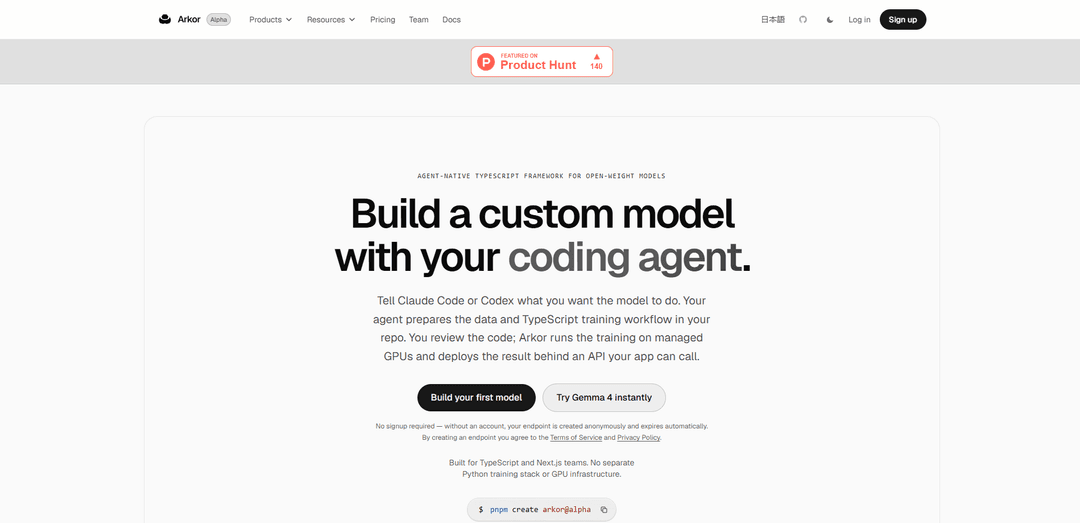
Arkor is an agent-native TypeScript framework and managed runtime that lets you describe a custom open‑weight model to a coding agent, review the generated training code, then run training on managed GPUs and deploy the result behind an OpenAI‑compatible API.
https://www.arkor.ai/?ref=producthunt
Product Information
Updated:Aug 8, 2026
What is Arkor
Arkor helps TypeScript and Next.js teams build, fine-tune, and ship custom open-weight models without standing up a separate Python training stack or GPU infrastructure. Instead of manually configuring complex ML pipelines, you tell a coding agent (e.g., Claude Code or Codex) what you want the model to do—such as rewriting rough drafts into tweets in your voice—and Arkor structures the work as a reviewable TypeScript project. After you approve the code and dataset preparation, Arkor runs training and deploys the fine-tuned model so it can be called from your product via an API.
Key Features of Arkor
Arkor is an agent-native TypeScript framework and managed runtime for training and deploying open-weight models. You describe the behavior you want to a coding agent (e.g., Claude Code or Codex), review the generated TypeScript training workflow and dataset preparation in your repo, then run training via Arkor Studio while Arkor handles managed GPU compute. After training, Arkor deploys the fine-tuned model behind an OpenAI-compatible API endpoint that your app (e.g., Next.js/Node) can call by setting a base URL and API key.
Agent-native model building: You specify desired model behavior in natural language to a coding agent; the agent prepares the dataset, training workflow, and evaluation code for you to review.
TypeScript-first training workflows: Training projects are written in TypeScript and live inside your existing repo, designed for TypeScript/Next.js teams without a separate Python training stack.
Reviewable, repo-based setup: Dataset preparation, trainer code, and evaluation are generated as normal code changes you can inspect and approve before any training run.
Arkor Studio for run control: Local Studio UI (typically at localhost:4000 via `pnpm dev`) detects the trainer and lets you start training and monitor progress from a dashboard.
Managed GPU training runtime: Arkor handles the GPU infrastructure and execution of training runs so teams can focus on product and code review rather than compute ops.
Hosted deployment with OpenAI-compatible API: After training, Arkor deploys the model behind an OpenAI-compatible endpoint, enabling easy integration by changing the client base URL and using an issued API key.
Use Cases of Arkor
Brand voice social rewriting: Fine-tune a model to rewrite rough drafts into tweets (or other short-form posts) in a consistent personal or company voice.
Customer support tone and policy alignment: Train a model to draft or rewrite support replies to match your brand tone, escalation rules, and preferred structure for faster, consistent responses.
E-commerce product copy generation: Customize a model to produce on-brand product descriptions, titles, and feature bullets from raw notes or catalog attributes.
Developer documentation and changelog drafting: Fine-tune a model to convert engineering notes into consistent release notes, docs snippets, or PR summaries tailored to your team’s style.
Internal workflow copilots in Next.js apps: Ship personalized AI features inside a TypeScript/Next.js product by calling the deployed Arkor model through the OpenAI-compatible API.
Pros
TypeScript-native workflow fits teams already building with Node/Next.js and keeps training code in the same stack.
Managed GPU training and hosted deployment reduce infrastructure and MLOps overhead.
Reviewable code and dataset prep in-repo makes changes auditable and easier to collaborate on.
Cons
Alpha-stage product: features may change and data loss is possible (per early access notice).
Workflow depends on a coding agent generating the project, which still requires careful human review before training.
Primarily optimized for the Arkor-managed runtime, which may be less flexible than fully custom self-hosted training pipelines.
How to Use Arkor
1) Create a new Arkor project: In a new folder, run `pnpm create arkor@alpha` to scaffold an Arkor TypeScript training repo.
2) Decide the model behavior you want: Write a plain-English description of the behavior (e.g., “rewrite rough drafts as tweets in my voice”), focusing on outputs you want rather than training hyperparameters.
3) Use your coding agent to generate the training project: Ask Claude Code or Codex to: (a) find or prepare a suitable dataset, (b) convert it into Arkor’s required format, (c) write the TypeScript trainer, and (d) add evaluation—directly inside your repo so you can review changes.
4) Review the generated code and data in your repo: Inspect the dataset files, the TypeScript trainer (e.g., `trainer.ts`), and any evaluation logic/configuration. Make edits until you’re satisfied.
5) Start Arkor Studio locally: Run `pnpm dev` and open Arkor Studio at `http://localhost:4000`.
6) Confirm the trainer is detected in Studio: In Arkor Studio, verify the project overview shows the detected trainer (the training workflow you reviewed).
7) Run training from Arkor Studio: Click “Run Training” in Studio. Arkor handles the managed GPU compute while you monitor progress in the UI.
8) Deploy the fine-tuned model behind an API: After training completes, Arkor deploys the resulting fine-tuned open-weight model behind an OpenAI-compatible API endpoint.
9) Call the deployed model from your app: Use the issued Base URL and API key in an OpenAI client by setting `baseURL` to your Arkor endpoint (e.g., `https://<your-model>.arkor.app/v1`) and `apiKey` to your Arkor key.
10) (Optional) Run anonymously without signup: You can create an endpoint anonymously without an account; it will expire automatically. Creating an endpoint implies agreement to Arkor’s Terms of Service and Privacy Policy.
Arkor FAQs
Arkor is an agent-native TypeScript framework and managed runtime for training open-weight models. Your coding agent generates a TypeScript training project that you review, and Arkor runs training on managed GPUs and deploys the result behind an API.
Popular Articles

Vosko AI: Localize and Dub Videos for Global Audiences
Oct 15, 2026

Atoms: A Multi-Agent AI Platform That Transforms Ideas into Launch-Ready Products
Oct 13, 2026

Nano Banana SBTI: What It Is, How It Works, and How to Use It in 2026
Apr 15, 2026

Atoms Review — The AI Product Builder Redefining Digital Creation in 2026
Apr 10, 2026
Latest AI Tools Similar to Arkor

Gait
Gait is a collaboration tool that integrates AI-assisted code generation with version control, enabling teams to track, understand, and share AI-generated code context efficiently.

invoices.dev
invoices.dev is an automated invoicing platform that generates invoices directly from developers' Git commits, with integration capabilities for GitHub, Slack, Linear, and Google services.

EasyRFP
EasyRFP is an AI-powered edge computing toolkit that streamlines RFP (Request for Proposal) responses and enables real-time field phenotyping through deep learning technology.

Cart.ai
Cart.ai is an AI-powered service platform that provides comprehensive business automation solutions including coding, customer relations management, video editing, e-commerce setup, and custom AI development with 24/7 support.
Popular AI Tools Like Arkor

GitHub Copilot Chat
GitHub Copilot Chat is an AI-powered coding assistant that provides natural language interactions, real-time code suggestions, and contextual support directly within supported IDEs and GitHub.com.

CopilotForXcode
CopilotForXcode is an Xcode Source Editor Extension that integrates GitHub Copilot, Codeium, and ChatGPT to provide AI-powered code suggestions, chat assistance, and prompt-to-code functionality within Xcode.

BrowserAI
BrowserAI is an open-source library that enables running local Large Language Models (LLMs) directly in web browsers with WebGPU acceleration, offering privacy-focused AI capabilities without requiring server infrastructure.

OpenAI Codex CLI
OpenAI Codex CLI is a lightweight, open-source coding agent that runs in your terminal, enabling developers to translate natural language into code execution while providing ChatGPT-level reasoning with the ability to run code, manipulate files, and iterate under version control.