ApiFlux
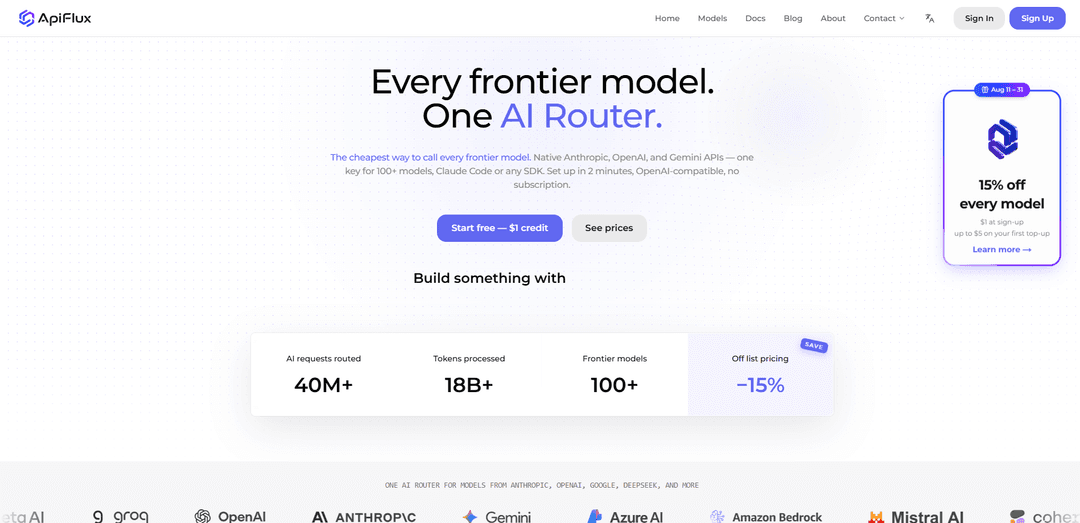
ApiFlux is an AI router with native Anthropic, OpenAI & Gemini APIs — one key for 100+ models, automatic failover, transparent per-token pricing. Claude Code ready.
https://apiflux.ai/?utm_source=aipure
Product Information
Updated:Aug 20, 2026
What is ApiFlux
ApiFlux is an AI gateway/router built to simplify how developers and teams integrate and operate multiple large language models without juggling separate provider accounts or rewriting code. It offers unified access to 100+ models across major ecosystems (including native Anthropic, OpenAI, and Gemini-style APIs) while keeping integration straightforward for existing OpenAI SDK-based apps and popular coding tools. With a single balance and a single endpoint, ApiFlux focuses on making multi-model development and production deployment cheaper, more reliable, and easier to observe.
Key Features of ApiFlux
ApiFlux is a multi-protocol AI router/gateway that lets developers access 100+ frontier models (including Anthropic Claude, OpenAI GPT, and Google Gemini) using a single API key and an OpenAI-compatible interface. It emphasizes fast setup (often just changing the base URL), transparent per-token pricing at roughly 85% of model-maker list rates (about 15% savings), and production reliability via automatic failover across upstream providers. ApiFlux also provides a live dashboard for token usage, latency, cost, and errors, plus team-friendly controls like per-key limits and usage logs to reduce vendor lock-in and simplify billing across tools, agents, and apps.
One key for 100+ models: Use a single ApiFlux API key to call models across major providers (Claude, GPT, Gemini, DeepSeek, and more) without maintaining multiple vendor accounts.
OpenAI-compatible, drop-in integration: Works with OpenAI SDKs/clients and popular coding tools (e.g., Claude Code, Codex CLI, OpenCode) by changing the base URL—no major code rewrite.
Transparent per-token pricing (≈15% off list): Billed in per-token units with clear request-level cost visibility, typically at ~85% of model makers’ list pricing and no subscription requirement.
Automatic failover routing: Routes requests around upstream degradation/outages to healthy providers/paths to reduce downtime and user-visible incidents.
Live usage & observability dashboard: Provides real-time insight into token usage, latency, costs, and errors for each request without extra instrumentation.
Team controls & auditability: Supports shared balances with per-key limits and per-key usage logs so teams can track spend by user/tool and control access.
Use Cases of ApiFlux
AI coding tools and developer workflows: Route Claude Code, Codex CLI, and other coding assistants through ApiFlux to reduce token costs and keep workflows running during provider issues.
Production chatbots and customer support: Deploy customer-facing assistants with higher reliability using failover, while monitoring costs/latency per request in the dashboard.
Agent pipelines and automation: Run multi-step agent systems (summarizers, code reviewers, copilots) on a single router with consistent billing and centralized observability.
Model evaluation and benchmarking: Compare outputs from Claude, GPT, Gemini, and others on the same prompt without juggling multiple provider keys and accounts.
Prototyping and side projects: Quickly test multiple frontier models with small top-ups and no subscription, switching models per request without changing code.
Small-team shared credit management: Use one balance across teammates and tools, enforce per-key limits, and audit usage logs to control spend and accountability.
Pros
Cost savings vs. list pricing (about 15% off) with transparent per-token billing and request-level visibility.
Fast adoption via OpenAI-compatible API (often just a base-URL change) and broad tool compatibility.
Higher resilience through automatic failover and centralized monitoring of model health/latency/errors.
Reduces vendor lock-in by enabling easy model/provider switching per request under one key and one bill.
Cons
Adds an intermediary layer, which may introduce additional dependency and potential routing overhead compared to calling providers directly.
Feature parity and behavior can vary across upstream providers/models, requiring testing when switching models.
Some organizations may have compliance or procurement constraints that prefer direct contracts with model providers.
How to Use ApiFlux
1) Create an ApiFlux account: Go to https://apiflux.ai/ and sign up (or sign in if you already have an account).
2) Get an API key: Open the Keys page (https://apiflux.ai/keys) and create an API key. ApiFlux provides an OpenAI-compatible key that can be used across 100+ models.
3) Add credit / top up your balance: Top up once to fund usage across all supported models (one balance for everything). ApiFlux advertises transparent per-token pricing at ~85% of model makers’ list price and may include sign-up credit/promotions depending on the current offer.
4) Point your existing OpenAI-compatible code or tool to ApiFlux: Keep your current OpenAI SDK/client/tooling and change only the base URL to ApiFlux. Use your ApiFlux API key for authentication. This is designed to be a drop-in replacement so you don’t need a code rewrite.
5) Choose a model per request (Claude/GPT/Gemini/DeepSeek/etc.): Select the model you want to call at request time. ApiFlux supports 100+ frontier models (including Claude, GPT, Gemini, DeepSeek, Kimi, Qwen, and more), letting you swap models without changing your integration.
6) Make your first request through the router: Send a normal OpenAI-style request (chat/completions style) to the ApiFlux base URL using your ApiFlux key, specifying the model you want. ApiFlux routes the request to the appropriate upstream provider.
7) Enable resilience with automatic failover (no extra work required): ApiFlux automatically reroutes requests when an upstream provider degrades or goes down, aiming to keep your app running without user-visible disruption.
8) Monitor usage, cost, latency, and errors in the dashboard: Use the live dashboard to view per-request token usage, latency, cost, and errors—no extra instrumentation needed. This helps you audit spend and performance across models.
9) Use per-key controls for teams: Create separate keys for teammates or services, then use per-key limits and per-key usage logs to track who spent what, on which model, and when.
10) Integrate with AI coding tools (optional): Follow ApiFlux’s step-by-step guides for tools like Claude Code, Codex CLI, and OpenCode. The general setup is the same: use your ApiFlux key and point the tool’s base URL at ApiFlux to reduce token costs and centralize billing.
ApiFlux FAQs
ApiFlux is an AI router (gateway) that provides one unified API key and endpoint to access 100+ frontier models (including Claude, GPT, Gemini, DeepSeek and others) with transparent per-token billing, usage visibility, and automatic failover.
Popular Articles

Vosko AI: Localize and Dub Videos for Global Audiences
Oct 15, 2026

Atoms: A Multi-Agent AI Platform That Transforms Ideas into Launch-Ready Products
Oct 13, 2026

Nano Banana SBTI: What It Is, How It Works, and How to Use It in 2026
Apr 15, 2026

Atoms Review — The AI Product Builder Redefining Digital Creation in 2026
Apr 10, 2026
Latest AI Tools Similar to ApiFlux

Gait
Gait is a collaboration tool that integrates AI-assisted code generation with version control, enabling teams to track, understand, and share AI-generated code context efficiently.

invoices.dev
invoices.dev is an automated invoicing platform that generates invoices directly from developers' Git commits, with integration capabilities for GitHub, Slack, Linear, and Google services.

EasyRFP
EasyRFP is an AI-powered edge computing toolkit that streamlines RFP (Request for Proposal) responses and enables real-time field phenotyping through deep learning technology.

Cart.ai
Cart.ai is an AI-powered service platform that provides comprehensive business automation solutions including coding, customer relations management, video editing, e-commerce setup, and custom AI development with 24/7 support.
Popular AI Tools Like ApiFlux

GitHub Copilot Chat
GitHub Copilot Chat is an AI-powered coding assistant that provides natural language interactions, real-time code suggestions, and contextual support directly within supported IDEs and GitHub.com.

CopilotForXcode
CopilotForXcode is an Xcode Source Editor Extension that integrates GitHub Copilot, Codeium, and ChatGPT to provide AI-powered code suggestions, chat assistance, and prompt-to-code functionality within Xcode.

BrowserAI
BrowserAI is an open-source library that enables running local Large Language Models (LLMs) directly in web browsers with WebGPU acceleration, offering privacy-focused AI capabilities without requiring server infrastructure.

OpenAI Codex CLI
OpenAI Codex CLI is a lightweight, open-source coding agent that runs in your terminal, enabling developers to translate natural language into code execution while providing ChatGPT-level reasoning with the ability to run code, manipulate files, and iterate under version control.