
Almanac Seed
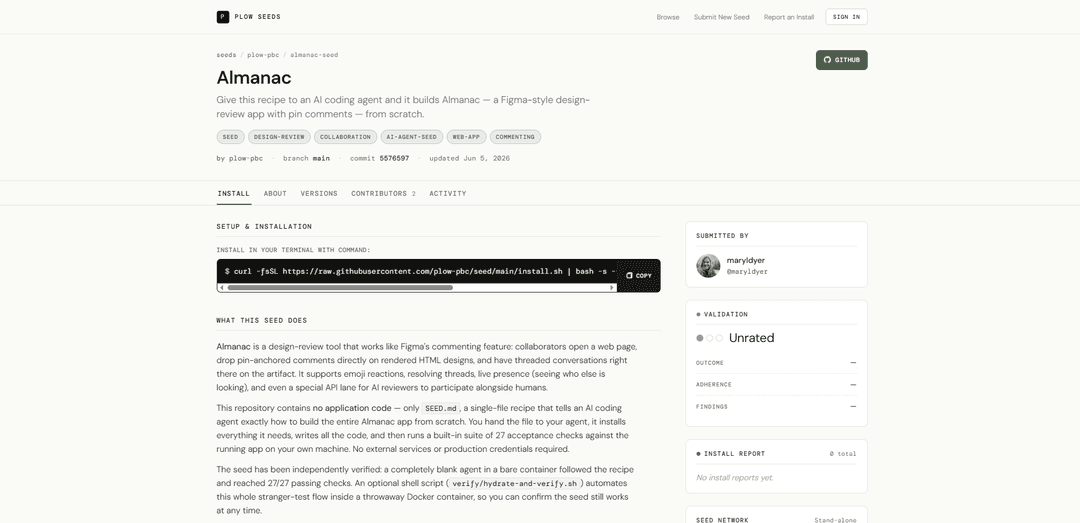
Almanac Seed is a single-file SEED.md recipe that lets an AI coding agent build and self-verify a full Next.js 14, Figma-style HTML design-review app with pin-anchored comments, threaded discussions, reactions, resolving, live presence, and a header-gated API for AI reviewers.
https://seeds.plow.co/seed/plow-pbc/almanac-seed?ref=producthunt
Product Information
Updated:Jun 8, 2026
What is Almanac Seed
Almanac Seed is a standalone “product seed” for Almanac, a locally hostable design-review tool built for commenting directly on rendered HTML artifacts—similar to Figma’s pin-based commenting, but for web prototypes and single-file HTML explorations. Instead of shipping application code, the repository provides one authoritative specification file, SEED.md, that instructs an AI coding agent how to generate the entire application from scratch, including routes, data model, UI behavior, security rules, and acceptance tests. The resulting app is a Next.js 14 (App Router) project with NextAuth-based authentication and a KV-backed persistence layer, designed to run and verify entirely on a developer’s machine without requiring external services or production credentials.
Key Features of Almanac Seed
Almanac Seed is a single-file “SEED.md” recipe that instructs an AI coding agent to build the full Almanac web app from scratch: a Next.js 14 design-review tool that lets collaborators comment directly on rendered HTML artifacts with pin-anchored threads (Figma-style), reactions, resolution state, and live presence. The seed includes a fixed data model, KV schema, route/API contracts (including a header-gated agent API), UI/brand requirements, and an automated verification suite (27 acceptance journeys) that can run locally with no external services or production instance, using a dev-only test-login path and optional in-memory KV fallback.
Single-file product spec that hydrates into a full app: Ships no application code—only SEED.md—so an AI agent can generate the entire Almanac implementation (Next.js 14 + TypeScript) from the specification alone.
Figma-style pin comments on real HTML artifacts: Reviewers open an artifact rendered in an iframe and drop numbered, draggable pins with threaded discussions, linkified text, reactions, and resolve/unresolve behavior.
Built-in acceptance verification (27 journeys): Includes an end-to-end Playwright suite that validates functional flows and visual fidelity via computed-style/DOM assertions against the spec’s absolute design tokens.
Two access paths: human sessions + agent API: Supports human review via NextAuth sessions and a separate two-header-gated API lane for AI reviewers to read artifacts and write comments into the same store.
Portable security and auth for local + production: Uses middleware and Next.js headers (not deploy-only config) for framing/security rules; provides a dev-only test-login route for verification without Google and a production passphrase login option.
KV-backed collaboration with resilient dev fallback: Persists comments/presence/reactions in Vercel KV (Upstash Redis) with a pinned Redis key/type schema, plus an in-memory Map fallback when KV env vars are absent for local runs.
Use Cases of Almanac Seed
Product design review for HTML prototypes: Teams reviewing static HTML mocks (landing pages, UI explorations, marketing pages) can annotate directly on the artifact with pins and threaded feedback.
Internal design QA and stakeholder sign-off: PMs, engineers, and stakeholders can resolve threads, react, and track activity/presence to coordinate approvals without moving feedback into separate docs.
AI-assisted UX critique and automated review: An AI agent can fetch artifacts and candidate anchors, post structured comments via the agent API, and participate alongside humans in the same review surface.
Private, locally hosted review tool for regulated environments: Organizations needing local-first tools can run the app on localhost with no external dependencies (dev auth + memory KV) and later deploy with controlled access.
Design-system and visual regression enforcement: Teams can use the spec-driven visual assertions to enforce consistent typography, casing, layout density, and interaction behavior across iterations.
Pros
Self-contained, reproducible build: a single seed file plus automated verification enables consistent hydration from scratch.
Strong collaboration primitives: anchored pins, threads, reactions, resolve state, and presence mirror familiar design-review workflows.
Agent-friendly by design: dedicated header-gated endpoints allow AI reviewers to read and write feedback programmatically.
Cons
Complex spec surface area: strict KV schema, auth rules, and UI fidelity requirements increase implementation and maintenance complexity.
Production setup still requires platform steps: deploying publicly needs Vercel project setup and an Upstash/Vercel KV connection (plus secret management).
Domain-specific defaults: the seed is tailored to a particular workflow (HTML artifacts, Next.js, Vercel KV, NextAuth), which may not fit all stacks without adaptation.
How to Use Almanac Seed
1) Install Almanac Seed (Plow Seeds CLI recipe): Run:
curl -fsSL https://raw.githubusercontent.com/plow-pbc/seed/main/install.sh | bash -s -- https://github.com/plow-pbc/almanac-seed/blob/main/SEED.md
This installs the Plow Seeds tooling and fetches the Almanac SEED.md recipe.
2) Open the SEED.md and hand it to a coding agent: Open the raw SEED.md in your editor or browser and paste it into your AI coding agent (e.g., Claude Code) with an instruction like: “Hydrate this seed: build the app it specifies, then run its ## Steps and ## Verify until all 27 §16 journeys pass.”
Note: SEED.md is a full product spec; it contains no implementation code by design.
3) Decide whether you are doing local verification or a real public deploy: Local build/verify: you can skip Step 0’s deployment interview and go straight to the build steps (the seed calls this “skip straight to §13.5”).
Public deploy: you must complete Step 0 first (Vercel login + Upstash store creation/connection) before building.
4) (Public deploy only) Complete Step 0 interview prerequisites: In a terminal, ensure Node is available (>= 18.17) and Vercel CLI is installed. If Vercel CLI is missing, install it with a user-writable prefix:
mkdir -p ~/.npm-global && npm config set prefix ~/.npm-global
export PATH="$HOME/.npm-global/bin:$PATH"
npm i -g vercel
Then authenticate:
vercel login
Create/link the Vercel project now (scope differs for Team vs Personal):
- Team: vercel link --yes --project <your-almanac> --scope <your-team>
- Personal: vercel link --yes --project <your-almanac>
In the Vercel dashboard, create + connect an Upstash for Redis database to this project (Storage → Create Database → Upstash for Redis → Connect Project → All Environments).
5) (Public deploy only) Set production secrets (agent-generated passphrase): Generate and set secrets (the seed specifies the agent should generate the passphrase; user does not choose it):
PASSPHRASE="$(openssl rand -base64 18)"
printf '%s' "$(openssl rand -base64 32)" | vercel env add NEXTAUTH_SECRET production
printf '%s' "$PASSPHRASE" | vercel env add ALMANAC_ACCESS_PASSWORD production
Do NOT set ALMANAC_TEST_LOGIN in production.
6) Run the seed’s build steps locally (the seed’s §13.5 “Steps”): Follow the SEED.md §13.5 steps to hydrate/build the app. In summary, the seed instructs the agent to:
- Ensure Node >= 18.17
- Install npm dependencies (npm install)
- Ensure a cookoff-seeds/ corpus exists (seed creates an example if missing)
- Install Playwright Chromium + OS deps:
npx playwright install --with-deps chromium
- Create .env.local for local dev (including NEXTAUTH_SECRET, NEXTAUTH_URL=http://localhost:3210, ALMANAC_TEST_LOGIN=1, and dev agent keys)
- Build and run on port 3210 (npm run build; npm start -p 3210 or equivalent)
7) Start the app on port 3210 and confirm it responds: Run the server and confirm /login loads:
npm run build
npm start
Then check:
curl -sI http://localhost:3210/login
Expect HTTP 200.
8) Sign in locally without Google using the dev-only test login route: With ALMANAC_TEST_LOGIN=1 in .env.local, open:
http://localhost:3210/api/[email protected]&next=/
This mints a NextAuth session cookie and redirects you to the app (no Google OAuth required for local verification).
9) Run the seed’s verification suite (the seed’s §15 “Verify” / §16 journeys): Run the Playwright E2E suite:
npm run e2e
The seed’s acceptance criteria are the 27 journeys in §16 (functional + visual computed-style assertions). All must pass against localhost:3210.
10) (Optional) Use the provided Docker stranger-test script: If you want a fully isolated “blank container” verification, run the repo’s verify script (requires Docker and a configured claude CLI):
verify/hydrate-and-verify.sh
It automates the stranger flow in a node:20-slim container and prints a FINAL_VERIFY result.
11) (Public deploy only) Deploy to Vercel (seed’s §13.6 “Deploy”): After Step 0 is complete and your app builds locally, deploy:
vercel deploy --prod
Then disable Vercel Deployment Protection (ssoProtection) via API or dashboard (required so /login is reachable). Set NEXTAUTH_URL to the deployed URL and redeploy once:
printf '%s' "https://<project>.vercel.app" | vercel env add NEXTAUTH_URL production
vercel deploy --prod
12) (Public deploy only) Share access using the generated passphrase: Your deployed Almanac uses passphrase login (Credentials provider). Reviewers sign in with any display name + the generated ALMANAC_ACCESS_PASSWORD passphrase. Confirm comments persist across reloads (proves Upstash KV is connected).
Almanac Seed FAQs
Almanac Seed is a single-file “SEED.md” product specification that instructs an AI coding agent how to build the full Almanac app from scratch. The repo contains no application code—only the recipe.
Almanac Seed Video
Popular Articles

Vosko AI: Localize and Dub Videos for Global Audiences
Oct 15, 2026

Atoms: A Multi-Agent AI Platform That Transforms Ideas into Launch-Ready Products
Oct 13, 2026

Nano Banana SBTI: What It Is, How It Works, and How to Use It in 2026
Apr 15, 2026

Atoms Review — The AI Product Builder Redefining Digital Creation in 2026
Apr 10, 2026
Latest AI Tools Similar to Almanac Seed
Foundry
Foundry is a versatile platform that exists in multiple forms - as a smart contract development toolchain, a virtual tabletop gaming software, and a traditional metal casting facility - each offering specialized features for their respective domains.
PythonConvert.com
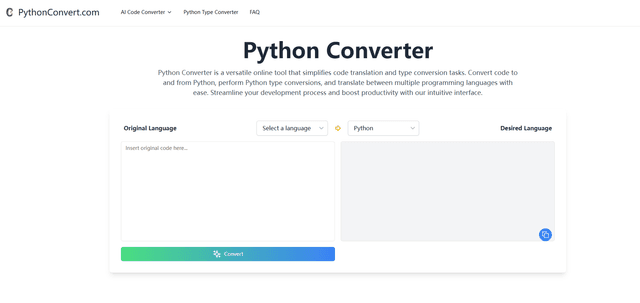
PythonConvert.com is a free web-based tool that provides AI-powered code translation between Python and other programming languages as well as Python type conversion capabilities.

Softgen
Softgen.ai is an AI-powered full-stack project generator platform that enables users to transform their ideas into functional web applications without coding requirements.
Micro SaaS Ideas
Micro SaaS Ideas are small-scale, niche-focused software solutions that target specific problems or markets, offering entrepreneurs a way to build profitable businesses with minimal resources and complexity.
Popular AI Tools Like Almanac Seed

GitHub Copilot Chat
GitHub Copilot Chat is an AI-powered coding assistant that provides natural language interactions, real-time code suggestions, and contextual support directly within supported IDEs and GitHub.com.

CopilotForXcode
CopilotForXcode is an Xcode Source Editor Extension that integrates GitHub Copilot, Codeium, and ChatGPT to provide AI-powered code suggestions, chat assistance, and prompt-to-code functionality within Xcode.

OpenAI Codex CLI
OpenAI Codex CLI is a lightweight, open-source coding agent that runs in your terminal, enabling developers to translate natural language into code execution while providing ChatGPT-level reasoning with the ability to run code, manipulate files, and iterate under version control.

GoCodeo SaaS Builder
GoCodeo SaaS Builder is an AI-native framework that automatically generates production-ready full-stack SaaS applications using autonomous AI agents, complete with authentication, real-time features, and TypeScript integration.