
AI Skills Manager
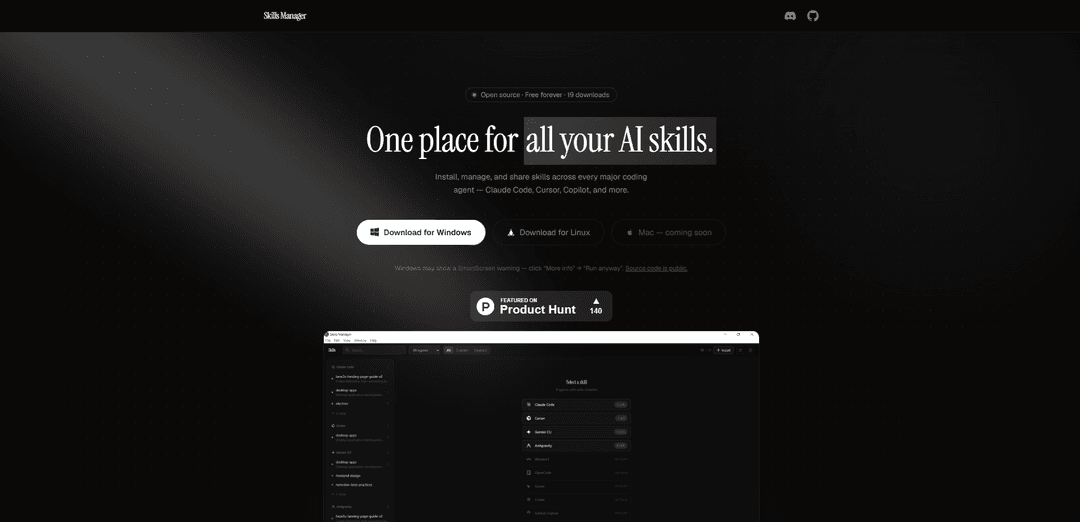
AI Skills Manager is a universal desktop application that allows users to install, manage, and share skills across multiple AI coding agents like Claude Code, Cursor, Copilot, and more in one centralized location.
https://sm.idoevergreen.me/?ref=producthunt
Product Information
Updated:Apr 8, 2026
What is AI Skills Manager
AI Skills Manager is an open-source, free-forever tool designed to solve the fragmentation problem across different AI coding agents. It serves as a unified platform where users can manage all their AI skills in one secure location, eliminating the need to handle skills manually across different configurations. The application currently supports 11 major coding agents including Claude Code, Cursor, GitHub Copilot, Gemini CLI, Windsurf, Goose, OpenAI Codex, OpenCode, Kilo Code, Trae, and Antigravity, with availability for Windows and Linux (Mac version coming soon).
Key Features of AI Skills Manager
AI Skills Manager is a universal management tool that allows users to install, manage, and share AI agent skills across multiple coding platforms including Claude Code, Cursor, Copilot, and more. It provides a centralized location to view and manage all AI skills, enables one-click installation from GitHub repositories, and uses smart synchronization through symlinks to ensure skills are consistently updated across different AI tools.
Unified Skills Management: Centralize all AI skills in one secure location, eliminating the need to hunt through multiple config directories
Cross-Platform Compatibility: Works with 11 different coding agents including Claude Code, Cursor, GitHub Copilot, and more, allowing seamless skill sharing across platforms
Smart Synchronization: Uses symlink synchronization mechanism to automatically keep skills updated across all supported AI tools without file duplication
One-Click Installation: Install skills directly from GitHub repositories with a simple URL paste, supporting both public repos and custom registries
Use Cases of AI Skills Manager
Development Team Collaboration: Teams can share and standardize AI skills across different coding platforms, ensuring consistency in development practices
Skills Library Management: Organizations can maintain a centralized repository of AI skills, making it easier to manage and distribute across different projects and teams
Cross-Platform Development: Developers working with multiple AI coding assistants can maintain consistent skills and capabilities across different platforms
Pros
Free and open source
Simple and user-friendly interface
Supports multiple major coding agents
Efficient skill synchronization across platforms
Cons
Mac version not yet available
May encounter SmartScreen warnings on Windows
Limited to coding-focused AI agents
How to Use AI Skills Manager
Download and Install: Download Skills Manager for your platform (Windows/Linux). For Windows users, if SmartScreen warning appears, click 'More info' then 'Run anyway'
First Launch Setup: On first launch, the app will guide you to select your skills storage directory (default is ~/.agents/skills/)
Automatic Agent Detection: The app automatically detects installed AI tools (like Claude Code, Cursor, Copilot etc.) on your system and links your skills
Install New Skills: Paste any GitHub repo URL containing skills and install them with one click. Works with both public repos and custom registries
Manage Skills: View all installed skills across different AI agents in one unified interface. Check symlink status and metadata for each skill
Share Skills Between Agents: Push skills from one agent to another (e.g., from Claude Code to Cursor) in seconds without manual file copying
Toggle Skills: Enable or disable any skill without deleting it. The app maintains symlinks automatically
Sync Skills: The app uses symlink synchronization to ensure all your AI tools have the latest version of skills without file duplication
AI Skills Manager FAQs
Skills Manager is a universal AI agent skills manager that allows users to install, manage, and share skills across multiple coding agents like Claude Code, Cursor, Copilot, and others, all in one unified place.
AI Skills Manager Video
Popular Articles

Atoms: A Multi-Agent AI Platform That Transforms Ideas into Launch-Ready Products
May 22, 2026

Nano Banana SBTI: What It Is, How It Works, and How to Use It in 2026
Apr 15, 2026

Atoms Review — The AI Product Builder Redefining Digital Creation in 2026
Apr 10, 2026

Kilo Claw: How to Deploy and Use a True "Do‑It‑For‑You" AI Agent(2026 Update)
Apr 3, 2026
Latest AI Tools Similar to AI Skills Manager

Gait
Gait is a collaboration tool that integrates AI-assisted code generation with version control, enabling teams to track, understand, and share AI-generated code context efficiently.

invoices.dev
invoices.dev is an automated invoicing platform that generates invoices directly from developers' Git commits, with integration capabilities for GitHub, Slack, Linear, and Google services.

EasyRFP
EasyRFP is an AI-powered edge computing toolkit that streamlines RFP (Request for Proposal) responses and enables real-time field phenotyping through deep learning technology.

Cart.ai
Cart.ai is an AI-powered service platform that provides comprehensive business automation solutions including coding, customer relations management, video editing, e-commerce setup, and custom AI development with 24/7 support.
Popular AI Tools Like AI Skills Manager

GitHub Copilot Chat
GitHub Copilot Chat is an AI-powered coding assistant that provides natural language interactions, real-time code suggestions, and contextual support directly within supported IDEs and GitHub.com.

CopilotForXcode
CopilotForXcode is an Xcode Source Editor Extension that integrates GitHub Copilot, Codeium, and ChatGPT to provide AI-powered code suggestions, chat assistance, and prompt-to-code functionality within Xcode.

BrowserAI
BrowserAI is an open-source library that enables running local Large Language Models (LLMs) directly in web browsers with WebGPU acceleration, offering privacy-focused AI capabilities without requiring server infrastructure.

OpenAI Codex CLI
OpenAI Codex CLI is a lightweight, open-source coding agent that runs in your terminal, enabling developers to translate natural language into code execution while providing ChatGPT-level reasoning with the ability to run code, manipulate files, and iterate under version control.