
Agent Skills
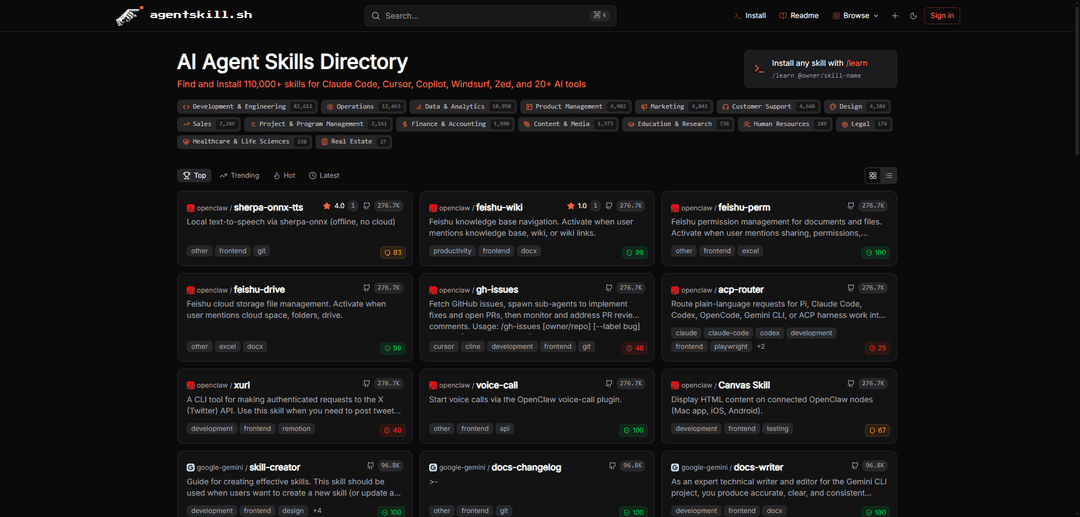
Agent Skills is an open standard format that packages instructions, scripts, and resources into reusable capabilities that AI agents can discover and load on demand to perform specific tasks more accurately and efficiently.
https://agentskill.sh/?ref=producthunt
Product Information
Updated:Mar 15, 2026
What is Agent Skills
Agent Skills is a breakthrough method developed by Anthropic that extends AI agents' capabilities by giving them access to specialized knowledge and context-specific information. While AI agents are trained on general knowledge, they often lack specific domain expertise or organizational context. Agent Skills solves this by providing a standardized way to package procedural knowledge, team conventions, and task-specific resources that agents can access when needed. The format has been adopted by multiple agent products including Claude, Cursor, Copilot, and others, with over 40,000 skills available through platforms like agentskill.sh.
Key Features of Agent Skills
Agent Skills is an open standard format that allows AI agents to extend their capabilities through packaged instructions, scripts, and resources. It enables agents to access specialized knowledge, workflows, and tool integrations on-demand, with over 40,000 skills available across different domains. Skills can be easily installed with a single command and are automatically used by agents when relevant tasks are detected, making AI agents more capable and reliable in performing specific tasks.
Modular Capability Extension: Skills can be packaged and installed as modular components, allowing agents to dynamically extend their functionality based on specific needs
Secure Installation System: Features two-layer security with server-side scanning for 12 threat categories and client-side verification before installation
Cross-Platform Compatibility: Works across multiple AI platforms including Claude Code, Cursor, Copilot, Codex, and others with a standardized format
Version-Controlled Knowledge Sharing: Allows teams to capture and share institutional knowledge in version-controlled packages that persist even after team members leave
Use Cases of Agent Skills
Software Development: Enables agents to perform code reviews, testing, debugging, and deployment using specialized development skills
Content Creation: Assists in creating presentations, documents, and visual designs using skills for different file formats and design tools
Data Analysis: Provides capabilities for analyzing datasets, creating spreadsheets, and generating reports using data-specific skills
Team Workflow Automation: Helps automate team-specific processes like PR reviews, documentation writing, and project management tasks
Pros
Easy installation and integration with one-command setup
Large ecosystem with 40,000+ available skills
Strong security measures to prevent malicious skills
Open standard format allowing community contributions
Cons
Skills share context window with other components which may limit complexity
Different sharing models across platforms may cause confusion
Requires manual skill selection and installation
How to Use Agent Skills
Install the /learn command: Clone the learn repository to your agent's skills directory: git clone https://github.com/agentskill-sh/learn.git ~/.claude/skills/learn (for Claude) or ~/.cursor/skills/learn (for Cursor)
Create a skill directory: Create a new directory for your skill (e.g., .agents/skills/my-skill/ or .claude/skills/my-skill/) that will contain all related files
Create SKILL.md file: Create a SKILL.md file in your skill directory with YAML frontmatter containing at minimum: name and description fields, followed by markdown instructions for the skill
Add optional resources: Optionally add supporting files in subdirectories: scripts/ for executable code, references/ for documentation, assets/ for templates and resources
Install the skill: Skills can be installed either through skills.sh directory or by copying the skill folder to your agent's skills directory
Use the skill: The agent will automatically detect and use relevant skills based on their descriptions. You can also explicitly invoke skills using /skills command or $ prefix in CLI/IDE
Rate and provide feedback: Rate skills from 1-5 and leave optional comments using '/learn feedback skill-name rating comment' to help other users find good skills
Update skills: Run '/learn update' periodically to check for and install updates to your installed skills
Review security: Check the security score (0-100) before installing skills. Skills below 30 require explicit confirmation. Always review shared skills before using them
Agent Skills FAQs
At its core, a skill is a folder containing a SKILL.md file with metadata (name and description) and instructions that tell an agent how to perform a specific task. Skills are portable, easy to edit, version, and share.
Popular Articles

Vosko AI: Localize and Dub Videos for Global Audiences
Oct 15, 2026

Atoms: A Multi-Agent AI Platform That Transforms Ideas into Launch-Ready Products
Oct 13, 2026

Nano Banana SBTI: What It Is, How It Works, and How to Use It in 2026
Apr 15, 2026

Atoms Review — The AI Product Builder Redefining Digital Creation in 2026
Apr 10, 2026
Latest AI Tools Similar to Agent Skills

invoices.dev
invoices.dev is an automated invoicing platform that generates invoices directly from developers' Git commits, with integration capabilities for GitHub, Slack, Linear, and Google services.

Monyble
Monyble is a no-code AI platform that enables users to launch AI tools and projects within 60 seconds without requiring technical expertise.

Devozy.ai
Devozy.ai is an AI-powered developer self-service platform that combines Agile project management, DevSecOps, multi-cloud infrastructure management, and IT service management into a unified solution for accelerating software delivery.
Mediatr
MediatR is a popular open-source .NET library that implements the Mediator pattern to provide simple and flexible request/response handling, command processing, and event notifications while promoting loose coupling between application components.
Popular AI Tools Like Agent Skills
Launch
Launch is an AI-powered platform that enables users to build full-stack applications instantly while providing comprehensive tools for product launches, entrepreneurship programs, and customer acquisition.

GitHub Copilot Chat
GitHub Copilot Chat is an AI-powered coding assistant that provides natural language interactions, real-time code suggestions, and contextual support directly within supported IDEs and GitHub.com.

Rememberall
Rememberall is a secure, open-source long-term memory solution that enables AI applications and GPT models to maintain persistent memory across conversations through semantic search and vector storage capabilities.

Upsonic
Upsonic is a reliability-focused AI agent framework with dockerized server-client architecture that enables trusted agent workflows through advanced features like verification layers, triangular architecture, and Model Context Protocol (MCP) integration.