
AI Skills Manager
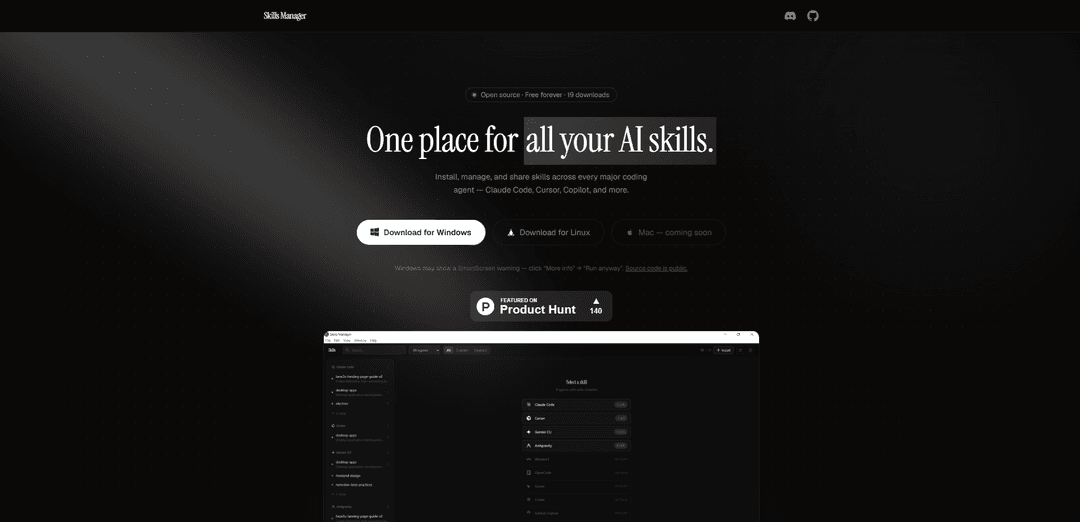
AI Skills Manager is a universal desktop application that allows users to install, manage, and share skills across multiple AI coding agents like Claude Code, Cursor, Copilot, and more in one centralized location.
https://sm.idoevergreen.me/?ref=producthunt
Informações do Produto
Atualizado:Apr 8, 2026
O que é AI Skills Manager
AI Skills Manager is an open-source, free-forever tool designed to solve the fragmentation problem across different AI coding agents. It serves as a unified platform where users can manage all their AI skills in one secure location, eliminating the need to handle skills manually across different configurations. The application currently supports 11 major coding agents including Claude Code, Cursor, GitHub Copilot, Gemini CLI, Windsurf, Goose, OpenAI Codex, OpenCode, Kilo Code, Trae, and Antigravity, with availability for Windows and Linux (Mac version coming soon).
Principais Recursos do AI Skills Manager
AI Skills Manager is a universal management tool that allows users to install, manage, and share AI agent skills across multiple coding platforms including Claude Code, Cursor, Copilot, and more. It provides a centralized location to view and manage all AI skills, enables one-click installation from GitHub repositories, and uses smart synchronization through symlinks to ensure skills are consistently updated across different AI tools.
Unified Skills Management: Centralize all AI skills in one secure location, eliminating the need to hunt through multiple config directories
Cross-Platform Compatibility: Works with 11 different coding agents including Claude Code, Cursor, GitHub Copilot, and more, allowing seamless skill sharing across platforms
Smart Synchronization: Uses symlink synchronization mechanism to automatically keep skills updated across all supported AI tools without file duplication
One-Click Installation: Install skills directly from GitHub repositories with a simple URL paste, supporting both public repos and custom registries
Casos de Uso do AI Skills Manager
Development Team Collaboration: Teams can share and standardize AI skills across different coding platforms, ensuring consistency in development practices
Skills Library Management: Organizations can maintain a centralized repository of AI skills, making it easier to manage and distribute across different projects and teams
Cross-Platform Development: Developers working with multiple AI coding assistants can maintain consistent skills and capabilities across different platforms
Vantagens
Free and open source
Simple and user-friendly interface
Supports multiple major coding agents
Efficient skill synchronization across platforms
Desvantagens
Mac version not yet available
May encounter SmartScreen warnings on Windows
Limited to coding-focused AI agents
Como Usar o AI Skills Manager
Download and Install: Download Skills Manager for your platform (Windows/Linux). For Windows users, if SmartScreen warning appears, click 'More info' then 'Run anyway'
First Launch Setup: On first launch, the app will guide you to select your skills storage directory (default is ~/.agents/skills/)
Automatic Agent Detection: The app automatically detects installed AI tools (like Claude Code, Cursor, Copilot etc.) on your system and links your skills
Install New Skills: Paste any GitHub repo URL containing skills and install them with one click. Works with both public repos and custom registries
Manage Skills: View all installed skills across different AI agents in one unified interface. Check symlink status and metadata for each skill
Share Skills Between Agents: Push skills from one agent to another (e.g., from Claude Code to Cursor) in seconds without manual file copying
Toggle Skills: Enable or disable any skill without deleting it. The app maintains symlinks automatically
Sync Skills: The app uses symlink synchronization to ensure all your AI tools have the latest version of skills without file duplication
Perguntas Frequentes do AI Skills Manager
Skills Manager is a universal AI agent skills manager that allows users to install, manage, and share skills across multiple coding agents like Claude Code, Cursor, Copilot, and others, all in one unified place.
Vídeo do AI Skills Manager
Artigos Populares

Atoms: Uma Plataforma de IA Multiagente Que Transforma Ideias em Produtos Prontos para Lançamento
May 22, 2026

Nano Banana SBTI: O Que É, Como Funciona e Como Usá-lo em 2026
Apr 15, 2026

Análise do Atoms — O Construtor de Produtos de IA Redefinindo a Criação Digital em 2026
Apr 10, 2026

Kilo Claw: Como Implementar e Usar um Verdadeiro Agente de IA "Faça Você Mesmo" (Atualização de 2026)
Apr 3, 2026
Ferramentas de IA Mais Recentes Semelhantes a AI Skills Manager

Gait
O Gait é uma ferramenta de colaboração que integra a geração de código assistida por IA com controle de versão, permitindo que as equipes rastreiem, entendam e compartilhem o contexto do código gerado por IA de forma eficiente.

invoices.dev
invoices.dev é uma plataforma de faturamento automatizada que gera faturas diretamente dos commits do Git dos desenvolvedores, com capacidades de integração para GitHub, Slack, Linear e serviços do Google.

EasyRFP
EasyRFP é um kit de ferramentas de computação de borda alimentado por IA que agiliza as respostas a RFP (Pedido de Proposta) e possibilita fenotipagem de campo em tempo real por meio de tecnologia de aprendizado profundo.

Cart.ai
O Cart.ai é uma plataforma de serviços impulsionada por IA que fornece soluções abrangentes de automação de negócios, incluindo codificação, gerenciamento de relações com clientes, edição de vídeo, configuração de e-commerce e desenvolvimento de IA personalizado com suporte 24/7.
Ferramentas de IA Populares Como AI Skills Manager

GitHub Copilot Chat
O GitHub Copilot Chat é um assistente de codificação alimentado por IA que fornece interações em linguagem natural, sugestões de código em tempo real e suporte contextual diretamente dentro de IDEs suportadas e GitHub.com.

CopilotForXcode
O CopilotForXcode é uma Extensão do Editor de Código do Xcode que integra GitHub Copilot, Codeium e ChatGPT para fornecer sugestões de código impulsionadas por IA, assistência por chat e funcionalidade de prompt-para-código dentro do Xcode.

BrowserAI
BrowserAI é uma biblioteca de código aberto que permite executar Modelos de Linguagem Grandes (LLMs) locais diretamente em navegadores da web com aceleração WebGPU, oferecendo recursos de IA focados na privacidade sem exigir infraestrutura de servidor.

OpenAI Codex CLI
OpenAI Codex CLI é um agente de codificação leve e de código aberto que é executado no seu terminal, permitindo que os desenvolvedores traduzam linguagem natural em execução de código, ao mesmo tempo em que fornece raciocínio em nível de ChatGPT com a capacidade de executar código, manipular arquivos e iterar sob controle de versão.