
Google Workspace CLI
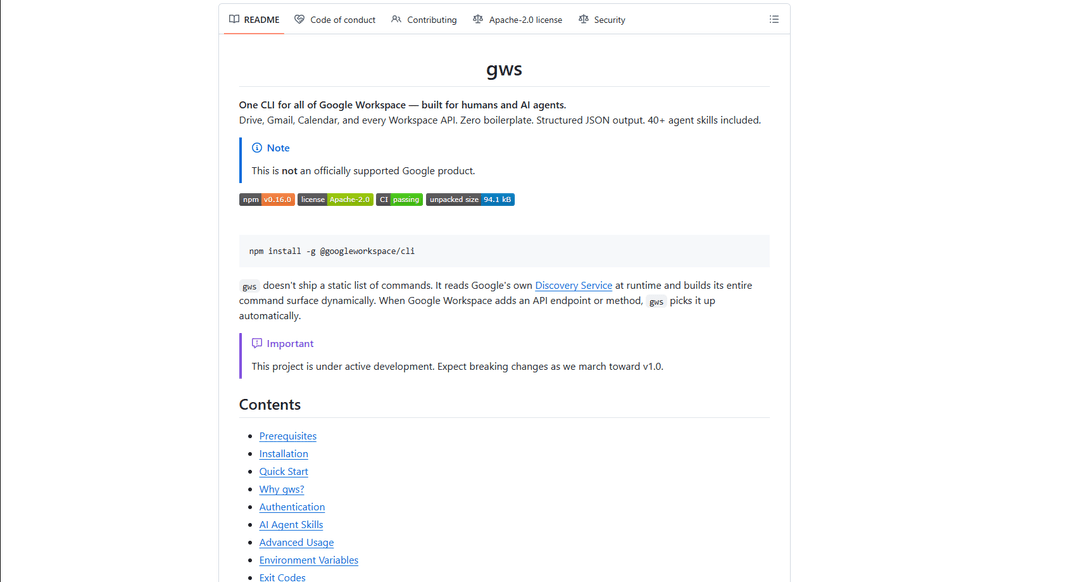
Google Workspace CLI is a unified command-line tool that provides access to all Google Workspace services (Drive, Gmail, Calendar, Sheets, Docs, Chat, Admin) through a single interface, with built-in AI agent skills and dynamic command generation.
https://github.com/googleworkspace/cli?ref=producthunt
產品資訊
更新時間:2026年03月16日
什麼是 Google Workspace CLI
Google Workspace CLI (gws) is an open-source command-line interface that enables users to interact with all Google Workspace services directly from their terminal, eliminating the need for multiple browser tabs or custom API integrations. Built with Rust and distributed as a Node.js package, it offers a streamlined way to automate Workspace tasks through command-line operations. While not an officially supported Google product, it provides comprehensive access to Google Workspace APIs with features like OAuth authentication, structured JSON output, and built-in AI agent capabilities.
Google Workspace CLI 的主要功能
Google Workspace CLI (gws) is a unified command-line tool that provides seamless access to all Google Workspace services including Drive, Gmail, Calendar, Sheets, Docs, Chat, and Admin. It dynamically builds its command surface from Google's Discovery Service, offers structured JSON output for AI agent integration, includes 100+ pre-built agent skills, and supports multiple authentication workflows. The tool simplifies automation and management of Google Workspace services through a single command-line interface, making it ideal for both human users and AI agents.
Dynamic Command Generation: Automatically builds commands from Google's Discovery Service, ensuring up-to-date access to all API endpoints without manual updates
AI Agent Integration: Includes 100+ pre-built agent skills and provides structured JSON output, making it easy for AI agents to interact with Google Workspace services
Flexible Authentication: Supports multiple authentication workflows including interactive desktop, browser-assisted, headless/CI, and service account authentication
Helper Commands: Provides hand-crafted helper commands (prefixed with '+') for common workflows across different services, simplifying complex operations
Google Workspace CLI 的使用案例
Enterprise Automation: Automate routine tasks like email management, document creation, and calendar scheduling across an organization using scripts and AI agents
Development Integration: Integrate Google Workspace services into development workflows and CI/CD pipelines for automated testing and deployment
Personal Productivity: Streamline personal workflow management through command-line access to emails, calendar, and documents without switching between browser tabs
AI Assistant Development: Build AI assistants that can interact with Google Workspace services using structured JSON outputs and pre-built agent skills
優點
Unified interface for all Google Workspace services
Automatic updates through Discovery Service integration
Rich support for AI agent integration with structured outputs
缺點
Project is still under active development with potential breaking changes
Requires technical knowledge to set up and use effectively
OAuth scope limitations for unverified apps in testing mode
如何使用 Google Workspace CLI
Install Google Workspace CLI: Run 'npm install -g @googleworkspace/cli' in your terminal to install the CLI globally
Set up authentication: Run 'gws auth setup' which will walk you through creating a Google Cloud project and enabling necessary APIs. If you don't have gcloud CLI, you'll need to set up OAuth credentials manually in Google Cloud Console.
Log in to your Google account: Run 'gws auth login' to authenticate. This will open a browser window for you to sign in to your Google account and grant permissions.
Select required API scopes: During login, choose which Google Workspace APIs you need access to (e.g., 'gws auth login -s drive,gmail,sheets' for specific services)
Test the connection: Try a simple command like 'gws drive files list --params '{"pageSize": 5}'' to verify everything is working
Learn basic commands: Use helper commands prefixed with '+' for common tasks. For example: 'gws gmail +send' to send emails, 'gws drive +upload' for file uploads, 'gws calendar +agenda' to see upcoming events
Handle pagination: Use --page-all flag to auto-paginate results, --page-limit <N> to set max pages, and --page-delay <MS> to set delay between pages
Work with Google Sheets: Always use single quotes when specifying sheet ranges, e.g. 'gws sheets spreadsheets values get --params '{"spreadsheetId": "ID", "range": "Sheet1!A1:C10"}'
Enable debug logging (optional): Set GOOGLE_WORKSPACE_CLI_LOG environment variable for debug output, e.g. 'export GOOGLE_WORKSPACE_CLI_LOG=gws=debug'
Install AI agent skills (optional): Run 'npx skills add https://github.com/googleworkspace/cli' to install all agent skills, or install specific ones like 'npx skills add https://github.com/googleworkspace/cli/tree/main/skills/gws-drive'
Google Workspace CLI 常見問題
Google Workspace CLI (gws) is a command-line tool that provides unified access to all Google Workspace services including Drive, Gmail, Calendar, Sheets, Docs, Chat, and Admin. It dynamically builds its command surface from Google's Discovery Service and includes AI agent skills. It's designed for both human users and AI agents to interact with Google Workspace services.




与 Google Workspace CLI 类似的最新 AI 工具

Gait
Gait 是一個集成 AI 辅助代碼生成和版本控制的協作工具,使團隊能夠高效地追蹤、理解和共享 AI 生成代碼的上下文。

invoices.dev
invoices.dev 是一個自動化發票平台,直接從開發者的 Git 提交生成發票,並具有 GitHub、Slack、Linear 和 Google 服務的集成能力。

EasyRFP
EasyRFP 是一個 AI 驅動的邊緣計算工具包,通過深度學習技術簡化 RFP(請求提案)回應並實現實時田間表型。

Cart.ai
Cart.ai 是一個 AI 驅動的服務平台,提供全面的業務自動化解決方案,包括編碼、客戶關係管理、視頻編輯、電商設置和定制 AI 開發,並提供 24/7 支持。
类似 Google Workspace CLI 的热门 AI 工具

GitHub Copilot Chat
GitHub Copilot Chat 是一個 AI 驅動的編碼助手,提供自然語言交互、實時代碼建議和上下文支持,直接在支持的 IDE 和 GitHub.com 中提供。

CopilotForXcode
CopilotForXcode 是一個 Xcode 源代碼編輯器擴展,將 GitHub Copilot、Codeium 和 ChatGPT 集成在一起,在 Xcode 中提供 AI 驅動的代碼建議、聊天協助和 prompt-to-code 功能。

BrowserAI
BrowserAI 是一個開源函式庫,它支援直接在具有 WebGPU 加速的 Web 瀏覽器中運行本地大型語言模型 (LLM),提供以隱私為中心的 AI 功能,而無需伺服器基礎設施。

OpenAI Codex CLI
OpenAI Codex CLI 是一個輕量級、開源的程式碼編寫代理,可在您的終端中執行,使開發人員能夠將自然語言轉換為程式碼執行,同時提供 ChatGPT 等級的推理能力,並具有執行程式碼、操作檔案以及在版本控制下迭代的能力。