
GhostDesk
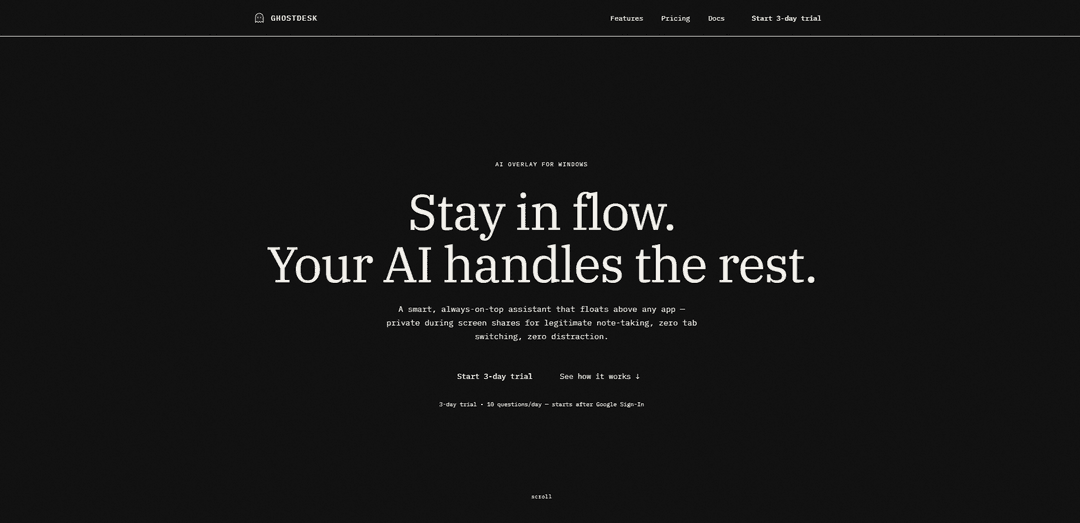
GhostDesk is a privacy-first AI overlay assistant for Windows that floats above any application while remaining invisible during screen shares, powered by DeepSeek V3 and GPT-4o with voice streaming and OCR capture capabilities.
https://ghostdesk-iota.vercel.app/?ref=producthunt
Ürün Bilgisi
Güncellendi:Apr 15, 2026
GhostDesk Nedir
GhostDesk is an innovative AI assistant designed specifically for Windows users who need intelligent support without disrupting their workflow or compromising privacy during professional interactions. Available as both a desktop overlay application and an MCP server for AI agents, GhostDesk offers a unique solution that stays visible only to the user while remaining completely hidden from screen sharing software, recording tools, and video conferencing platforms. The application features a 3-day trial with 10 questions per day, and integrates advanced AI models including DeepSeek V3 intelligence, Llama, and GPT-4o to provide smart, context-aware assistance. With region-aware billing through Razorpay for India and Dodo Payments for international users, GhostDesk caters to a global audience seeking a seamless blend of productivity and discretion.
GhostDesk Temel Özellikleri
GhostDesk is a privacy-first AI overlay assistant for Windows 10/11 that floats above any application while remaining invisible during screen shares, Zoom calls, and recordings. Powered by DeepSeek V3, GPT-4o, and Llama, it offers features like voice mode, OCR capabilities, and click-through focus that allows users to work seamlessly without tab switching. The tool uses OS-level Windows APIs to hide from screen capture, task manager, and taskbar while providing instant AI assistance through customizable hotkeys. It offers a 3-day trial with 10 questions per day and flexible pricing plans ranging from $5 for 24 hours to $34.99 for 6 months.
Screen-Share Privacy: Uses OS-level Windows APIs to remain completely invisible during screen sharing, video calls, and recordings across 14+ platforms including Zoom, Teams, Google Meet, and Discord, verified daily for privacy compliance.
Click-Through Focus Layer: Allows users to continue working in their active application while GhostDesk stays in place without focus shifts, window shuffling, or taskbar clutter, maintaining seamless workflow.
Multi-Modal AI Interaction: Supports text, voice, and OCR-based interactions with near real-time responses, powered by DeepSeek V3, GPT-4o, and Llama models for quick answers and complex reasoning.
Quick Screen Context Capture: Enables users to capture on-screen content via keyboard shortcuts and send it directly to AI chat for instant analysis and assistance without manual copying.
Customizable Hotkeys: Provides fully customizable keyboard shortcuts for toggling visibility (Ctrl+Shift+Space), enabling click-through mode, scrolling, and quick quit functions.
Instant Setup & Trial: Offers installation in under a minute with no dependencies or API keys required, including a 3-day trial with 10 questions per day after Google Sign-In.
GhostDesk Kullanım Alanları
Professional Client Meetings: Ideal for MENA enterprise environments and GCC countries where displaying AI tools during client meetings may signal inexperience. Sales teams and consultants can access AI assistance privately without revealing it to clients during screen shares.
Live Coding & Technical Interviews: Developers can receive real-time coding assistance, debugging help, and algorithm suggestions during technical work or pair programming sessions while keeping the AI overlay private from screen recordings.
Remote Presentations & Demos: Presenters can access speaker notes, fact-checking, and real-time information lookup during webinars, product demos, or training sessions without disrupting the viewer experience.
Content Creation & Streaming: Content creators and streamers can use AI assistance for research, script suggestions, and real-time information while recording or streaming without the overlay appearing in their output.
Customer Support & Help Desk: Support agents can quickly access knowledge bases, troubleshooting steps, and solution suggestions during screen-sharing sessions with customers while maintaining a professional appearance.
Educational Tutoring Sessions: Online tutors can access supplementary information, explanations, and teaching resources during live sessions with students without the AI assistant appearing in the shared screen.
Artıları
Complete privacy during screen shares with daily verification across 14+ video platforms including Zoom, Teams, and Google Meet
No-friction workflow with click-through focus that doesn't interrupt active applications or cause window switching
Quick setup in under a minute with no API keys or complex configuration required
Flexible pricing options including affordable 24-hour passes ($5) and cost-effective long-term plans (6 months for $34.99)
Eksileri
Currently only available for Windows 10/11, excluding macOS and Linux users
Trial limited to 10 questions per day, which may be restrictive for heavy users evaluating the product
Requires Google Sign-In for trial access, which may be a privacy concern for some users
User is solely responsible for ethical use; the tool could potentially be misused in prohibited contexts like exams or interviews despite disclaimers
GhostDesk Nasıl Kullanılır
1. Download and Install: Download the lightweight installer from the GhostDesk website and run it. No dependencies or runtimes needed - everything is bundled. Installation takes less than 1 minute.
2. Sign In with Google: Sign in with your Google account to start your 3-day trial, which includes 10 questions per day.
3. Configure Settings: Set your preferred hotkeys, choose your overlay position on screen, and customize shortcuts if needed. This takes approximately 30 seconds. The AI is built-in, so no API keys or additional setup required.
4. Toggle GhostDesk Visibility: Press Ctrl + Shift + Space (default hotkey) to show or hide the GhostDesk overlay window. The overlay will float above any active application.
5. Ask Questions: Type your questions or prompts into the GhostDesk chat interface. The AI will provide quick responses for everyday prompts and stronger reasoning for harder questions.
6. Use Voice Mode (Optional): Click the voice icon (♪) to talk naturally and get near real-time responses without interrupting your workflow.
7. Capture Screen Context (Optional): Use Ctrl + Shift + C to capture what's on your screen and send it directly into the AI chat for context-aware assistance using OCR.
8. Enable Click-Through Mode: Press Ctrl + Shift + C to enable click-through mode, allowing you to keep working in your active app while GhostDesk stays in place without focus jumps.
9. Scroll Without Changing Focus: Use Ctrl + Shift + Up to scroll up or Ctrl + Shift + Down to scroll down in GhostDesk without changing your active window focus.
10. Use During Screen Shares: GhostDesk automatically stays private during screen shares on platforms like Zoom, Google Meet, Microsoft Teams, and others. Your overlay remains visible only to you while shared output stays clean.
11. Quick Quit: Press Ctrl + Shift + Q to quickly close GhostDesk when needed.
12. Upgrade After Trial: After your 3-day trial ends, choose a paid plan (24-hour, monthly, 3-month, or 6-month) to continue with unlimited usage and premium features. Checkout is auto-routed by region.
GhostDesk SSS
GhostDesk uses OS-level Windows APIs (SetWindowDisplayAffinity) to exclude its overlay from screen-capture pipelines. This means platforms like Zoom, Teams, Google Meet, Discord, and recording tools like OBS will capture your shared content while keeping GhostDesk's overlay visible only on your local screen.
Popüler Makaleler

Atoms: Fikirleri Lansmana Hazır Ürünlere Dönüştüren Çoklu Ajan Yapay Zeka Platformu
May 22, 2026

Nano Banana SBTI: Nedir, Nasıl Çalışır ve 2026'da Nasıl Kullanılır
Apr 15, 2026

Atoms İncelemesi — 2026'da Dijital Oluşumu Yeniden Tanımlayan Yapay Zeka Ürün Geliştiricisi
Apr 10, 2026

Kilo Claw: Gerçek Bir "Senin Yerine Yapan" Yapay Zeka Aracısı Nasıl Kurulur ve Kullanılır (2026 Güncellemesi)
Apr 3, 2026
GhostDesk Benzer En Yeni Yapay Zeka Araçları

Inbox AI
Inbox AI, kullanıcıların özelleştirilmiş iş akışları ve komutlar oluşturmasına olanak tanırken, hem bulut tabanlı hem de cihaz içi AI seçenekleri sunan, sesle yönlendirilen AI otomasyonunu e-posta yönetim yetenekleriyle birleştiren gizlilik odaklı bir MacOS verimlilik uygulamasıdır.

Cart.ai
Cart.ai, kodlama, müşteri ilişkileri yönetimi, video düzenleme, e-ticaret kurulumu ve 24/7 destek ile özel AI geliştirme dahil kapsamlı iş otomasyon çözümleri sunan AI destekli bir hizmet platformudur.

Hiyllo Work
Hiyllo Work, sohbet, proje yönetimi, takvim, e-posta, dosya depolama ve video toplantılarını tek bir entegre ortamda birleştiren hepsi bir arada bir ekip çalışma alanı platformudur.

MailSense
MailSense, kullanıcıların gelen kutularını daha verimli bir şekilde yönetmelerine yardımcı olmak için bir Telegram botu arayüzü aracılığıyla e-postaları filtreleyen, özetleyen ve yanıtlar üreten AI destekli bir e-posta asistanıdır.
GhostDesk Gibi Popüler Yapay Zeka Araçları

Magentic-UI
Magentic-UI, Microsoft Research tarafından geliştirilen, insanlar ve yapay zeka ajanları arasında şeffaf etkileşim yoluyla karmaşık web tabanlı görevlerin işbirlikçi planlanmasını ve yürütülmesini sağlayan açık kaynaklı, insan merkezli bir web aracı prototipidir.

Microsoft Copilot Cowork
Microsoft Copilot Cowork, kullanıcı niyetini eyleme geçirilebilir planlara dönüştüren ve kontrol noktaları ve onaylar aracılığıyla kullanıcıları kontrol altında tutarken Microsoft 365 uygulamaları genelinde çok adımlı görevleri otonom olarak yürüten yapay zeka destekli bir asistandır.

Upsonic
Upsonic, doğrulama katmanları, üçgen mimari ve Model Bağlam Protokolü (MCP) entegrasyonu gibi gelişmiş özellikler aracılığıyla güvenilir aracı iş akışları sağlayan, dockerize edilmiş sunucu-istemci mimarisine sahip, güvenilirliğe odaklı bir AI aracı çerçevesidir.

CampEd Hire
CampEd Hire, LinkedIn iş ilanlarından başvuru verilerini otomatik olarak toplayıp düzenleyerek işe alımı kolaylaştıran güçlü bir Chrome uzantısıdır; otomatik veri toplama, CSV dışa aktarma ve toplu özgeçmiş indirme gibi özellikler sunar.