
Zaro
Zaro is a unified, company-owned AI workspace that connects your internal data to context-aware agents and prompt-built apps/workflows, so automation retains shared memory, avoids vendor lock-in (via MCP), and stays cost-efficient with model-agnostic routing.
https://zaro.ai/?ref=producthunt
Product Information
Updated:Jul 8, 2026
What is Zaro
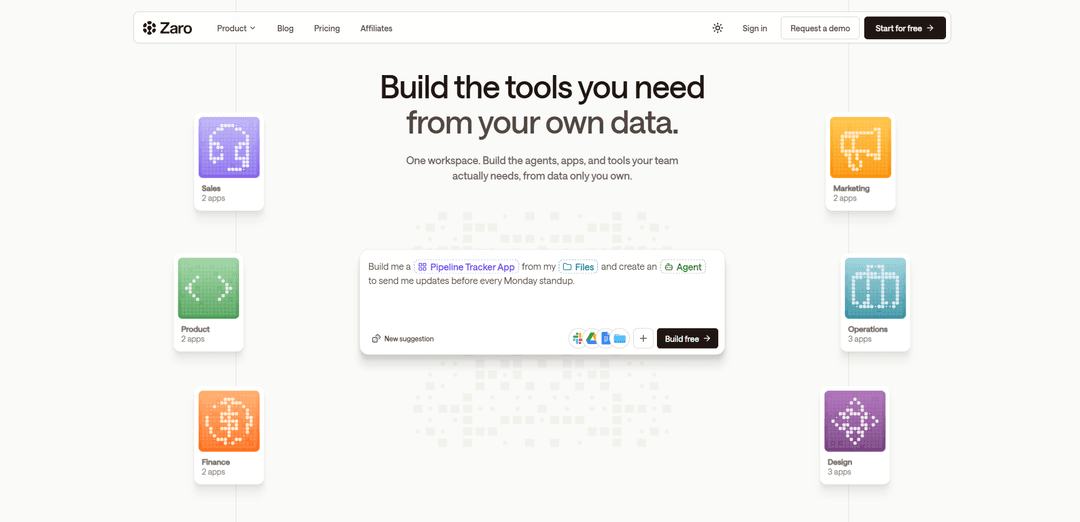
Zaro is an enterprise AI workspace designed to help teams generate custom apps, agents, and workflows directly from the data they already produce—files, meeting notes, Slack threads, CRM records, and more—without scattering context across disconnected tools. Built around the idea that a company should own its institutional intelligence (not the vendor), Zaro centralizes operational knowledge in one place and lets teams describe what they need (e.g., a pipeline tracker, dashboard, or weekly briefing) to create tools that read from and write back to the same workspace over time.
Key Features of Zaro
Zaro is an enterprise AI workspace that unifies a company’s scattered data (files, calls, CRM records, Slack threads, specs) into a shared, company-owned context layer where agents can run, write back results, and generate custom internal apps and dashboards from natural-language descriptions. It’s designed to make “intelligence compound” over time by keeping memory persistent across workflows, while remaining model-agnostic and built on MCP (an open standard for tool connectivity) to reduce vendor lock-in and let teams choose their architecture and cost profile.
Shared context layer (persistent memory): A workspace-level memory that connects company data, decisions, workflows, and operational history so agents and apps don’t “reset” between tasks and can build on prior outputs.
Connect existing tools and data sources: Ingests and centralizes context from sources like files, calls/meeting notes, CRM records, Slack threads, and specifications without forcing teams to change how they work.
Agents that read + write back to the workspace: Agents can be scheduled, triggered, or run on demand; they operate on workspace context and persist results back into the shared layer (e.g., captured decisions, updated trackers).
Generate custom apps from plain English: Describe what you need and Zaro builds internal tools such as live dashboards, automated morning briefings, pipeline/status trackers, and other workflow apps—without relying on rigid templates.
MCP-based interoperability and architecture choice: Built on MCP (open standard for AI tool connectivity), enabling flexible integration patterns and reducing vendor lock-in by letting customers choose how tools and components connect.
Model-agnostic, cost-aware routing: Routes simpler tasks to lower-cost models and reserves frontier models for complex work, aiming to reduce AI operating costs versus frontier-only deployments.
Use Cases of Zaro
Sales pipeline tracker and standup updates: Build a pipeline tracker app from existing CRM notes/call summaries and run an agent that sends Monday standup updates with changes, risks, and next steps.
Executive or team morning briefing: Automatically compile an 8am briefing from internal updates plus relevant external signals, summarizing what changed yesterday, what matters today, and what needs attention.
Compliance and audit readiness workspace: Centralize SOC2/GDPR artifacts, decisions, and evidence; run agents that track gaps, update checklists, and generate status dashboards for audits and security reviews.
Product & engineering status tracker: Pull context from specs, tickets, and Slack discussions to generate a living status dashboard that updates itself, highlights blockers, and records key technical decisions.
Customer support and operations knowledge loop: Unify support threads, incident notes, and runbooks so agents can summarize recurring issues, propose workflow improvements, and keep an internal “single source of truth” current.
Research and competitive intelligence hub: Aggregate research docs, meeting notes, and links into one workspace; agents can extract insights, track decisions, and produce shareable dashboards for stakeholders.
Pros
Reduces fragmentation by unifying data, agents, and apps in one workspace with persistent memory.
Company-owned context layer helps mitigate vendor lock-in and preserves institutional knowledge.
Flexible integrations via MCP and model-agnostic approach can improve interoperability and control costs.
Cons
Owning the context layer can increase trust/procurement requirements and slow enterprise adoption.
Dependence on third-party models/tools can introduce reliability and liability limitations (as noted in terms).
Backward compatibility for customer-built apps may not be guaranteed, increasing maintenance risk over time.
How to Use Zaro
1) Create a workspace: In Zaro, start by creating a new workspace that matches your scope (company-wide, per team, or per use case). A workspace is a siloed context layer where your data, agent runs, and app outputs live together so memory compounds over time.
2) Connect your existing data sources: Connect the tools and repositories your team already uses so Zaro can read the context in one place (e.g., files/docs, call notes, CRM records, Slack threads, specifications). The goal is to centralize what you already produce without changing how your team works.
3) Organize and verify the workspace context: Confirm your connected content is visible inside the workspace (e.g., folders for meetings, operations, product, compliance). This ensures agents and generated apps can reliably reference the right documents and history.
4) Ask questions in workspace chat to validate retrieval: Use the workspace chat to ask a concrete question that should be answered from your connected data (example from the source: “Hey @Zaro, did the team agree on a price and date for the contract renewal?”). This helps confirm Zaro can find decisions and relevant context.
5) Capture outputs back into the workspace: When Zaro produces useful results (e.g., a decision like price/date), store them back into the workspace so they become part of the shared memory. The platform is designed so each interaction builds intelligence inside your workspace rather than being lost across tools.
6) Create an agent that reads from and writes to your workspace: Create an agent for a recurring operational task. Agents are designed to read from your workspace context and write results back into it. Zaro supports running agents on demand, on a schedule, or via triggers.
7) Schedule, trigger, or run agents on demand: Choose how the agent runs: schedule it (e.g., daily/weekly), trigger it from events, or run it manually. The sources emphasize that each agent run should update the workspace so the system compounds knowledge over time.
8) Generate a custom app from your workspace data (prompt-driven): Describe the tool you want in plain language and have Zaro generate it from your connected context (example from the source: “Build me a Pipeline Tracker App from my Files and create an Agent to send me updates before every Monday standup.”). Zaro can generate dashboards, trackers, and briefings without relying on fixed templates.
9) Review the generated app and confirm it stays live: Open the generated app (e.g., a sales pipeline, meeting intel, UX audit, status tracker) and verify it is connected to your workspace data. The intended behavior is that the app stays live and updates as agents run and new context arrives.
10) Set up automated reporting/briefings: Configure an agent to produce recurring outputs like a morning digest or pre-meeting update. The case study example describes an overnight news monitor that delivers an email digest at 8am, illustrating how to operationalize scheduled briefings.
11) Use MCP-based tool connectivity when integrating workflows: When connecting tools or extending capabilities, rely on Zaro’s MCP-based connectivity (an open standard for AI tool connectivity). This is positioned as enabling interoperability and reducing vendor lock-in by letting you choose your architecture.
12) Iterate so intelligence compounds in the workspace: Keep running agents and generating apps that write results back into the same workspace. The core workflow is: connect context → run agents → generate tools → store outputs back into the workspace, so memory, decisions, and operational history accumulate over time.
Zaro FAQs
Zaro is an AI workspace platform that lets teams build context-aware AI agents, apps, and tools on top of their own data inside a single workspace.
Zaro Video
Popular Articles

Atoms: A Multi-Agent AI Platform That Transforms Ideas into Launch-Ready Products
May 22, 2026

Nano Banana SBTI: What It Is, How It Works, and How to Use It in 2026
Apr 15, 2026

Atoms Review — The AI Product Builder Redefining Digital Creation in 2026
Apr 10, 2026

Kilo Claw: How to Deploy and Use a True "Do‑It‑For‑You" AI Agent(2026 Update)
Apr 3, 2026
Latest AI Tools Similar to Zaro

invoices.dev
invoices.dev is an automated invoicing platform that generates invoices directly from developers' Git commits, with integration capabilities for GitHub, Slack, Linear, and Google services.

Monyble
Monyble is a no-code AI platform that enables users to launch AI tools and projects within 60 seconds without requiring technical expertise.

Devozy.ai
Devozy.ai is an AI-powered developer self-service platform that combines Agile project management, DevSecOps, multi-cloud infrastructure management, and IT service management into a unified solution for accelerating software delivery.
Mediatr
MediatR is a popular open-source .NET library that implements the Mediator pattern to provide simple and flexible request/response handling, command processing, and event notifications while promoting loose coupling between application components.
Popular AI Tools Like Zaro

Launch
Launch is an AI-powered platform that enables users to build full-stack applications instantly while providing comprehensive tools for product launches, entrepreneurship programs, and customer acquisition.

GitHub Copilot Chat
GitHub Copilot Chat is an AI-powered coding assistant that provides natural language interactions, real-time code suggestions, and contextual support directly within supported IDEs and GitHub.com.

Rememberall
Rememberall is a secure, open-source long-term memory solution that enables AI applications and GPT models to maintain persistent memory across conversations through semantic search and vector storage capabilities.

Upsonic
Upsonic is a reliability-focused AI agent framework with dockerized server-client architecture that enables trusted agent workflows through advanced features like verification layers, triangular architecture, and Model Context Protocol (MCP) integration.