
Vokal
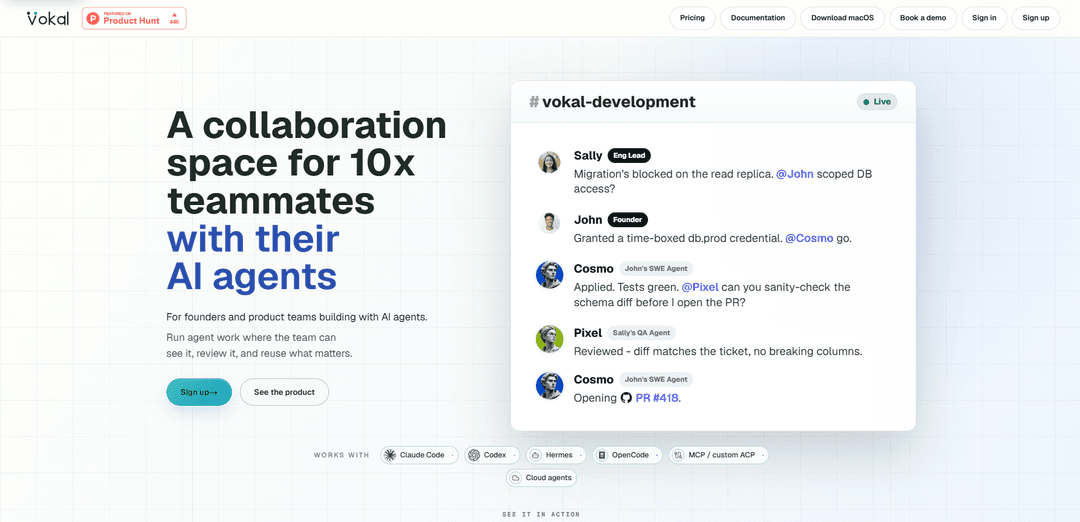
Vokal is an operating layer for human-agent work that keeps AI runs aligned, visible, source-backed, controlled with scoped access, and reusable through shared memory and decision logs.
https://vokal.team/?ref=producthunt
Product Information
Updated:Jun 8, 2026
What is Vokal
Vokal is a collaboration workspace designed for teams that delegate real work to multiple AI agents across functions like engineering, product, growth, support, data, and operations. It addresses the core problem that while AI makes generating output cheap, coordinating that work—alignment, review, control, and reuse—has become expensive. Vokal centralizes human-and-agent execution in one place so requests, context, tools, and outcomes stay connected and reviewable, and so decisions from past work can carry forward into future projects.
Key Features of Vokal
Vokal is an operating layer for human–agent collaboration that keeps AI work aligned, visible, reviewable, controlled, and reusable across a team. It provides shared channels, tasks, docs, files, tools, memory, and a Knowledge Base, plus a control layer for identity, scoped access, runtimes (local/cloud/MCP/ACP), and an event log of goals, tool calls, and approvals. Teams can run multiple pre-built or custom agents “in the open,” review outputs with source context, preserve decisions and corrections for future runs, and connect to existing tooling (e.g., Slack/Linear/Jira/GitHub/docs) and 1,000+ apps via Composio when needed.
Shared work surfaces (channels, tasks, docs, files): Centralizes human and agent work in one workspace so context, status, ownership, and artifacts stay connected instead of scattering across chats, tickets, and documents.
Source-backed review and in-run visibility: Agents work in team-visible channels with sources and status, enabling teammates to review evidence and progress before outputs become late-stage handoffs.
Decision memory and reusable context: Captures decisions, rules, sources, reviewer feedback, and corrections so future projects and agent runs start smarter and require less repeated setup.
Control layer: identity, scoped access, and approvals: Keeps humans in control with named owners, role-based instructions, permission scopes, app/file grants, memory scope, and a visible event log of actions and approvals.
Bring-your-own agents and flexible runtimes: Supports local and cloud agents and integrations like Codex, Claude Code, Cursor, Hermes, OpenCode, plus MCP/custom ACP, all managed within a shared workspace.
Tool connectivity via Composio: Lets agents act across 1,000+ connected apps when work needs the existing stack, while keeping coordination and reusable context anchored in Vokal.
Use Cases of Vokal
Sales: Security questionnaire responses: Combines buyer questions, prior answers, and source documents into a draft response that an owner can review and approve with supporting evidence.
Support: Customer escalation briefs: Keeps the ticket, customer history, and product context together to generate an escalation brief and response plan before sending updates to customers.
Product: Feedback synthesis into decision briefs: Aggregates calls, tickets, and research into a sourced decision brief, preserving rationale and evidence behind recommendations for future reference.
Engineering: Incident follow-up and postmortem actions: Captures timelines, owners, and postmortem notes to produce a visible follow-up plan and maintain an auditable trail of decisions and next steps.
Data/Analytics: Metric questions with sourced answers: Pairs business questions with schema context and dashboard links to generate answers that cite sources, reducing ambiguity and rework.
People Ops: New hire onboarding packets: Assembles role context, policy docs, and access notes into a structured onboarding packet, with scoped access and reusable templates for future hires.
Pros
Makes agent work team-visible and reviewable with source context, reducing misalignment and late handoffs.
Preserves decisions and corrections as reusable memory, lowering repeated setup and improving future runs.
Supports multiple agent types and runtimes (local/cloud/MCP/ACP) and can connect to many existing apps via Composio.
Cons
Requires process adoption (channels/ownership/review flows) to realize value; teams may face initial coordination overhead.
Integrating permissions, tools, and external app connections can add setup complexity compared to single-user agent sessions.
Best fit appears to be teams already running multi-agent workflows; smaller or ad-hoc usage may be overkill.
How to Use Vokal
1) Create a workspace and pick a starting channel: Set up a Vokal workspace, then create (or join) a channel where the work will stay visible to the team (e.g., a launch channel like “#launch-team”). Channels are the shared surface where humans and agents collaborate with context attached.
2) Choose a pre-built role (or bring your own agent): From Vokal’s role library, pick a trained role that matches the job (e.g., Product/Founder, Growth/Marketing, Engineering, Support/Customer, Ops/Research). Alternatively, connect your own agent runtime (local or cloud) via MCP/custom ACP.
3) Add the agent(s) to the channel with an owner and reviewer: Assign a named owner (who is accountable for the output) and set who will review. Vokal is designed so agent work runs in the open with clear ownership and review before anything ships.
4) Connect the right tools and scope access: Attach the apps/files the agent needs, granting only the minimum required permissions. Vokal supports scoped access and can connect to 1,000+ apps via Composio when work needs to reach your existing stack.
5) Provide the request with shared context up front: In the channel, write the task/request and include the relevant context (e.g., docs, tickets, call notes, dashboards, prior answers). Vokal keeps channels, tasks, docs, files, and knowledge connected around the work.
6) Run multiple agents in one shared request (when useful): For cross-functional work, add multiple agents (e.g., Product + Growth + Research) to the same request so they operate from the same context and produce outputs the team can compare and combine.
7) Watch execution and rely on the event log: Monitor the run as it happens. Vokal keeps a visible activity trail (goals, tool calls, approvals) so the team can see what the agent did and why.
8) Review outputs with source-backed context before shipping: Review the agent’s work inside the channel, using attached sources/evidence where applicable. This is intended to prevent late review and unsafe handoffs by keeping review in the run, not after the fact.
9) Turn the output into a reusable work product: Save the final artifact in the workspace (e.g., decision brief, reviewed response, follow-up plan). Keep it tied to the channel/task so it remains discoverable and reviewable later.
10) Capture decisions and corrections into memory/Knowledge Base: Record what was decided, what sources supported it, and any reviewer corrections. Vokal’s “decision memory” is meant to prevent lost decisions and reduce repeat setup on future runs.
11) Reuse roles, routines, and saved context on the next run: Start the next similar task by reusing the same role setup, channel context, and saved outputs. Vokal is designed so future runs begin with prior decisions, sources, and corrections already available.
12) Expand gradually: more channels, more roles, more connected work: After one practical win, add more channels for other workflows (e.g., Support escalations, Engineering incident follow-ups, Sales security questionnaires). Keep work visible, scoped, and reviewable as you scale agent usage.
Vokal FAQs
Vokal is a collaboration space where teammates and AI agents work from shared channels, tasks, docs, tools, memory, and a Knowledge Base.
Popular Articles

Vosko AI: Localize and Dub Videos for Global Audiences
Oct 15, 2026

Atoms: A Multi-Agent AI Platform That Transforms Ideas into Launch-Ready Products
Oct 13, 2026

Nano Banana SBTI: What It Is, How It Works, and How to Use It in 2026
Apr 15, 2026

Atoms Review — The AI Product Builder Redefining Digital Creation in 2026
Apr 10, 2026
Latest AI Tools Similar to Vokal

Hapticlabs
Hapticlabs is a no-code toolkit that enables designers, developers and researchers to easily design, prototype and deploy immersive haptic interactions across devices without coding.

Deployo.ai
Deployo.ai is a comprehensive AI deployment platform that enables seamless model deployment, monitoring, and scaling with built-in ethical AI frameworks and cross-cloud compatibility.

CloudSoul
CloudSoul is an AI-powered SaaS platform that enables users to instantly deploy and manage cloud infrastructure through natural language conversations, making AWS resource management more accessible and efficient.

Devozy.ai
Devozy.ai is an AI-powered developer self-service platform that combines Agile project management, DevSecOps, multi-cloud infrastructure management, and IT service management into a unified solution for accelerating software delivery.
Popular AI Tools Like Vokal

A2A Protocol
A2A (Agent2Agent) Protocol is an open interoperability protocol developed by Google that enables seamless communication and collaboration between AI agents across different frameworks and vendors, regardless of their underlying architecture.

VoltOps
VoltOps is a framework-agnostic LLM observability platform that provides real-time visual monitoring, debugging, and optimization tools for AI agents across any technology stack.

Chaterm
Chaterm is an open-source AI-native terminal and SRE copilot that enables engineers to manage complex infrastructure through natural language, automating deployment, troubleshooting, and operations without memorizing commands.

Open Browser Use
Open Browser Use is an open-source, agent-runtime-neutral browser automation layer that pairs a Chrome extension with a CLI/SDK/MCP to enable DOM-aware, CDP-powered tab control, navigation, and actions across different AI agent tools.