
Town
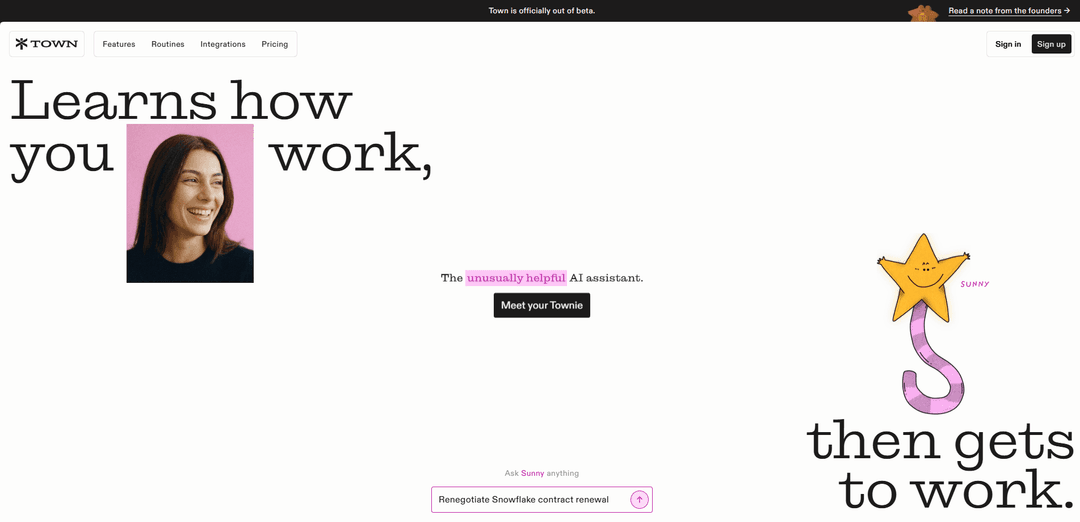
Town is an AI assistant platform where “Townies” learn how you work from your existing work and then execute tasks from your to-do list, automate repeat routines, and collaborate across 50+ integrations.
https://town.com/?ref=producthunt
Product Information
Updated:Jun 8, 2026
What is Town
Town (town.com) positions itself as “the AI assistant that does the work,” built around agents called Townies that quickly adapt to your working style—your voice, clients, and workflows—without requiring extensive prompt engineering. It focuses on practical day-to-day execution, such as drafting and organizing email, preparing meeting briefings, producing summaries, and coordinating tasks, while also supporting team use cases through shared routines and integrations. The product emphasizes fast onboarding (“learn you on day one”), task execution from a to-do list, and automation of recurring workflows across common workplace tools.
Key Features of Town
Town is an AI assistant (“Townie”) designed to do real work across your existing tools by learning how you operate from day one—your voice, clients, and patterns—so you don’t need to perfect prompts. It can take tasks from a to-do list, automate repeatable workflows via scheduled “Routines,” and proactively suggest next actions. Town connects to a broad set of integrations (50+ shown) spanning email, calendars, docs, CRMs, project management, and developer tools, enabling it to draft communications, prepare briefings, research contacts, summarize activity, and log operational data with review/approval controls.
Learns your working style day one: Adapts to your writing voice and context (clients, deadlines, typical workflows) based on the work you’ve already done, reducing setup and prompt engineering.
To-do list driven execution: You write what needs doing; the Townie reads the list, completes research/drafting/updates, and returns with actionable outputs (e.g., drafted replies, decisions needed).
Automated Routines for repeat work: Prebuilt or custom scheduled automations (e.g., weekly summaries, inbox management, meeting prep) that run on a cadence and deliver results without manual chasing.
Proactive suggestions and follow-through: Identifies patterns (e.g., how you review contracts) and proposes automations or next steps, helping teams discover more efficient ways to work.
Deep integrations across work apps (50+): Works across Gmail/Google Calendar/Docs/Drive/Sheets, Slack, Notion, HubSpot, Salesforce, Jira/Linear, GitHub, QuickBooks, and more to read/write data where work happens.
Messaging access + multi-device presence: Accessible via desktop and iPhone apps and messaging channels (e.g., Slack; WhatsApp/Telegram inbound-only), enabling quick task capture and updates on the go.
Use Cases of Town
Finance close & vendor coordination: CFO/controller workflows like drafting quarter-close vendor emails, producing weekly financial summaries, and extracting/logging invoices and receipts to Sheets or accounting tools.
Sales & CRM hygiene: For sales teams, summarize client interactions, draft follow-ups in the team’s voice, research new inbound contacts, and update CRM records (e.g., HubSpot/Salesforce/Attio).
Executive coaching / professional services: Prepare client briefings, draft high-quality client communications in a consistent voice, and generate weekly account or engagement summaries from email threads.
Recruiting & HR operations: Support recruiting teams by working with ATS data (e.g., Ashby), scheduling coordination, and generating candidate or pipeline summaries for weekly reviews.
Engineering & product status reporting: Aggregate GitHub activity (PRs, merges, blockers) and project tracker updates (Jira/Linear) into concise team status reports and leadership-ready briefings.
Operations & travel administration: Automatically detect and organize travel bookings from email, log key details to Sheets, and keep teams aligned with consistent travel and expense records.
Pros
Reduces prompt/setup overhead by learning from existing work patterns and writing voice.
Strong automation via scheduled Routines for recurring workflows (inbox, briefings, summaries, logging).
Broad integration coverage enables end-to-end workflows across email, calendar, docs, CRM, and dev tools.
Proactive suggestions can uncover new automations beyond what users explicitly request.
Cons
Value depends on granting access to sensitive systems (email/CRM/docs), which may raise privacy/security or compliance concerns for some organizations.
Some messaging integrations are inbound-only (e.g., WhatsApp/Telegram), limiting full two-way delegation in those channels.
Effectiveness may vary based on integration availability/quality and how structured a team’s underlying data and processes are.
How to Use Town
Create a town: Stand in the chunk you want as your starting area (your homeblock) and run: /t new <town name>. This creates your town centered on the chunk you are standing on.
View your town’s info/status: Run: /t (or /town) to see key information about your town (including claimed land, bank balance, and other town details).
Deposit money to your town bank (to cover upkeep and expansion): Run: /t deposit <amount> (or /town deposit <amount>) to move money from your personal balance into the town bank. Town upkeep is automatically taken from the town bank at the start of each Towny Day (real day). If the bank can’t pay upkeep, the town falls into Ruins.
Claim more land for your town: Move to an unclaimed chunk adjacent to your existing claims and run: /t claim. Towny land is chunk-based (16x16). You can use the chunk visualizer (F3+G, or CMD+F3+G on Mac) to see chunk borders.
Claim a non-connected outpost (if your server allows it): Stand in the chunk you want as the outpost and run: /t claim outpost. This claims land that is not directly connected to your town (cost varies by server).
Invite players to join your town: As mayor, run: /t add <player>. The invited player joins by running: /accept <town name>.
Let players join without an invite (optional): As mayor, set your town to open with: /town toggle open. Then new players can join using: /town join <townname> (or /t join <townname>).
Teleport to your town spawn: Run: /t spawn to teleport to your town’s spawn point.
Set your town homeblock/spawn location (mayor setup): Stand where you want residents to spawn and use the town homeblock/spawn setting commands available on your server (commonly: /t set homeblock, then /t set spawn).
Sell a plot to residents (create resident-owned plots): Stand in the plot (chunk) you want to sell and run: /plot fs <price>. A resident can then buy it with: /plot claim. Money transfers from the resident’s balance to the town bank.
Remove a plot from sale (if you listed it): Stand in the plot and run: /plot notforsale.
Unclaim a resident plot (give it back to the town): A resident stands in their owned plot and runs: /plot unclaim to remove their ownership.
Set plot types (organize districts like shops, farms, embassies): Stand in a plot and run a plot-type command such as: /plot set shop (or /plot set normal, /plot set embassy, /plot set farm depending on your server’s enabled types).
Adjust plot permissions (fine-grained access control): While standing in a plot, use plot permission commands such as: /plot set perm build ally on (example: allow allied players to build in that plot).
Adjust town-wide permissions (optional lockdown): If you want to restrict access broadly, you can disable town permissions with: /t set perm off (server-dependent behavior). You can also selectively allow groups (e.g., allies) with commands like: /t set perm ally build on.
Create a chest shop inside town claims: Hold the item you want to trade and run: /iteminfo to get the item ID. Place a chest, then place a sign on or above the chest. Fill the sign as follows: Line 1: leave blank; Line 2: item amount per transaction; Line 3: B#: S#: (use B for the price you sell at, S for the price you buy at).
Use town chat (optional): Use /tc before a message (or alone to switch channels) to chat only with your town. Some servers also provide /nc for nation chat and /g for global chat.
Maintain growth limits (bonus claims): If you need more claim capacity than your current town size allows, you can buy bonus townblocks on servers that enable it using: /t buy bonus <amount>.
Town FAQs
Town is an AI assistant product where “Townies” (AI assistants) do work based on your to-do list and can automate repeat workflows via scheduled routines.
Town Video
Popular Articles

Vosko AI: Localize and Dub Videos for Global Audiences
Oct 15, 2026

Atoms: A Multi-Agent AI Platform That Transforms Ideas into Launch-Ready Products
Oct 13, 2026

Nano Banana SBTI: What It Is, How It Works, and How to Use It in 2026
Apr 15, 2026

Atoms Review — The AI Product Builder Redefining Digital Creation in 2026
Apr 10, 2026
Latest AI Tools Similar to Town

Ticknotes
Ticknotes is an AI-powered meeting assistant that automatically records, transcribes, and generates personalized meeting summaries, action items, and key insights from audio, video, and text content.

Feta
Feta is an AI-powered meeting tool that helps product and engineering teams run efficient meetings by capturing discussions, automating tasks, and providing actionable insights through smart summaries and integrations.

Aimeet
Aimeet is a comprehensive AI-powered communication platform that combines real-time translation, transcription, screen sharing, and unlimited meeting capabilities for effective virtual collaboration.

MinutesLink
MinutesLink is an advanced AI-powered note-taking assistant that automatically records, transcribes, summarizes and organizes virtual meetings while building personalized digital avatars from meeting data.
Popular AI Tools Like Town

Second Brain for AI
Second Brain for AI is a self-hosted, MCP-compatible persistent memory layer on Cloudflare that lets Claude, ChatGPT, Cursor, and other AI clients store and semantically recall shared context across sessions.

Slack
Slack is an AI-powered work platform that brings team communication, channels, files, automation, and app integrations into one conversational workspace.

24me Smart Personal Assistant
24me is an award-winning smart personal assistant app that combines calendar, to-do lists, notes, and personal accounts in one unified platform to help boost productivity and time management.

Granola for iOS
Granola for iOS is an AI-powered notepad app that helps users effortlessly capture, transcribe and summarize meeting conversations through intelligent note-taking and one-tap recording capabilities.