
Tokimeter
Tokimeter is a local-first, MIT-licensed CLI (with an optional VS Code/Cursor extension) that reads existing on-device logs to estimate and report AI coding tool usage, costs, budgets, and limit windows—without accounts or telemetry.
https://tokimeter.com/?ref=producthunt
Product Information
Updated:Aug 8, 2026
What is Tokimeter
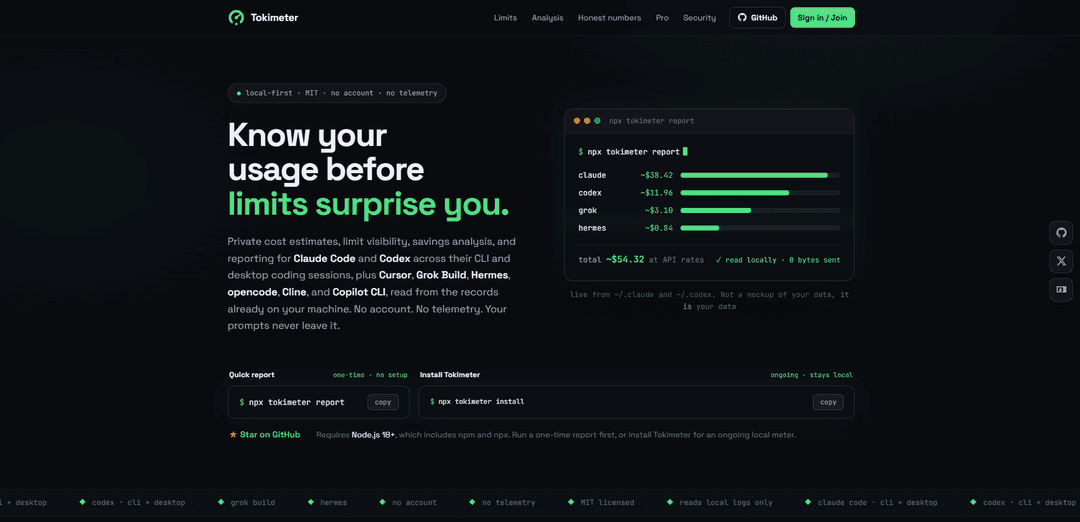
Tokimeter is a privacy-focused usage and cost visibility tool for AI coding workflows. It helps you understand how much you’re using tools like Claude Code and Codex (plus others such as Cursor, Grok Build, Hermes, opencode, Cline, and Copilot CLI) by generating clear reports from the records already stored on your machine. Designed to be “local-first,” it requires no account and sends 0 bytes by default, giving you practical insights—like per-tool totals and per-project reporting—without moving your prompts off-device.
Key Features of Tokimeter
Tokimeter is a local-first, MIT-licensed CLI (with an optional VS Code/Cursor extension) that reads the usage records already stored on your machine to estimate and report AI coding spend and limit consumption across tools like Claude Code, Codex, Cursor, Grok Build, Hermes, opencode, Cline, and Copilot CLI. It provides quick reports, rolling-window budget tracking, and deeper analyses (savings opportunities, agent/subagent breakdowns, per-session traces, and cross-tool orchestration), while keeping prompts and responses off-limits by design—no account required and no telemetry by default.
Local-only usage reporting: Generates spend and usage reports directly from local logs (e.g., ~/.claude and ~/.codex) with commands like `npx tokimeter report`, sending 0 bytes by default.
Limit visibility with real counters when available: Shows 5-hour and 7-day usage windows for budgets you set; when tools store vendor rate-limit counters (e.g., Codex/OpenAI), Tokimeter surfaces exact reset times instead of guessing.
Budgets, headroom, and warnings: Supports daily/weekly/per-tool 5h/per-session budgets and warns (e.g., at 80%) in the CLI and even in Claude Code’s status line—informational, never blocking.
Cost & efficiency analysis (no extra model calls): Computes savings analysis (what usage would cost on cheaper tiers), pacing-based planning (`tokimeter plan`), and cache-aware pricing buckets (input/cache write/cache read/output) entirely locally.
Session and orchestration tracing: Explains single sessions end-to-end (`tokimeter trace <session>`), splits director vs subagents (`tokimeter agents`), and reports how multiple tools are used together per project (`--orchestration`).
Editor dashboard (VS Code/Cursor): Optional extension displays today’s estimated spend and usage metrics in the status bar and a dashboard, using the same local metadata as the CLI.
Use Cases of Tokimeter
Freelancer/client chargeback reporting: Export clean Markdown/HTML reports with per-project lines to justify AI-assisted development costs and support invoicing or internal record-keeping.
Engineering team budget governance: Set rolling-window budgets (5h/7d) per tool or session and monitor headroom to prevent surprise slowdowns when approaching subscription or rate limits.
Tool and model optimization: Identify routine tasks running on premium models and estimate potential savings by switching tiers or tools, without collecting prompts or making additional model calls.
Operational visibility for AI-assisted coding: Analyze how work is delegated to subagents and which skills they use to understand workflow patterns and improve orchestration strategies.
Privacy-sensitive environments: Use local-only metadata analysis (no telemetry, no account, prompts never collected) for organizations with strict data handling requirements.
Pros
Local-first privacy posture: reads existing local records; no telemetry by default; prompts/responses not collected by design.
Actionable limit and budget insights: rolling windows plus exact vendor reset times when recorded by the tool (e.g., Codex).
Broad tool coverage and multiple views: quick totals, per-session traces, agent breakdowns, and cross-tool orchestration reports.
Cons
Accuracy depends on what tools log locally: some providers don’t record rate-limit counters, so Tokimeter can only show honest rolling-window usage rather than exact quota resets.
Dollar figures are often estimates (~$) at API rates for subscription usage, which may not match invoices exactly.
Optional cloud features (Pro/Team) are paid and rely on metadata sync for history/alerts beyond what local logs retain.
How to Use Tokimeter
1) Run a one-time quick report (no install): In a terminal, run: `npx tokimeter report`. Tokimeter reads usage records already on your machine (e.g., from `~/.claude` and `~/.codex`) and prints a local-only cost/tokens summary (0 bytes sent).
2) Install Tokimeter for ongoing use (global install): Run: `npm install -g tokimeter && "$(npm prefix -g)/bin/tokimeter" setup --auto`. Then close and reopen your terminal so your PATH updates.
3) Verify and troubleshoot setup (optional): If anything looks off, run `tokimeter doctor` to check common issues with local log discovery and configuration.
4) Generate your standard usage report: Run `tokimeter report` to see per-tool totals (e.g., Claude Code, Codex, etc.) computed from local metadata. Use this to understand approximate API-rate value (shown as `~$X`) and totals by tool.
5) Export a shareable report (Markdown/HTML): Run `tokimeter report --md` for Markdown output or `tokimeter report --html` for an HTML report you can hand off for chargeback or record-keeping.
6) Check whether you’re nearing limits (rolling windows + vendor counters when available): Run `npx tokimeter limits` (or `tokimeter limits` if installed). Tokimeter groups locally observed usage into 5-hour and 7-day views for budgets you set. If a tool records vendor counters (e.g., Codex), Tokimeter shows those with real reset times; it does not guess quotas/reset times for tools that don’t log them.
7) Review savings opportunities: Run `tokimeter savings` to identify routine work that ran on premium models and see an upper-bound estimate of what the same tokens would cost on cheaper tiers (computed locally; no extra model calls).
8) Analyze orchestration across tools (who you used together): Run `tokimeter report --orchestration` to see projects where multiple tools were used in the same window and how spend splits between them (correlation shown as correlation).
9) Break down agent usage (director vs subagents): Run `tokimeter agents` to split a session into the main thread and spawned subagents, with cost broken out by agent type and the skills they used.
10) Plan headroom against your budgets: Run `tokimeter plan` to see how much budget remains in each window (in dollars and tokens) and how long until you reach it at your current pace.
11) Trace a single session end-to-end: Run `tokimeter trace <session>` to inspect one session’s cost, models used, delegation, and whether cache reads/writes paid off.
12) (Optional) Add the VS Code/Cursor dashboard: Download `tokimeter-vscode-0.1.0.vsix` from the Tokimeter GitHub release. In VS Code/Cursor: Extensions → `⋯` → Install from VSIX… (or `code --install-extension tokimeter-vscode-0.1.0.vsix`). Then run `Tokimeter: Show Cost Dashboard` from the command palette to view today’s spend and recent totals from the same local metadata.
Tokimeter FAQs
Tokimeter is a local-first CLI tool (MIT licensed) that reads usage records already on your machine to estimate costs, show limit visibility, and generate reports for AI coding tools like Claude Code and Codex, plus Cursor, Grok Build, Hermes, opencode, Cline, and Copilot CLI.
Popular Articles

Vosko AI: Localize and Dub Videos for Global Audiences
Oct 15, 2026

Atoms: A Multi-Agent AI Platform That Transforms Ideas into Launch-Ready Products
Oct 13, 2026

Nano Banana SBTI: What It Is, How It Works, and How to Use It in 2026
Apr 15, 2026

Atoms Review — The AI Product Builder Redefining Digital Creation in 2026
Apr 10, 2026
Latest AI Tools Similar to Tokimeter

Gait
Gait is a collaboration tool that integrates AI-assisted code generation with version control, enabling teams to track, understand, and share AI-generated code context efficiently.

invoices.dev
invoices.dev is an automated invoicing platform that generates invoices directly from developers' Git commits, with integration capabilities for GitHub, Slack, Linear, and Google services.

EasyRFP
EasyRFP is an AI-powered edge computing toolkit that streamlines RFP (Request for Proposal) responses and enables real-time field phenotyping through deep learning technology.

Cart.ai
Cart.ai is an AI-powered service platform that provides comprehensive business automation solutions including coding, customer relations management, video editing, e-commerce setup, and custom AI development with 24/7 support.
Popular AI Tools Like Tokimeter

GitHub Copilot Chat
GitHub Copilot Chat is an AI-powered coding assistant that provides natural language interactions, real-time code suggestions, and contextual support directly within supported IDEs and GitHub.com.

CopilotForXcode
CopilotForXcode is an Xcode Source Editor Extension that integrates GitHub Copilot, Codeium, and ChatGPT to provide AI-powered code suggestions, chat assistance, and prompt-to-code functionality within Xcode.

BrowserAI
BrowserAI is an open-source library that enables running local Large Language Models (LLMs) directly in web browsers with WebGPU acceleration, offering privacy-focused AI capabilities without requiring server infrastructure.

OpenAI Codex CLI
OpenAI Codex CLI is a lightweight, open-source coding agent that runs in your terminal, enabling developers to translate natural language into code execution while providing ChatGPT-level reasoning with the ability to run code, manipulate files, and iterate under version control.