
Timbal AI
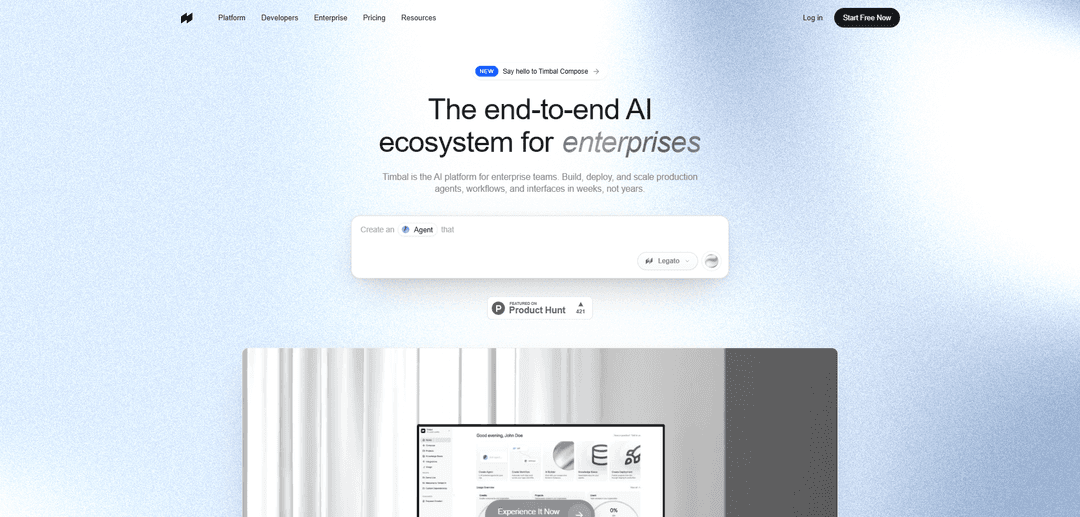
Timbal AI — это комплексная платформа корпоративного уровня для создания, развертывания и управления производственными агентами ИИ, рабочими процессами, интерфейсами и базами знаний, объединяющая типизированную среду выполнения с открытым исходным кодом, встроенные средства наблюдаемости/оценки и более 100 интеграций с гибким развертыванием в облаке/VPC/локально.
https://timbal.ai/?ref=producthunt&utm_source=aipure
Информация о продукте
Обновлено:15/07/2026
Что такое Timbal AI
Timbal AI — это производственная платформа ИИ, разработанная для корпоративных команд, позволяющая развертывать надежные решения ИИ без объединения нескольких инструментов. Она объединяет агентов (автономное рассуждение с инструментами и памятью), детерминированные рабочие процессы, пользовательские интерфейсы/интерфейсы и корпоративные базы знаний (RAG) в единой экосистеме, поддерживаемой стеком, ориентированным на разработчиков (фреймворк Python, SDK, CLI, API) и обширными интеграциями. Timbal делает акцент на прозрачности (экспортируемый, читаемый код вместо абстракций «черного ящика»), независимом от модели выполнении через основных провайдеров и совместимые с OpenAI конечные точки, а также на готовности к корпоративному использованию с элементами управления, возможностью аудита и множеством вариантов развертывания (Timbal Cloud, частная инфраструктура/VPC или полностью локально).
Ключевые особенности Timbal AI
Timbal AI — это комплексная платформа, ориентированная на предприятия, для создания, развертывания и управления производственными ИИ-агентами, детерминированными рабочими процессами, интерфейсами и базами знаний из единой среды выполнения. Она сочетает в себе типизированную, прозрачную среду разработки (Python/TypeScript), визуальную студию, гибридный слой RAG/DB (векторы + полнотекстовый поиск + SQL), широкие интеграции (включая MCP) и производственные инструменты, такие как наблюдаемость, среды, оценки и управление. Платформа не зависит от моделей (поддерживает основных провайдеров и конечные точки, совместимые с OpenAI) и может быть развернута в Timbal Cloud, в выделенном VPC или полностью локально для обеспечения безопасности и требований к резидентности данных.
Агенты + Рабочие процессы в одной среде выполнения: Создавайте автономных агентов для рассуждений с использованием инструментов и сочетайте их с детерминированными, пошаговыми рабочими процессами, которые могут ветвиться по логике, чтобы гарантировать результаты в производстве.
Базы знаний с гибридным поиском: RAG корпоративного уровня, построенный на гибридном движке БД, который поддерживает векторный поиск, полнотекстовый поиск и извлечение/свертывание на основе SQL для более контролируемых, проверяемых результатов.
Интерфейсы Studio + автоматически генерируемые API: Развертывайте пользовательские интерфейсы (чат, дашборды и многое другое) и предоставляйте доступ к агентам/рабочим процессам через API, обеспечивая омниканальную доставку и встраивание в продукты.
Развертывание в любом месте (Cloud, VPC, on-prem): Работайте в многопользовательском SaaS, выделенной частной инфраструктуре или полностью локально с переносимостью и производительностью, соответствуя требованиям безопасности предприятия и резидентности данных.
Наблюдаемость, среды и управление: Отслеживайте каждый запуск от начала до конца (подсказки, вызовы инструментов, использование модели, сбои), разделяйте dev/stage/prod, интегрируйте с рабочими процессами проверки Git и сохраняйте поведение проверяемым и воспроизводимым.
Интеграции + расширяемость MCP: Подключайтесь к 100+ нативным системам (например, SAP, Salesforce, Slack, Drive, Jira) и быстро подключайте любой сервер MCP или пользовательские инструменты, чтобы избежать работы по интеграции «склеивающего кода».
Варианты использования Timbal AI
Внутренний помощник службы поддержки (ИТ/HR/операции): Отвечайте на вопросы сотрудников и решайте заявки, извлекая политики и документы из Drive/Notion и выполняя действия в Slack/Teams, сохраняя при этом отслеживаемость и управляемость процессов.
Автоматизация «электронная почта — ERP» (операции и цепочка поставок): Превращайте входящие электронные письма в структурированные действия (например, создание или обновление заказов в SAP), используя рабочие процессы для детерминированных шагов и валидации для уменьшения ошибок в заказах.
Автоматизация ответа на запросы потенциальных клиентов (автомобильная розница и не только): Используйте агентов для квалификации потенциальных клиентов, получения контекста CRM и быстрого ответа по всем каналам, улучшая время ответа при сохранении последовательного, проверяемого поведения.
Помощник по продукту для клиентов (SaaS/электронная коммерция): Встройте агента поддержки в пользовательский интерфейс продукта, который может извлекать контент из базы знаний, проверять контекст учетной записи или заказа через интеграции и эскалировать при необходимости.
Преобразование заметок о встречах в пункты действий (межфункциональные команды): Преобразуйте сводки встреч в задачи и последующие действия, записывая их в такие инструменты, как Notion/Linear, и отправляя обновления по электронной почте/Slack, с этапами рабочего процесса для утверждений и маршрутизации.
Оценка рисков и соответствия поставщиков (финансы/юридические вопросы/закупки): Анализируйте документы и опросники поставщиков с общих дисков, извлекайте ключевые риски и создавайте стандартизированные оценки с помощью извлечения + структурированных рабочих процессов для проверки.
Преимущества
Комплексная платформа (агенты, рабочие процессы, KB/RAG, интерфейсы, интеграции, развертывание, управление) сокращает разрастание инструментов и накладные расходы на интеграцию.
Независимость от моделей и варианты развертывания в любом месте (облако/VPC/локально) поддерживают безопасность предприятия, резидентность данных и гибкость провайдера.
Высокая готовность к производству: наблюдаемость/трассировка, среды, оценки/управление и рабочие процессы проверки на основе Git.
Экспортируемый/прозрачный подход к коду помогает уменьшить привязку к поставщику и улучшает отладку.
Недостатки
Комплексные платформы могут быть тяжелее точечных решений для небольших прототипов или команд, которым нужен только один компонент.
Функции развертывания/управления корпоративного уровня могут потребовать дополнительной настройки и согласования процессов (RBAC, среды, проверки).
Некоторые возможности (например, голосовые агенты, рабочее пространство) указаны как «скоро появятся», поэтому доступность может варьироваться в зависимости от области продукта.
Как использовать Timbal AI
1) Создайте аккаунт и откройте Timbal: Перейдите на https://timbal.ai/ и нажмите «Start Free Now» (или войдите в систему по адресу https://app.timbal.ai/). Это даст вам доступ к Timbal Studio, где вы сможете создавать Агентов, Рабочие процессы, Интерфейсы и Базы знаний.
2) Выберите, что вы создаете (Агент или Рабочий процесс): В Studio выберите между: (а) Агентами для автономного рассуждения с инструментами и памятью, или (б) Рабочими процессами для детерминированных, пошаговых конвейеров с логикой ветвления и гарантированными результатами.
3) Подключите свои данные и инструменты через Интеграции (или MCP): Откройте «Интеграции» в Studio и подключите системы, необходимые вашему ИИ (например, Slack, Drive, Jira, SAP, Salesforce). Если у вас уже есть инструменты, доступные через MCP, укажите им конечную точку MCP Timbal: api.timbal.ai/mcp.
4) (Необязательно) Создайте Базу знаний для RAG: В Studio создайте Базу знаний и синхронизируйте свои документы/источники данных. Timbal предоставляет корпоративный поиск (гибридный поиск: векторы + полнотекстовый + запросы в стиле SQL), чтобы агенты/рабочие процессы могли отвечать, используя ваш внутренний контент.
5) Настройте маршрутизацию моделей (независимую от модели): Выберите LLM/провайдера, который соответствует вашему варианту использования (OpenAI, Anthropic, Google, Mistral, Meta или любая совместимая с OpenAI конечная точка). Timbal не зависит от модели и поддерживает переключение провайдеров для каждого агента, каждого шага или каждого клиента.
6) Создавайте код с помощью открытого фреймворка Python (локальная разработка): Клонируйте репозиторий фреймворка и запустите тесты локально: git clone https://github.com/timbal-ai/timbal.git && cd timbal && uv sync --dev && uv run pytest. Затем создайте Агента, используя async/await и инструменты (пример из исходников): import asyncio; from timbal import Agent; from timbal.tools import WebSearch; agent = Agent(name=\"assistant\", model=\"anthropic/claude-sonnet-4-6\", tools=[WebSearch()], max_tokens=1024); async def main(): result = await agent(prompt=\"What's new in AI this week?\\").collect(); print(result.output); asyncio.run(main()).
7) Создавайте в Studio (визуально) и экспортируйте код при необходимости: Используйте Studio для визуальной сборки агентов/рабочих процессов и интеграций. Timbal делает акцент на экспортируемом коде (без черных ящиков): агенты, рабочие процессы и интеграции могут быть скомпилированы в читаемый код, который вы можете запускать локально или размещать самостоятельно.
8) Добавьте управление: среды + рабочий процесс проверки (интеграция с Git): Настройте отдельные среды (Dev/Stage/Prod), чтобы эксперименты не влияли на производство. Свяжите изменения Timbal с ветками и запросами на слияние, чтобы каждое обновление агента/рабочего процесса/конфигурации проверялось перед продвижением в производство.
9) Развертывание (управляемое или самостоятельное): Выберите режим развертывания: (а) Полностью управляемые развертывания на инфраструктуре, управляемой Timbal (выберите регион/размер машины, масштабирование, откат), или (б) самостоятельное размещение компонентов. Платформа поддерживает развертывание в облаке, VPC или локально.
10) Развертывание из CLI (быстрый путь): Используйте Timbal CLI для создания и развертывания (пример из исходников): $ timbal init my-agent; $ timbal deploy --env prod → deployed … → url: api.timbal.ai/agents/…. CLI поддерживает аутентификацию, локальные запуски с UI и отправку в облако.
11) Вызовите развернутый ИИ через TypeScript/JavaScript SDK: Установите и используйте официальный SDK для вызова вашей рабочей силы/агентов/рабочих процессов из Node/React/Bun (пример из исходников): import Timbal from \"@timbal-ai/timbal-sdk\"; const timbal = new Timbal({ token: \"your-api-key\", orgId: \"your-org-id\", projectId: \"your-project-id\" }); const res = await timbal.callWorkforce(\"support\", { message: \"Refund #8812\" }); Вы также можете настроить через переменные среды и создать клиенты с областью действия пользователя с помощью as().
12) Разверните интерфейс (чат/панель управления/омниканальный) или встройте в свой продукт: Используйте Timbal Interfaces для создания пользовательских интерфейсов (от чата до панелей управления и голосовых) и доставки по каналам (например, WhatsApp, Instagram, электронная почта, голос) или встраивания опыта в существующий продукт.
13) Наблюдайте и отлаживайте производственные запуски с полной прослеживаемостью: Используйте наблюдаемость Timbal для сквозной проверки трассировок: подсказки, вызовы инструментов, использование модели, время и сбои. Это поддерживает отладку и уверенное объяснение решений.
14) Безопасная итерация: оценка, продвижение и откат: Используйте встроенные оценки/управление для проверки поведения перед продвижением в производство. Продвигайте версии между средами и откатывайте развертывания при необходимости, чтобы обеспечить надежность и возможность аудита производства.
Часто задаваемые вопросы о Timbal AI
Timbal — это корпоративная AI-платформа, которую команды используют для создания, развертывания и управления агентами, рабочими процессами и базами знаний. Вы можете определять поведение в коде или в Studio, запускать на выбранной вами модели/провайдере и доставлять в чат, электронную почту, голосовые сообщения и пользовательский интерфейс продукта из единой среды выполнения.
Популярные статьи

Vosko AI: локализация и дубляж видео для мировой аудитории
Oct 15, 2026

Atoms: Мультиагентная ИИ-платформа, которая превращает идеи в готовые к запуску продукты
May 22, 2026

Nano Banana SBTI: Что это такое, как это работает и как это использовать в 2026 году
Apr 15, 2026

Обзор Atoms — AI Product Builder, переопределяющий цифровое творчество в 2026 году
Apr 10, 2026
Последние ИИ-инструменты, похожие на Timbal AI

Gait
Gait — это инструмент для сотрудничества, который интегрирует генерацию кода с поддержкой ИИ с системой контроля версий, позволяя командам эффективно отслеживать, понимать и делиться контекстом кода, сгенерированного ИИ.

invoices.dev
invoices.dev - это автоматизированная платформа для выставления счетов, которая генерирует счета напрямую из коммитов Git разработчиков, с возможностями интеграции с GitHub, Slack, Linear и Google-услугами.

EasyRFP
EasyRFP — это ИИ-технология для вычислений на краю, которая упрощает ответы на RFP (запросы предложений) и позволяет проводить реальное время полевой фенотипизации с использованием технологий глубокого обучения.

Cart.ai
Cart.ai — это платформа на основе ИИ, предоставляющая комплексные решения для автоматизации бизнеса, включая программирование, управление отношениями с клиентами, редактирование видео, настройку электронной коммерции и разработку пользовательских решений на основе ИИ с поддержкой 24/7.
Популярные ИИ-инструменты, похожие на Timbal AI

GitHub Copilot Chat
GitHub Copilot Chat — это помощник по кодированию на базе искусственного интеллекта, который обеспечивает взаимодействия на естественном языке, реальные предложения кода и контекстную поддержку непосредственно в поддерживаемых IDE и на GitHub.com.

CopilotForXcode
CopilotForXcode — это расширение редактора исходного кода Xcode, которое интегрирует GitHub Copilot, Codeium и ChatGPT для предоставления предложений по коду на основе искусственного интеллекта, чат-помощи и функциональности prompt-to-code в Xcode.

BrowserAI
BrowserAI — это библиотека с открытым исходным кодом, которая позволяет запускать локальные большие языковые модели (LLM) непосредственно в веб-браузерах с ускорением WebGPU, предлагая возможности ИИ, ориентированные на конфиденциальность, без необходимости в серверной инфраструктуре.

OpenAI Codex CLI
OpenAI Codex CLI - это легкий агент для кодирования с открытым исходным кодом, который работает в вашем терминале, позволяя разработчикам переводить естественный язык в выполнение кода, обеспечивая при этом рассуждения на уровне ChatGPT с возможностью запуска кода, манипулирования файлами и итерации под контролем версий.