Termexo
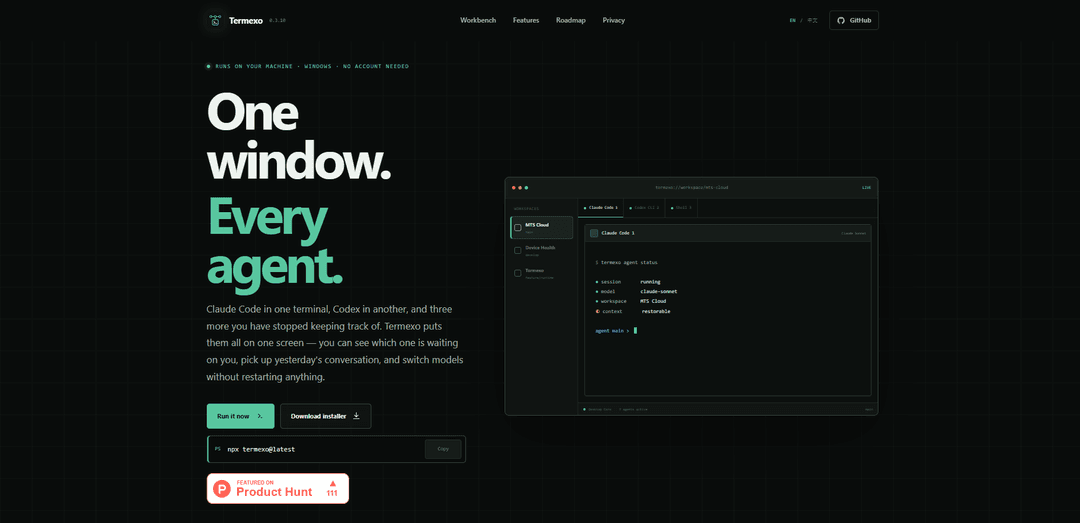
Termexo is a local-first Windows workspace that runs Claude Code, Codex, and other coding-agent CLIs side by side in real PTY terminals, restores layouts and sessions, notifies you when an agent needs input/approval, and lets you switch Claude-compatible model profiles without restarting.
https://www.termexo.com/?ref=producthunt
Product Information
Updated:Aug 8, 2026
What is Termexo
Termexo is a Windows 10/11 desktop app designed to make multi-agent CLI workflows manageable in one place. If you regularly juggle Claude Code, Codex CLI, and multiple terminals across projects, Termexo consolidates them into a single recoverable workspace where you can arrange terminals in custom grids, return to yesterday’s exact layout, and quickly see which agent is working versus waiting on you. It is local-first (no Termexo account, no cloud sync), and it keeps sensitive data on your machine—using Windows Credential Manager for API keys and treating agent session files as read-only.
Key Features of Termexo
Termexo is a Windows-only, local-first workbench that brings multiple coding agents (e.g., Claude Code and Codex CLI) into a single recoverable workspace. It runs real PTY terminals in a customizable grid, restores your project layout and running sessions when you reopen it, and helps you resume prior agent conversations using the CLIs’ native resume commands. It also adds “attention” signaling (taskbar flashes, system notifications, on-screen banners) when an agent needs input/approval, and supports switching Claude-compatible model profiles (Anthropic, DeepSeek, MiniMax, GLM, or compatible gateways) without rebuilding environment variables, while keeping API keys in Windows Credential Manager and leaving session files read-only.
Multi-agent terminal workbench: Run Claude Code, Codex CLI, and additional shells/agents side-by-side in one window using real PTY terminals; keep many sessions alive in tabs while pinning the ones you want visible.
Custom grid layouts per project: Arrange terminals in a 1×1 up to 6×6 grid, with each project remembering its own layout so you can switch projects and return to the exact same view.
Workspace persistence (close/reopen continuity): Restores project folder, which terminals were open, model assignments, and even UI choices (e.g., colors) so you can pick up work the next day without re-setup.
Attention & approval notifications: Detects when an agent is waiting for approval/input or has finished/failed, then flashes the taskbar, sends Windows notifications, and shows an on-screen banner you can click to jump to the right terminal.
Searchable session center + native resume: Lists and searches past sessions across projects (by name/path/branch/model) and resumes them via the official commands (e.g., `claude --resume`, `codex resume`) without modifying session files.
Model routing via profiles (secure key storage): Switch the same CLI between Claude-compatible providers/endpoints (Anthropic, DeepSeek, MiniMax, GLM, or gateways) using saved profiles; API keys are stored in Windows Credential Manager rather than plaintext config.
Use Cases of Termexo
Software engineering teams running multiple agents: Developers can keep Claude Code generating/refactoring code while Codex runs tests or edits in parallel, all visible in one workspace with alerts when approvals are needed.
Consultants/contractors juggling multiple client projects: Maintain separate workspaces per client with remembered layouts and sessions, quickly resuming prior conversations and context without hunting through terminals or directories.
AI model evaluation and cost/performance switching: Route the same Claude-style CLI workflow to different providers/models (e.g., cheaper vs. stronger) mid-task to compare outputs without reinstalling tools or rewriting environment variables.
DevOps/SRE incident response with parallel shells: Keep multiple operational terminals (logs, SSH, scripts, agent-assisted diagnostics) organized in a grid and get immediate notification when an automated agent needs a decision.
Training, demos, and workshops: Instructors can present multiple agent sessions side-by-side (prompting, code changes, test runs) and reliably restore the exact workspace state between sessions.
Pros
Local-first and privacy-oriented: no Termexo account required, no cloud sync, and session files are read-only.
Strong workflow continuity: restores layouts/terminals/models and resumes native agent sessions across days/projects.
Reduces missed prompts: clear attention states plus system notifications for approvals/input across projects.
Secure key handling: API keys stored in Windows Credential Manager instead of plaintext files.
Cons
Windows-only (Windows 10/11), limiting cross-platform adoption.
Some roadmap capabilities (e.g., quota visibility, phone-based approvals, remote access) are explicitly “coming later,” not available today.
How to Use Termexo
1) Install/launch Termexo (fastest: npx): On Windows 10/11, open PowerShell and run: `npx termexo@latest`. This starts the Termexo Windows app without requiring an account.
2) (Optional) Install via GitHub release installer: If you prefer a traditional installer, download the latest Windows installer from the Termexo GitHub releases page and run it. Then launch Termexo from Windows as a normal app.
3) Create or open a workspace for a project: In Termexo, open a workspace tied to a project folder. Each workspace remembers its own project path, layout, open terminals, and model choices so you can switch projects and come back later with everything restored.
4) Open multiple real terminal sessions (PTY terminals): Open as many terminals as you need inside the workspace (e.g., one for Claude Code, one for Codex CLI, plus extra shells). Termexo keeps sessions alive in tabs; you choose which ones are visible.
5) Run your coding agents in separate terminals: In one terminal, run Claude Code; in another, run Codex CLI. Termexo is designed to keep these side-by-side so you can monitor multiple agents at once.
6) Arrange visible terminals into a custom grid: Set a grid layout that fits your workflow (from 1×1 up to 6×6). Place the terminals you want to watch into the grid. The workspace will remember this layout.
7) Use agent attention notifications so you don’t miss prompts: When an agent is waiting for approval or input (or finishes/fails), Termexo surfaces it via taskbar flashing, system notifications, and an on-screen banner. Click the banner to jump directly to the terminal that needs you.
8) Close and reopen Termexo without losing your setup: Quit Termexo and reopen it later. Your workspace restores: project folder, grid layout, which terminals were open, and other workspace settings—so you can continue where you left off.
9) Resume prior Claude Code / Codex sessions from the session list: Open the session center/list and search past sessions by name, path, branch, or model. Resume using the CLIs’ native resume commands (e.g., `claude --resume` and `codex resume`) so full context returns.
10) Switch model profiles without changing your CLI workflow: Configure model routing profiles (e.g., Anthropic Claude, DeepSeek, MiniMax, GLM, or any compatible endpoint). Then switch profiles in the UI to point the same Claude Code CLI at a different provider without reinstalling or manually editing config files.
11) Store API keys securely (Windows Credential Manager): When setting up model profiles, save API keys into Windows Credential Manager. Termexo stores only references and can indicate a key exists without revealing it back in the UI.
12) Work across multiple projects and return instantly: Open multiple workspaces (one per project). Switch between them as you work; each workspace restores its own terminals, grid, and model selections so you can pick up yesterday’s sessions quickly.
Termexo FAQs
Termexo is a local-first Windows app that puts multiple coding-agent CLI terminals (e.g., Claude Code and Codex CLI) into one workspace window, so you can view them side by side, resume sessions, and switch model profiles without restarting.
Popular Articles

Vosko AI: Localize and Dub Videos for Global Audiences
Oct 15, 2026

Atoms: A Multi-Agent AI Platform That Transforms Ideas into Launch-Ready Products
Oct 13, 2026

Nano Banana SBTI: What It Is, How It Works, and How to Use It in 2026
Apr 15, 2026

Atoms Review — The AI Product Builder Redefining Digital Creation in 2026
Apr 10, 2026
Latest AI Tools Similar to Termexo

Gait
Gait is a collaboration tool that integrates AI-assisted code generation with version control, enabling teams to track, understand, and share AI-generated code context efficiently.

invoices.dev
invoices.dev is an automated invoicing platform that generates invoices directly from developers' Git commits, with integration capabilities for GitHub, Slack, Linear, and Google services.

EasyRFP
EasyRFP is an AI-powered edge computing toolkit that streamlines RFP (Request for Proposal) responses and enables real-time field phenotyping through deep learning technology.

Cart.ai
Cart.ai is an AI-powered service platform that provides comprehensive business automation solutions including coding, customer relations management, video editing, e-commerce setup, and custom AI development with 24/7 support.
Popular AI Tools Like Termexo

GitHub Copilot Chat
GitHub Copilot Chat is an AI-powered coding assistant that provides natural language interactions, real-time code suggestions, and contextual support directly within supported IDEs and GitHub.com.

CopilotForXcode
CopilotForXcode is an Xcode Source Editor Extension that integrates GitHub Copilot, Codeium, and ChatGPT to provide AI-powered code suggestions, chat assistance, and prompt-to-code functionality within Xcode.

BrowserAI
BrowserAI is an open-source library that enables running local Large Language Models (LLMs) directly in web browsers with WebGPU acceleration, offering privacy-focused AI capabilities without requiring server infrastructure.

OpenAI Codex CLI
OpenAI Codex CLI is a lightweight, open-source coding agent that runs in your terminal, enabling developers to translate natural language into code execution while providing ChatGPT-level reasoning with the ability to run code, manipulate files, and iterate under version control.