
Tempest
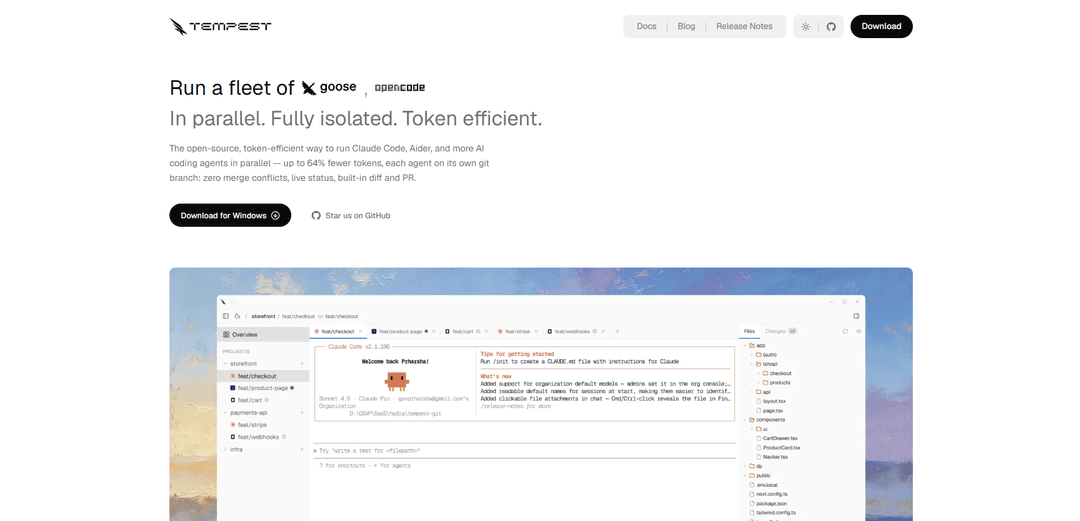
Tempest is a native Tauri desktop app for running multiple AI coding agents (Claude Code, Aider, OpenCode, and more) in parallel with isolated git worktrees/branches, live status, and built-in diff/commit/PR tooling to prevent conflicts and speed up shipping.
https://tempestai.dev/?ref=producthunt
Product Information
Updated:Aug 8, 2026
What is Tempest
Tempest is an open-source desktop interface that lets developers run a “fleet” of AI coding agents side-by-side from one place. Instead of juggling multiple terminals and risking agents overwriting each other’s work, Tempest focuses on strong isolation (per-session git worktrees/branches), fast review (a live diff viewer), and an end-to-end workflow (stage, commit, push, and open PRs without leaving the app). It’s designed for developers who want to execute multiple implementation threads at once—whether you’re a solo builder, freelancer, open-source contributor, or a team—while keeping changes organized and safe.
Key Features of Tempest
Tempest is a native (Tauri 2) desktop workspace for running multiple AI coding agents—like Claude Code, Aider, OpenCode and other CLI tools—in parallel with strong isolation. It automatically gives each agent its own git worktree/branch to prevent collisions and merge conflicts, provides a real integrated terminal per session, and includes built-in code review workflows (live diffs, staging/committing, pushing, and opening PRs) plus live preview as your dev server updates. It also emphasizes efficiency and continuity via a shared local code-knowledge graph (token intelligence, coming soon) and session persistence so you can close and reopen tabs without losing history.
Parallel agent sessions in one window: Launch and monitor multiple AI coding agents side-by-side (Claude Code, Aider, OpenCode, Copilot CLI, Cline, Goose, etc.) without juggling separate apps or terminals.
Isolated git worktrees per agent: Each session runs in its own isolated git worktree and branch so agents never touch each other’s files—reducing merge conflicts mid-run and protecting uncommitted changes.
Built-in diff, commit, and PR workflow: Review exactly what each agent changed in a live diff viewer, then stage, commit, push, and open a pull request without leaving Tempest.
Session continuity with full history: Close a tab and reopen it later; the agent resumes where it left off with its full context and run history intact.
Real terminal integration: Provides a responsive PTY-backed terminal (portable-pty + xterm.js) with ANSI color, search, and clickable links for running agent CLIs and dev commands.
Token intelligence via shared code-knowledge graph (coming soon): A local, shared knowledge graph helps agents pull targeted context instead of repeatedly scanning the repo—claimed to cut context tokens (up to 64%) and tool calls (up to 58%).
Use Cases of Tempest
Solo feature parallelization: An indie developer runs several agents at once to implement multiple features or refactors in parallel, then keeps only the best branch and discards the rest.
Freelance multi-client context switching: A freelancer keeps separate agent sessions per client/repo task, each isolated on its own branch, enabling fast switching without stash juggling or accidental cross-contamination.
Open-source experimentation and triage: Contributors try multiple approaches to a bug or performance issue simultaneously, compare diffs, and merge the winning solution while dropping unsuccessful attempts.
Team workflows for safer automation: Engineering teams run automated agent sessions that can’t impact main directly, review changes in-app, and open PRs with clear diffs for human approval.
Rapid UI iteration with live preview: Front-end teams watch their local dev server update live as agents modify code, speeding up iterative design and reducing feedback cycles.
Pros
Strong isolation via per-session git worktrees/branches reduces conflicts and limits blast radius.
End-to-end workflow in one app (terminal + diffs + commit/PR) reduces context switching.
Parallel agent orchestration improves throughput for multi-threaded development tasks.
Cons
Some headline capabilities are marked “coming soon” (e.g., token intelligence and database branches), so availability may vary by version.
Requires a git-repository-based workflow; benefits are reduced for non-git or non-branch-centric environments.
Running many parallel agents can be resource-intensive depending on the tools/models used.
How to Use Tempest
1) Install Tempest: Download and install the Tempest desktop app for your OS (Windows/macOS/Linux) from https://www.tempestai.dev/download. Tempest is a native (Tauri 2) desktop app.
2) Launch Tempest: Open the Tempest application. You’ll work in a single window that can host multiple parallel agent sessions.
3) Open a git repository: Point Tempest at any existing git repository (“Open your repo”). Tempest will prepare the repo for parallel work by creating isolated git worktrees per session automatically (no manual branching required).
4) Create your first session: Start a new session in Tempest. Each session gets a unique sessionId (UUID) and runs in its own isolated git worktree/branch so agents never touch each other’s files.
5) Choose an agent tool to run: Pick the CLI agent you want to use in that session (e.g., Claude Code, Aider, OpenCode, Copilot CLI, Cline, Goose, or any other agent/CLI you use).
6) Run the agent in the built-in terminal: Use the session’s real terminal (PTY + xterm.js) to start the agent. The terminal supports ANSI color, in-session search, and clickable links.
7) Start multiple sessions in parallel: Launch additional sessions for other tasks/approaches. Tempest supports multiple PTY sessions concurrently; each runs isolated on its own worktree/branch to avoid mid-run merge conflicts and protect uncommitted changes.
8) Monitor live status while agents work: Watch each session’s live status indicators (UI shows “working” vs “done”) so you can see when an agent finishes a turn without tab-watching.
9) Switch between sessions like tabs: Move between sessions to review progress. Tempest is designed so you can switch tools/sessions as easily as switching tabs, while keeping each thread separated.
10) Close and resume sessions later: If you need to pause, close a session tab and reopen it later. Tempest preserves full history and resumes the session exactly where it left off.
11) Review changes in the live diff viewer: Open the built-in diff viewer to see exactly what each agent changed in its isolated worktree. This helps you compare parallel approaches and verify edits before merging.
12) Stage and commit changes inside Tempest: From within Tempest, stage the files you want and create a commit on that session’s branch. Because each session is isolated, commits stay cleanly separated per agent/task.
13) Push the branch: Push the session’s branch to your remote repository directly from Tempest.
14) Open a pull request (PR) from Tempest: Use Tempest’s built-in PR flow to open a pull request without leaving the app, then proceed with your normal review/merge process.
15) Use live preview while agents change code (optional): If you run a dev server, keep it running and watch it update in real time as agents modify code in their worktrees (useful for quickly validating UI/behavior changes).
16) Compare parallel attempts and keep the best result: When trying multiple approaches, drop the sessions that didn’t work and merge the one that did. Tempest’s worktree isolation prevents cross-contamination and reduces merge-conflict risk.
Tempest FAQs
Yes. Tempest is free and open source under the Apache 2.0 license—no subscription or seat fee.
Tempest Video
Popular Articles

Vosko AI: Localize and Dub Videos for Global Audiences
Oct 15, 2026

Atoms: A Multi-Agent AI Platform That Transforms Ideas into Launch-Ready Products
Oct 13, 2026

Nano Banana SBTI: What It Is, How It Works, and How to Use It in 2026
Apr 15, 2026

Atoms Review — The AI Product Builder Redefining Digital Creation in 2026
Apr 10, 2026
Latest AI Tools Similar to Tempest

Gait
Gait is a collaboration tool that integrates AI-assisted code generation with version control, enabling teams to track, understand, and share AI-generated code context efficiently.

invoices.dev
invoices.dev is an automated invoicing platform that generates invoices directly from developers' Git commits, with integration capabilities for GitHub, Slack, Linear, and Google services.

EasyRFP
EasyRFP is an AI-powered edge computing toolkit that streamlines RFP (Request for Proposal) responses and enables real-time field phenotyping through deep learning technology.

Cart.ai
Cart.ai is an AI-powered service platform that provides comprehensive business automation solutions including coding, customer relations management, video editing, e-commerce setup, and custom AI development with 24/7 support.
Popular AI Tools Like Tempest

GitHub Copilot Chat
GitHub Copilot Chat is an AI-powered coding assistant that provides natural language interactions, real-time code suggestions, and contextual support directly within supported IDEs and GitHub.com.

CopilotForXcode
CopilotForXcode is an Xcode Source Editor Extension that integrates GitHub Copilot, Codeium, and ChatGPT to provide AI-powered code suggestions, chat assistance, and prompt-to-code functionality within Xcode.

BrowserAI
BrowserAI is an open-source library that enables running local Large Language Models (LLMs) directly in web browsers with WebGPU acceleration, offering privacy-focused AI capabilities without requiring server infrastructure.

OpenAI Codex CLI
OpenAI Codex CLI is a lightweight, open-source coding agent that runs in your terminal, enabling developers to translate natural language into code execution while providing ChatGPT-level reasoning with the ability to run code, manipulate files, and iterate under version control.