Spellar AI
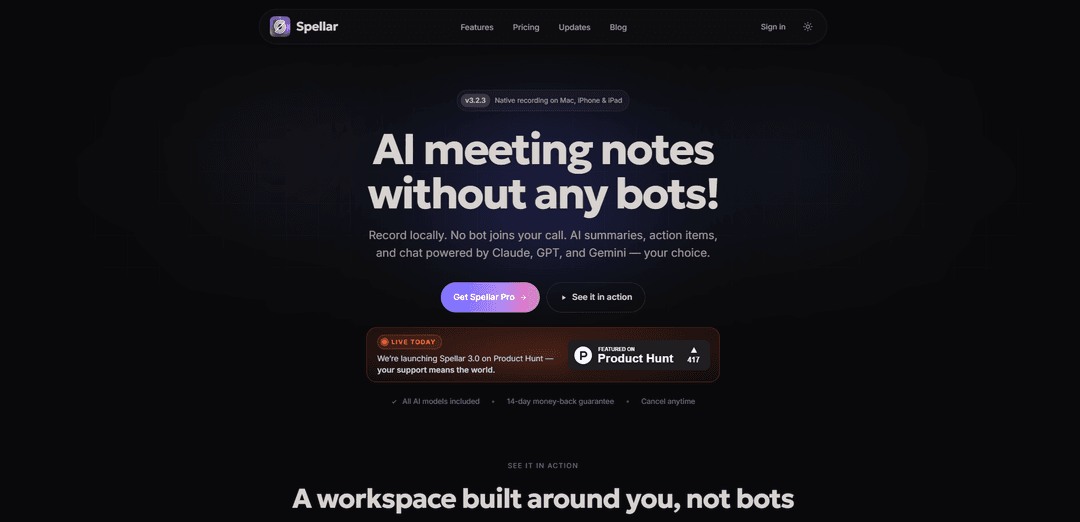
Spellar AI is a bot-free meeting assistant for Mac, iPhone, iPad, and Web that records locally, transcribes in 100+ languages, and generates smart summaries, action items, and searchable AI chat with deep integrations (e.g., Notion, Jira, Linear, Google Docs, Slack).
https://spellar.ai/?utm_source=aipure&ref=producthunt
Product Information
Updated:May 18, 2026
Spellar AI Monthly Traffic Trends
Spellar AI received 8.0k visits last month, demonstrating a Significant Decline of -20.5%. Based on our analysis, this trend aligns with typical market dynamics in the AI tools sector.
View history trafficWhat is Spellar AI
Spellar AI is an AI-powered meeting note taker and communication copilot designed to turn conversations into clear, actionable outputs—without inviting a recording bot into your calls. Available across macOS, iOS/iPadOS, and the web, it captures meetings (Zoom, Google Meet, Teams, and in-room audio), produces structured meeting summaries, decisions, and tasks, and lets you chat with your meeting knowledge afterward. Spellar emphasizes privacy-first workflows with on-device recording and configurable retention, and it supports exporting notes and tasks into the tools teams already use.
Key Features of Spellar AI
Spellar AI is a bot-free meeting assistant for macOS, iPhone, iPad, and Web that records locally (no meeting bot joins), transcribes in 100+ languages, and turns conversations into structured outputs like summaries, decisions, and action items. It includes an in-meeting copilot chat, customizable meeting templates/presets, and the ability to choose among multiple AI models (Claude, GPT, Gemini, Perplexity) or bring your own API key. Spellar also exports notes and tasks into the tools where teams work—such as Notion, Google Docs, Linear, Jira, Confluence, and Slack—while emphasizing privacy controls like opt-in cloud transcription and configurable retention.
Bot-free, on-device recording: Captures audio locally on Mac/iPhone/iPad so no recording bot needs to join Zoom/Meet/Teams calls; you control what’s stored and for how long.
Multilingual transcription + smart summaries: Provides accurate transcription with automatic language detection and generates structured outputs (key topics, decisions, highlights, follow-ups/action items).
AI model choice (or BYOK): Lets you pick Claude, GPT, Gemini, or Perplexity per meeting/template, or bring your own API key to keep more processing under your control and scale usage.
Meeting templates & presets: 30+ built-in templates (standups, 1:1s, retros, sales discovery, etc.) plus custom prompts/presets to tailor summaries to a project’s context and preferred format.
Cited AI chat across meetings: Ask questions about a meeting (or across all meetings) and get answers grounded in the transcript with references linking back to the exact moment it was said.
Integrations + one-click export: Push summaries and tasks into tools like Notion, Google Docs, Slack, Linear, Jira, and Confluence; includes workflow-friendly task export with context and deep links back to the meeting.
Use Cases of Spellar AI
Product & engineering rituals: Use templates for standups, sprint retros, and roadmap reviews to capture decisions and export action items to Linear/Jira with full context for traceability.
Sales discovery & customer success: Turn calls into structured notes (pain points, stakeholders, budget, next steps) and share summaries to Notion/Docs or post recaps to Slack without manual write-ups.
Leadership, 1:1s, and performance reviews: Keep searchable records of commitments and decisions across recurring meetings, then generate weekly/monthly digests for managers and teams.
Recruiting & interviews: Record interviews discreetly, produce consistent scorecard-style summaries, and quickly pull quotes or answers via cited chat for debriefs.
Multilingual teams & language improvement: Support 100+ languages and help non-native speakers with communication improvement features (e.g., feedback on speaking clarity/pronunciation/grammar mentioned in reviews).
Education, lectures, and research discussions: Capture lectures or study-group conversations, generate concise summaries and action items, and query the content later using the cross-meeting AI chat.
Pros
No-bot workflow: records locally so you avoid inviting/maintaining meeting bots and reduce friction in calls.
Strong structure and follow-through: produces clear summaries, decisions, and action items with links back to source context.
Flexible AI setup: multiple premium models included and optional bring-your-own-key for more control and scalability.
Ecosystem-friendly: exports to common tools (Notion, Docs, Slack, Linear, Jira, Confluence) to reduce copy-paste.
Cons
Platform emphasis: positioning and features are heavily centered on Apple devices (macOS/iOS/iPadOS), which may limit fit for some non-Apple-first teams.
Privacy choices require configuration: cloud transcription is opt-in and retention is configurable, but users must actively set preferences to match their compliance needs.
Integration depth varies by tool: while many integrations exist, teams may still need webhooks/Zapier for niche workflows.
How to Use Spellar AI
1) Install Spellar AI: Download and install Spellar AI on your device (Mac App Store for macOS; iPhone/iPad via iOS/iPadOS; or use the web app).
2) Sign in and set up your workspace: Launch Spellar and sign in. You’ll land in a notes workspace where meetings are organized and searchable.
3) Connect your calendar (recommended): Connect Google or Outlook Calendar so Spellar can show upcoming meetings and automatically add meeting context.
4) Choose your recording approach (bot-free): Spellar records locally on your device—no bot joins your call. Decide whether you’ll start recordings manually or enable auto-start (if available in your setup).
5) Start a meeting session and record: At the start of a call (Zoom/Google Meet/Microsoft Teams or any in-room audio), click Record (or use the shortcut). Spellar captures microphone and system audio on-device.
6) Pick an AI model (or bring your own key): Select the model you want for that meeting (GPT, Claude, Gemini, or Perplexity). If you prefer maximum privacy/control, bring your own API key (BYOK) and use it for processing.
7) Select a meeting template (preset) for structured notes: Choose a built-in template (e.g., 1:1, standup, retro, sales discovery) or create a custom template using plain-language instructions so outputs match how you work.
8) Control transcription mode and privacy settings: Keep transcription on-device or opt in to server-side AI transcription (it’s not the default). Configure retention (e.g., 1 hour, always, or device-only) to control how long data is stored.
9) Run the meeting while Spellar captures and analyzes: Continue your conversation normally. Spellar recognizes context, highlights key points, and prepares structured outputs (summary, decisions, action items, transcript).
10) Review outputs after the meeting: Open the meeting note and review the generated sections such as Summary, Transcript, Decisions/Highlights, and Actions (action plan).
11) Chat with your meeting notes (and across meetings): Use the AI Chat to ask questions like “What did we decide?” or “Who owns the next step?” Spellar returns cited answers linked back to the moment it was said.
12) Export summaries and notes to your tools: Send meeting summaries/recaps to where work happens using native integrations (e.g., Notion, Google Docs, Slack, Confluence). This avoids copy-paste and keeps teams aligned.
13) Export action items as tasks (e.g., Linear/Jira): From the Actions list, select one or more tasks and export in one click to tools like Linear (and other supported task systems). Before sending, adjust titles/descriptions, choose team/project, set assignees, priorities, labels, and due dates. Spellar creates an issue per task and includes context plus a deep link back to the meeting.
14) Use weekly/monthly digests to track progress: Enable automated recaps so Spellar summarizes all meetings you touched into weekly/monthly digests (wins, blockers, commitments, next steps) and helps you spot slipping commitments early.
15) Manage subscriptions and policies when needed: If you upgrade to Pro or manage billing, review the Terms of Subscription and related policies on Spellar’s site. For help, contact [email protected].
Spellar AI FAQs
Spellar AI is an AI meeting note taker that records locally (on Mac, iPhone, and iPad) and generates AI meeting notes such as summaries, action items, and recaps—without any recording bot joining your call.
Spellar AI Video
Popular Articles

Atoms: A Multi-Agent AI Platform That Transforms Ideas into Launch-Ready Products
May 22, 2026

Nano Banana SBTI: What It Is, How It Works, and How to Use It in 2026
Apr 15, 2026

Atoms Review — The AI Product Builder Redefining Digital Creation in 2026
Apr 10, 2026

Kilo Claw: How to Deploy and Use a True "Do‑It‑For‑You" AI Agent(2026 Update)
Apr 3, 2026
Analytics of Spellar AI Website
Spellar AI Traffic & Rankings
8K
Monthly Visits
#2309776
Global Rank
#10437
Category Rank
Traffic Trends: Jul 2024-Jun 2025
Spellar AI User Insights
00:00:11
Avg. Visit Duration
2.04
Pages Per Visit
43.34%
User Bounce Rate
Top Regions of Spellar AI
US: 60.38%
IN: 12.3%
MX: 7.1%
GB: 6.65%
CH: 5.49%
Others: 8.08%
Latest AI Tools Similar to Spellar AI

Ticknotes
Ticknotes is an AI-powered meeting assistant that automatically records, transcribes, and generates personalized meeting summaries, action items, and key insights from audio, video, and text content.

Feta
Feta is an AI-powered meeting tool that helps product and engineering teams run efficient meetings by capturing discussions, automating tasks, and providing actionable insights through smart summaries and integrations.

Aimeet
Aimeet is a comprehensive AI-powered communication platform that combines real-time translation, transcription, screen sharing, and unlimited meeting capabilities for effective virtual collaboration.

MinutesLink
MinutesLink is an advanced AI-powered note-taking assistant that automatically records, transcribes, summarizes and organizes virtual meetings while building personalized digital avatars from meeting data.
Popular AI Tools Like Spellar AI

Second Brain for AI
Second Brain for AI is a self-hosted, MCP-compatible persistent memory layer on Cloudflare that lets Claude, ChatGPT, Cursor, and other AI clients store and semantically recall shared context across sessions.

Slack
Slack is an AI-powered work platform that brings team communication, channels, files, automation, and app integrations into one conversational workspace.

24me Smart Personal Assistant
24me is an award-winning smart personal assistant app that combines calendar, to-do lists, notes, and personal accounts in one unified platform to help boost productivity and time management.

Granola for iOS
Granola for iOS is an AI-powered notepad app that helps users effortlessly capture, transcribe and summarize meeting conversations through intelligent note-taking and one-tap recording capabilities.