
Soup CLI
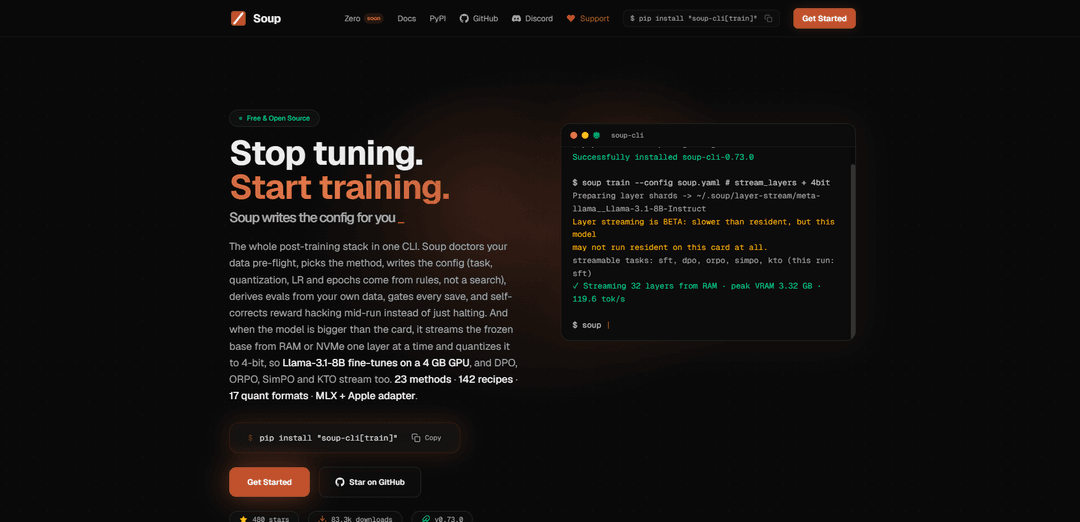
Soup CLI is an open-source, CLI-first post-training stack that auto-doctors your data, chooses a training method, generates configs, derives evals, gates every checkpoint, and can stream+NF4-quantize frozen base layers so even 8B fine-tunes can run on ~4 GB GPUs.
https://trysoup.dev/?ref=producthunt
Product Information
Updated:Aug 15, 2026
What is Soup CLI
Soup CLI is a free, Apache-2.0 licensed command-line tool that turns LLM post-training (SFT and preference alignment) into a single, reproducible workflow: decide the run, train, evaluate, and ship. Instead of making you hand-tune endless YAML knobs, Soup focuses on “rules, not search,” automatically selecting sensible defaults (e.g., task setup, quantization, learning rate, epochs, batch sizing, optimizer/scheduler) and validating your data before training. It integrates with common ecosystem tools (Hugging Face, Unsloth, DeepSpeed, MLX, W&B, vLLM/Ollama/llama.cpp export paths) while staying offline-capable and avoiding vendor lock-in.
Key Features of Soup CLI
Soup CLI is an open-source, CLI-first post-training toolkit that turns LLM fine-tuning and alignment into a one-command workflow: it pre-flights and “doctors” your dataset, selects an appropriate training method, auto-writes a config using rules (not hyperparameter search), derives evaluations from your own data, and gates checkpoints with a ship/don’t-ship verdict. Its flagship capability is exact layer streaming: it can keep the frozen base model in CPU RAM or NVMe and stream it into VRAM one layer at a time while quantizing to 4-bit (e.g., NF4), enabling LoRA SFT and preference methods (DPO/ORPO/SimPO/KTO) on very small GPUs (reported: Llama-3.1-8B on a 4 GB laptop GPU). It also integrates with common ML ecosystem tools for ingesting production traces, evaluation, exporting, and serving.
One-command post-training workflow: Runs the end-to-end loop (data checks → method selection → config generation → training → eval → gated saves) from a single CLI, reducing manual wiring across tools.
Rule-based auto-config (less config hell): Automatically writes training configs and chooses key defaults (task, quantization, learning rate, epochs, batch sizing/optimizer/scheduler/target modules) using built-in rules rather than requiring parameter searches.
Exact layer streaming + 4-bit quantization: Streams the frozen base model from CPU RAM/NVMe into VRAM layer-by-layer on a dedicated CUDA stream and quantizes to 4-bit (e.g., NF4), bounding peak VRAM by a single layer and enabling training of larger models on small GPUs.
Supports multiple post-training methods: Provides supervised fine-tuning (SFT) and preference/alignment methods including DPO, ORPO, SimPO, and KTO (with streaming support for these methods as well).
Evaluation and save-gating tied to your data: Derives evals from your own dataset and gates every save with a single “SHIP or DON’T-SHIP” verdict, aiming to prevent blindly saving/releasing degraded checkpoints.
Migration + ecosystem integrations: Includes `soup migrate` to convert existing configs from other fine-tuning stacks (e.g., LLaMA-Factory, Axolotl, Unsloth) and integrates with common tooling for training acceleration, tracking, export, and serving (e.g., Unsloth, DeepSpeed, W&B, vLLM, Ollama, llama.cpp, ONNX, TensorRT).
Use Cases of Soup CLI
On-device fine-tuning for edge apps: Teams building assistants that must run locally (privacy/offline) can fine-tune an 8B-class model on constrained hardware using streaming + 4-bit quantization, then export/serve via local runtimes.
Customer-support and enterprise knowledge assistants: Fine-tune and align a base model on internal Q&A and chat transcripts, using data pre-flight checks and gated saves to reduce regressions before deployment to helpdesk or internal chat tools.
Product iteration from production traces: Ingest logs/traces from observability and LLM platforms (e.g., Langfuse/LangSmith/Helicone/OpenTelemetry exports) to create training data, run SFT or preference optimization, and evaluate improvements in a repeatable CLI pipeline.
Academic labs and small teams with limited GPU budgets: Researchers can run reproducible fine-tuning/alignment experiments on modest GPUs without needing multi-GPU infrastructure, while still using standard evaluation flows and exports.
Regulated industries needing offline workflows: Healthcare/finance/public-sector teams can keep data local, run training and evaluation offline, and use explicit ship/don’t-ship gating to support internal release processes.
Model deployment packaging for varied runtimes: After training, teams can target different serving stacks (local dev with Ollama, high-throughput with vLLM/SGLang, edge with llama.cpp/GGUF, or inference stacks via ONNX/TensorRT) from the same project workflow.
Pros
Enables fine-tuning larger LLMs on very small GPUs via exact layer streaming and 4-bit quantization (e.g., 8B on 4 GB reported).
CLI-first, rule-based automation reduces configuration burden and speeds up iteration (auto-config + method selection + pre-flight).
End-to-end workflow includes evaluation and gated checkpoint saving, encouraging safer releases.
Broad ecosystem integration and config migration lowers switching costs from other tooling.
Cons
Layer streaming is explicitly labeled BETA with stated limitations (e.g., transformers/text/plain LoRA focus), so edge cases may require caution.
Streaming bounds weights but not all memory drivers (e.g., logits/vocab can dominate VRAM), so some workloads may still not fit on small GPUs.
Historical correctness issues were disclosed (e.g., prior streamed adapter no-op outside streaming path; NF4 gradient defect above 32B pre-fix), suggesting users should pin versions and validate results.
Performance claims for some preference losses were not fully benchmarked in the provided sources, so throughput expectations may need local measurement.
How to Use Soup CLI
1) Install Soup CLI (lightweight core): Install the core CLI + config + data tools (no PyTorch stack):
pip install soup-cli
Use this if you only want to initialize projects, manage configs, or run data tooling without training dependencies.
2) Install Soup with training support (recommended for fine-tuning): Install Soup plus the training stack (torch, transformers, peft, trl, datasets, etc.):
pip install "soup-cli[train]"
This is the typical install for SFT and preference training workflows.
3) (Optional) Install the full feature bundle: If you want train + serve + UI + data tooling in one install:
pip install "soup-cli[all]"
4) (Optional) Install the latest development version from GitHub: If you want the newest changes (may be less stable):
pip install git+https://github.com/MakazhanAlpamys/Soup.git
5) Initialize a new project from a template: Create a starter project/config using a built-in template (example: chat):
soup init --template chat
This sets up a runnable structure so you can train with minimal manual configuration.
6) Prepare your training data (point Soup at your dataset): Place your dataset locally (commonly JSONL). In a Soup config, you’ll reference paths like:
train: ./data/train.jsonl
Soup supports dataset formats such as Alpaca-style data (as shown in the sources).
7) Configure the run (manual config example): You can provide a config that specifies the base model, task/stage, LoRA settings, quantization, and output directory. Example fields shown in the sources include:
- base/model_name_or_path: meta-llama/Llama-3.1-8B (or -Instruct)
- task/stage: sft
- finetuning_type: lora
- lora_rank (r), lora_alpha, lora_dropout, lora_target
- cutoff_len
- learning_rate, epochs
- quantization_bit: 4
- output_dir
Soup can also auto-detect/pick many settings (optimizer, scheduler, target modules, batch size) depending on workflow.
8) Train in one command: Run training from your initialized project/config:
soup train
According to the sources, Soup performs pre-flight checks on data, selects/derives training settings via rules (not manual hyperparameter search), derives evals from your own data, and gates saves.
9) Use 4-bit quantization for low-VRAM fine-tuning (example): To reduce VRAM usage, configure 4-bit quantization (e.g., quantization_bit: 4). The sources describe streaming the frozen base model layer-by-layer from CPU RAM or NVMe and quantizing to NF4 so an 8B model can fine-tune on a 4 GB GPU.
10) Run preference/alignment methods (DPO/ORPO/SimPO/KTO) when needed: Soup supports alignment methods including DPO, ORPO, SimPO, and KTO, and the sources state these can also run with the same layer-streaming approach when the model is larger than GPU VRAM.
11) Migrate from another fine-tuning tool (config conversion): If you already have configs from other tools, use:
soup migrate
The sources state this converts existing configs (e.g., from LLaMA-Factory, Axolotl, Unsloth) without rewriting, then you can train normally.
12) Ingest production traces/logs for offline training data (optional): To build datasets from existing logs/exports, use the ingest command pattern shown in the sources:
soup ingest --source <vendor> --logs <export.jsonl>
Supported sources mentioned include Langfuse, LangSmith, Helicone, OpenPipe, OpenTelemetry, and OpenAI Stored Completions.
Soup CLI FAQs
Soup CLI is a free, open-source (Apache-2.0) CLI-first post-training toolchain that covers the full loop: it validates and “doctors” your data pre-flight, chooses a training method, writes the training config automatically (including task, quantization, learning rate and epochs from rules rather than hyperparameter search), derives evals from your own data, gates every save, and can self-correct reward hacking mid-run instead of only halting. It also integrates with common ML tooling (Hugging Face, Ollama, vLLM, DeepSpeed, Unsloth, ONNX/TensorRT, W&B, etc.).
Soup CLI Video
Popular Articles

Vosko AI: Localize and Dub Videos for Global Audiences
Oct 15, 2026

Atoms: A Multi-Agent AI Platform That Transforms Ideas into Launch-Ready Products
Oct 13, 2026

Nano Banana SBTI: What It Is, How It Works, and How to Use It in 2026
Apr 15, 2026

Atoms Review — The AI Product Builder Redefining Digital Creation in 2026
Apr 10, 2026
Latest AI Tools Similar to Soup CLI

Gait
Gait is a collaboration tool that integrates AI-assisted code generation with version control, enabling teams to track, understand, and share AI-generated code context efficiently.

invoices.dev
invoices.dev is an automated invoicing platform that generates invoices directly from developers' Git commits, with integration capabilities for GitHub, Slack, Linear, and Google services.

EasyRFP
EasyRFP is an AI-powered edge computing toolkit that streamlines RFP (Request for Proposal) responses and enables real-time field phenotyping through deep learning technology.

Cart.ai
Cart.ai is an AI-powered service platform that provides comprehensive business automation solutions including coding, customer relations management, video editing, e-commerce setup, and custom AI development with 24/7 support.
Popular AI Tools Like Soup CLI

GitHub Copilot Chat
GitHub Copilot Chat is an AI-powered coding assistant that provides natural language interactions, real-time code suggestions, and contextual support directly within supported IDEs and GitHub.com.

CopilotForXcode
CopilotForXcode is an Xcode Source Editor Extension that integrates GitHub Copilot, Codeium, and ChatGPT to provide AI-powered code suggestions, chat assistance, and prompt-to-code functionality within Xcode.

BrowserAI
BrowserAI is an open-source library that enables running local Large Language Models (LLMs) directly in web browsers with WebGPU acceleration, offering privacy-focused AI capabilities without requiring server infrastructure.

OpenAI Codex CLI
OpenAI Codex CLI is a lightweight, open-source coding agent that runs in your terminal, enabling developers to translate natural language into code execution while providing ChatGPT-level reasoning with the ability to run code, manipulate files, and iterate under version control.