
Snipplet
Snipplet is a Pinterest-like platform for saving, organizing, and reusing snippets—ranging from developer code templates (with tags/categories and GitHub OAuth) to shareable, visually designed travel “snipplets.”
https://snipplet.com/?ref=producthunt
Product Information
Updated:Aug 8, 2026
What is Snipplet
Snipplet is a “save-and-organize” product built around the idea of collecting reusable snippets and making them easy to find and share later. In the developer-oriented version, it aims to take GitHub Gists to the next level by providing a dedicated interface for managing code snippets with categories (e.g., Design Patterns, Java, Python, Messaging) and tags, so teams and individuals can quickly search, locate, and reuse commonly used code. Separately, Snipplet also appears as a consumer travel product (“Snip Your Trip”) that turns favorite places, itineraries, and recommendations into beautiful visual cards that can be tagged by category (food, beaches, culture, etc.) and shared publicly or kept private.
Key Features of Snipplet
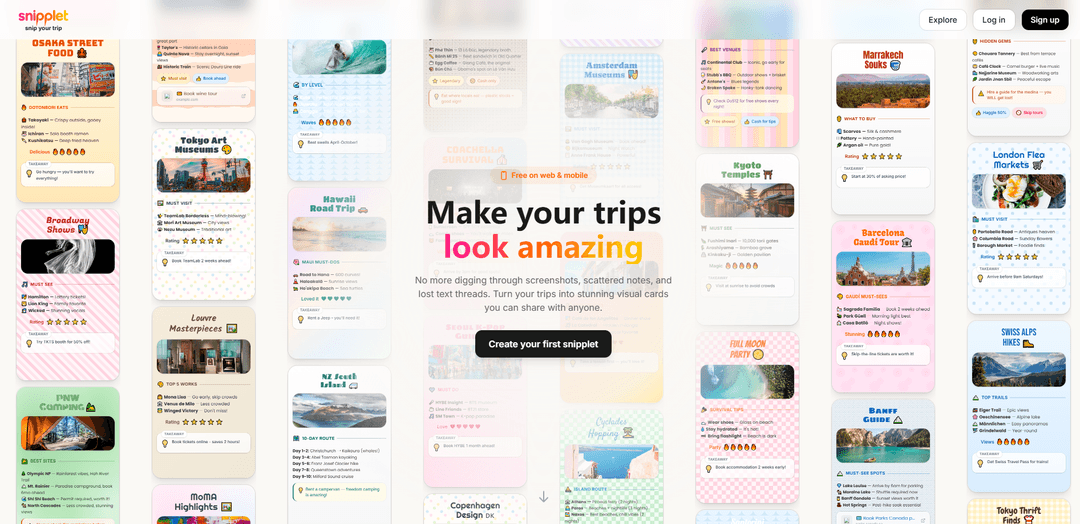
Snipplet is a travel-focused web and mobile app for turning places you’ve been (and genuinely loved) into shareable, visually polished “snipplets” (cards). It helps you collect destinations, restaurants, activities, and tips in one place, then organize them with categories/tags and share them via a single link (or keep them private). The product emphasizes fast creation, attractive design templates (backgrounds, stickers, fonts), and lightweight sharing so your travel memories and recommendations don’t stay scattered across screenshots, notes, and message threads.
Visual travel cards: Create “snipplets” that combine a title, photos, tips, and takeaways into a clean, aesthetic card format designed for quick browsing and sharing.
Customization & design tools: Make guides look unique using backgrounds, stickers, and fonts—useful for personal style, branding, or making recommendations more engaging.
Tagging and categories for organization: Organize snipplets by category (e.g., food, beaches, culture, adventure, hidden gems) to make collections searchable and easy to revisit.
Public or private sharing: Keep snipplets private for personal planning or publish them to inspire others; share with a single link to avoid long docs or message threads.
Cross-device access (web & mobile): Works on desktop and mobile, enabling quick capture on the go and easy editing/sharing later from any device.
Collections for trips and local favorites: Supports both trip-based guides (itineraries, city lists) and ongoing “local go-to” collections for where you live.
Use Cases of Snipplet
Personal travel journaling & memory keeping: Travelers can save favorite spots with photos and practical tips, building a reusable visual archive of places they’ve visited.
Friends-and-family recommendations: Create a curated mini-guide (e.g., “Osaka street food” or “NYC rooftop bars”) and share a single link instead of sending scattered messages and screenshots.
Content creators & travel influencers: Publish polished, branded-looking guides that followers can browse quickly; useful as a lightweight alternative to long blog posts.
Tour operators and boutique travel planning: Agencies or guides can package themed recommendations (food, museums, photo spots) into shareable cards for clients before or after a trip.
Hospitality and destination marketing: Hotels, cafés, or visitor centers can create “best of the neighborhood” snipplets to help guests discover curated local experiences.
Team trip coordination: Groups can maintain shared collections of approved places to eat, meet, or visit, reducing planning overhead and keeping everyone aligned.
Pros
Highly shareable format: single-link visual guides reduce friction compared to docs, threads, or spreadsheets.
Strong organization: categories/tags make it easy to build reusable collections (trips, local favorites, themes).
Design-forward: customization features help recommendations feel polished and engaging.
Cons
Travel-centric scope: may be less useful for users who want a general-purpose note/bookmark tool rather than place-based guides.
Quality depends on user input: without good photos/tips, snipplets may feel thin compared to full itineraries or long-form reviews.
Potential feature overlap: users already invested in maps, note apps, or itinerary tools may not want another system to maintain.
How to Use Snipplet
1) Open Snipplet: Go to https://snipplet.com on desktop or mobile. You can browse without signing up.
2) Browse public snipplets (optional): Explore existing snipplets to see examples of visual cards for trips, restaurants, activities, and local favorites.
3) Create an account (to save your own snipplets): Click “Create your first snipplet” (or sign up from the site). Creating an account lets you create, organize, and share your own snipplets.
4) Start a new snipplet: From your account, create a new snipplet to begin turning your travel notes into a shareable visual card.
5) Add a title and theme: Give your snipplet a clear title (e.g., “Osaka Street Food” or “Paris Vintage Shops”) and choose a visual style/background to make it look polished.
6) Add photos: Attach photos that match the places or experiences you’re saving so the snipplet becomes a visual mini-guide.
7) Add your places + notes: List your favorite spots (restaurants, museums, shops, hikes, etc.) and add short tips (e.g., “Go early,” “Book 2 weeks ahead,” “Cash only”).
8) Tag and organize by topic: Add categories/tags such as food, beaches, adventure, culture, shops, itineraries, local favorites, or hidden gems to keep your collection searchable and organized.
9) Add quick ratings or takeaways (optional): Include simple ratings (e.g., stars) and a “Takeaway” tip to summarize what matters most for each snipplet.
10) Choose privacy: public or private: Set the snipplet to public if you want to inspire others, or keep it private for personal planning and reference.
11) Share your snipplet with a link: Use the share option to generate a link. Anyone with the link can browse, save, or get inspired.
12) Keep building your collection: Create more snipplets for full trips, itineraries, or your local go-to spots so everything is no longer scattered across screenshots, notes, and text threads.
Snipplet FAQs
Snipplet is a tool for creating, organizing, and sharing “snipplets” (visual cards/notes). It’s designed to help you save travel ideas—like places to eat, things to do, shops, and itineraries—so you don’t have to rely on scattered screenshots and notes.
Snipplet Video
Popular Articles

Vosko AI: Localize and Dub Videos for Global Audiences
Oct 15, 2026

Atoms: A Multi-Agent AI Platform That Transforms Ideas into Launch-Ready Products
Oct 13, 2026

Nano Banana SBTI: What It Is, How It Works, and How to Use It in 2026
Apr 15, 2026

Atoms Review — The AI Product Builder Redefining Digital Creation in 2026
Apr 10, 2026
Latest AI Tools Similar to Snipplet

Gait
Gait is a collaboration tool that integrates AI-assisted code generation with version control, enabling teams to track, understand, and share AI-generated code context efficiently.

invoices.dev
invoices.dev is an automated invoicing platform that generates invoices directly from developers' Git commits, with integration capabilities for GitHub, Slack, Linear, and Google services.

EasyRFP
EasyRFP is an AI-powered edge computing toolkit that streamlines RFP (Request for Proposal) responses and enables real-time field phenotyping through deep learning technology.

Cart.ai
Cart.ai is an AI-powered service platform that provides comprehensive business automation solutions including coding, customer relations management, video editing, e-commerce setup, and custom AI development with 24/7 support.
Popular AI Tools Like Snipplet

GitHub Copilot Chat
GitHub Copilot Chat is an AI-powered coding assistant that provides natural language interactions, real-time code suggestions, and contextual support directly within supported IDEs and GitHub.com.

CopilotForXcode
CopilotForXcode is an Xcode Source Editor Extension that integrates GitHub Copilot, Codeium, and ChatGPT to provide AI-powered code suggestions, chat assistance, and prompt-to-code functionality within Xcode.

BrowserAI
BrowserAI is an open-source library that enables running local Large Language Models (LLMs) directly in web browsers with WebGPU acceleration, offering privacy-focused AI capabilities without requiring server infrastructure.

OpenAI Codex CLI
OpenAI Codex CLI is a lightweight, open-source coding agent that runs in your terminal, enabling developers to translate natural language into code execution while providing ChatGPT-level reasoning with the ability to run code, manipulate files, and iterate under version control.